1. Bubuka
This manual provides detailed instructions for the AOPUTTRIVER Professional Coating Thickness Gauge, Model UK-HP-1001. This device is designed for non-destructive measurement of coating and paint thickness on various metal substrates. It is widely used in manufacturing, metal processing, chemical industries, and automotive inspection.
The gauge features an automatic 2-in-1 sensor for both ferrous (Fe) and non-ferrous (NF) metals, offering a measurement range of 0-1300um (0-51.2mil). Its portable design and high precision make it an essential tool for professionals and enthusiasts alike.

Image 1.1: The AOPUTTRIVER Coating Thickness Gauge and included accessories.
2. Fitur Produk
The AOPUTTRIVER Coating Thickness Gauge offers a range of features for accurate and convenient measurements:
- Rentang Ukur Lebar: 0 to 1300um (0 to 51.2mil).
- Precision luhur: Accuracy of ± (3% + 2um) or ± (3% + 0.08mil).
- Fine Resolution: 0.1um for detailed readings.
- Dual Probe Technology: Integrated Fe (ferrous) and NF (non-ferrous) probes for automatic substrate detection.
- Uji Non-Destruktif: Measures coating thickness without damaging the surface.
- Multiple Calibration Methods: Supports zero calibration and multi-point calibration (50/100/250/500/1000um).
- Desain anu ramah-pamaké: Anti-slip grip and compact, pocket-sized form factor (130mm x 62mm x 32mm).
- Layar LCD ageung: Clear digital readout for easy viewing.
- Ngalihkeun Unit: Easily switch between micrometers (um) and mils (mil).
- Lampu tukang otomatis: Ningkatkeun pisibilitas dina rupa-rupa kaayaan cahaya.
- Pareum Otomatis: Conserves hirup batré.

Gambar 2.1: Leuwihview of the gauge's digital features.
3. Eusi Paket
Mangga parios pakét sacara saksama pikeun mastikeun yén sadaya barang aya:
- AOPUTTRIVER Coating Thickness Gauge (1 unit)
- 9V Battery (1 unit)
- Manual pamaké (1 unit)
- Iron Substrate (1 unit)
- Aluminum Substrate (1 unit)
- Standard Thickness Calibration Films (50/100/250/500/1000um) (1 set)
- Protective Case (1 unit)
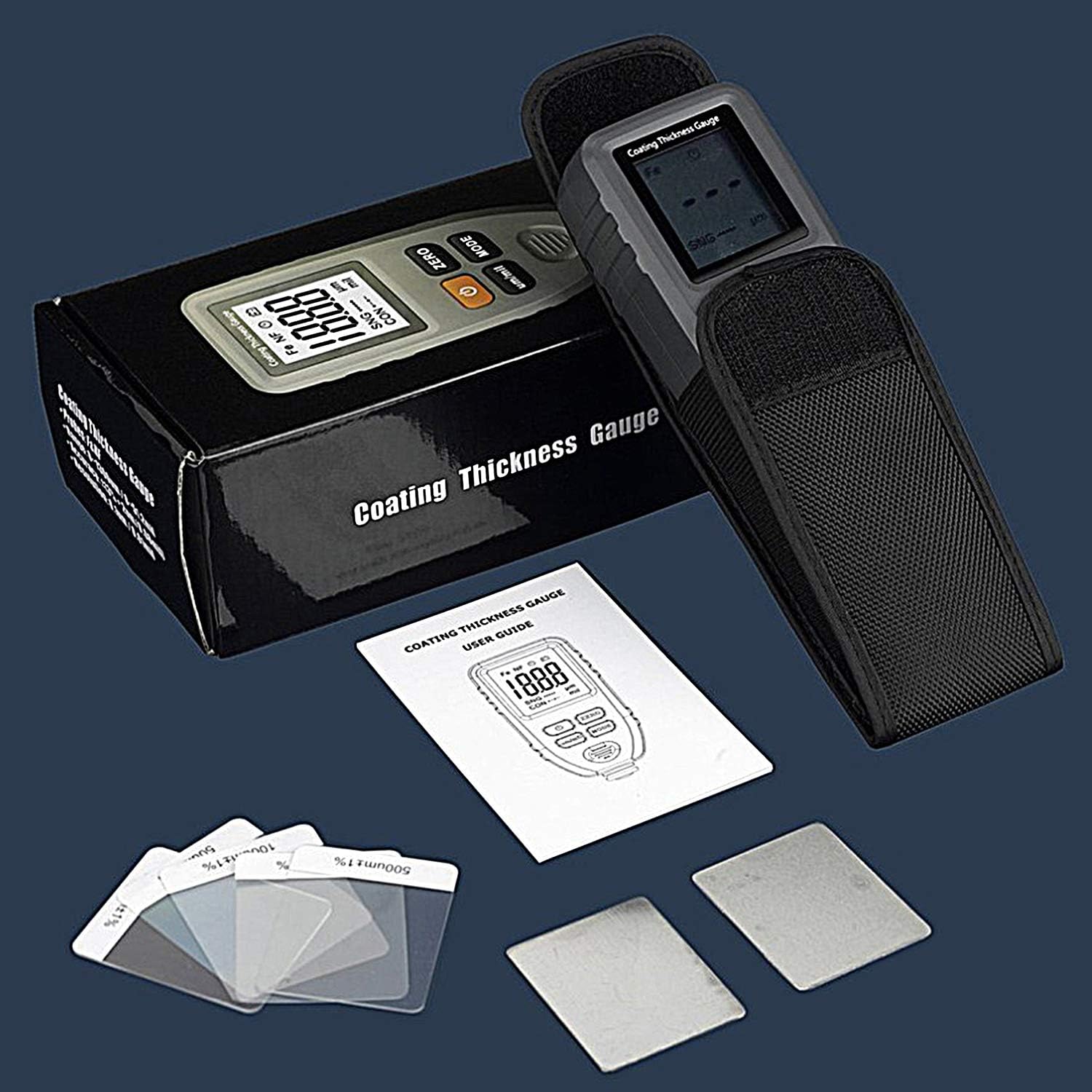
Gambar 3.1: Sadaya barang kalebet dina pakét produk.
4. Setélan
4.1. Pamasangan batré
- Teang tempat panutup kompartemen batre dina tonggong alat.
- Geser atawa cabut panutup panutup pikeun muka kompartemen.
- Insert the included 9V battery, ensuring correct polarity (+/- terminals).
- Tutup panutup kompartemen batré aman.
4.2. Daya Awal Hurung
Pencét éta POWER button to turn on the device. The LCD display will illuminate, and the device will perform a self-test before entering measurement mode.
5. Parentah Operasi
5.1. Daya Hurung / Pareum
- Pikeun ngaktipkeun, pencét tombol POWER kancing.
- Pikeun pareum, pencét jeung tahan POWER button for a few seconds until the display turns off, or the device will automatically power off after a period of inactivity.
5.2. Modeu pangukuran
The gauge supports two measurement modes:
- SNG (Single Measurement Mode): For taking individual readings. Press the probe onto the surface, and the reading will be displayed. Lift the probe and repeat for a new measurement.
- CON (Continuous Measurement Mode): For continuous readings. Keep the probe on the surface and slide it across to get real-time thickness updates.
Pencét éta MODÉ button to switch between SNG and CON modes.

Image 5.1: Using the gauge in SNG (Single) mode for quick measurements.
5.3. Ngaganti Unit
Pencét éta emh/mil button to toggle between micrometers (um) and mils (mil) units.
5.4. Probe Types (Fe & NF)
The gauge automatically detects the substrate material:
- Fe (Ferrous Probe): Used for detecting non-magnetic coatings (e.g., chrome, copper, zinc, varnish, rubber) on magnetic substrates like iron or steel.
- NF (Non-Ferrous Probe): Used for detecting insulating coatings (e.g., paint, anodizing, ceramic) on non-magnetic substrates like aluminum, copper, or brass.

Image 5.2: The dual-function probe for Fe and NF substrates.

Image 5.3: Differentiation between Fe and NF material detection.
5.5. Kalibrasi
Calibration ensures the accuracy of your measurements. It is recommended to calibrate the device before critical measurements or if you suspect inaccurate readings.
- Nol Kalibrasi: Place the probe directly onto the bare iron or aluminum substrate (without any coating). Press the NOL tombol. Layarna kedah nunjukkeun "0.0" atanapi nilai anu caket pisan kana nol.
- Multi-Point Calibration: Use the provided standard thickness calibration films. Place a film (e.g., 100um) on the appropriate substrate (iron for Fe, aluminum for NF). Take a reading. If the reading deviates, adjust the calibration according to the device's specific menu options (refer to the quick start guide for detailed steps if available). Repeat for other calibration films as needed.

Image 5.4: Custom calibration using standard films and substrates.
5.6. Nyandak Pangukuran
- Ensure the device is powered on and calibrated.
- Select the desired measurement mode (SNG or CON).
- Place the probe perpendicularly and firmly onto the coated surface you wish to measure.
- Ngadagoan bacaan pikeun nyaimbangkeun dina tampilan LCD.
- Lift the probe from the surface. For SNG mode, the reading will hold. For CON mode, the reading will update as you move the probe.

Gambar 5.5: Example of measuring car paint thickness.
6. Pangropéa
6.1. beberesih
- Usap alatna nganggo lawon anu lemes sareng garing.
- Ulah nganggo pembersih atanapi pelarut anu abrasif, sabab tiasa ngaruksak casing atawa tampilan.
- Keep the probe tip clean and free from debris to ensure accurate readings.
6.2. Panyimpenan
- Simpen alat dina wadah pelindungna nalika henteu dianggo.
- Simpen dina tempat anu tiis, garing, jauh tina sinar panonpoé langsung sareng suhu anu ekstrim.
- Cabut batré upami alatna moal dianggo kanggo waktos anu panjang pikeun nyegah bocor.
7. Cara ngungkulan
| Masalah | Mungkin Cukang lantaranana | Solusi |
|---|---|---|
| Alat teu hurung. | batré lemah atawa maot; pamasangan batré salah. | Replace the 9V battery; ensure correct polarity. |
| Bacaan teu akurat. | Device not calibrated; dirty probe tip; unstable placement. | Perform zero and multi-point calibration; clean the probe tip; ensure firm and perpendicular placement. |
| Tampilanna taram atawa kedip-kedip. | batré lemah. | Ganti batréna 9V. |
| "ERR" or error message on display. | Measurement out of range; sensor malfunction. | Ensure measurement is within 0-1300um range; try recalibrating. If problem persists, contact support. |
8. Spésifikasi
| Parameter | Nilai |
|---|---|
| Nomer modél | UK-HP-1001 |
| Rentang pangukuran | 0 - 1300um (0 - 51.2mil) |
| Akurasi | ± (3% + 2um) / ± (3% + 0.08mil) |
| Resolusi | 0.1 emh |
| Diménsi | 130mm x 62mm x 32mm |
| Beurat | 110 gram |
| Suhu Operasi | 0 °C nepi ka 40 °C (32 °F nepi ka 104 °F) |
| Kalembaban Operasi | 20% nepi ka 90% RH |
| Diaméter Area Pangukuran Minimum | 6 mm |
| Minimum Convex Curvature Radius | 1.5 mm |
| Minimum Concave Curvature Radius | 25 mm |
| Minimum Substrate Thickness | 0.3 mm |
| Sasayogian tanaga | Batré 1 x 9V (kaasup) |

Image 8.1: Physical dimensions of the product.
9. Garansi jeung Rojongan
For any questions, technical assistance, or warranty claims, please refer to the contact information provided with your purchase or visit the official AOPUTTRIVER website. Please have your model number (UK-HP-1001) and purchase details ready when contacting support.


