Bubuka
This manual provides detailed instructions for the setup, operation, and maintenance of your NETVUE Outdoor Camera NI-1901. This 1080P WiFi outdoor security camera features FHD night vision, A.I. motion detection, 2-way audio, and flexible storage options. Please read this manual thoroughly before use to ensure optimal performance and safety.
Eusi pakét
- NETVUE Outdoor Camera NI-1901
- Adaptor kakuatan
- Pemasangan Screws sareng Jangkar
- Quick Start Guide (refer to this manual for detailed steps)
Disetél
1. Download the NETVUE App
Milarian pikeun "NETVUE" in your smartphone's app store (iOS or Android) and download the official application. Create an account or log in if you already have one.
2. Hurungkeun Kaméra
Connect the camera to a power source using the provided power adapter. Wait for the camera's indicator light to flash, indicating it's ready for setup.
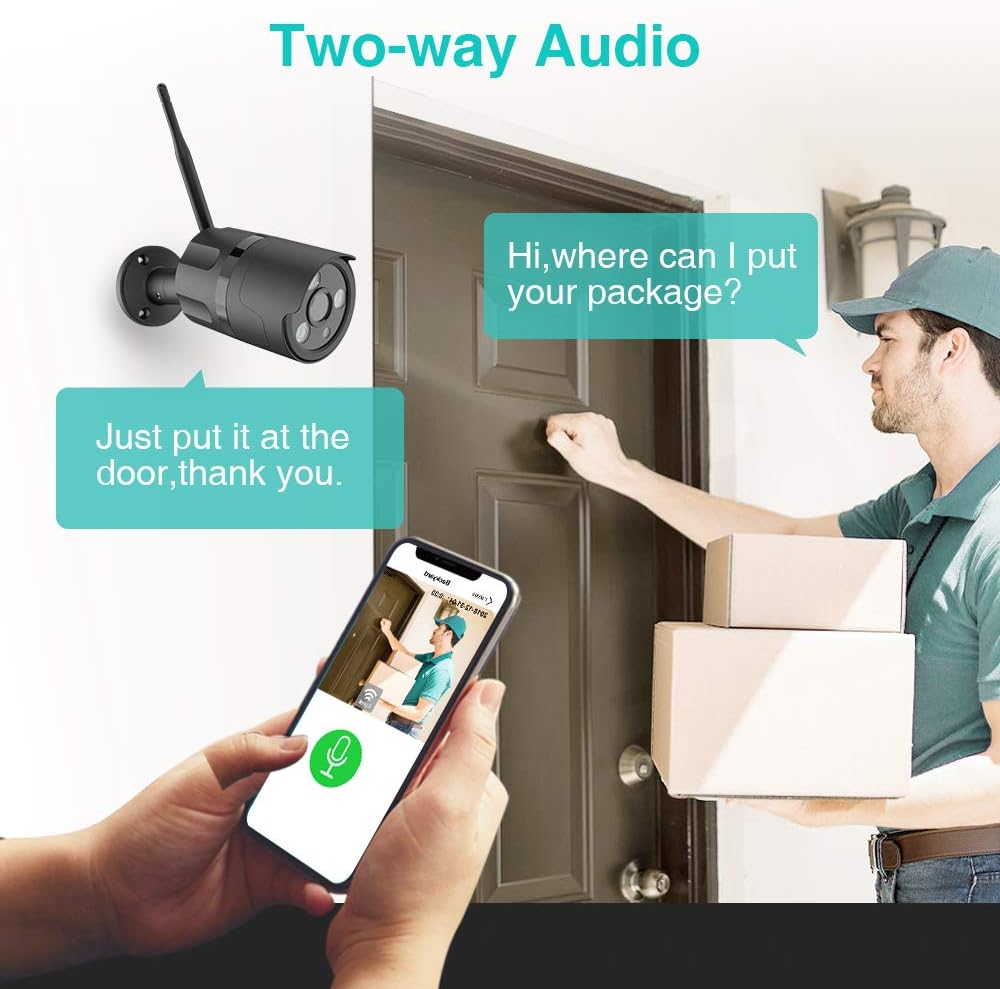
Image: The NETVUE Outdoor Camera connected to a power outlet, illustrating the power connection step.
3. Nyambung ka Wi-Fi
Open the NETVUE app and follow the on-screen instructions to add a new device. You will be prompted to connect the camera to your 2.4GHz Wi-Fi network. Ensure your phone is connected to the same Wi-Fi network during setup.
4. Scan QR Code
The app will generate a QR code. Hold your phone with the QR code approximately 4-12 inches (10-30 cm) in front of the camera lens. You should hear a "Ding Dong" sound, indicating a successful scan. If no sound is heard, ensure proper distance and lighting.
5. Masang kaméra
Choose a suitable outdoor location for your camera, ensuring it has a clear view and is within Wi-Fi range. Use the provided screws and anchors to securely mount the camera to a wall or other stable surface. The camera is designed for wall mounting.

Image: The NETVUE Outdoor Camera, showing its adjustable mounting base and antenna, ready for installation.
Parentah Operasi
1. Pemantauan Video Langsung
Access the NETVUE app to view live 1080P Full HD video from your camera. The camera offers a 100° viewing angle. You can switch between day and FHD night vision modes within the app.

Image: A split image showing the camera's view during the day (color) and at night (infrared black and white), demonstrating its FHD night vision capability.
2. A.I. Motion Detection and Alerts
The camera features A.I. motion detection with customizable zones and adjustable sensitivity. When motion is detected, you will receive instant alerts on your phone. Detected events are recorded as videos and can be downloaded via the app. AI Human Detection helps reduce false alarms.

Image: An illustration showing the camera detecting motion and sending a "Danger reminder" alert to a smartphone, indicating unusual activity.
Video: This official seller video highlights the NETVUE Outdoor Security Camera's A.I. Motion Detection feature, showing how it identifies and alerts users to activity.
3. Audio Dua Arah
Utilize the built-in microphone and speaker for two-way communication. This allows you to speak with visitors or deter unwanted individuals directly through the app, even when you are away from home.

Image: An illustration demonstrating the two-way audio feature, showing a user speaking through the app to a delivery person at their door.
4. Pilihan Panyimpenan
The camera supports up to a 128GB Micro SD card for local storage. Additionally, it offers cloud storage options via AWS Cloud, providing up to 30 days of storage for recorded events.

Image: An image illustrating the camera's support for both Micro SD card and cloud storage, with a smartphone screen showing video playback from stored footage.
5. Alexa Pamaduan
The NETVUE camera is compatible with Amazon Alexa, Echo Show, Echo Spot, and Fire TV. You can use voice commands to view live feeds on compatible devices.
Pangropéa
1. Ngabersihan Kaméra
To maintain optimal image quality, regularly clean the camera lens with a soft, dry cloth. Avoid using harsh chemicals or abrasive materials that could scratch the lens.
2. Résistansi Cuaca
The camera is IP66 waterproof and designed to withstand temperatures from -4°F to 122°F (-20°C to 50°C). While robust, avoid prolonged direct exposure to extreme weather conditions like heavy storms or direct sunlight to extend its lifespan.
Image: The NETVUE Outdoor Camera, highlighting its IP66 waterproof rating and ability to withstand various weather conditions.
3. Apdet firmware
Periodically check the NETVUE app for available firmware updates. Keeping your camera's firmware up-to-date ensures you have the latest features and security enhancements.
Pamérésan masalah
- Kaméra offline: Ensure the camera is powered on and within range of your 2.4GHz Wi-Fi network. Check your router for internet connectivity.
- Failed Wi-Fi Connection: Verify your Wi-Fi password is correct and that you are connecting to a 2.4GHz network. Try resetting the camera and repeating the setup process.
- Kualitas Gambar goréng: Ngabersihan lénsa kaméra. Pastikeun teu aya halangan dina widang kaméra view. Pariksa laju sambungan internét anjeun.
- Masalah Deteksi Gerak: Adjust the motion detection sensitivity and customize detection zones in the app. Ensure the camera is positioned correctly to capture the desired area.
- Henteu aya Audio: Check the volume settings on your smartphone and within the NETVUE app. Ensure the microphone and speaker are not obstructed.
- Alexa Integration Not Working: Confirm the "Netvue Live Video" skill is enabled in your Alexa app and your devices are discovered. Ensure the camera is named appropriately for voice commands.
spésifikasi
| Fitur | Rincian |
|---|---|
| Nomer modél | NI-1901 |
| Resolusi Capture Video | 1080 p |
| Viewdina Angle | 100 darajat |
| Téhnologi konektipitas | Nirkabel (Wi-Fi) |
| Sumber Daya | Listrik Kabel (6 watt) |
| Tingkat Résistansi Cai | IP66 Waterproof |
| Suhu Operasi | -4°F nepi ka 122°F (-20°C nepi ka 50°C) |
| Panyimpenan | Micro SD Card (up to 128GB), Cloud Storage (AWS Cloud) |
| Alat nu cocog | Smartphone, Amazon Alexa, Echo Show, Echo Spot, Fire TV |
| Ukuran (L x W x H) | 2.64 x 2.64 x 7.64 inci |
| Item Beurat | 12.6 ons |
Garansi sareng Rojongan
Émbaran jaminan
Please refer to the product packaging or the official NETVUE website for detailed warranty information regarding your NI-1901 Outdoor Camera.
Rojongan Palanggan
For any technical assistance, troubleshooting, or inquiries, please contact NETVUE customer support. They offer live chat customer service for prompt responses.


