1. Bubuka
The AOPUTTRIVER AP-570C is a 4000-count auto-ranging digital clamp meter designed for precise electrical measurements. It offers a wide range of functions including AC/DC current, AC/DC voltage, resistance, capacitance, frequency, duty cycle, temperature, diode test, and continuity. This manual provides essential information for safe and effective operation of your device.
2. Émbaran Kasalametan
Salawasna patuh kana tindakan pencegahan kaamanan nalika nganggo alat uji listrik. Upami henteu dilakukeun, éta tiasa nyababkeun sengatan listrik, tatu, atanapi karusakan kana méter atanapi alat anu diuji.
- Pastikeun méterna dina kaayaan anu saé sateuacan dianggo.
- Ulah nerapkeun voltage or current exceeding the maximum rated values.
- Anggo alat pelindung pribadi (PPE) anu cocog sapertos sarung tangan insulasi sareng kacamata kaamanan.
- Verify the function switch is in the correct position for the measurement being performed.
- Avoid touching exposed conductors or circuit components during measurements.
- Ulah ngoperasikeun méteran dina lingkungan baseuh atanapi nalika aya gas atanapi lebu anu ngabeledug.
- Ganti batré gancang-gancang nalika indikator batré lemah nembongan pikeun mastikeun bacaan akurat.
- The AP-570C Clamp Meter meets IEC1010 Double Insulation, Pollution Degree 2, and Overvoltage Category III standards.
3. Komponén produk
The AOPUTTRIVER AP-570C package includes the following items:
- AOPUTTRIVER AP-570C Clamp Méter
- Uji Lead (2)
- Suhu Probe
- 9V (6F22) Battery
- Manual pamaké
- Kantong Panyimpen
- Obeng leutik

Image: AOPUTTRIVER AP-570C Digital Clamp Meter with test leads, temperature probe, battery, and storage bag.
4. Product Diagram and Key Functions
Familiarize yourself with the main parts and controls of the AP-570C clamp méteran:

Image: Labeled diagram of the AP-570C showing the clamp, rotary switch, LCD display, D.HOLD/Back Light key, SELECT key, MAX/MIN key, REL key, Hz/DUTY key, COM Input Jack, and T+VΩHz Input Jack.
- Clamp: Dianggo pikeun ngukur arus AC/DC non-kontak.
- Saklar Rotary: Milih fungsi pangukuran anu dipikahoyong.
- Layar LCD: Némbongkeun bacaan sareng indikator pangukuran.
- D.HOLD/Back Light Key: Freezes the current reading on the display and activates/deactivates the backlight.
- Konci PILIH: Ngaganti antara modeu pangukuran anu béda dina hiji posisi saklar puteran (contona, vol AC/DCtage, dioda/kontinuitas).
- MAX/MIN Key: Ngarékam nilai maksimum sareng minimum salami sési pangukuran.
- Konci REL: Ngaktipkeun modeu pangukuran relatif.
- Hz/DUTY Key: Milih pangukuran frékuénsi atanapi siklus tugas.
- Input Jacks (COM, T+VΩHz): Connect test leads for voltage, resistance, capacitance, diode, continuity, and temperature measurements.
5. Setélan
5.1. Pamasangan batré
The AP-570C requires one 9V (6F22) battery. To install or replace the battery:
- Pastikeun méterna dipareuman.
- Use the provided small screwdriver to open the battery compartment cover on the back of the meter.
- Insert the 9V battery, observing the correct polarity (+/-).
- Ganti panutup kompartemen batré jeung amankeun ku screw nu.
5.2. Nyambungkeun Test Leads
Kanggo sabagéan ageung pangukuran (voltage, resistance, capacitance, diode, continuity, temperature), connect the test leads:
- Selapkeun kabel tés hideung kana jack input "COM" (umum).
- Insert the red test lead into the "T+VΩHz" input jack.
- For temperature measurements, connect the temperature probe to the same input jacks, ensuring correct polarity if applicable.
6. Parentah Operasi
6.1. Pangukuran Arus AC/DC (Clamp)
clamp function allows for non-contact current measurement. This is ideal for safely measuring current in live circuits.
- Turn the rotary switch to the desired current range (e.g., 400A or 1000A).
- Press the SELECT button to toggle between AC and DC current measurement if necessary.
- Buka clamp rahang ku mencét picuna.
- Lebetkeun hiji konduktor (lain sakumpulan kawat) kana jeroeun clamp rahang. Pastikeun rahang ditutupan pinuh.
- Baca nilai ayeuna dina tampilan LCD.

Image: The AP-570C clamp meter measuring current on an electrical cable.
Video: Demonstration on how to measure DC current using a clamp méter.
6.2. AC/DC Voltage Pangukuran
Pikeun ngukur voltage, use the test leads connected to the appropriate input jacks.
- Turn the rotary switch to the "V~" (AC Voltage) atawa "V-" (DC Voltage) position. The meter may auto-range.
- Sambungkeun kabel tés sacara sajajar jeung sirkuit atawa komponén anu rék diukur.
- Baca voltage nilai dina tampilan LCD.

Image: The AP-570C clamp meter with test leads connected to an electrical outlet for voltage pangukuran.
6.3. Resistance, Capacitance, Diode, and Continuity Measurement
These functions are accessed via the rotary switch and SELECT button.
- Turn the rotary switch to the "Ω" (Resistance), "CAP" (Capacitance), or "Diode/Continuity" position.
- Use the SELECT button to switch between Diode Test and Continuity Test if on the combined setting.
- Sambungkeun lead test kana komponén anu bakal diukur.
- Read the value on the LCD display. For continuity, a buzzer will sound if continuity is detected.
Video: Demonstration on how to measure capacitance using a clamp méter.
6.4. Pangukuran Suhu
The AP-570C can measure temperature using the included temperature probe.
- Turn the rotary switch to the "°C" (Temperature) position.
- Connect the temperature probe to the "COM" and "T+VΩHz" input jacks.
- Place the tip of the temperature probe on or in the object whose temperature you wish to measure.
- Read the temperature value on the LCD display. The range is -20°C to 1000°C.
6.5. Backlight and Data Hold
- Lampu tukang: Press the "D.HOLD/Back Light" button briefly to turn the LCD backlight on or off, improving visibility in low-light conditions.
- Tahan Data: Press and hold the "D.HOLD/Back Light" button to freeze the current reading on the display. Press again to release.

Gambar: Deukeut view of the AP-570C's bright LCD display and protective case.
6.6. Non-Kontak Voltage (NCV) Deteksi
Fungsi NCV ngamungkinkeun deteksi gancang voltase ACtage tanpa kontak langsung.
- Puterkeun saklar puteran ka posisi "NCV".
- Move the top part of the meter (near the clamp jaws) close to the conductor or outlet.
- Méterna bakal nunjukkeun ayana voltase ACtage ngaliwatan sora bip jeung/atawa indikator visual.
7. Spésifikasi
Key technical specifications for the AOPUTTRIVER AP-570C:
- tampilan: 4000 cacah
- DC Ayeuna: 200A~1000A
- AC Ayeuna: 400A~1000A (0.1A resolution for 0.1~400A)
- DC Voltage: 400mV~1000V
- AC Voltage: 4V~750V
- Résistansi: 400Ω, 4KΩ, 40KΩ, 400KΩ, 4MΩ, 40MΩ
- Kapasitansi: 5.12nF~100µF
- Frékuénsi: Sumuhun
- Siklus tugas: Sumuhun
- Tés Diode: Sumuhun
- Buzzer Kontinuitas: Sumuhun
- Rentang Suhu: -20°C nepi ka 1000°C
- Jaw Caliber: 45mm (1.77 inci)
- Peunteun Kasalametan: IEC1010 Double Insulation, Pollution Degree 2, Overvoltage Kategori III
- Sumber Daya: 1 x batré 9V (kaasup)
- Ukuran produk: 22.35 x 9.65 x 3.81 cm
- Beurat barang: 444.52 g (0.98 Pon)
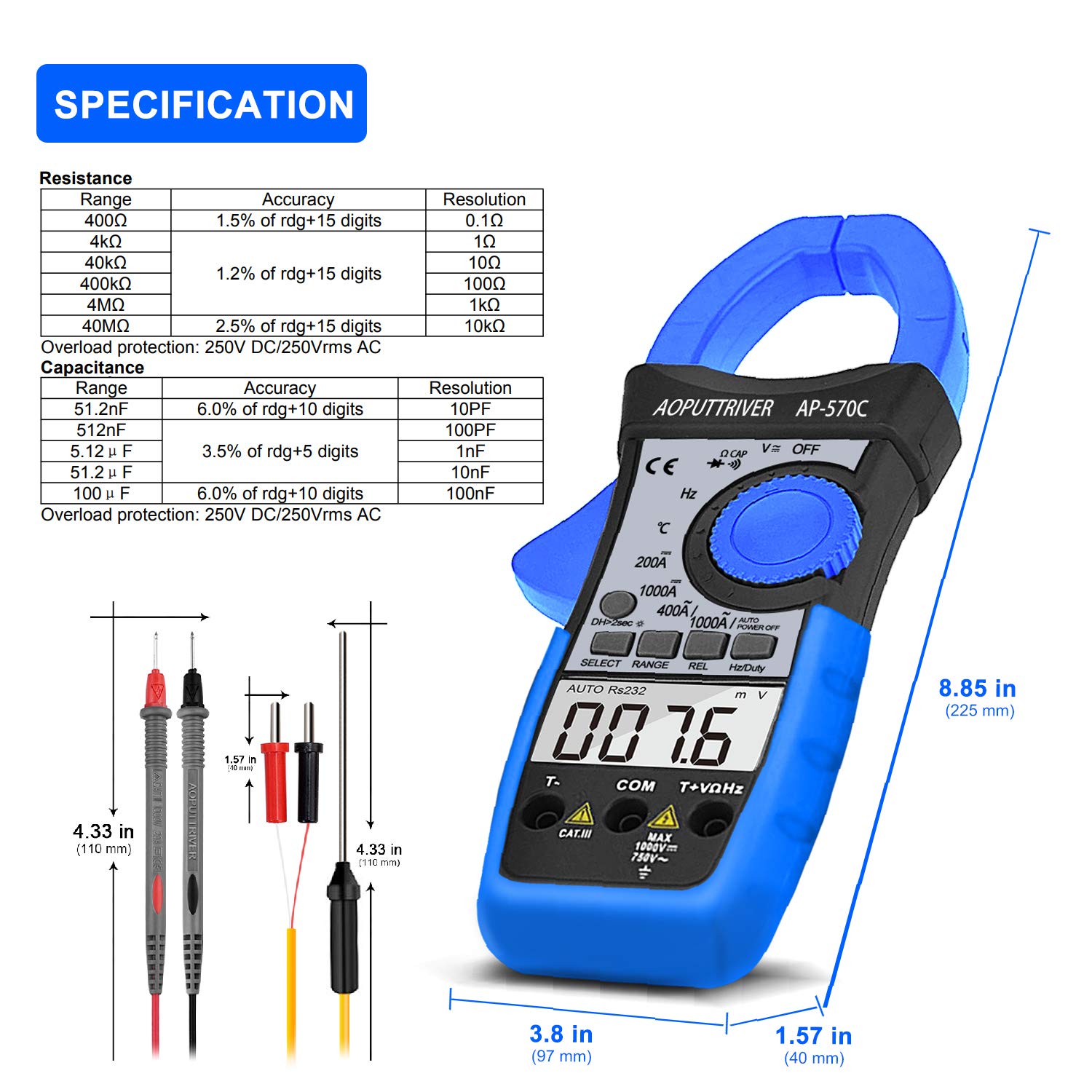
Image: Detailed specifications table for Resistance and Capacitance, along with physical dimensions of the meter and test leads.
8. Pangropéa
8.1. beberesih
To maintain the accuracy and longevity of your meter:
- Ngusap kasus kalayan iklanamp kaén sareng detérjen hampang. Entong nganggo abrasives atanapi pangleyur.
- Simpen terminal input sareng clamp jaws clean and free of debris.
8.2. Ngagantian batré
When the low battery indicator appears on the LCD, replace the 9V battery as described in the "Setup" section. Prompt replacement ensures continued accuracy.
8.3. Panyimpenan
When not in use, store the meter in its protective storage bag in a dry, cool place, away from direct sunlight and extreme temperatures.
9. Cara ngungkulan
If you encounter issues with your AP-570C, consider the following common solutions:
- Teu Aya Tampilan/Tampilan Samar: Check battery charge and ensure it is correctly installed. Replace if necessary.
- "OL" on Display: Indicates an over-range condition. The measured value exceeds the selected range. Switch to a higher range or verify the circuit.
- Bacaan teu akurat:
- Ensure test leads are fully inserted and making good contact.
- Verify the rotary switch is set to the correct function and range.
- Pikeun pangukuran arus, pastikeun ngan hiji konduktor anu aya dina jero clamp rahang.
- Check for external electromagnetic interference.
- Continuity Buzzer Not Working: Ensure the meter is in continuity mode and test leads are making proper contact. If the issue persists, the meter may require service.
10. Garansi jeung Rojongan
The AOPUTTRIVER AP-570C comes with a garansi 2 taun and lifetime technical support. For any questions or assistance with your product, please contact AOPUTTRIVER customer support.
You can visit the official AOPUTTRIVER store for more information: AOPUTTRIVER Store


