1. Émbaran Kasalametan
Mangga baca sadaya pitunjuk kaamanan kalayan saksama sateuacan nganggo televisi. Simpen buku panduan ieu kanggo rujukan ka hareup.
- Sasayogian tanaga: Pastikeun TV disambungkeun ka sumber listrik kalayan voltase anu lerestage sakumaha dituduhkeun dina labél produk.
- Ventilasi: Ulah meungpeuk bukaan ventilasi. Ngidinan spasi nyukupan sabudeureun TV pikeun aliran hawa ditangtoskeun.
- Cai sareng Uap: Ulah ngalaan TV ka hujan atawa beueus. Ulah nempatkeun barang-barang anu dieusi cairan, sapertos vas, dina TV.
- beberesih: Cabut TV sateuacan beberesih. Paké lawon lemes, garing. Hindarkeun pembersih cair atanapi semprotan aerosol.
- panempatan: Teundeun TV dina permukaan datar anu stabil. Hindarkeun nempatkeunna dina sinar panonpoé langsung atanapi caket sumber panas.
- Barudak: Ngawaskeun barudak pikeun nyegah aranjeunna naek dina TV atawa nangtung.
2. Eusi Paket
Pastikeun yén sadaya item aya dina bungkusan:
- KMC 43-inch Smart LED TV
- Kadali jauh
- Stand TV (2 buah)
- Screws pikeun Instalasi Stand
- Kabel Daya
- Manual pamaké
3. Setélan
3.1. Instalasi nangtung
- Teundeun layar TV sacara saksama dina tempat anu lemes sareng datar pikeun nyegah karuksakan.
- Sejajarkeun unggal potongan nangtung sareng slot anu cocog dina handapeun TV.
- Ngamankeun potongan nangtung ngagunakeun screws disadiakeun. Pastikeun aranjeunna tightened pageuh.
3.2. Nyambungkeun périferal
The KMC 43-inch Smart LED TV offers various connection options. Refer to the image below for port locations.
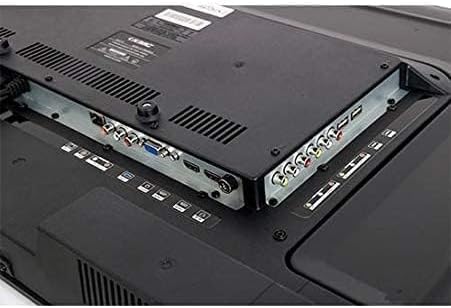
Gambar: Rear panel of the KMC 43-inch Smart LED TV, displaying various input and output ports including HDMI, USB, VGA, and AV connections.
- Port HDMI: Connect Blu-ray players, game consoles, or set-top boxes using HDMI cables for high-definition audio and video.
- Port USB: Insert USB drives to view poto, muter musik, atawa lalajo video.
- Port VGA: Sambungkeun komputer pikeun dianggo salaku monitor.
- Input AV: Sambungkeun alat anu langkung lami nganggo kabel video komposit sareng audio stereo.
- Antenna/Kabel Input: Sambungkeun anteneu atawa sinyal TV kabel pikeun saluran siaran.
- Input kakuatan: Sambungkeun kabel kakuatan ka TV terus ka stop kontak témbok.
3.3. Daya Awal Hurung sareng Setup Kahiji-Waktos
- Colokkeun kabel listrik kana stop kontak témbok.
- Pencét tombol Daya dina kadali jauh atanapi dina TV.
- Turutan pitunjuk dina layar pikeun milih basa, nagara, sareng zona waktos anjeun.
- Sambungkeun ka jaringan Wi-Fi anjeun ku milih jaringan anjeun sareng asupkeun kecap akses.
- Scan for available channels if you have an antenna or cable connected.
4. Ngoperasikeun TV
4.1. Fungsi Jauh Jauh
Biasakeun diri sareng tombol kadali jauh pikeun navigasi anu gampang:
- kakuatan: Ngahurungkeun atawa mareuman TV.
- Sumber/Input: Milih sumber input (HDMI, AV, USB, TV).
- Volume +/-: Saluyukeun tingkat polumeu.
- Saluran +/-: Robah saluran TV.
- Tombol Navigasi (Kaluhur/Turun/Kénca/Katuhu) & OK: Navigates ménu jeung confirms selections.
- Balik / Kaluar: Balik deui ka menu saméméhna atawa kaluar ti menu ayeuna.
- imah: Ngaksés layar utama Smart TV.
- Netflix, YouTube, Amazon Prime Video: Tombol khusus pikeun aksés gancang ka layanan streaming ieu.
4.2. Fitur TV Smart
Your KMC Smart LED TV allows you to access a variety of online content:
- Nyambungkeun ka Wi-Fi: From the Home screen, navigate to Settings > Network > Wi-Fi. Select your network and enter the password.
- Ngaksés Aplikasi: From the Home screen, select the desired application icon (e.g., Netflix, YouTube, Amazon Prime Video) to launch it. Ensure you have an active internet connection.
- Browsing Content: Use the remote control's navigation buttons to browse content within applications.
4.3. Gambar jeung Sora Setélan
Sesuaikeun Anjeun viewpangalaman nguping sareng ngupingkeun:
- Modeu Gambar: Adjust brightness, contrast, color, and sharpness. Pre-set modes like Standard, Dynamic, Movie, and User are available.
- Modeu Sora: Select from pre-set sound modes such as Standard, Music, Movie, or User to optimize audio output.
- Rasio Aspék: Change the screen aspect ratio to fit different content formats.
5. Pangropéa
5.1. Ngabersihan TV
- layar: Lembut usap layar nganggo lawon anu lemes sareng teu aya serat. Pikeun tanda nekad, rada dampen lawon kalawan cai atawa cleaner layar husus (larapkeun kana lawon, teu langsung ka layar).
- awak: Wipe the TV body and remote control with a soft, dry cloth.
- Awas: Ulah make cleaners abrasive, lilin, atawa pangleyur sabab bisa ngaruksak finish.
5.2. Apdet parangkat lunak
Periodically check for software updates to ensure optimal performance and access to the latest features. Navigate to Settings > System > Software Update and follow the on-screen prompts.
6. Cara ngungkulan
Upami anjeun mendakan masalah, tingal solusi umum ieu:
| Masalah | Solusi anu mungkin |
|---|---|
| Taya kakuatan | Pariksa lamun kabel kakuatan disambungkeun aman ka duanana TV jeung stop kontak témbok. Coba outlet béda. |
| Henteu aya gambar, tapi aya sora | Pastikeun sumber input anu leres dipilih. Pariksa sambungan kabel (HDMI, AV). |
| Henteu aya sora, tapi aya gambar | Pariksa tingkat polumeu sareng pastikeun TV teu dijempékeun. Pariksa sambungan kabel audio. |
| Kadali jauh teu jalan | Ganti batréna. Pastikeun teu aya halangan antara jauh sareng sénsor IR TV. |
| Teu bisa nyambung ka Wi-Fi | Check your Wi-Fi password. Restart your router and the TV. Ensure the TV is within range of your Wi-Fi signal. |
| Slow performance / Apps freezing | Close unused applications. Restart the TV. Check for software updates. |
6.1. Reset pabrik
Upami masalah masih aya, reset pabrik tiasa ngabéréskeunana. Awas: This will erase all your settings and installed apps. Navigate to Settings > System > Reset > Factory Reset and confirm.
7. Spésifikasi
| Fitur | Rincian |
|---|---|
| merek | KMC |
| Nomer modél | K18M43262SMART |
| Ukuran layar | 43 inci |
| Téknologi tampilan | LED |
| Resolusi | 1920x1080 (HD lengkep) |
| Refresh Laju | 60 Hz |
| Rasio Aspék | 16:9 |
| Téhnologi konektipitas | USB, HDMI, VGA, AV (Composite) |
| Dirojong jasa Internét | Pidéo Instan Amazon, Netflix, YouTube |
| Komponén Kaasup | Television, Remote Control, Stand |
| Shipping Dimensions (Approx.) | 100 x 61 x 13.5 cm |
| Beurat Pengiriman (Perkawis.) | 10 kg |
8. Garansi jeung Rojongan
This KMC Smart LED TV comes with a manufacturer's warranty. Please refer to the warranty card included in your package for specific terms and conditions, including warranty period and coverage details.
For technical support, service, or warranty claims, please contact KMC customer service through the contact information provided on your warranty card or the official KMC websitus.


