1. Bubuka
This manual provides detailed instructions for the installation, operation, and maintenance of your ESX VN715-E39-DAB In-Car Navigation and Multimedia System. Please read this manual thoroughly before using the device to ensure proper functionality and to prevent damage. Keep this manual for future reference.
2. Produk Langkungview jeung Fitur
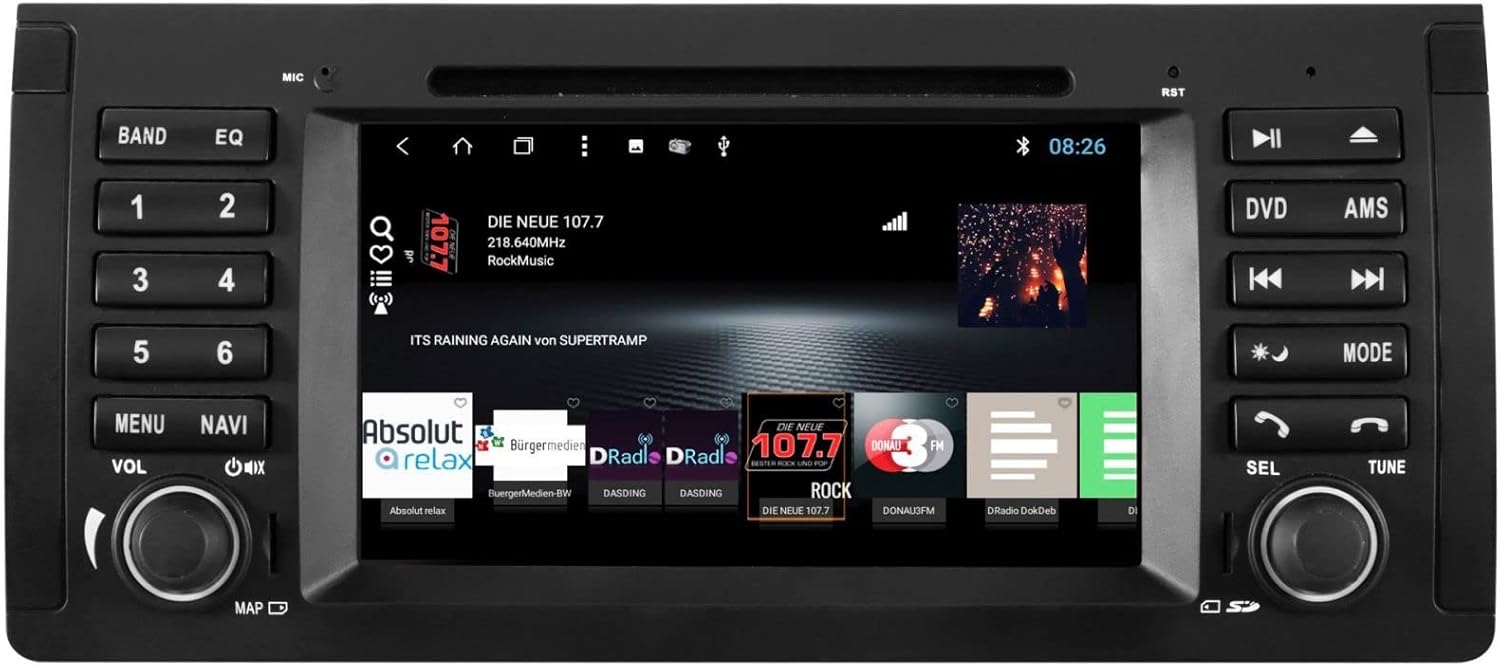
The ESX VN715-E39-DAB is an advanced in-car multimedia system designed to enhance your driving experience with navigation, entertainment, and connectivity features. It integrates seamlessly into compatible BMW vehicles.
Fitur konci:
- High-Resolution 8-inch Touchscreen: Provides clear visuals and intuitive control.
- Advanced Android i15 Operating System: Offers a familiar and customizable user interface.
- Google Maps Navigation: Supports both online and offline navigation for reliable route guidance.
- Mobile Internet Connectivity: Connects via Wi-Fi hotspot for online services.
- Radio Digital DAB+: Includes a DAB antenna for high-quality digital radio reception with station logos.
- AM/FM Radio with RDS: Standard analog radio reception with Radio Data System functionality.
- Multi-format DVD Player: Supports DVD, DVD-R/RW, DVD+R/RW, VCD, CD, CD Text, CD-R/RW, and MP3 formats.
- Bluetooth Hands-Free Kit: Enables safe phone calls and audio streaming with an internal microphone and optional external microphone connection.
- Integrasi Smartphone: Connect iPhone or Android smartphones via USB for various functions.
- Kontrol sora: Utilize voice commands through a connected smartphone.
- Kaluaran Audio: pra-amplifier outputs for front, rear, subwoofer, and center channels.
- Input kaméra: One adjustable camera input for reverse cameras.
- Auxiliary Inputs/Outputs: One AUX video input, two audio/video outputs, and one AUX audio input.
- Port USB: Two USB ports for media and connectivity.
- Slot Kartu SD Mikro: Dedicated slot for navigation data and media files.
- Kustomisasi: Personalize with customizable logos and wallpapers.
- Authenticity Certificate: Included with the product.
3. Setup jeung Instalasi
Installation of the ESX VN715-E39-DAB system requires technical knowledge and should ideally be performed by a qualified professional. Incorrect installation can lead to damage to the device or vehicle electrical system.
Kasaluyuan:
This unit is compatible with specific BMW models and connector types:
- BMW 5 Series E39 (1996-2001) with 17-pin system connector.
- BMW 5 Series E39 (2002-2003) with 40-pin system connector.
- BMW X5 E53 (2000-2001) with 17-pin system connector.
- BMW X5 E53 (2002-2007) with 40-pin system connector.
- BMW M5 (1996-2003) with 17/40-pin system connector.
Léngkah-léngkah Pamasangan Umum (Disarankeun Pamasangan Profesional):
- Pegatkeun sambungan batré: Salawasna pegatkeun batré kandaraan sateuacan ngamimitian padamelan listrik naon waé.
- Hapus Unit anu Aya: Carefully remove the factory radio or navigation system from the dashboard.
- Sambungkeun Wiring Harness: Connect the appropriate wiring harness (17-pin or 40-pin) to the vehicle's electrical system and the ESX unit. Ensure all connections are secure.
- Sambungkeun Antenna: Connect the GPS antenna, DAB antenna, and radio antenna to their respective ports on the unit. Position the antennas for optimal reception.
- Sambungkeun Periferal: Connect any optional accessories such as a reverse camera, external microphone, USB devices, or auxiliary inputs/outputs.
- Pasang Unit: Securely mount the ESX unit into the dashboard opening.
- Sambungkeun deui Batré: Sambungkeun deui batré kendaraan sareng uji sistemna.

4. Parentah Operasi
Familiarize yourself with the touchscreen interface and physical buttons for optimal use.
4.1 Operasi Dasar
- Hurungkeun/Pareuman: Press and hold the power button (usually the VOL knob) to turn the unit on or off. A short press typically mutes or unmutes the audio.
- Kontrol volume: Rotate the VOL knob to adjust the audio volume.
- Antarmuka layar rampa: Navigate through menus and applications by tapping, swiping, and pinching on the 8-inch touchscreen.

4.2 Napigasi
Access the navigation application (e.g., Google Maps) from the home screen. Input your destination, and the system will provide turn-by-turn directions. Ensure GPS antenna is properly connected for accurate positioning.

4.3 Radio (DAB+/AM/FM)
- Pilih Mode: Tap the 'Radio' or 'DAB+' icon on the home screen or press the 'BAND' button.
- Stasion Scan: Use the 'AMS' (Auto Memory Store) button or on-screen controls to scan and save available stations.
- lagu: Manually tune using the 'TUNE' knob or on-screen frequency controls.
- Prasetél: Save your favorite stations to preset buttons (1-6) for quick access.

4.4 Konektipitas Bluetooth
- papasangan: Go to the Bluetooth settings on the unit and your smartphone. Milarian pikeun available devices and select 'ESX VN715-E39-DAB'. Enter the PIN if prompted (usually '0000' or '1234').
- Telepon Hand-Free: Once paired, you can make and receive calls directly through the unit.
- Streaming Audio: Play music from your smartphone via Bluetooth A2DP.
4.5 Media Playback (DVD/USB/SD)
- DVD: Insert a DVD into the disc slot. The system will automatically switch to DVD mode or prompt you to select it.
- USB/SD: Insert a USB drive into a USB port or an SD card into the Micro SD slot. Access media files through the 'Media' or 'File Explorer' application.
5. Pangropéa
Regular maintenance ensures the longevity and optimal performance of your ESX VN715-E39-DAB system.
- Ngabersihan layar: Anggo lawon anu lemes sareng henteu lint pikeun ngusap layar rampa. Pikeun smudges nekad, rada dampen lawon jeung cai atawa cleaner aman layar. Hindarkeun bahan kimia anu kasar.
- Apdet parangkat lunak: Periodically check for software updates from the manufacturer's official website or through the unit's system settings (if available) to ensure you have the latest features and bug fixes.
- Disc Drive Care: Keep the DVD slot free of dust and debris. Avoid inserting damaged or non-standard discs.
6. Cara ngungkulan
If you encounter issues with your unit, refer to the following common troubleshooting steps:
| Masalah | Mungkin Cukang lantaranana | Solusi |
|---|---|---|
| Taya Daya | Sambungan kakuatan leupas, sekering ditiup, masalah batré kandaraan. | Check power cables and fuse. Ensure vehicle battery is charged. Consult a professional if issues persist. |
| Taya Sora | Volume muted, speaker wires disconnected, incorrect audio source. | Check volume level and mute status. Verify speaker connections. Select the correct audio source. |
| Sinyal GPS Leungit | GPS antenna improperly connected or obstructed, unit in an area with poor satellite reception. | Pastikeun anteneu GPS disambungkeun kalayan pageuh sareng gaduh sinyal anu jelas view langit. Pindah ka tempat anu kabuka. |
| Gagal Nyapasangkeun Bluetooth | Bluetooth not enabled on device, incorrect PIN, device out of range. | Ensure Bluetooth is active on both devices. Re-enter PIN. Bring devices closer. Restart both devices. |
| Layar rampa teu ngaréspon | Sistem macet, layar kotor. | Perform a soft reset (refer to device settings or power cycle). Clean the screen. |
If these steps do not resolve the issue, please contact customer support or a qualified service technician.
7. Spésifikasi
Detailed technical specifications for the ESX VN715-E39-DAB unit:
- merek: ESX
- model: VN715-E39-DAB
- Ukuran layar: 8 inci
- Jenis tampilan: LCD
- Sistem operasi: Android i15
- Téknologi konektipitas: Bluetooth, USB, Wi-Fi (via hotspot)
- Jenis Média: DVD, DVD-R/RW, DVD+R/RW, VCD, CD, CD Text, CD-R/RW, MP3, USB, Micro SD
- Radio Tuner: DAB+, AM/FM with RDS
- Napigasi: Google Maps (online/offline)
- Kasaluyuan: BMW 5 Series E39 (1996-2003), BMW X5 E53 (2000-2007), BMW M5 (1996-2003)
- Asal: Cina
8. Garansi jeung Rojongan
For warranty information, please refer to the documentation provided with your purchase or contact your retailer. For technical support, please visit the official ESX website or contact their customer service department. Ensure you have your model number (VN715-E39-DAB) and proof of purchase available when seeking support.


