1. Bubuka
This manual provides detailed instructions for the installation, operation, and maintenance of your Aerocool Streak Mid-Tower ATX PC Gaming Case. Designed for both new and experienced PC builders, the Streak case offers a compact design with a polished aluminum front panel, vibrant RGB lighting, and a full tempered glass side panel to showcase your components. It supports various cooling configurations to ensure optimal performance for your system.
2. Émbaran Kasalametan
Please read and understand all safety instructions before installing or operating the PC case. Failure to do so may result in personal injury or damage to the product.
- Salawasna pegatkeun sambungan catu daya ti stop kontak témbok saméméh ngajalankeun sagala instalasi atawa perawatan.
- Be aware of sharp edges inside the case. Handle components with care to avoid cuts.
- Tetep bagian leutik tur screws jauh ti barudak.
- Pastikeun grounding ditangtoskeun pikeun nyegah shock listrik.
- Ulah ngalaan wadahna kana cai atanapi kalembaban anu kaleuleuwihi.
3. Eusi Paket
Pastikeun yén sadaya item aya dina bungkusan:
- Aerocool Streak Mid-Tower ATX PC Gaming Case
- Accessory box (screws, standoffs, cable ties, etc.)
- Manual pangguna (dokumén ieu)
4. Case Components Overview
Familiarize yourself with the various parts of your Aerocool Streak case.

Gambar 4.1: Angled view of the Aerocool Streak PC case, showcasing the RGB front panel and tempered glass side panel.

Gambar 4.2: Top-handap angled view of the Aerocool Streak PC case, highlighting the top panel and front I/O ports.
4.1 Hareupna I / O Palabuhan
The front I/O panel provides convenient access to essential connections.
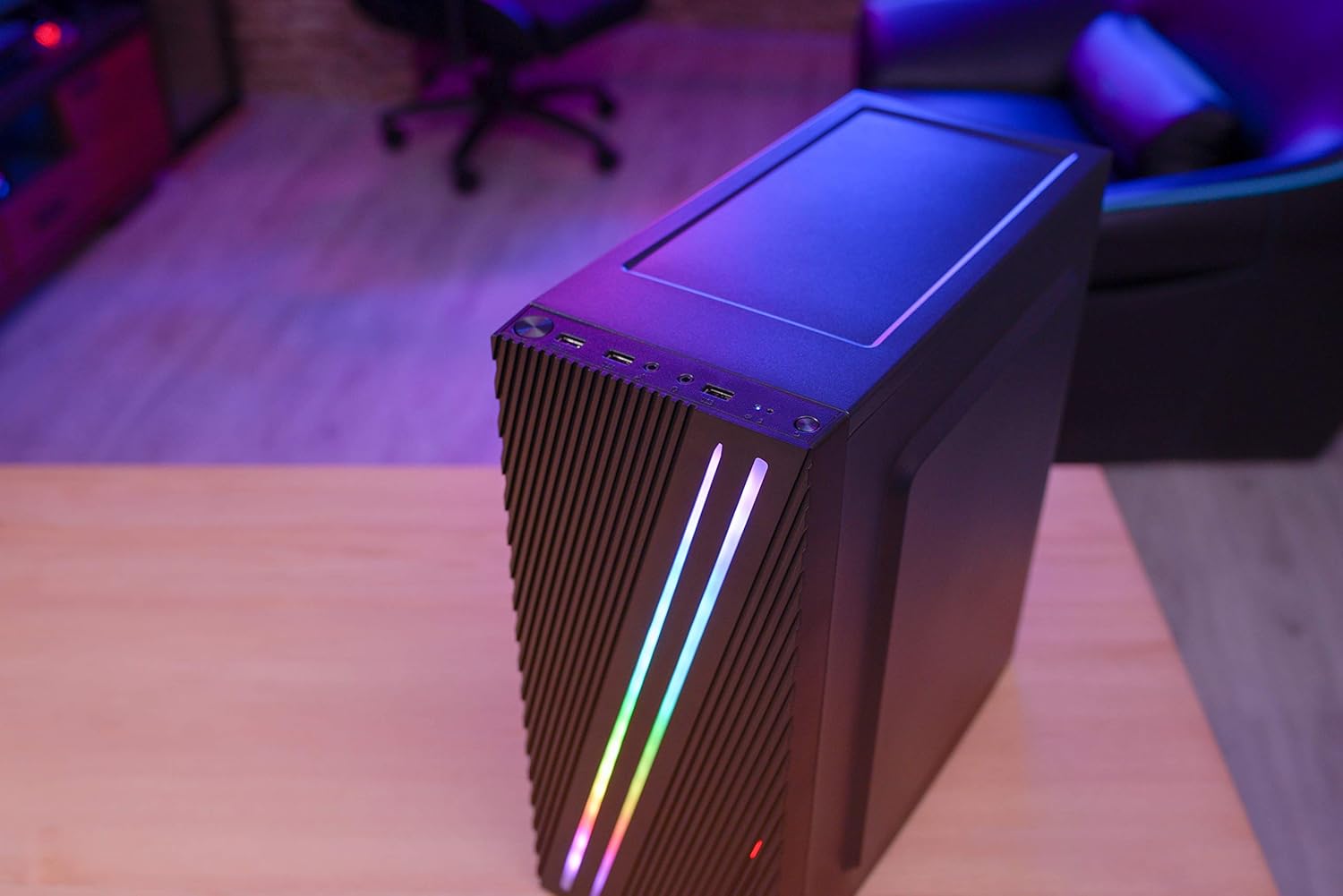
Gambar 4.3: Close-up of the front I/O panel, showing the power button, LED control button, USB 3.0 port, two USB 2.0 ports, and HD audio/microphone jacks.
- Tombol Daya: Pikeun ngahurungkeun / mareuman sistem.
- Tombol Kontrol LED: To cycle through RGB lighting modes.
- Port USB 3.0 (x1): Pikeun mindahkeun data-speed tinggi.
- Port USB 2.0 (x2): Pikeun alat USB standar.
- HD Audio & Mic Jacks: Pikeun nyambungkeun headphone sareng mikropon.
4.2 Perenah interior
The interior is designed for efficient component installation and cable management.

Gambar 4.4: Internal view of the Aerocool Streak PC case, showing the motherboard tray, drive bays, and cable routing cutouts.
5. Setup jeung Instalasi
Follow these steps to assemble your PC components within the Aerocool Streak case.
5.1 Persiapan
- Buka bungkusna teras cabut sadaya bahan bungkusna.
- Teundeun wadahna dina permukaan datar anu stabil.
- Gather necessary tools: Phillips head screwdriver, cable ties (included in accessory box).
- Remove the tempered glass side panel by unscrewing the four thumb screws.
5.2 Pamasangan motherboard
The Aerocool Streak supports ATX, Micro-ATX, and Mini-ITX motherboards.

Gambar 5.1: Diagram illustrating the compatible motherboard sizes (Mini-ITX, Micro-ATX, ATX) within the case.
- Pasangkeun standoff motherboard anu diperyogikeun kana baki motherboard numutkeun faktor bentuk motherboard anjeun.
- Place your motherboard carefully onto the standoffs, aligning the screw holes.
- Ngamankeun motherboard jeung screws disadiakeun.
5.3 Pamasangan Power Supply Unit (PSU).
The case features a bottom-mount PSU design.
- Geser PSU kana kompartemen anu ditunjuk di handapeun pungkur.
- Secure the PSU to the case rear with screws.
5.4 Pamasangan Girang Panyimpenan
Install your 2.5" SSDs and 3.5" HDDs.
- 2.5" SSDs: Mount SSDs to the designated 2.5" drive trays or mounting points on the motherboard tray.
- 3.5" HDDs: Install HDDs into the drive cage located beneath the PSU shroud.
5.5 Expansion Card Installation (Graphics Card, etc.)
The case supports high-end graphics cards up to 335mm in length.
- Leupaskeun slot PCIe perlu nyertakeun ti pungkur kasus.
- Insert your expansion card into the corresponding PCIe slot on the motherboard.
- Amankeun kartuna ku sekrup.
5.6 Pamasangan Sistim cooling
The Aerocool Streak supports both air and liquid cooling solutions.

Gambar 5.2: Diagram showing air cooling options, including front 120mm fans (optional) and a rear 80mm fan (included).

Gambar 5.3: Diagram illustrating liquid cooling support, specifically a 240mm radiator at the front (optional).
- Pendinginan Udara: The case supports up to two 120mm fans at the front (optional) and includes one 80mm fan at the rear.
- Cooling cair: A 240mm radiator can be installed at the front of the case (optional).
- Install fans or radiators into their respective mounting points and secure them with screws.
5.7 Manajemén kabel
Utilize the cable routing cutouts and tie-down points behind the motherboard tray to organize cables for improved airflow and aesthetics.
- Route all power and data cables through the designated cutouts.
- Use cable ties to bundle and secure cables neatly.
6. Parentah Operasi
6.1 Powering Dina Sistim anjeun
- Ensure all components are correctly installed and all cables are securely connected.
- Connect the power cable to your PSU and then to a wall outlet.
- Flip saklar kakuatan dina PSU ka posisi 'ON'.
- Press the power button on the front I/O panel of the case to start your system.
6.2 Kontrol cahaya RGB
The Aerocool Streak features 18 distinct RGB lighting modes on its front panel.

Gambar 6.1: The Aerocool Streak PC case with its vibrant RGB lighting illuminated on the front panel.
- Pencét éta Tombol Control LED on the front I/O panel to cycle through the 18 available lighting modes.
- These modes include 11 RGB flow modes and 7 static color modes.
7. Pangropéa
Pangropéa rutin ngabantosan mastikeun umur panjang sareng kinerja optimal tina casing sareng komponén PC anjeun.
7.1 Ngabersihkeun Casing
- Luar: Ngagunakeun lemes, damp lawon pikeun ngusap handap surfaces exterior. Ngahindarkeun cleaners abrasive.
- Interior: Periodically use compressed air to remove dust buildup from inside the case, especially around fans and heatsinks.
7.2 Dust Filter Maintenance
The case may include removable dust filters to prevent dust ingress. Clean these filters regularly.
- Locate and carefully remove any dust filters (e.g., top, bottom, front).
- Clean the filters with water and mild soap, or use compressed air.
- Pastikeun saringan parantos garing sateuacan dipasang deui.
8. Cara ngungkulan
If you encounter issues with your Aerocool Streak case, refer to the following common problems and solutions.
- Sistem teu hurung:
- Check all power connections, including the PSU to the wall, PSU switch, and motherboard power cables.
- Pastikeun kabel saklar daya panel hareup disambungkeun kalayan leres kana motherboard.
- RGB lighting is not working:
- Verify that the RGB lighting cables are properly connected to the power supply or motherboard RGB header.
- Press the LED control button to cycle through modes, as it might be on a static black mode.
- Poor airflow/overheating:
- Pastikeun sadaya kipas casing muter kalayan leres.
- Clean any dust filters and internal components.
- Verify proper fan orientation for optimal airflow (intake/exhaust).
9. Spésifikasi
| Fitur | Spésifikasi |
|---|---|
| Ngaran modél | streak |
| Nomer modél | ACCM-PV19012.11 |
| Jenis Kasus | Tengah munara |
| Motherboard kasaluyuan | ATX, Micro ATX, Mini ITX |
| Bahan | Tempered Glass (side panel) |
| Warna | Hideung |
| Port I / O payun | 1x USB 3.0, 2x USB 2.0, HD Audio, Mic, LED Control Button, Power Button |
| Lampu RGB | 18 Lighting Modes (11 flow, 7 static) |
| CPU Cooler Clearance | Nepi ka 151mm |
| Panjang Kartu Grafika | Nepi ka 335mm |
| Pamasangan PSU | Gunung handap |
| Métode Cooling | Hawa, Cai |
| Kaasup Fans | 1x 80mm Rear Fan |
| Optional Fan Support | Hareupeunana: 2x 120mm |
| Rojongan Radiator | Front: 1x 240mm (optional) |
10. Garansi jeung Rojongan
The Aerocool Streak PC Gaming Case comes with a 2-year warranty on parts. For technical support, warranty claims, or further assistance, please contact your retailer or the official Aerocool support channels. Keep your proof of purchase for warranty validation.


