1. Bubuka
This manual provides essential information for the safe and effective use of your Sony Cyber-Shot DSC-RX100 VA Digital Camera. Please read it thoroughly before operating the camera and retain it for future reference.
The Sony Cyber-Shot DSC-RX100 VA is a compact digital camera featuring a 20.1 MP 1" Exmor RS BSI CMOS Sensor and a BIONZ X Image Processor, designed for high-quality still images and UHD 4K video recording. It includes a Zeiss Vario-Sonnar T* f/1.8-2.8 lens (24-70mm equivalent) and a 3.0" 1229k-Dot Multi-Angle Xtra Fine LCD.
2. Setélan
2.1 Ngabongkar jeung Mariksa Eusi
Carefully unpack your camera and verify that all included items are present. The standard package includes:
- Sony Cyber-shot DSC-RX100 VA Digital Camera
- NP-BX1 Replacement Battery
- Kabel USB (pikeun ngecas sareng mindahkeun data)
- Adaptor kakuatan
- Tali pigeulang
- Manual Pitunjuk (dokumén ieu)
Additional accessories may be included depending on your purchase bundle, such as a SanDisk 64GB Extreme PRO UHS-I SDXC Memory Card, Premium Flexible Tripod, Deluxe Point & Shoot Camera Case, Deluxe Cleaning Kit, High Quality Dust Cleaner Blower, Lens Pen Cleaner, and SD Card USB Reader.
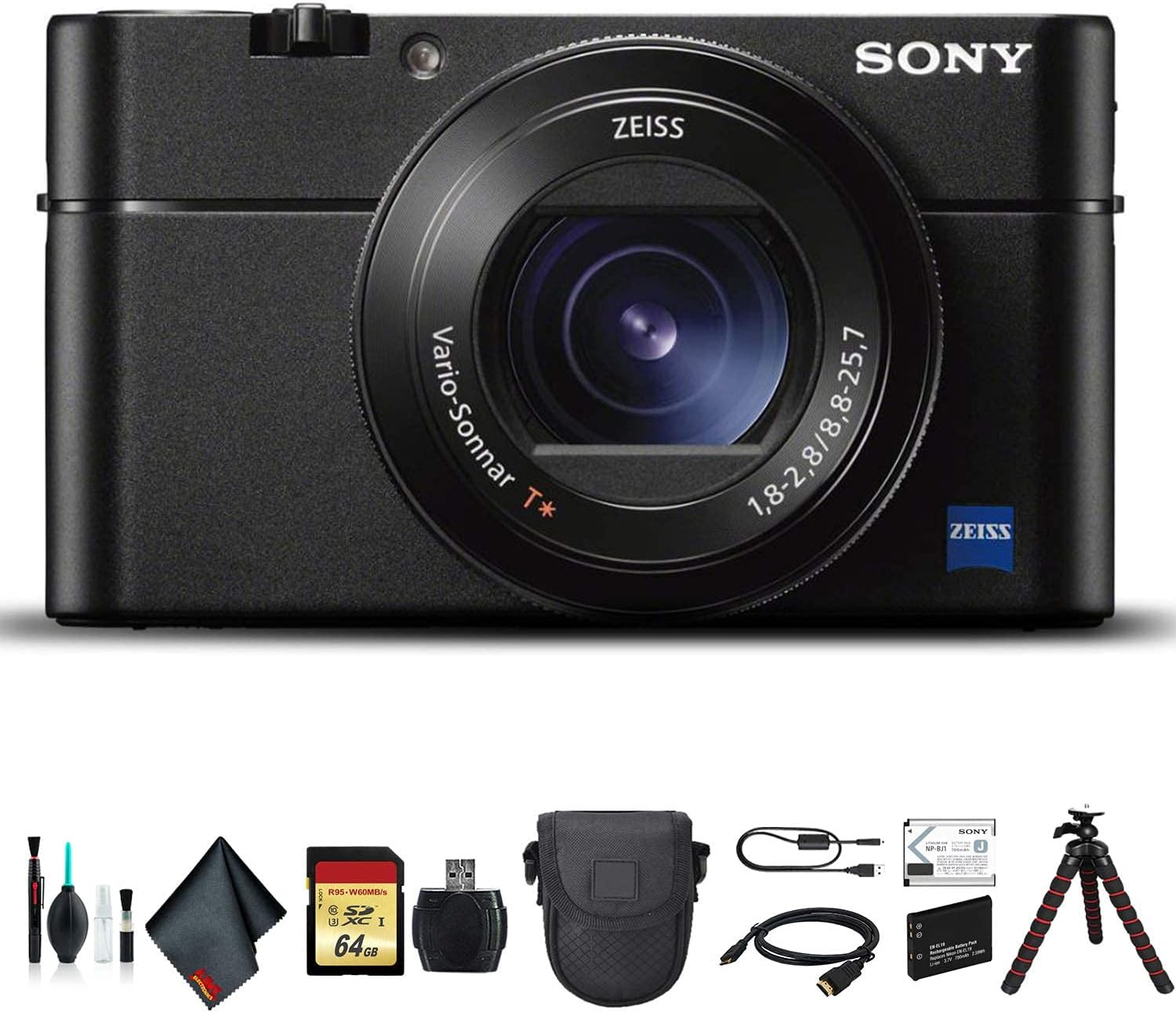
Figure 2.1: Sony Cyber-Shot DSC-RX100 VA camera and typical bundled accessories.
2.2 Pamasangan Batré sareng Ngecas
- Open the battery cover on the bottom of the camera.
- Insert the NP-BX1 battery with the correct orientation, ensuring it clicks into place.
- Tutup panutup batre aman.
- Connect the camera to a power outlet using the supplied USB cable and power adapter to charge the battery. The charging indicator will light up.
2.3 Pamasangan Kartu Mémori
The camera supports SDXC memory cards. A SanDisk 64GB Extreme PRO UHS-I SDXC Memory Card may be included.
- Buka panutup slot kartu memori, biasana aya di deukeut kompartemen batré.
- Lebetkeun kartu memori kalayan kontakna ngadep ka arah anu leres dugi ka ngaklik kana tempatna.
- Tutup panutup slot kartu memori.
2.4 Daya Awal Hurung
Pencét éta POWER button to turn on the camera. Follow the on-screen prompts to set the date, time, and language.
3. Ngoperasikeun kaméra
3.1 Kontrol Kaméra Leuwih tiview
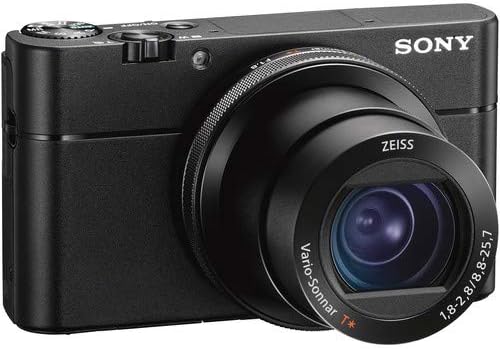
Gambar 3.1: Hareupeun view of the Sony Cyber-Shot DSC-RX100 VA camera, showing the lens and control ring.

Gambar 3.2: Tukangeun view of the Sony Cyber-Shot DSC-RX100 VA camera, displaying the LCD screen and control buttons.
Biasakeun diri anjeun sareng kontrol utama:
- Tombol jepret: Pencét satengahna pikeun pokus, pinuh pikeun nyandak gambar.
- Lever zum: Ngontrol zum optik sareng digital.
- Mode Dial: Selects shooting modes (e.g., Program Auto, Aperture Priority, Shutter Priority, Manual, Movie).
- Cingcin kontrol: Tempatna di sabudeureun lensa, tiasa disaluyukeun pikeun sababaraha fungsi sapertos zum, aperture, atanapi laju jepret.
- Tombol MENU: Ngaksés setélan kaméra.
- Tombol Fn (Fungsi): Nyayogikeun aksés gancang kana setélan anu sering dianggo.
- Tombol DISP (Tampilan): Changes the information displayed on the LCD screen or viewanu mendakan
- Roda Kontrol: Navigates menus and adjusts settings.
- MOVIE Button: Mimitian sareng ngeureunkeun ngarékam pidéo.
- FINDER Button: Activates or retracts the electronic viewanu mendakan
3.2 Nyokot Poto
- Hurungkeun kaméra.
- Select your desired shooting mode using the Mode Dial.
- Frame your shot using the LCD screen or the pop-up OLED Tru-Finder EVF.
- Press the shutter button halfway to achieve focus. The camera features Contrast Detection Autofocus with 150 autofocus points.
- Pencét pinuh tombol jepret pikeun moto gambar.
3.3 Ngarékam Pidéo
The DSC-RX100 VA supports internal UHD 4K video recording and S-Log2 Gamma for advanced color grading.
- Hurungkeun kaméra.
- Pencét dedicated Pilem tombol pikeun ngamimitian ngarékam.
- Pencét éta Pilem tombol deui pikeun ngeureunkeun ngarékam.
The camera also offers slow-motion video recording at up to 960 fps.
3.4 Playback
Ka view your photos and videos, press the Playback button (usually indicated by a triangle icon). Use the Control Wheel to navigate through your media.
3.5 Nyambung kana Komputer
You can transfer photos and videos to a computer using the supplied USB cable or by removing the SD card and using an SD Card USB Reader.
- Ngaliwatan Kabel USB: Connect the camera to your computer using the USB cable. The camera will appear as a removable drive.
- Ngaliwatan Pamaca Kartu SD: Insert the memory card into the SD Card USB Reader, then connect the reader to your computer.
4. Pangropéa
4.1 Ngabersihan Kaméra
Beberesih rutin ngabantosan ngajaga kinerja sareng kualitas gambar anu optimal.
- Lensa: Use a lens brush or blower to remove dust. For smudges, apply a small amount of lens cleaning solution to a microfiber cloth and gently wipe the lens in a circular motion. A lens pen cleaner can also be used.
- Awak kaméra: Lap ku lawon anu lemes sareng garing. Pikeun kokotor anu bandel, radaampen lawon jeung cai.
- Layar LCD: Use a clean, dry microfiber cloth.
Awas:
- Never use organic solvents such as alcohol, benzene, or paint thinner to clean the camera.
- Avoid touching the lens or sensor directly with your fingers.
4.2 Panyimpenan
When not in use, store the camera in a cool, dry place away from direct sunlight and extreme temperatures. If storing for an extended period, remove the battery.
4.3 Perawatan Batré
- Ngeusi batre sapinuhnya sateuacan dianggo heula.
- Hindarkeun sering-sering ngecas batré pikeun manjangkeun umurna.
- Simpen batré di tempat anu tiis sareng garing.
5. Cara ngungkulan
Upami anjeun mendakan masalah sareng kaméra anjeun, tingal solusi umum ieu:
| Masalah | Mungkin Cukang lantaranana / Solusi |
|---|---|
| Kaméra henteu hurung | Battery is depleted or incorrectly inserted. Charge the battery or reinsert it correctly. |
| Teu tiasa nyandak gambar | Memory card is full, locked, or not inserted. Check card status, free up space, or insert correctly. |
| Gambar blur | Camera shake, incorrect focus, or low light. Use a faster shutter speed, ensure proper focus, or use a tripod. |
| Rékam pidéo eureun teu disangka-sangka | Memory card speed is insufficient for 4K video, or card is full. Use a high-speed card (UHS-I Speed Class 10, V30 recommended). |
| LCD screen is blank | Display setting might be off. Press the DISP button to cycle through display modes. |
For more detailed troubleshooting or issues not listed here, please refer to the official Sony support websitus atanapi ngahubungan layanan palanggan maranéhna.
6. Spésifikasi
Key technical specifications for the Sony Cyber-Shot DSC-RX100 VA (DSC-RX100M5A) camera:
- Resolusi Tetep Éféktif: 20.1 MP
- Tipe sénsor: 1" Exmor RS BSI CMOS
- Prosesor Gambar: BIONZ X
- Lensa: Zeiss Vario-Sonnar T* f/1.8-2.8 (24-70mm equivalent)
- Stabilisasi Gambar: Digital
- Resolusi Video: UHD 4K (2160p)
- Frame Rate (Video): Up to 960 fps (slow motion)
- Ukuran layar: 3.0" (1229k-Dot Multi-Angle Xtra Fine LCD)
- Viewpapanggihan: 2359k-Dot OLED Tru-Finder Pop-Up EVF
- Titik pokus otomatis: 150 (Contrast Detection)
- Shooting kontinyu: 10 FPS
- Dirojong File Bentuk: JPEG, RAW
- Jenis kartu mémori: SDXC (up to 64 GB supported)
- Konektipitas: USB, HDMI
- Jenis Batré: Ion Litium (NP-BX1)
- beurat: Kurang leuwih 2.7 Pon (kalayan batré sareng kartu mémori)
7. Garansi jeung Rojongan
Your Sony Cyber-Shot DSC-RX100 VA Digital Camera is covered by a manufacturer's warranty. Please refer to the warranty card included with your product for specific terms and conditions, including the warranty period and coverage details.
For technical support, service, or further inquiries, please visit the official Sony support website or contact Sony customer service directly. Keep your purchase receipt and product serial number handy when seeking support.
Rojongan Sony Websitus: https://www.sony.com/electronics/support