1. Bubuka
The Verbatim Keypad Secure USB 3.0 Flash Drive provides secure data storage with 256-bit AES hardware encryption and a built-in keypad for password entry. This manual provides essential information for setting up, operating, maintaining, and troubleshooting your device, ensuring your data remains protected and accessible.

Image: Verbatim Keypad Secure USB drive connected to a laptop, illustrating its secure function.
2. Émbaran Kasalametan
- Entong ngalaan alat ka suhu anu ekstrim, sinar panonpoé langsung, atanapi kalembaban anu luhur.
- Hindarkeun ragrag atanapi ngagentoskeun alat kana tabrakan anu kuat.
- Jauhkeun tina jangkauan barudak.
- Ulah nyobian ngabongkar atanapi ngarobih alat. Ieu bakal ngabatalkeun garansi sareng tiasa nyababkeun karusakan.
- Pastikeun ventilasi anu cekap nalika dianggo pikeun nyegah panas teuing.
3. Produk Langkungview
Fitur konci:
- Built-in Keypad: For secure password entry, supporting up to 12 digits.
- 256-bit AES Hardware Encryption: Encrypts all data on the drive in real-time.
- 100% Data Encryption: Ensures complete data protection.
- Data Wipe Feature: Automatically erases data after multiple failed password attempts to prevent unauthorized access.
- USB 3.0 Type-A Interface: Offers high-speed data transfer, backward compatible with USB 2.0.
- Kasaluyuan Cross-Platform: Works with both PC (Windows) and Mac operating systems.
- Kapasitas Panyimpen 32GB: Ample space for important documents, photos, and videos.
komponén:
- Panyambung USB: Standard USB Type-A for connecting to your computer.
- Papan tombol: Numeric keys (0-9) and lock/unlock buttons for password input.
- Indikator LED: Display power, lock, and encryption status.
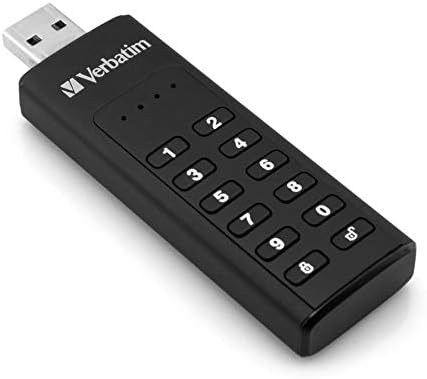
Image: Close-up of the Verbatim Keypad Secure USB drive, highlighting the keypad.
4. Setélan
Follow these steps for initial setup and password creation:
- Sambungkeun drive: Plug the Verbatim Keypad Secure USB drive into an available USB port on your computer. The drive's LED indicators will illuminate.
- Initial Password Entry: The drive will typically require an initial default password. Refer to the small instruction leaflet included in the packaging for this default password.
- Set Your Personal Password: After entering the default password and unlocking the drive, you will be prompted to set a new, personal password. This password should be between 6 and 12 digits long. Enter your desired password and confirm it.
- Drive Initialization (if necessary): For some operating systems or if the drive is not immediately recognized, you may need to initialize and format the drive through your computer's disk management utility. Follow on-screen prompts or consult your operating system's help for 'Disk Management' or 'Disk Utility'.
- Amankeun Drive: Once your password is set, the drive will automatically lock when removed from the USB port or after a period of inactivity.

Image: Connecting the Verbatim Keypad Secure USB drive to a computer via a USB hub.
5. Parentah Operasi
Muka konci drive:
- Plug the drive into a USB port.
- Pencét éta Muka konci button (often represented by an open padlock icon) on the keypad.
- Enter your personal password using the numeric keys.
- Pencét éta Muka konci button again to confirm. The LED indicator will change to show the drive is unlocked and ready for use.
Mindahkeun Data:
Once unlocked, the drive functions like any standard USB flash drive. You can drag and drop files, copy and paste, or save directly to the drive.
Locking the Drive:
The drive automatically locks when safely ejected from the computer or when power is removed. To manually lock the drive while connected, press the Konci button (often represented by a closed padlock icon) on the keypad.
Ngahapus Aman:
Always safely eject the USB drive from your operating system before physically removing it from the USB port to prevent data corruption.
6. Pangropéa
- Tetep Bersih: Anggo lawon anu lemes sareng garing pikeun ngabersihkeun bagian luar drive. Hindarkeun cairan pembersih.
- Pembaruan firmware: Pariksa Verbatim sacara berkala websitus wéb ieu pikeun apdet firmware anu sayogi pikeun alat anjeun pikeun mastikeun kinerja sareng kaamanan anu optimal.
- Cadangan Data: While the drive offers strong security, it is always recommended to maintain backups of critical data on multiple storage devices.
- Panyimpenan: Store the drive in a cool, dry place away from direct sunlight and strong magnetic fields.
7. Cara ngungkulan
- Drive teu dikenal ku komputer:
- Pastikeun drive diselapkeun pinuh kana port USB.
- Coba port USB anu béda dina komputer anjeun.
- Uji drive dina komputer anu sanés pikeun ngaluarkeun masalah khusus komputer.
- Check your computer's Device Manager (Windows) or Disk Utility (Mac) to see if the drive is detected but not assigned a drive letter or formatted.
- Cannot unlock the drive:
- Pastikeun anjeun ngasupkeun kecap akses anu leres.
- The drive will wipe its data after a certain number of incorrect password attempts (typically 10-20 attempts). If this occurs, the data is unrecoverable, and the drive will need to be reset and reformatted.
- Kecepatan transfer data anu laun:
- Pastikeun anjeun nyambung ka port USB 3.0 dina komputer anjeun pikeun kinerja anu optimal. Port USB 2.0 bakal ngahasilkeun kecepatan anu langkung laun.
- Avoid using long or low-quality USB extension cables, as these can degrade transfer speeds.
- Gede file transfers can sometimes cause the drive to warm up, which may lead to a temporary reduction in speed to protect the device.
- Drive gets warm during use:
- It is normal for the drive to become warm during extended periods of data transfer, especially with USB 3.0 speeds. This is generally not a cause for concern unless it becomes excessively hot to touch.
8. Spésifikasi
| Ngaran modél | Keypad Secure |
| Nomer modél | 49427 |
| Kapasitas | 32 GB |
| Panganteur | USB 3.0 (USB 3.1 Gen 1) Type-A |
| Énkripsi | AES 256-bit Hardware Encryption |
| Baca Speed | Nepi ka 160 MB/s |
| Tulis Speed | Nepi ka 130 MB/s |
| Kasaluyuan | Windows 7, 8, 10; Mac OS X 10.4 or higher |
| Ukuran (L x W x H) | 93.5 mm x 28 mm x 12 mm |
| Beurat | 30 g |
| Warna | Hideung |

Image: Dimensional diagram of the Verbatim Keypad Secure USB drive.
9. Émbaran jaminan
For detailed warranty information, please refer to the warranty card included with your product packaging or visit the official Verbatim websitus. Sarat jeung kaayaan jaminan bisa rupa-rupa dumasar wewengkon.
10. Rojongan
If you encounter any issues or have questions not covered in this manual, please visit the official Verbatim support websitus kanggo FAQ, unduhan supir, sareng inpormasi kontak kanggo bantosan téknis.
Resmi Websitus: www.verbatim.com


