Parentah Kasalametan penting
Please read this manual carefully before operating the fan and retain it for future reference. Failure to follow these instructions may result in electric shock, fire, or serious injury.
- Pastikeun catu daya voltage cocog sareng labél rating dina kipas.
- Ulah neuleumkeun kipas, colokan, atawa ari dina cai atawa cairan séjén.
- Cabut kipas tina stop kontak nalika teu dianggo, nalika mindahkeun tina hiji lokasi ka lokasi anu sanés, sareng sateuacan beberesih.
- Jauhkeun kipas tina jangkauan barudak sareng piaraan.
- Ulah ngoperasikeun kipas ku kabel atawa colokan ruksak.
- Ulah ngasupkeun ramo atawa barang séjén ngaliwatan gril nalika kipas keur dioperasikeun.
- Teundeun kipas dina tempat anu datar sareng stabil pikeun nyegahna tibalik.
Komponén produk
Familiarize yourself with the parts of your Midea FS40-15AR Pedestal Fan.

Gambar: The Midea FS40-15AR Pedestal Fan, showing its main body, fan head, base, and the included remote control.
- Hulu Kipas: Includes front and rear grilles, fan blades, and motor housing.
- Panél kontrol: Located on the fan body, with LED display and control buttons.
- Stand adjustable: Allows for height adjustment.
- Dasar: Nyadiakeun stabilitas pikeun kipas.
- Kadali jauh: Pikeun operasi merenah ti kajauhan.
Setup sareng Majelis
Follow these steps to assemble your Midea FS40-15AR Pedestal Fan.
- Majelis Dasar: Attach the fan stand to the base. Ensure it is securely fastened.
- Penyesuaian Jangkungna: The fan features an adjustable stand. Loosen the height adjustment knob, extend or retract the stand to the desired height, and then tighten the knob securely.

Gambar: Illustration of the fan's adjustable height mechanism, showing arrows indicating upward and downward movement.
- Majelis Kepala kipas: Secure the rear grille, fan blades, and front grille to the motor housing according to the diagrams in the full manual (not provided here). Ensure all components are correctly aligned and locked into place.
- panempatan: Place the assembled fan on a firm, level surface. Ensure there is adequate space around the fan for optimal airflow and oscillation.
- Sambungan Daya: Colokkeun kabel listrik kana stop kontak listrik anu cocog (220-240V).
Parentah Operasi
Your Midea FS40-15AR fan can be operated using the control panel on the unit or the included remote control.
Panél kontrol


Gambar: Icons illustrating key features: 3 modes, 26 speeds, and a low noise level of 30 dB.
- Tombol Daya: Pencét pikeun ngahurungkeun kipas ON atawa OFF.
- Pangaluyuan Kacepetan: Use the speed control buttons to select from 26 available speed settings. The current speed will be displayed on the LED screen.
- Tombol Mode: Cycle through the available modes:
- Modeu Normal: Provides continuous airflow at the selected speed.
- Mode alam: Simulasi angin alami ku cara ngarobah-robah kecepatan kipas.
- Modeu Bobo: Operates at a very low speed and noise level (as low as 27 dB) for quiet operation, ideal for sleeping.
- Mode Eco: Adjusts fan speed automatically based on room temperature to optimize energy consumption.
- Tombol Osilasi: Press to activate or deactivate the 80-degree oscillation function, which distributes air across a wider area.
- Tombol Timer: Set the fan to automatically turn off after a specified period, up to 12 hours. Each press typically increases the timer by 1 hour.
Kadali jauh
The remote control allows for convenient operation of all fan functions from a distance.

Gambar: The remote control for the Midea FS40-15AR fan, highlighting the power button and the 12-hour timer function.

Gambar: A hand holding the remote control, pointing towards the Midea FS40-15AR fan, demonstrating wireless operation.
- Insert batteries into the remote control (type and orientation usually indicated inside the battery compartment).
- Point the remote control towards the fan's receiver for optimal response.
- Sadaya pungsi anu aya dina panel kontrol ogé tiasa diaksés ku kadali jauh.
Pangropéa
Pembersih sareng pangropéa teratur bakal mastikeun kinerja optimal sareng umur panjang kipas anjeun.
- Ngabersihan Luar:
- Sok cabut kipas angin sateuacan beberesih.
- Ngusap permukaan luar kalayan lemes, damp lawon. Ulah make cleaners abrasive atawa pangleyur.
- Pastikeun teu aya cai anu asup kana wadah motor atanapi komponén listrik.
- Ngabersihkeun Grilles sareng Wilah:
- Periodically remove the front grille (refer to assembly instructions for removal) to clean dust from the fan blades.
- Use a soft cloth or a vacuum cleaner with a brush attachment to remove dust.
- Pastikeun sadaya bagian tos rengse garing sateuacan reassembling sarta operasi kipas.
- Panyimpenan:
- Upami nyimpen kipas kanggo waktos anu lami, bersihan tuntas.
- Store it in its original packaging or cover it to protect it from dust.
- Simpen dina tempat anu tiis, garing.
Pamérésan masalah
If you encounter any issues with your Midea FS40-15AR fan, refer to the following common problems and solutions.
| Masalah | Mungkin Cukang lantaranana | Solusi |
|---|---|---|
| Kipas angin teu hurung. | Taya catu daya. Kabel listrik henteu leres dipasang. | Pariksa naha stop kontak listrik berpungsi. Ensure the power cord is securely plugged into the outlet and the fan. |
| Aliran hawa lemah. | Laju kipas disetel handap teuing. Grilles or blades are dusty. | Ningkatkeun setelan laju kipas. Unplug the fan and clean the grilles and blades as per maintenance instructions. |
| Kipas nyieun sora anu teu biasa. | Bagéan leupas. Halangan dina bilah kipas. | Unplug the fan and check for any loose components or foreign objects. Ensure the fan is on a stable surface. |
| Kadali jauh teu jalan. | Batré paéh. Halangan antara remote jeung kipas. | Ganti batré dina kadali jauh. Pastikeun aya garis anu jelas antara remot sareng panarima kipas. |
| Osilasi teu jalan. | Pungsi osilasi pareum. Halangan mékanis. | Press the oscillation button to activate it. Check for any obstructions preventing the fan head from rotating. |
Lamun masalah persists sanggeus nyobian solusi ieu, mangga ngahubungan rojongan customer.
spésifikasi
Technical details for the Midea FS40-15AR DC Pedestal Fan.
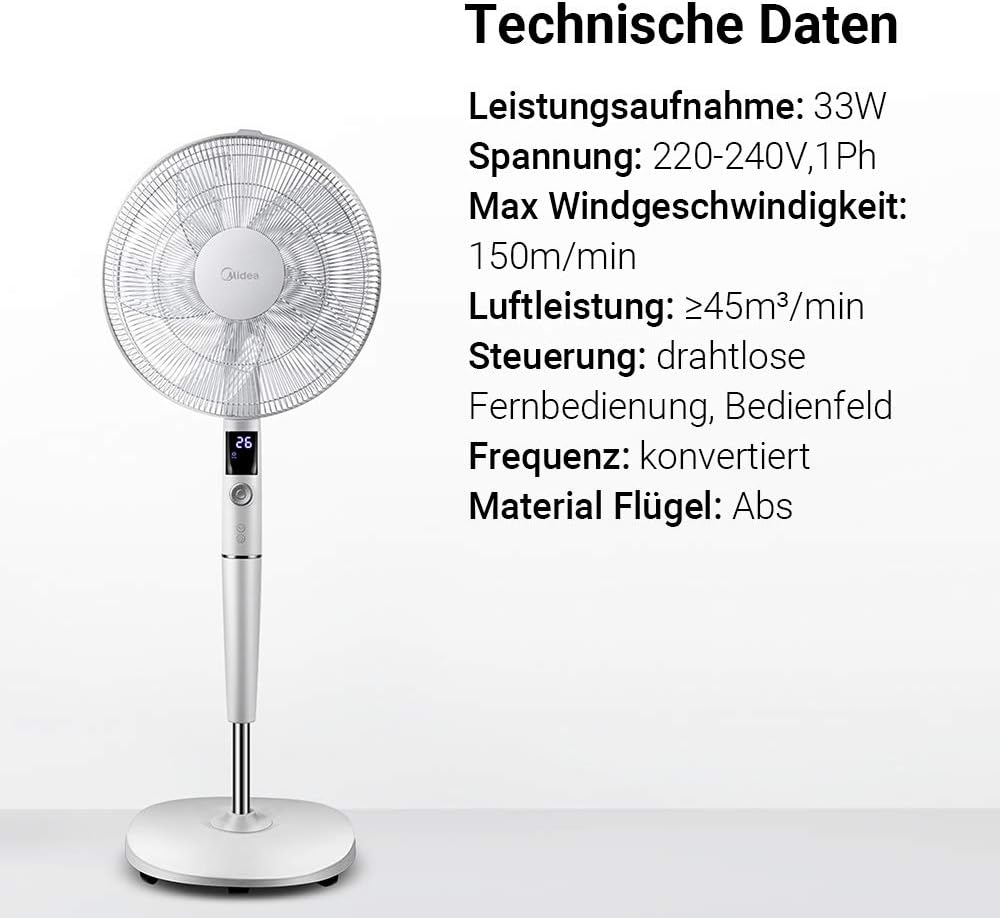
Gambar: A visual representation of the Midea FS40-15AR fan alongside its technical data, including power consumption, voltage, and control methods.
| Fitur | Rincian |
|---|---|
| Nomer modél | FS40-15AR |
| merek | Midea |
| Tipe | Kipas DC Alas |
| Konsumsi Daya | 30 Watt |
| Voltage | 220-240V |
| Kacepetan Angin Max | 150 m / mnt |
| Tiupan hawa | ≥45 m³/min |
| Jumlah Speeds | 26 |
| Tingkat Noise | 27 Decibels (min) |
| Sudut Osilasi | 80 derajat |
| Fungsi Timer | Nepi ka 12 jam |
| Métode kontrol | Wireless Remote Control, On-unit Control Panel |
| Bahan (Bilah) | Plastik ABS |
| Ukuran produk (L x W x H) | 45.3 x 40 x 137 cm |
| Beurat | 7.8 kg |
| Fitur husus | Adjustable Height, Tiltable Head, ECO Mode, Sleep Mode |
Garansi sareng Rojongan
Kanggo inpormasi garansi sareng dukungan pelanggan, mangga tingal kartu garansi anu kalebet dina produk anjeun atanapi kunjungan ka Midea resmi websitus. Simpen resi pameseran anjeun salaku bukti pameseran.
For technical assistance or service inquiries, please contact Midea customer service through their official channels.
- Dukungan Online: www.midea.com/global/support
- Inpormasi kontak: Refer to your regional Midea websitus pikeun detil kontak lokal.