
Bubuka
This user manual provides comprehensive instructions for the Andoer HDV-201LM 1080P FHD Digital Video Camera. It covers setup, operation, maintenance, and troubleshooting to help you get the most out of your device. The Andoer HDV-201LM is a portable digital video camera designed for capturing high-quality photos and videos, making it ideal for preserving memories.
Eusi pakét
Saatos muka bungkusan, mangga pariksa yén sadaya item di handap ieu kalebet:
- 1 x Digital Video Camera
- 1 x Kantong Kaméra
- 2 x Rechargeable Batteries (one already in camera)
- 1 x Kabel USB
- 1 Cable x AV
- 1 x Kadali Jauh
- 1 x Buku Panduan (Basa Inggris)

Image: All items included in the Andoer HDV-201LM package, including the camera, batteries, cables, remote, and bag.
Disetél
1. Pamasangan batré
The camera comes with two 3.7V 1500mAh rechargeable batteries. One battery is typically pre-installed. Before first use, ensure you remove any insulating film from the battery terminals.
- Open the battery compartment cover, usually located at the bottom or side of the camera.
- Lebetkeun batréna, pastikeun polaritasna leres sapertos anu dituduhkeun di jero kompartemenna.
- Tutup panutup kompartemen batré aman.
- Charge the battery fully before initial use using the provided USB cable.

Image: The Andoer HDV-201LM camera, two rechargeable batteries, and the remote control, illustrating the main components.
2. Pamasangan Kartu Mémori
The camera requires an SD card (not included) for storing photos and videos. A Class 10 or higher SD card is highly recommended for optimal performance and smooth recording.
- Panggihan slot kartu SD, ilaharna deukeut kompartemen batré.
- Lebetkeun kartu SD kalayan kontak logamna ngadep ka arah anu leres dugi ka ngaklik kana tempatna.
- Pikeun nyabut, dorong kartu ka jero dugi ka kaluar.
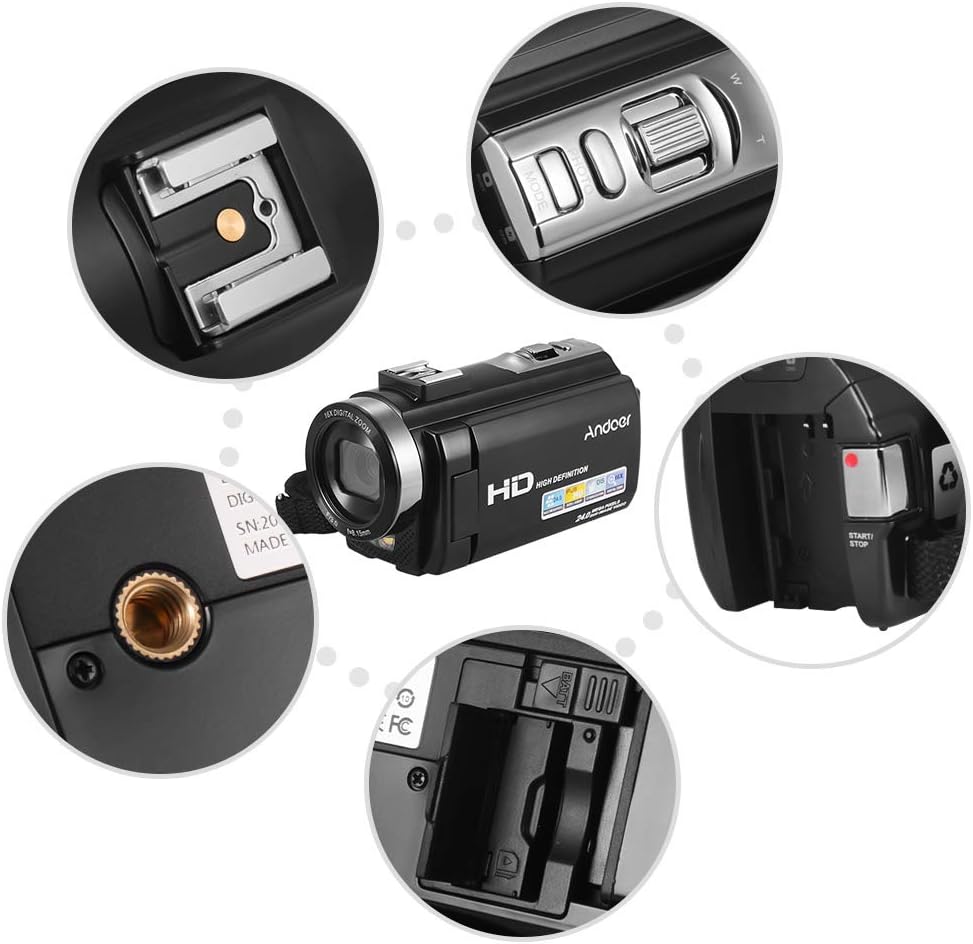
Gambar: Deukeut views of various camera components, including the SD card slot, hot shoe mount, and control buttons.
3. Attaching External Accessories
The camera features a hot shoe mount for connecting external accessories such as microphones or LED video lights (sold separately).
- Slide the accessory onto the hot shoe mount located on top of the camera.
- Secure the accessory if it has a locking mechanism.
- For external microphones, connect the audio cable to the camera's microphone input port.

Image: Illustration of the hot shoe mount on the Andoer HDV-201LM camera, showing how external microphones and LED lights can be attached.
Parentah Operasi
1. Daya Hurung / Pareum
- Pikeun ngahurungkeun, buka layar LCD atanapi pencét tombol POWER kancing.
- Pikeun mareuman, tutup layar LCD atanapi pencét terus tahan tombol POWER kancing.
2. Ngarékam Pidéo
The camera supports 1080P FULL HD video recording.
- Hurungkeun kaméra.
- Ensure the camera is in video recording mode (usually indicated by a video camera icon on the screen). If not, press the MODÉ tombol pikeun pindah.
- Pencét éta Mimitian / STOP button to begin recording. The recording indicator will light up.
- Pencét éta Mimitian / STOP tombol deui pikeun ngeureunkeun ngarékam.
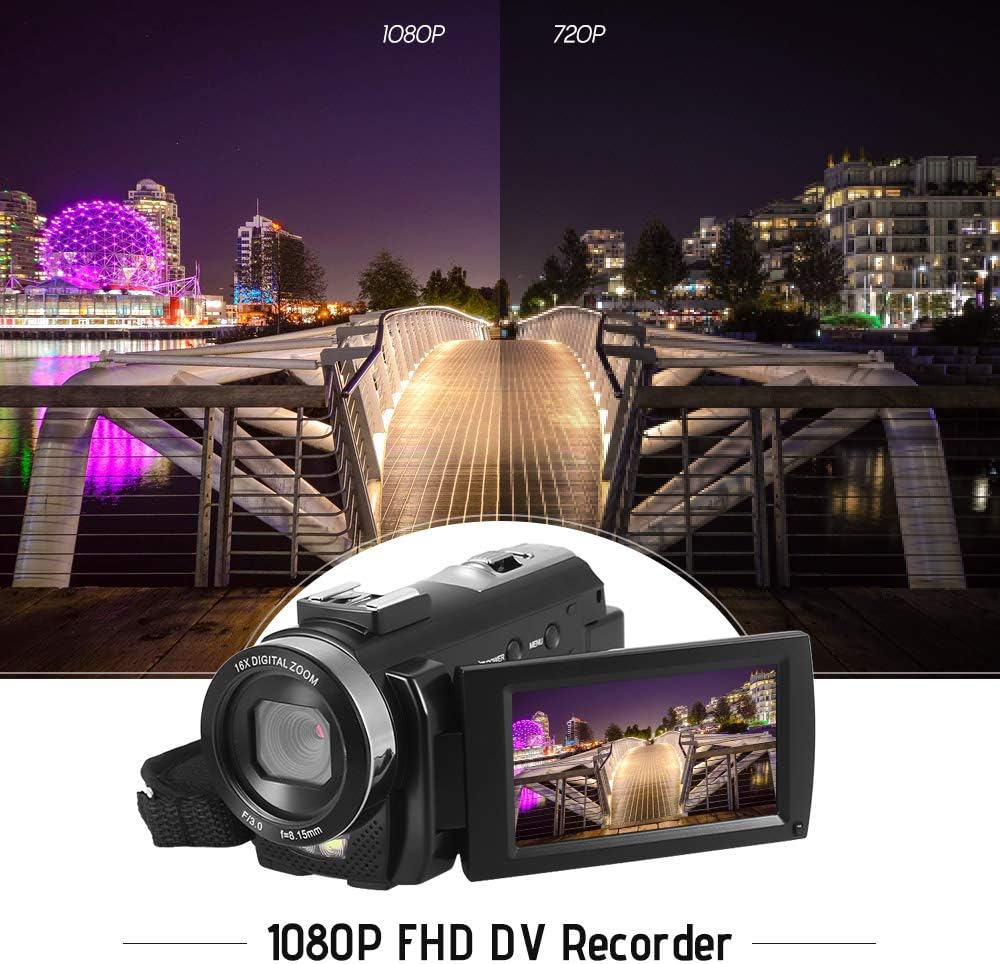
Image: Comparison of 1080P and 720P video quality, highlighting the 1080P FHD capability of the Andoer HDV-201LM camcorder.
3. Nyokot Poto
The camera can capture still images up to 24MP (interpolation).
- Hurungkeun kaméra.
- Pencét éta MODÉ button to switch to photo mode (indicated by a camera icon).
- Pigura shot anjeun ngagunakeun layar LCD.
- Pencét éta FOTO button (shutter button) to take a picture.
4. Using the LCD Screen
The 3.0-inch TFT-LCD screen offers 270° rotation for flexible viewdina sudut.
- Rotate the screen to face forward for self-recording or to various angles for comfortable viewing.
- The screen displays recording status, battery level, mode, and other settings.

Image: The Andoer HDV-201LM camera with its rotatable LCD screen open, showing the camera's compact design.
5. Digital ngazum
The camera features 16X digital zoom.
- Ngagunakeun éta L (Lega) jeung T (Telefoto) buttons, typically located near the top of the camera, to zoom in or out.
- Note: Digital zoom may reduce image quality compared to optical zoom.

Image: Demonstrates the 16X digital zoom capability of the Andoer HDV-201LM, showing a zoomed-in view of a subject.
6. Setélan Menu
Access the menu to adjust various camera settings:
- Pencét éta MENU tombol pikeun asup ka menu setelan.
- Anggo tombol navigasi (luhur/handap/kénca/katuhu) pikeun milih pilihan.
- Pencét éta OK tombol pikeun ngonfirmasi pilihan.
- Pencét MENU deui pikeun kaluar.
Setélan konci kalebet:
- Kasaimbangan bodas: Auto, Daylight, Cloudy, Fluorescent, Tungsten.
- Mode: Auto, Night, Portrait, Landscape, Backlight, Sport, Party, Beach, High Sensitivity.
- Kakeunaan: Adjust brightness from ±3.0EV.
- Timer Timer: Off, 2s, 5s, 10s.
- Daya Otomatis Pareum: OFF, 1min, 3min, 5min.
- Fungsi séjén: Face detection, smile capture, beauty face, anti-shake.

Image: A user holding and operating the Andoer HDV-201LM camera, demonstrating its portability and ease of use.
7. Nyambungkeun ka Komputer (USB)
Anjeun tiasa nyambungkeun kaméra ka komputer pikeun mindahkeun files.
- Pastikeun kaméra diaktipkeun.
- Sambungkeun kaméra ka komputer Anjeun nganggo kabel USB nu disadiakeun.
- The camera will appear as a removable disk drive on your computer.
- You can now access and transfer your photos and videos.
Supported Operating Systems: Windows XP/Vista/7/8/10.

Gambar: Deukeut view of the USB and TV output ports on the Andoer HDV-201LM camera, indicating connectivity options.
8. Connecting to a TV (AV Output)
View your recordings directly on a television using the AV cable.
- Connect one end of the AV cable to the camera's AV output port.
- Connect the other end to the AV input ports on your television (yellow for video, white/red for audio).
- Select the correct AV input source on your TV.
TV Output Standards: NTSC/PAL.
9. Ngagunakeun Remote Control
kadali jauh kaasup ngamungkinkeun pikeun operasi merenah ti kajauhan.
- Ensure the remote control battery (1 x 3V CR2025) is installed correctly.
- Point the remote control towards the camera's IR receiver.
- Use the buttons on the remote to control recording, playback, zoom, and menu navigation.
Pangropéa
1. Ngabersihan Kaméra
- Anggo kaén anu garing sareng lemes pikeun ngabersihan awak kaméra.
- Pikeun lénsa sareng layar LCD, paké lawon beberesih lénsa khusus sareng solusi. Hindarkeun bahan abrasive.
- Ulah nganggo deterjen atanapi pelarut anu kuat.
2. Kaperawatan batré
- Simpen batré di tempat anu tiis sareng garing upami henteu dianggo.
- Hindarkeun batré pinuh sering-sering pikeun manjangkeun umurna.
- Upami kaméra henteu dianggo kanggo waktos anu panjang, cabut batréna.
3. Panyimpenan
- Simpen kaméra dina kantong kamérana pikeun ngajaga tina lebu sareng goresan.
- Keep the camera away from extreme temperatures, humidity, and direct sunlight.
Pamérésan masalah
| Masalah | Mungkin Cukang lantaranana | Solusi |
|---|---|---|
| Kaméra teu hurung. | Battery is dead or not inserted correctly. Insulating film on battery. | Charge the battery. Reinsert the battery correctly. Remove insulating film. |
| Teu tiasa ngarékam pidéo / nyandak poto. | No SD card or SD card full/corrupted. Incorrect mode. | Insert a valid SD card. Delete files or format SD card. Switch to correct mode. |
| Kualitas gambar/video goréng. | Lens is dirty. Low light conditions. Digital zoom used excessively. | Clean the lens. Use LED fill light. Avoid excessive digital zoom. |
| Kadali jauh teu jalan. | Battery dead or incorrectly inserted. Obstruction between remote and camera. | Replace/reinsert remote battery. Ensure clear line of sight to IR receiver. |
| Kaméra freezes atawa jadi unresponsive. | Software glitch. | Cabut sareng pasang deui batréna pikeun ngareset kaméra. |
spésifikasi
| Fitur | Rincian |
|---|---|
| merek | Andoer |
| Nomer modél | HDV-201LM |
| Sénsor | 8MP CMOS Sensor, max. 24MP (interpolation) |
| Mémori éksternal | SD Card, max. 32G (Not included, Class 10+ recommended) |
| Lensa kaméra | Ff (F/3.0 f=8.15mm) |
| layar | 3.0 Inch TFT-LCD (16:9), 270° rotation |
| Video Format & Resolution | AVI, 1920*1080P FULL HD/30fps, 1280*720 HD/30fps, VGA 640*480/30fps, QVGA 320*240/30fps |
| Image Format & Resolution | JPG, 5600*4200 (24MP Interpolation) / 5200*3900 (20MP Interpolation) / 4608*3456 (16MP Interpolation) / 4000*3000 (12MP Interpolation) / 3648*2736 (10MP Interpolation) / 3648*2048 HD (7M-Wide Interpolation) / 2592*1944 (5MP) / 2048*1536 (3MP) / 1920*1080 HD (2M-Wide) / 640*480 VGA |
| Kasaimbangan Bodas | Auto/ Daylight/ Cloudy/ Fluorescent/ Tungsten |
| Modus | Auto/Night/Portrait/Landscape/Backlight/Sport/Party/Beach/High Sensitivity |
| Kakeunaan | ± 3.0EV |
| Timer otomatis | Pareum, 2s, 5s, 10s |
| Daya Otomatis OFF | OFF/1min/ 3min/ 5min |
| Port USB | USB2.0 |
| Kaluaran TV | NTSC / PAL |
| Rojongan System Operasi | Windows XP/Vista/7/8/10 |
| Kaméra Power Supply | 1 * Battery 3.7V 1500mAh (included) |
| Batré Kadali Jauh | 1 * 3V CR2025 Battery |
| Ukuran kaméra | 13.5 * 5.5 * 6.5cm / 5.3 * 2.2 * 2.6 inci |
| Beurat kaméra | 273g / 9.6oz (With battery) |
Garansi sareng Rojongan
This product comes with standard manufacturer support. For extended coverage, consider the following options:
- 1 Year Extended Warranty Plan
- 2 Years Extended Warranty Plan
For technical support or warranty claims, please refer to the contact information provided with your purchase documentation or visit the official Andoer websitus.