Produk Leuwihview
The Pritech Universal TV Remote Control is designed as an ideal replacement for your old or faulty remote. This convenient control allows you to operate your television as if it were the original remote. Simply insert the batteries, and it's ready to use.
Fitur konci:
- Perfect replacement for your existing TV remote.
- Guaranteed to work with all TV brands.
- Made from durable ABS material.
- Features soft plastic buttons for comfortable use.
- Desain lightweight sareng ergonomis.
- Operating range of up to 10 meters.

Image: Pritech Universal Remote Control highlighting its compatibility with LG, high performance, 8-meter range, comfortable design, and quick access buttons.
Setup sareng Instalasi
The Pritech Universal Remote Control is designed for immediate use without complex setup. Follow these simple steps to begin using your remote.
1. Pamasangan batré
The remote requires AAA batteries (not supplied). Ensure correct polarity when inserting the batteries.
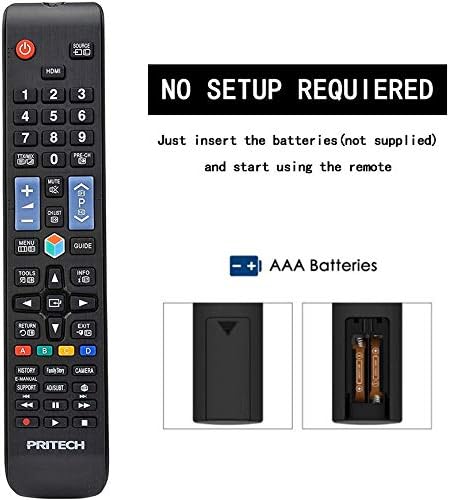
Image: A diagram illustrating the "NO SETUP REQUIRED" feature and the location for AAA battery insertion in the remote control.
- Cabut panutup batré: Gently slide down the battery cover located on the back of the remote control.
- Selapkeun Batré: Insert two AAA batteries, ensuring the positive (+) and negative (-) ends align with the markings inside the battery compartment.
- Ganti panutup batré: Geser panutup batré deui kana tempatna nepi ka ngaklik aman.

Image: A four-panel visual guide demonstrating the steps for battery installation: 1. Removing the battery cover, 2. Distinguishing positive and negative electrodes, 3. Snapping batteries into place, and 4. Ready to control your TV.
2. Pamakéan awal
Once batteries are installed, the remote is ready to operate your LG compatible television. No programming or code entry is typically required.
Parentah Operasi
This universal remote control provides all the essential functions of your original LG TV remote. Familiarize yourself with the button layout for optimal use.

Gambar: hareup jelas view of the Pritech Universal Remote Control, showing all buttons and their labels, including power, input, channel, volume, navigation, and smart TV functions.
Fungsi umum:
- Tombol Daya (●): Ngahurungkeun atawa mareuman TV.
- Input/Sumber: Switches between different video inputs (HDMI, AV, etc.).
- Saluran luhur/handap (▲/▼): Robah saluran TV.
- Volume Kaluhur/Turun (+/-): Nyaluyukeun polumeu sora.
- Jempé: Ngajempékeun audio TV.
- Tombol Jumlah (0-9): Langsung asupkeun nomer saluran.
- Pad Navigasi (Kaluhur, Turun, Kénca, Katuhu, OK): Dipaké pikeun nganapigasi ménu jeung mastikeun selections.
- Tombol imah: Ngaksés hub pinter utama atanapi layar utama TV.
- Balik / Kaluar: Mulih ka layar saméméhna atawa kaluar hiji ménu.
- Smart/My Apps: Direct access to smart TV features and installed applications.
For specific functions related to your LG TV model, refer to your television's user manual in conjunction with this remote control.
Pangropéa sareng Perawatan
To ensure the longevity and optimal performance of your Pritech Universal Remote Control, follow these maintenance guidelines:
- beberesih: Use a soft, dry cloth to clean the remote. For stubborn dirt, slightly dampen the cloth with water or a mild cleaning solution. Avoid abrasive cleaners or solvents.
- Ngagantian batré: Ganti batréna nalika réspon remot janten laun atanapi eureun jalan. Salawasna ganti kadua batréna dina waktos anu sami.
- Panyimpenan: Nyimpen remote di tempat anu tiis sareng garing jauh tina sinar panonpoé langsung sareng suhu anu ekstrim.
- Hindarkeun tetes: While designed to be durable, avoid dropping the remote, as this can damage internal components.
- Paparan Cairan: Keep the remote away from liquids. If it gets wet, remove batteries immediately and allow it to dry completely before reinserting them.
Pamérésan masalah
If you encounter issues with your Pritech Universal Remote Control, try the following troubleshooting steps:
| Masalah | Mungkin Cukang lantaranana | Solusi |
|---|---|---|
| Jauh teu ngabales. | Batré paéh atanapi teu leres diselapkeun. Halangan antara remote jeung TV. Jauh di luar jangkauan. | Check battery polarity and replace batteries if necessary. Ensure a clear line of sight to the TV's IR receiver. Move closer to the TV (within 10 meters). |
| Some buttons not working. | Dirt or debris under buttons. Internal malfunction. | Bersihkeun permukaan anu dipasang ti jarak jauh. Upami masalahna terus-terusan, hubungi dukungan palanggan. |
| Jauh dianggo intermittently. | Daya batre lemah. gangguan. | Replace batteries. Remove any potential sources of infrared interference. |
| Remote does not control TV. | Not compatible with TV model (despite being universal). | While designed for broad compatibility, some specific TV models might not be fully supported. Verify compatibility or contact Pritech support. |
spésifikasi
| Fitur | Rincian |
|---|---|
| merek | PRITECH |
| Modél | Universal Remote Control (Compatible with LG) |
| Warna | Black (Compatible with LG design) |
| Téhnologi konektipitas | Infrabeureum |
| Alat nu cocog | Television (specifically designed for LG compatibility) |
| Rentang maksimum | 10 méter |
| Bahan | Plastik ABS |
| Sumber Daya | 2 x Batré AAA (teu kalebet) |
| ASIN | B07SRPZYWC |
| Produsén | Pritech |
Garansi sareng Rojongan
Pritech offers a garansi 2 taun on this universal remote control. This warranty covers manufacturing defects and ensures the product functions as described.
For warranty claims, technical support, or further assistance, please contact Pritech customer service through their official websitus atanapi pangecér tempat produk éta dipésér. Simpen bukti pameseran anjeun pikeun validasi garansi.
Catetan: Garansi ieu henteu ngawengku karusakan anu disababkeun ku salah panggunaan, kacilakaan, modifikasi anu henteu sah, atanapi panggunaan normal.


