Bubuka
The Enbrighten 46200 Add-On Switch is designed to expand control capabilities when paired with an existing Enbrighten in-wall smart switch or dimmer. This device enables multi-location control for lighting or other fixtures, allowing operation from up to five different points. It is not a standalone switch and requires connection to a compatible Enbrighten smart control (Z-Wave or Zigbee) to function.
Fitur produk
- Kontrol Multi-Lokasi: Designed to work with Enbrighten smart switches or dimmers for controlling lights or devices from multiple locations (e.g., 3-way, 4-way setups).
- QuickFit Design: Features a 20% smaller housing compared to previous models, facilitating easier installation in crowded electrical boxes. No break-off tabs are required.
- SimpleWire Technology: Includes dual ground ports, offset to avoid mounting screws, which simplifies daisy-chaining in multi-switch installations.
- Kasaluyuan lega: Compatible with any Enbrighten in-wall Z-Wave or Zigbee smart switch, dimmer, or fan control.
- Aplikasi serbaguna: Supports both 120VAC and 277VAC systems, suitable for residential and light-commercial use when paired with a compatible 277VAC smart device (e.g., model 43074).
- Wiring Gampang: Requires only neutral, traveler, and ground wires for installation. A neutral wire is mandatory.
- Kasaluyuan beban: Works with LED, CFL, incandescent, and halogen bulbs, as well as other fixtures, based on the functionality of the primary smart device.
Émbaran Kasalametan penting
PERHATOSAN: RISIKO KEUNGGULAN LISTRIK.
- Always turn OFF power at the circuit breaker or fuse box before installation.
- Alat ieu dimaksudkeun pikeun pamasangan saluyu sareng Kode Listrik Nasional sareng peraturan lokal.
- A neutral wire is REQUIRED for installation. If a neutral wire is not present, consult a qualified electrician.
- This add-on switch is NOT a standalone device and must be paired with a compatible Enbrighten smart switch or dimmer.
- Pastikeun sadaya sambungan kabel aman sareng insulated leres.
- Do not exceed the maximum electrical ratings of the primary smart device.
Instalasi jeung Setup
This section provides instructions for installing your Enbrighten 46200 Add-On Switch. Professional installation by a qualified electrician is recommended if you are unfamiliar with electrical wiring.
1. Persiapan
- Pareuman Daya: Locate the circuit breaker or fuse that supplies power to the switch box where you will install the add-on switch. Turn off the power. Verify power is off using a voltage panguji.
- Hapus saklar anu aya: Carefully remove the wall plate and the existing switch from the wall box.
- Identipikasi Kawat: You will need to identify the following wires:
- Kawat nétral: Typically white. This is REQUIRED.
- Kawat Wisatawan: Connects to the primary smart switch.
- Kawat taneuh: Typically green or bare copper.
2. Wiring the Add-On Switch
The Enbrighten 46200 Add-On Switch features SimpleWire technology for simplified wiring. Connect the wires as follows:
- Nyambungkeun Kawat nétral from the wall box to the terminal labeled 'Neutral' on the add-on switch.
- Nyambungkeun Traveler wire from the wall box to the terminal labeled 'Traveler' on the add-on switch.
- Nyambungkeun Kawat taneuh from the wall box to one of the 'Ground' terminals on the add-on switch. The dual ground ports allow for easy daisy-chaining if multiple switches are in the same box.
Note: This add-on switch does not connect directly to the line (hot) or load wires. These connections are made at the primary smart switch.
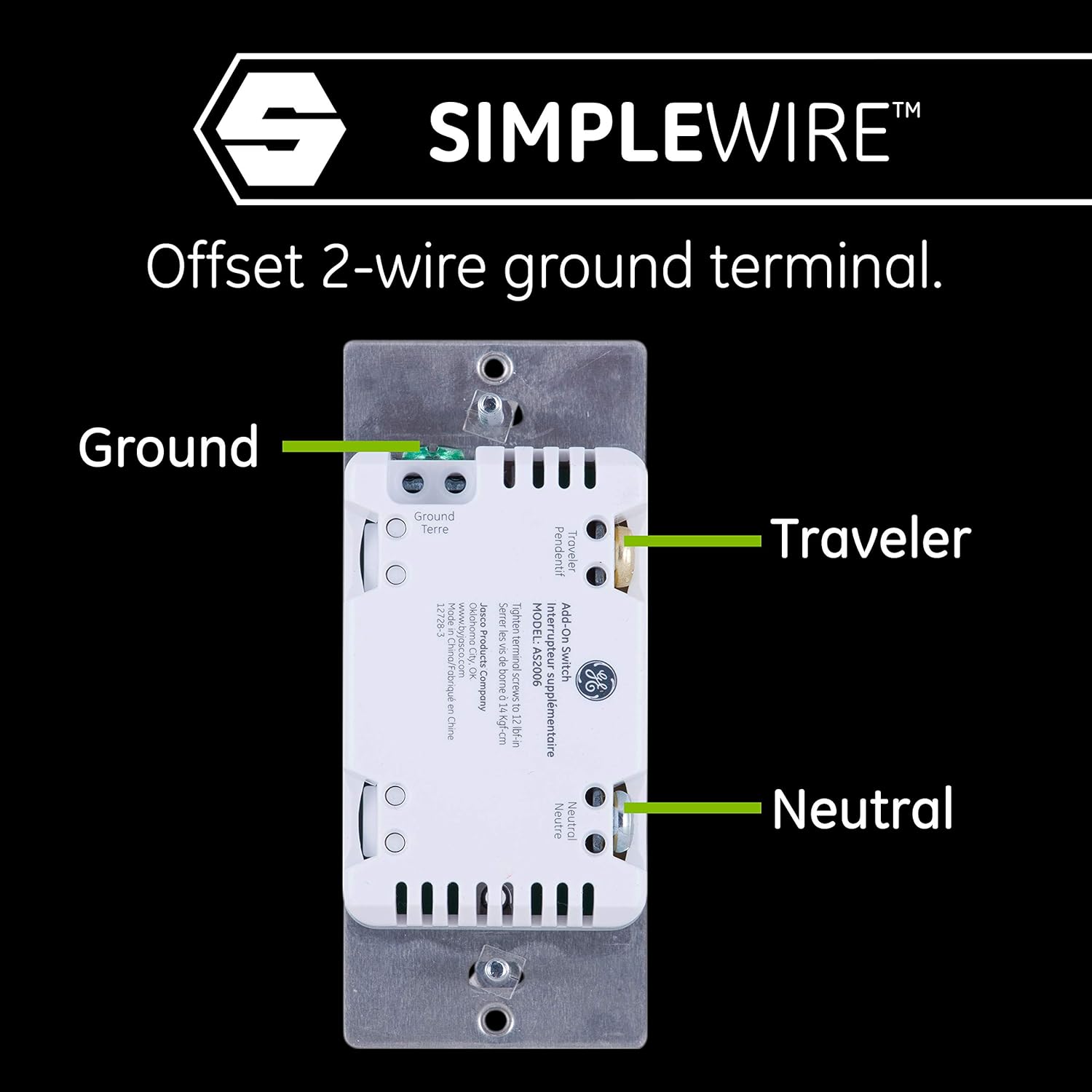
Image: SimpleWire connections for Ground, Traveler, and Neutral wires on the Enbrighten Add-On Switch.
3. Pemasangan sareng Finishing
- Carefully insert the wired add-on switch into the wall box. The QuickFit design with its smaller housing and absence of break-off tabs makes this easier.
- Pasangkeun saklar kana kotak témbok nganggo sekrup anu disayogikeun.
- Attach the wall plate (not included) over the switch.
- Mulangkeun Daya: Hurungkeun kakuatan deui ON di circuit breaker atawa kotak sekering.
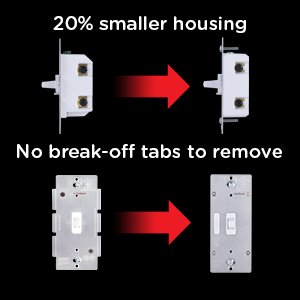
Image: Illustration of the QuickFit design, highlighting the 20% smaller housing for easier installation.
4. Pairing with Primary Smart Control
The add-on switch will automatically function once correctly wired to a compatible Enbrighten Z-Wave or Zigbee smart switch/dimmer. The primary smart control handles the network pairing process. Refer to the instruction manual of your primary Enbrighten smart control for specific pairing instructions (e.g., SmartStart, inclusion/exclusion modes).

Image: Enbrighten Add-On Switch compatible with both Z-Wave and Zigbee smart dimmers.
Operasi
Once installed and connected to a primary Enbrighten smart control, the 46200 Add-On Switch will mirror the functionality of the primary device. This means:
- If the primary device is a smart dimmer, the add-on switch will allow you to turn lights ON/OFF and adjust brightness levels.
- If the primary device is a smart switch, the add-on switch will allow you to turn lights ON/OFF.
- If the primary device is a smart fan control, the add-on switch will allow you to turn the fan ON/OFF and adjust fan speeds.
The add-on switch provides physical control at the secondary location, while the primary smart control handles all smart home automation features, including app control, voice commands (via Alexa, Google Assistant), and scheduling.

Image: The add-on switch supports various loads including LED, CFL, halogen, incandescent bulbs, fans, and pumps, depending on the primary smart device.
Pangropéa
The Enbrighten 46200 Add-On Switch requires minimal maintenance.
- beberesih: To clean the switch, gently wipe it with a soft, damp lawon. Ulah make bahan kimia kasar atawa cleaners abrasive.
- Pamariksaan: Periodically check the switch and wall plate for any signs of damage or loose connections. If any issues are found, turn off power at the circuit breaker and consult a qualified electrician.
Pamérésan masalah
If you experience issues with your Enbrighten 46200 Add-On Switch, consider the following:
- Switch Teu Ngabales:
- Pastikeun daya dina pemutus sirkuit hurung.
- Verify all wiring connections (neutral, traveler, ground) are secure and correct.
- Confirm the add-on switch is properly connected to a compatible Enbrighten smart switch or dimmer. This add-on switch is not a standalone device.
- Check the primary smart control for proper operation and network connectivity.
- Lights Flicker or Don't Dim (if primary is a dimmer):
- This issue is typically related to the primary smart dimmer. Refer to the primary dimmer's manual for instructions on adjusting minimum/maximum brightness thresholds for LED bulbs.
- Add-On Switch Does Not Control Smart Features:
- The add-on switch provides physical control only. All smart features (app control, voice control, scheduling) are managed through the primary smart control and its connected hub/network.
spésifikasi
| Fitur | Spésifikasi |
|---|---|
| Nomer modél | 46200 |
| Modeu Operasi | ON-OFF-ON |
| Peunteun ayeuna | 15 Amps |
| Operasi Voltage | 120 Volts (AC), 277 Volts (AC) |
| Tipe Kontak | Biasana Buka |
| Tipe Panyambung | Clamp |
| Terminal | SPDT |
| Ukuran barang (L x W x H) | 1.13 x 1.75 x 4.13 inci (28.7 x 44.5 x 104.9 mm) |
| Jinis Sirkuit | 3-jalan |
| Tipe Aktuator | Pencét Tombol |
| Bahan Kontak | logam |
| Peunteun Protection Internasional | IP54 |
| Peunteun Suhu Handap | 32 darajat Fahrenheit (0 darajat Celsius) |
| Peunteun Suhu luhur | 104 darajat Fahrenheit (40 darajat Celsius) |
| Controller Type Compatibility | Amazon Alexa, Google Assistant, SmartThings, Vera (via primary smart control) |
| Protokol konektipitas | Z-Wave, ZigBee (via primary smart control) |
| Warna | Bodas |
| Sumber Daya | Hardwire |
| Garansi | 2-taun jaminan kawates |

Image: Detailed dimensions of the Enbrighten 46200 Add-On Switch.
Video Produk Resmi
Video: This video from Jasco Products Company demonstrates key features of Enbrighten Z-Wave Plus Smart Dimmers and Switches, including space-saving design, auto line/load detection, dual ground, S2 security, SmartStart pairing, programmable brightness thresholds, multifunctional design, central scene capabilities, and alternate exclusion mode. These features are relevant as the add-on switch integrates with these primary smart controls.
Garansi sareng Rojongan
The Enbrighten 46200 Add-On Switch comes with a 2-taun jaminan kawates. For warranty claims or technical support, please contact Enbrighten customer service. Keep your proof of purchase for warranty validation.
For additional resources, troubleshooting guides, or to register your product, visit the official Enbrighten websitus atanapi ngahubungan tim rojongan maranéhanana.


