1. Bubuka
The LAUNCH CRP123E V2.0 is an advanced automotive diagnostic tool designed to assist in identifying and resolving issues across various vehicle systems. This device offers comprehensive diagnostic capabilities for the Engine, Anti-lock Braking System (ABS), Supplemental Restraint System (SRS), and Transmission. It also includes seven essential reset functions and full OBD2 functionality, making it a versatile tool for both professional technicians and DIY enthusiasts.
2. Fitur konci
- 4-Diagnostik Sistem: Comprehensive scanning for Engine, ABS, SRS, and Transmission systems.
- 7 Fungsi Reset: Includes Oil Reset, Steering Angle Sensor (SAS) Reset, Electronic Parking Brake (EPB) Reset, Diesel Particulate Filter (DPF) Regeneration, ABS Bleeding, Battery Matching, and Throttle Adaptation.
- Fungsi OBD2 lengkep: Supports all 10 OBD2 test modes for complete vehicle diagnostics, including reading/clearing codes, live data stream, I/M readiness, O2 sensor test, EVAP test, and more.
- Téhnologi AutoVIN: Otomatis ngaidentipikasi inpormasi kandaraan pikeun diagnostik anu gancang sareng akurat.
- Free Lifetime WiFi Updates: Ensures the software is always up-to-date with the latest vehicle models and diagnostic functions.
- Antarmuka anu ramah-pamaké: Features a 5-inch touchscreen display and Android 8.1 operating system for intuitive navigation.
- Batré Voltage Monitoring: Helps assess the vehicle's battery health.
- Cakupan Kandaraan éksténsif: Supports over 60 car brands and 100,000 car models, covering vehicles from 1996 to 2025 (and continuously growing).
- Diagnostic Report Generation: Ability to record, replay, and print diagnostic reports for analysis and sharing.
- DTC Help & Google Code Search: Provides detailed explanations for diagnostic trouble codes and allows for online lookup.

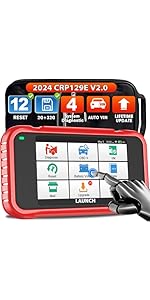
Gambar: Leuwihview of the LAUNCH CRP123E V2.0's 4-system diagnostic capabilities (Engine, ABS, SRS, Transmission) and 7 key reset functions (BMS Reset, EPB Reset, DPF Reset, ABS Bleeding, Oil Reset, SAS Reset, Throttle Adaptation).
Gambar: Detil view of the 7 hot reset services available on the LAUNCH CRP123E V2.0, including Brake Reset, DPF Reset, ABS Bleeding, Battery Matching, Oil Reset, Steering Angle Reset, and Electric Throttle Relearn.
3. Eusi Paket
Saatos muka bungkusan, mangga pariksa yén sadaya item di handap ieu kalebet:
- LAUNCH CRP123E V2.0 Diagnostic Tool
- Main Diagnostic Cable (OBD2 connector)
- Type-C USB Cable (for charging and data transfer)
- Kantong Bag
- Manual pangguna (dokumén ieu)
- Gancang Mimitian Guide
- Bungkusan Kotak Warna

Image: The LAUNCH CRP123E V2.0 diagnostic scanner and its included accessories: main cable, Type-C cable, carry bag, user manual, quick start guide, and color box.
4. Setélan
- Ngeusi batre alat: Before first use, fully charge the CRP123E V2.0 using the provided Type-C USB cable and a compatible USB power adapter (not included). The device has a 6100mAh battery.
- Daya Hurung: Pencét jeung tahan tombol daya pikeun ngahurungkeun alat.
- Setup Awal: Follow the on-screen prompts to select your language, time zone, and connect to a Wi-Fi network. A stable Wi-Fi connection is essential for software updates.
- Ngadaptar sareng Update:
- Register your device online through the "Upgrade" or "Settings" menu to activate lifetime free updates.
- Navigate to the "Upgrade" section and download all available software updates for your vehicle makes. This ensures you have the latest diagnostic capabilities and vehicle coverage.
- Nyambung ka Kendaraan: Locate your vehicle's OBD2 port (usually under the dashboard on the driver's side). Connect the main diagnostic cable to the CRP123E V2.0 and then to the vehicle's OBD2 port. Turn the vehicle's ignition to the "ON" position (engine off).
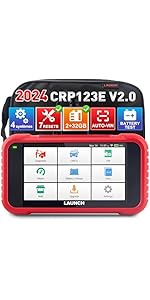
Image: The main interface of the LAUNCH CRP123E V2.0, displaying icons for various functions such as Diagnose, OBD II, I/M Readiness, Reset, Battery Voltage, Data, Mall, Upgrade, and Settings. This screen is accessed after initial setup.
5. Parentah Operasi
5.1. System Diagnostics (Engine, ABS, SRS, Transmission)
- Tina ménu utama, pilih "Diagnosis".
- The device will attempt to automatically identify the vehicle via AutoVIN. If successful, confirm the vehicle information. If not, manually select the vehicle make, model, and year.
- Choose the system you wish to diagnose (e.g., Engine, ABS, SRS, or Transmission).
- Select "Read Fault Codes" to retrieve Diagnostic Trouble Codes (DTCs). The device will display the codes and their descriptions.
- Select "Clear Fault Codes" to erase the codes after repairs have been made. Catetan: Clearing codes without addressing the underlying issue will result in the codes reappearing.
- View "Live Data Stream" to monitor real-time parameters from the selected system. This data can be displayed in text or graphical format.

Image: Smart diagnostic features of the CRP123E V2.0, including online feedback, one-click WiFi update, battery test, health report printing, AutoVIN recognition, and DTC help with Google search integration.
5.2. Fungsi OBD2
The CRP123E V2.0 provides full OBD2 functionality for all OBD2 compliant vehicles (1996 and newer). From the main menu, select "OBD II" to access these functions:
- Baca Konci: Nampilkeun Kode Masalah Diagnostik (DTC) anu ayeuna, ngantosan, sareng permanén.
- Hapus Kodeu: Erases DTCs from the vehicle's computer.
- Aliran Data Langsung: Némbongkeun data sacara real-time tina sababaraha sénsor dina format téks atanapi grafik.
- Kesiapan I / M: Mariksa kesiapan monitor anu aya patalina jeung émisi.
- View Frame Frame: Némbongkeun gambaran kaayaan operasi kandaraan nalika aya gangguan anu aya patalina jeung émisi.
- Tés Sénsor O2: Retrieves O2 hasil tés ngawas sensor.
- Tes Monitor On-Board: Retrieves hasil pikeun komponén powertrain patali émisi jeung sistem.
- Uji Sistem EVAP: Initiates a test of the Evaporative Emission System.
- Émbaran Kandaraan: Meunangkeun nomer idéntifikasi kendaraan (VIN), ID kalibrasi (CALID), sareng nomer verifikasi kalibrasi (CVN).

Image: The LAUNCH CRP123E V2.0 showcasing its full OBD2 functions, including Read Codes, Clear Codes, Live Data Stream, DTCs Help, EVAP Test, O2 Sensor Test, I/M Readiness, Freeze Frame, On Board Monitoring, and support for over 60 car brands and 11 languages.

Image: Professional functions of the CRP123E V2.0, illustrating 4-in-1 live data graphing, diagnostic record keeping, real-time battery voltage display, and the ability to launch diagnostic feedback.
5.3. Reset Functions
From the main menu, select "Reset" to access the special service functions. The availability of specific reset functions may vary by vehicle make and model.
- Reset minyak: Ngareset sistem hirup oli saatos ganti oli.
- Sénsor Sudut Setir (SAS) Reset: Performs calibration for the Steering Angle Sensor.
- Reset Parkir Éléktronik (EPB): Nganonaktipkeun sareng ngaktipkeun deui sistem kontrol rem, ngabantosan kontrol cairan rem, muka sareng nutup kampas rem, sareng nyetel rem saatos ngaganti cakram atanapi kampas.
- Regenerasi Filter Partikulat Diesel (DPF): Manages DPF regeneration, DPF component replacement teach-in, and DPF after-treatment.
- Perdarahan ABS: Ngalakukeun rupa-rupa tés dua arah pikeun mariksa kaayaan operasi Sistem Rem Anti-konci.
- Cocog batré: Allows the scan tool to evaluate the battery charge state, monitor the close-circuit current, register the battery replacement, and activate the rest state of the vehicle.
- Adaptasi throttle: Initializes the throttle actuators to the default state for regulating throttle (or idle engine) operations accurately.
6. Pangropéa
- Apdet parangkat lunak: Regularly connect the device to Wi-Fi and check for updates in the "Upgrade" section. Lifetime free updates ensure optimal performance and expanded vehicle coverage.
- beberesih: Ngagunakeun lemes, damp lawon pikeun ngabersihkeun alat. Hindarkeun pembersih atanapi pangleyur anu abrasif.
- Panyimpenan: Store the CRP123E V2.0 in its protective carry bag in a dry, cool environment when not in use.
- Perawatan batré: Pikeun manjangkeun umur batré, ulah sering ngosongkeun batré alat sacara total. Cas alat sacara rutin, khususna upami disimpen kanggo waktos anu lami.

Image: The "One-Key Free Update" feature of the LAUNCH CRP123E V2.0, demonstrating how to update the device, read ECU memory, view diagnostic records, and monitor real-time battery voltage.
7. Cara ngungkulan
| Masalah | Mungkin Cukang lantaranana | Solusi |
|---|---|---|
| Alat teu hurung. | Low battery; faulty power button; internal issue. | Charge the device for at least 30 minutes. If still unresponsive, contact technical support. |
| Teu tiasa nyambung ka kendaraan. | Loose OBD2 connection; vehicle ignition off; incompatible vehicle; faulty OBD2 port. | Ensure the OBD2 cable is securely connected. Turn vehicle ignition to "ON". Verify vehicle compatibility. Try connecting to another vehicle if possible. |
| Fungsi diagnostik teu jalan. | Outdated software; incorrect vehicle selection; communication error. | Perform a software update. Ensure correct vehicle information is entered. Reconnect the OBD2 cable. |
| Masalah sambungan Wi-Fi. | Sandi salah; sinyal lemah; masalah router. | Verify Wi-Fi password. Move closer to the router. Restart the router. |
| Device is slow or freezes. | Loba teuing aplikasi ngajalankeun; gudang low; glitch software. | Restart the device. Ensure sufficient storage space. Perform a software update. |
8. Spésifikasi
| Fitur | Rincian |
|---|---|
| merek | ngaluncurkeun |
| Modél | CRP123E V2.0 |
| Sistem operasi | Android 8.1 |
| Ukuran layar | Layar sentuh 5 inci |
| Panyimpenan internal | 32GB (implied from feature bullets) |
| Kapasitas batré | 6100 mah |
| Konektipitas | Wi-Fi, OBD2 Cable (Type-C USB for charging/data) |
| Ukuran produk (L x W x H) | 17 x 7 x 25 cm |
| Item Beurat | 1 Kilogram |
| Protokol anu dirojong | OBDII/EOBD (all 10 modes) |
| Panutup Kandaraan | 60+ car brands, 1996-2025+ models |
| UPC | 724190789872 |
9. Garansi jeung Rojongan
The LAUNCH CRP123E V2.0 comes with a garansi lima taun, as stated in the product features. Additionally, LAUNCH offers:
- Apdet Parangkat Lunak Gratis Saumur Hirup: Ensure your device always has the latest features and vehicle compatibility.
- Technical Feedback Function: Utilize the built-in "Feedback" function to send diagnostic reports and receive professional guidance from LAUNCH engineers.
- Dukungan Online: For further assistance, refer to the contact information provided with your product or visit the official LAUNCH websitus.
For specific inquiries regarding vehicle compatibility or service functions, it is recommended to contact LAUNCH support directly.