
Lepro PR901503-RGB-EU
Lepro Smart LED Ceiling Light User Manual
Model: PR901503-RGB-EU
Bubuka
This user manual provides detailed instructions for the installation, operation, and maintenance of your Lepro Smart LED Ceiling Light. This smart light offers versatile lighting options, including 16 million colors and tunable white light, controllable via a smartphone app or voice commands through Amazon Alexa and Google Assistant. Please read this manual thoroughly before installation and use to ensure proper functionality and safety.

Image: The Lepro Smart LED Ceiling Light, shown with compatible smart home devices like Amazon Alexa and Google Home speakers, and a smartphone displaying the control app interface. The background features a gradient of colors, highlighting the light's RGB capabilities.
Émbaran Kasalametan
- Ensure the power supply is turned off at the main circuit breaker before installation or maintenance.
- Pamasangan kedah dilakukeun ku tukang listrik anu mumpuni upami anjeun henteu yakin.
- Do not attempt to disassemble or modify the light fixture.
- This product is designed for indoor use and is IP54 rated for protection against splashing water, making it suitable for bathrooms (zones 1, 2 & 3).
- Operate the light within the specified voltagrentang e (240 Volt).
Naon dina Box
Pariksa yén sadaya komponén aya sateuacan ngamimitian pamasangan:
- 1 x Lepro Smart LED Ceiling Light
- Screws
- Tukang Tembok
- Pads anti Geter
- 1 x Manual Pamaké (dokumén ieu)
Disetél
1. Pamariksaan Pra-instalasi
- Confirm that your home Wi-Fi network operates on the 2.4GHz frequency. This device is not compatible with 5GHz Wi-Fi.
- Ensure the installation location is suitable and the power supply can be safely disconnected.

Image: A visual representation indicating that the smart light connects to a smartphone via a 2.4GHz Wi-Fi network only.
2. Instalasi fisik
Follow these steps to physically install the ceiling light:
- Pareuman Daya: Before starting, ensure the main power switch to the circuit is OFF.
- Leupaskeun kurung: Gently remove the mounting bracket from the light fixture.
- Fix Bracket: Secure the mounting bracket to the ceiling using the provided screws and wall plugs. Ensure it is firmly attached.
- Sambungkeun kawat: Connect the electrical wires from your ceiling to the "N" (Neutral) and "L" (Live) terminals on the light fixture. Ensure connections are secure.
- Pasang Lampu: Align the light fixture with the mounted bracket and push it firmly until it clicks into place.

Image: Step-by-step diagram illustrating the physical installation process of the ceiling light, including fixing the bracket to the ceiling, inserting electrical wires into the N and L terminals, and attaching the lamp kana bracket ningkatna.
3. App Ngundeur tur Sambungan
To control your smart light, download the "Smart Life" app and follow the pairing process:
- Unduh App: Milarian pikeun and download the "Smart Life" app from your smartphone's app store (Google Play Store for Android or Apple App Store for iOS).
- Power Cycle Light: Turn the light switch ON and OFF three times consecutively. The light should begin to blink rapidly, indicating it is in pairing mode.
- Tambahkeun Alat: Open the Smart Life app, register or log in, and tap "Add Device" or the "+" icon. Select "Lighting" and then "Ceiling Light (Wi-Fi)".
- Nyambung ka Wi-Fi: Enter your 2.4GHz Wi-Fi network password when prompted. Ensure your phone is also connected to the 2.4GHz network.
- papasangan: The app will search for and connect to the light. Once connected, you can rename the device and begin controlling it.
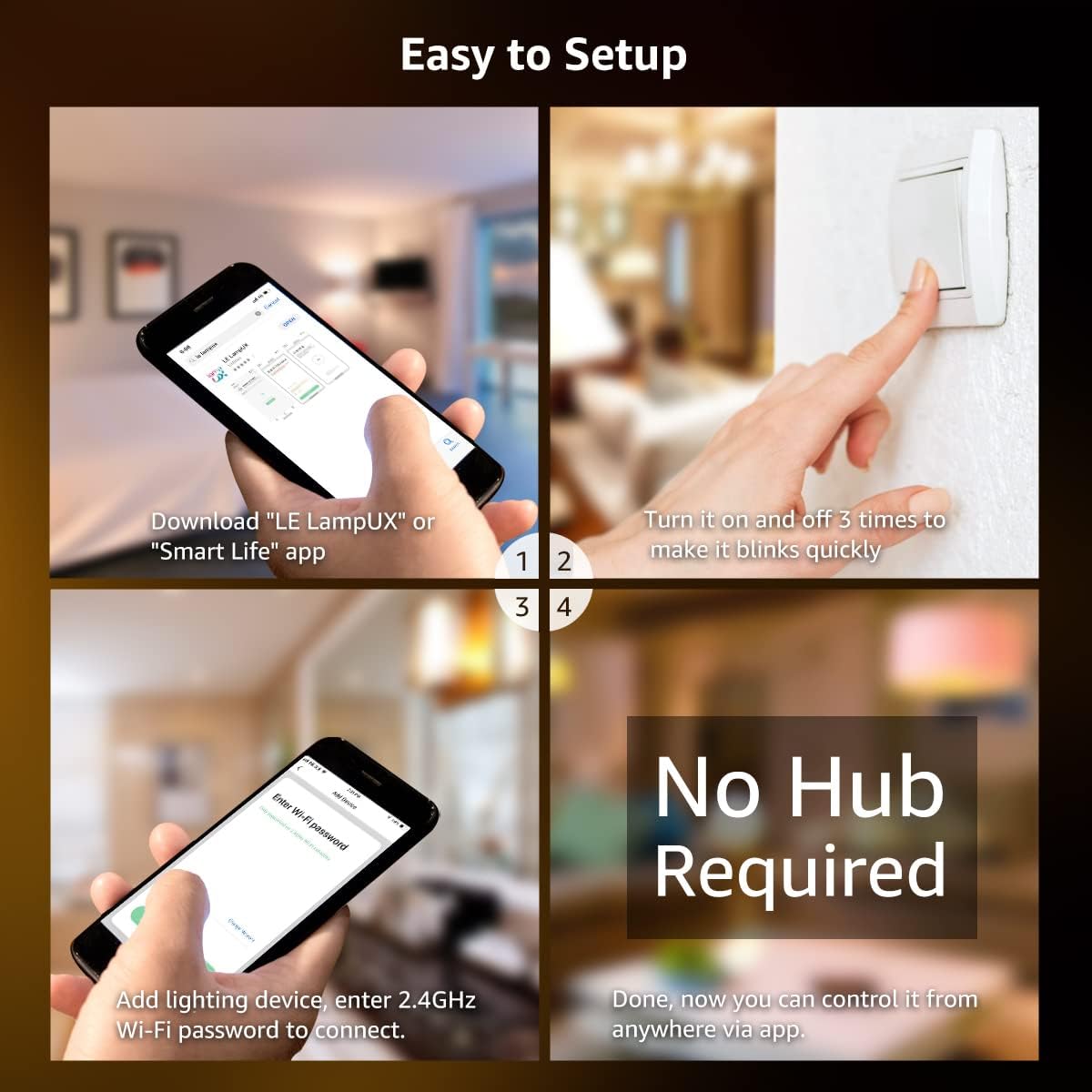
Image: A four-panel graphic detailing the easy setup process: downloading the "Smart Life" app, power cycling the light three times to enter pairing mode, adding the lighting device in the app, and entering the 2.4GHz Wi-Fi password to connect. No hub is required for operation.
Parentah Operasi
1. App Control
The "Smart Life" app provides full control over your Lepro Smart LED Ceiling Light:
- Pilihan Warna: Choose from over 16 million colors to create various ambiances.
- Bodas Tunable: Adjust the white light temperature from warm white (2700K) to cool white (6500K).
- Caang dimming: Seamlessly dim the light from 1% to 100% brightness.
- Jadwal: Set custom schedules for the light to turn on or off automatically at specific times.
- Modeu Pamandangan: Utilize pre-set scene modes for different occasions (e.g., Party, Reading, Relax).

Image: A smartphone screen showing the "Smart Life" app interface with a color wheel, brightness slider, and saturation slider, demonstrating the ability to select from 16 million colors for the ceiling light.

Image: A visual comparison demonstrating the tunable white feature, showing the same room illuminated with warm white (2700K), daylight white (4000K), and cool white (6500K) light temperatures.

Image: A visual representation of the brightness dimming capability, showing the light intensity adjustable from 1% to 100%.

Image: A composite image demonstrating remote control of the light from anywhere using the app, and the ability to set schedules for automatic turn-on (e.g., 9:00 AM) and turn-off (e.g., 9:00 PM).
2. Kontrol sora
Integrate your Lepro Smart LED Ceiling Light with Amazon Alexa or Google Assistant for convenient voice control:
- Linking Accounts: Follow the instructions in the Smart Life app to link your account with Amazon Alexa or Google Home.
- Paréntah sora: Sakali dikaitkeun, anjeun tiasa nganggo paréntah sapertos:
- "Alexa, turn on the ceiling light."
- "Hey Google, set the ceiling light to warm white."
- "Alexa, dim the ceiling light to 50%."
- "Hey Google, change the ceiling light to blue."

Image: A person relaxing in a bathtub, demonstrating voice control by saying, "Alexa, set ceiling light to warm white," with smart speakers (Amazon Echo and Google Home) visible, indicating compatibility.
Pangropéa
To ensure the longevity and optimal performance of your Lepro Smart LED Ceiling Light, follow these simple maintenance guidelines:
- beberesih:
- Ensure the light is turned off and cooled down before cleaning.
- Ngusap beungeut ku lemes, garing, atawa rada damp lawon.
- Ulah make cleaners abrasive, pangleyur, atawa bahan kimia kasar, sabab ieu bisa ngaruksak finish.
- Pamariksaan: Periodically check the light fixture for any signs of damage or loose connections. If any issues are found, consult a qualified electrician.
- Tahan cai: While IP54 rated for splashing water, avoid direct water jets or submerging the fixture.

Gambar: A close-up view of the light fixture's edge with water droplets, illustrating its IP54 water-resistant design, suitable for environments where splashing water may occur.
Pamérésan masalah
If you encounter issues with your Lepro Smart LED Ceiling Light, refer to the following common problems and solutions:
| Masalah | Mungkin Cukang lantaranana | Solusi |
|---|---|---|
| Lampu henteu hurung. | Taya catu daya; kabel leupas; switch lepat. | Check circuit breaker. Ensure wires are securely connected. Test the light switch. |
| Light is not blinking for pairing. | Incorrect power cycle sequence. | Ensure you turn the light ON and OFF three times consecutively, waiting a few seconds between each cycle. |
| Teu bisa nyambung ka Wi-Fi. | Incorrect Wi-Fi frequency (5GHz); weak signal; wrong password. | Ensure your router is broadcasting a 2.4GHz signal and your phone is connected to it. Move closer to the router. Double-check Wi-Fi password. |
| Kontrol sora teu jalan. | Account not linked; incorrect device name; internet connectivity issues. | Verify that your Smart Life account is correctly linked to Alexa/Google Home. Use the exact device name configured in the app. Check your internet connection. |
| Lampu kedip-kedip atanapi redup teu disangka-sangka. | Unstable power supply; Wi-Fi interference. | Check household electrical system. Reduce Wi-Fi interference by moving other devices or adjusting router channels. |
spésifikasi
| Fitur | Rincian |
|---|---|
| merek | Lepro |
| Nomer modél | PR901503-RGB-EU |
| Dimensi produk | 8.66 x 8.66 x 2.56 cm; 580 g (Diameter: 22 cm, Height: 4.8 cm) |
| Klasifikasi Cahaya Wewengkon | IP54 (Tahan Cai) |
| Voltage | 240 volt |
| Jenis Bohlam | LED |
| Fluks Luminous | 1250 Lumén |
| Wattage | 15 Watt (Sarua jeung Lampu Pijar 100 Watt) |
| Suhu Warna | 2700K - 6500K (Bodas Ngatur) |
| Indéks Rendering Warna (CRI) | 85 |
| Rata Kahirupan | 15000 Jam |
| Fitur husus | Compatible with Alexa and Google Home, 16 million colors, Dimmable via app or voice, App remote control, Schedule on/off. |
| Konektipitas | 2.4GHz WiFi Ngan |
| Bahan | Plastic, Acrylic (Shade Material) |
| Rengse Tipe | Disikat |
| Arah Cahaya | Lampu handap |
| Gaya Ngalih | Remote (via app/voice) |
| Pindah Tipe Instalasi | Gunung siling |

Image: A diagram illustrating the compact dimensions of the Lepro Smart LED Ceiling Light, showing a diameter of 22 cm and a height of 4.8 cm.

Image: A visual comparison highlighting the energy efficiency of the 15W LED ceiling light, equivalent to a 100W incandescent bulb, demonstrating significant energy savings.
Garansi sareng Rojongan
For warranty information and customer support, please refer to the documentation included with your purchase or visit the official Lepro website. Typically, warranty details and contact information for technical assistance are provided by the manufacturer.
Anjeun oge bisa nganjang ka Lepro Store on Amazon pikeun émbaran leuwih produk jeung sumber rojongan.
Dokumén Patali - PR901503-RGB-EU
 |
Buku Panduan Pangguna sareng Pituduh Persiapan Bohlam LED Lepro Wifi Smart Pituduh lengkep pikeun nyetél sareng nganggo Bohlam LED Smart Wifi Lepro, kalebet pamasangan, sambungan aplikasi, integrasi kontrol sora sareng Alexa sareng Google Assistant, sareng spésifikasi téknis. |
 |
Lepro Smart Lamp Manual Pangguna - Kontrol Aplikasi WiFi, Cocog sareng Alexa & Google Home Buku pituduh pikeun Lepro Smart Lamp (séri PR902102/PR902103). Diajar kumaha nyetél, nyambung ka WiFi, nganggo aplikasi, sareng ngontrol méja LED RGB anu tiasa diredupkeun anjeunamp with Alexa and Google Home. |
 |
Pituduh Pangguna sareng Pitunjuk Persiapan Bohlam LED Lepro Wifi Smart Pituduh lengkep pikeun nyetél sareng nganggo Bohlam LED Smart Wifi Lepro anjeun, kalebet pamasangan, sambungan aplikasi, integrasi kontrol sora sareng Alexa sareng Google Assistant, sareng ngungkulan masalah. |
 |
Buku Panduan Pangguna sareng Pituduh Pamasangan Lampu Sorot LED Pinter Lepro F1/F2 Pituduh lengkep pikeun Lampu Sorot LED Pintar Lepro F1 sareng F2, anu ngawengku pamasangan, sambungan aplikasi, integrasi kontrol sora, inpormasi kaamanan, sareng spésifikasi téknis. |
 |
Pituduh Pangguna sareng Pitunjuk Pamasangan Lampu Langit-langit LED Lepro Pituduh pangguna anu lengkep pikeun Lampu Langit-langit LED Lepro, kalebet pitunjuk pamasangan, tindakan pencegahan kaamanan, spésifikasi modél, sareng daptar bungkusan pikeun modél PR150003, PR150004, sareng PR150005. |
 |
Lepro B1 AI Smart LED Bulb - Setup, Features, and Specifications Comprehensive guide for the Lepro B1 AI Smart LED Bulb, covering setup, voice control integration with Alexa and Google Assistant, troubleshooting, reset instructions, and technical specifications. |
Ask a question about this manual
Ask about setup, troubleshooting, compatibility, parts, safety, or missing instructions. Manuals+ will review the question and use this page’s manual context to help answer it.