1. Bubuka
This manual provides comprehensive instructions for the setup, operation, maintenance, and troubleshooting of your Canyon CNS-SW71SS Smartwatch. Please read this manual carefully before using your device to ensure proper function and longevity.
The Canyon CNS-SW71SS Smartwatch is designed to help you monitor your fitness activities and stay connected. It features a 1.22-inch color screen, multi-sport modes, heart rate monitoring, sleep tracking, and notification alerts. Its IP68 water resistance makes it suitable for various environments.
2. Produk Langkungview
2.1 Fitur konci
- 1.22-inch color touch screen display.
- Multi-sport mode for tracking various activities.
- Daily activity monitoring: calories, steps, heart rate, and sleep.
- Notifications for incoming calls, SMS, emails, calendar events, and social media.
- Music control and remote camera function.
- Smart alarm and weather data display.
- Nepi ka 7 dinten umur batre.
- IP68 water resistance (submersible up to 1 meter for 30 minutes).
- konektipitas Bluetooth 4.0.
- Compatible with iOS and Android operating systems.
- Comes with two interchangeable wristbands: metal and TPU.
2.2 Komponén
The Canyon CNS-SW71SS Smartwatch consists of the main watch unit, interchangeable wristbands, and a charging cable.

Gambar 1: Hareupeun view of the Canyon CNS-SW71SS Smartwatch, showing the display with steps, distance, calories, and heart rate data.

Gambar 2: Angled view of the Canyon CNS-SW71SS Smartwatch, featuring a silver metal mesh strap and a round display.
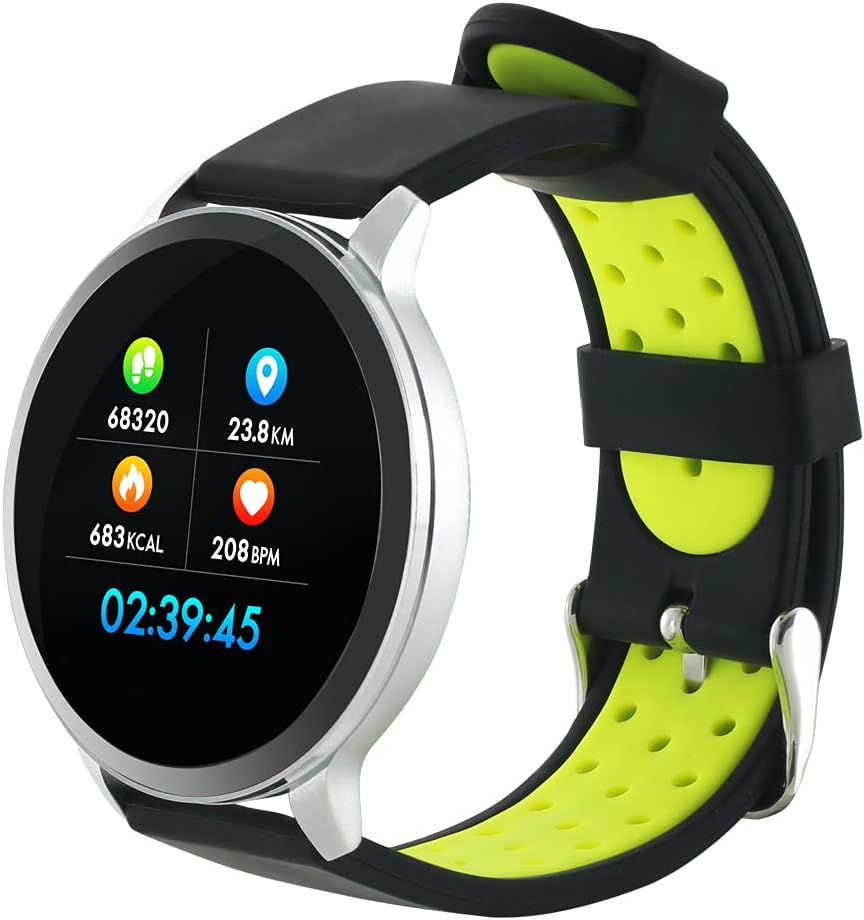
Figure 3: The Canyon CNS-SW71SS Smartwatch shown with an alternative black and lime green TPU strap, highlighting its interchangeable design.

Gambar 4: Tukangeun view of the Canyon CNS-SW71SS Smartwatch, displaying the optical heart rate sensor and magnetic charging contacts.

Figure 5: The retail packaging for the Canyon CNS-SW71SS Smartwatch, illustrating key features and the included two straps.
3. Setélan
3.1 Ngecas Smartwatch
- Sambungkeun kabel ngecas kana adaptor daya USB (teu kaasup) atanapi port USB komputer.
- Align the magnetic charging pins of the cable with the charging contacts on the back of the smartwatch. The watch will vibrate and display a charging icon.
- Allow approximately 2-3 hours for a full charge. A full charge provides up to 7 days of usage.
3.2 Installing the Canyon Fit Application
- Scan the QR code provided in the packaging or search for "Canyon Fit" in your smartphone's app store (Google Play Store for Android, Apple App Store for iOS).
- Unduh sareng pasang aplikasina.
- Open the Canyon Fit app and follow the on-screen instructions to create an account and set up your profile.
3.3 Masangkeun sareng Smartphone Anjeun
- Pastikeun jam tangan pinter anjeun dicas sareng diaktipkeun.
- Aktipkeun Bluetooth dina smartphone Anjeun.
- Open the Canyon Fit application.
- Navigate to the device pairing section within the app (usually found under 'Device' or 'Profile').
- Select your smartwatch (e.g., "CNS-SW71SS") from the list of available devices.
- Confirm the pairing request on both your smartphone and smartwatch if prompted.
3.4 Attaching/Changing Wristbands
The smartwatch comes with two wristbands (metal and TPU) that can be interchanged. To attach or change a wristband, locate the quick-release pins on the underside of the strap. Slide the pin to detach the current strap and then align and slide the pin of the new strap into the corresponding holes on the watch body until it clicks into place.
4. Parentah Operasi
4.1 Napigasi Dasar
- Layar cabak: Swipe left/right to navigate through different functions and menus. Swipe up/down to view bewara atanapi setelan gancang.
- Tombol samping: Press the side button to return to the main watch face or to wake up the screen. A long press may access power options or specific features depending on the context.
4.2 Kabugaran nyukcruk
- Modeu Multi-Olahraga: Access the 'Workout' or 'Sport' menu on your watch. Select your desired activity (e.g., running, cycling, walking) to start tracking. The watch will record duration, distance, calories burned, and heart rate.
- Kagiatan poean: The watch automatically tracks your steps, distance, and calories burned throughout the day. View these statistics on the watch face or in the Canyon Fit app.
- Ngawaskeun Laju haté: The watch continuously monitors your heart rate. You can also manually initiate a heart rate measurement from the heart rate interface.
- Nyukcruk saré: Wear the smartwatch to bed, and it will automatically track your sleep patterns, including deep sleep, light sleep, and wake times. View detailed sleep analysis in the Canyon Fit app.
4.3 Bewara
Once paired with your smartphone and with notification permissions granted in the Canyon Fit app, your smartwatch will display alerts for:
- Telepon asup
- Pesen SMS
- Surélék
- Kajadian almenak
- Social Media Apps (e.g., WhatsApp, Facebook, InstagRam)
Gesek ka luhur dina beungeut arloji ka view recent notifications. You can dismiss notifications from the watch.
4.4 Fungsi tambahan
- Kontrol Musik: While music is playing on your phone, you can use the watch to play/pause, skip tracks, and adjust volume.
- Kaméra jauh: Open the camera function in the Canyon Fit app. Use your smartwatch as a remote shutter button to take photos on your phone.
- Alarm Smart: Set alarms through the Canyon Fit app. The watch will vibrate to wake you up gently.
- Data Cuaca: Once connected to your phone, the watch will display current weather conditions and forecasts for your location.
5. Pangropéa
5.1 beberesih
- Ngusap layar arloji jeung awak ku hipu, damp lawon.
- For the metal strap, use a soft brush to gently clean any debris. For the TPU strap, wash with mild soap and water.
- Pastikeun kontak ngecas beresih jeung garing saméméh ngecas.
- Ulah make bahan kimia kasar atawa bahan abrasive pikeun beberesih.
5.2 Tahan Cai (IP68)
The Canyon CNS-SW71SS Smartwatch is IP68 rated, meaning it is resistant to dust and can be immersed in water up to 1 meter deep for a maximum of 30 minutes. While it can withstand splashes, rain, and brief immersion, it is not recommended for hot showers, saunas, or diving, as steam and high water pressure can compromise the seals.
- Ulah mencet tombol naon wae bari arloji beuleum.
- Tegalan arloji sacara saksama saatos kakeunaan cai.
5.3 Perawatan Batré
- Hindarkeun sering-sering ngeusi batre.
- Ngeusi batre alat rutin, sanajan teu dipake, pikeun ngajaga kaséhatan batré.
- Simpen arloji dina tempat anu tiis sareng garing upami henteu dianggo kanggo waktos anu lami.
6. Cara ngungkulan
- Lalajo teu hurung: Pastikeun arloji dicas pinuh. Sambungkeun ka carjer sahenteuna 30 menit.
- Teu tiasa dipasangkeun sareng smartphone:
- Pastikeun Bluetooth diaktipkeun dina telepon anjeun.
- Ensure the Canyon Fit app has necessary permissions.
- Balikan deui telepon anjeun sareng jam tangan pinter.
- Coba pisahkeun sareng pasangkeun deui alat liwat aplikasi.
- Bewara teu muncul:
- Check notification settings in the Canyon Fit app and your phone's system settings.
- Pastikeun arloji disambungkeun via Bluetooth.
- Inaccurate heart rate/activity data:
- Pastikeun yén arloji dipaké pas dina pigeulang anjeun, henteu ketat teuing atanapi longgar teuing.
- Ngabersihan sénsor dina tonggong arloji.
- Faktor lingkungan atanapi gerakan-gerakan tertentu tiasa mangaruhan akurasi.
- Layar teu ngaréspon: Try restarting the smartwatch by holding down the side button. If unresponsive, allow the battery to fully drain and then recharge.
7. Spésifikasi
| Ngaran modél | SSP-SW71SS |
| merek | CANYON |
| Ukuran tampilan | 1.22 inci |
| Kasaluyuan System Operasi | Android, ios |
| Téhnologi konektipitas | Bluetooth 4.0 |
| Peunteun Résistansi Cai | IP68 |
| Fitur husus | Wireless Charging (implied by product data), Multi-Sport Mode, Heart Rate Monitor, Sleep Tracker, Notifications |
| Alat nu cocog | Smartphone |
| Batré | Rechargeable (1 included) |
| Pilihan Warna | Black, Lime Green, Silver |
8. Garansi jeung Rojongan
For warranty information and technical support, please refer to the documentation included with your purchase or visit the official Canyon website. You can also contact Canyon customer service for assistance with product issues or inquiries.
Dukungan Online: https://canyon.eu/support/ (Kelample link, mangga pariksa halaman dukungan resmi)


