
1. Bubuka
This manual provides essential information for the installation, operation, and maintenance of your EVGA GeForce GTX 1080 Ti FTW3 Gaming graphics card. This high-performance graphics card features 11GB GDDR5X memory, EVGA iCX Technology with 9 thermal sensors, RGB LED lighting, 3X Async Fan Control, and an optimized airflow design for superior thermal performance.

Figure 1.1: EVGA GeForce GTX 1080 Ti FTW3 Gaming Graphics Card
2. Émbaran Kasalametan
Please read and follow these safety guidelines to prevent damage to your product or personal injury:
- Salawasna pegatkeun sambungan kakuatan tina komputer Anjeun sateuacan masang atawa miceun komponén nanaon.
- Ground yourself by touching a metal object (like your computer case) before handling the graphics card to discharge static electricity.
- Nanganan kartu grafik dina sisina pikeun nyegah noel komponén sénsitip.
- Pastikeun ventilasi anu pas dina wadah komputer anjeun pikeun nyegah overheating.
- The card includes a safety fuse designed to protect components from damage due to improper installation or other component failures.
3. Eusi Paket
Pariksa yén pakét anjeun ngandung barang-barang ieu:
- EVGA GeForce GTX 1080 Ti FTW3 Gaming Graphics Card
- Manual pangguna (dokumén ieu)
- Driver & Utility CD/DVD (or download instructions)
4. Pamasangan
4.1. Pra-Pamasangan
- Pareuman komputer anjeun teras cabut kabel daya tina stop kontak.
- Buka wadah komputer anjeun.
- Pilari slot PCI Express x16 anu sayogi dina motherboard anjeun.
- Remove any existing graphics card or the slot cover from the chosen PCIe slot.
4.2. Instalasi Hardware
Carefully insert the graphics card into the PCI Express x16 slot until it is fully seated and the retention clip locks into place. Secure the card to the chassis with a screw.

Gambar 4.1: Hareupeun view of the graphics card for installation reference
Connect the required PCIe power cables from your power supply to the graphics card. The EVGA GeForce GTX 1080 Ti FTW3 Gaming typically requires two 8-pin PCIe power connectors.

Gambar 4.2: Sisi view showing PCIe power connectors

Gambar 4.3: Backplate view of the graphics card
4.3. Pamasangan supir
- Tutupkeun casing komputer anjeun teras sambungkeun deui kabel daya.
- Connect your display monitor to one of the video output ports on the graphics card.
- Daya dina komputer Anjeun.
- Once the operating system loads, install the latest graphics drivers from the official EVGA or NVIDIA websitus (evga.com/drivers or nvidia.com/drivers).
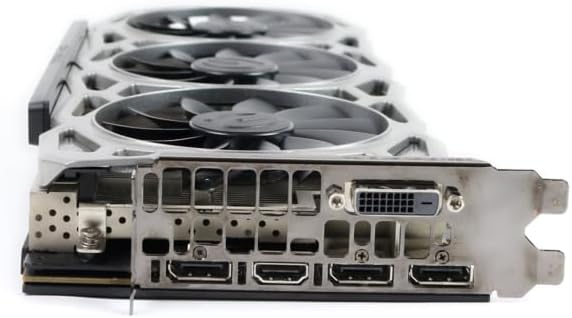
Figure 4.4: Rear I/O ports (DisplayPort, HDMI, DVI)
5. Parentah Operasi
5.1. Sambungan tampilan
Connect your monitor(s) to the available DisplayPort, HDMI, or DVI ports on the graphics card. The card supports up to 4 monitors with a maximum digital resolution of 7680x4320.
5.2. Konfigurasi Software
For advanced control and monitoring, download and install EVGA Precision XOC software from the EVGA websitus. Parangkat lunak ieu ngamungkinkeun anjeun pikeun:
- Monitor GPU, memory, and VRM temperatures via iCX Technology's 9 thermal sensors.
- Adjust fan speeds with 3X Async Fan Control for optimized cooling.
- Customize RGB LED lighting.
- Overclock the GPU for enhanced performance.
6. Pangropéa
To ensure optimal performance and longevity of your graphics card:
- Bersihkeun lebu tina kipas kartu grafis sareng heatsink sacara rutin nganggo udara anu dikomprés. Pastikeun komputer dipareuman sareng dicabut tina colokan listrik sateuacan dibersihkeun.
- Do not obstruct the airflow around the graphics card within your computer case.
- Tetep supir grafik anjeun diropéa ka versi panganyarna pikeun perbaikan kinerja sarta perbaikan bug.
7. Cara ngungkulan
If you encounter issues with your graphics card, refer to the table below for common problems and solutions:
| Masalah | Mungkin Cukang lantaranana | Solusi |
|---|---|---|
| Taya kaluaran tampilan | Incorrect cable connection, unseated card, no power, driver issue. | Ensure display cable is securely connected. Reseat the graphics card. Verify PCIe power cables are connected. Reinstall drivers. |
| Ketidakstabilan sistem atanapi kacilakaan | Panas teuing, overclock teu stabil, konflik supir, daya teu cekap. | Monitor temperatures. Reset overclock settings. Update/reinstall drivers. Ensure PSU meets requirements. |
| kinerja kaulinan goréng | Outdated drivers, incorrect game settings, background applications. | Update graphics drivers. Adjust in-game graphics settings. Close unnecessary background programs. |
| Kipas angin teu muter atawa ngaluarkeun sora anu teu biasa | Dust buildup, fan failure, incorrect fan curve. | Clean fans. Check fan settings in EVGA Precision XOC. Contact support if fan is faulty. |
If the problem persists, please contact EVGA customer support for further assistance.
8. Spésifikasi
Key technical specifications for the EVGA GeForce GTX 1080 Ti FTW3 Gaming graphics card:
| Fitur | Spésifikasi |
|---|---|
| Grafik Coprocessor | NVIDIA GeForce GTX 1080 Ti |
| merek | EVGA |
| Ukuran RAM Grafis | 11 GB |
| Tipe RAM Grafika | GDDR5X |
| Panganteur Kaluaran Video | DisplayPort, HDMI, DVI |
| Pabrikan Prosesor Grafis | NVIDIA |
| Resolusi tampilan Maximum | 7680x4320 |
| Panganteur Kartu grafik | PCI Express |
| Real Boost Clock | 1683 MHz |
| Jumlah Fans | 3 |
| Item Ukuran (L x W) | 12.81 "L x 9.5" W |
| Ngaran modél | FTW3 Gaming |
| UPC | 737488610383 |
9. Garansi jeung Rojongan
This product comes with a 90-day limited warranty. For detailed warranty terms and conditions, please refer to the official EVGA website or contact EVGA customer support.
For technical support, driver downloads, or further assistance, please visit the official EVGA support websitus: