1. Bubuka
Thank you for choosing the Anker PowerPort Strip 2 mini. This compact power strip is designed to provide convenient power and charging solutions for your electronic devices at home, in the office, or while traveling. It features two AC outlets and two PowerIQ-enabled USB ports, allowing you to power and charge up to four devices simultaneously.
Please read this manual carefully before using the product to ensure proper operation and safety. Keep this manual for future reference.
2. Produk Langkungview
The Anker PowerPort Strip 2 mini is a versatile charging solution with a compact design. Key features include:
- Dua Stop Kontak AC: Provides power for standard electronic devices.
- Two PowerIQ USB Ports: Intelligently identifies your device to deliver the fastest possible charge up to 2.4A per port, 24W total.
- Desain kompak sareng portabel: Idéal pikeun perjalanan sareng rohangan leutik.
- Kabel Daya 5ft: Offers flexibility in placement.
- Colokkeun datar: Designed to keep other wall outlets accessible.
- Fitur kaamanan: Includes an internal safety shutter and fire-retardant casing.
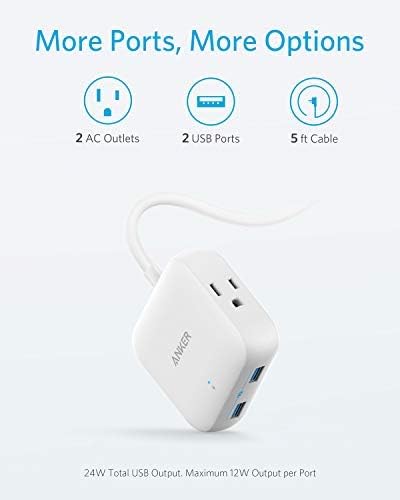
Image: The Anker PowerPort Strip 2 mini, highlighting its two AC outlets, two USB ports, and the integrated 5-foot power cable.
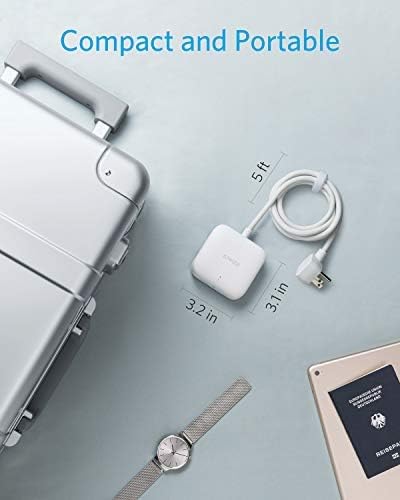
Image: The compact size of the PowerPort Strip 2 mini is demonstrated next to a travel suitcase and a wristwatch, emphasizing its portability.
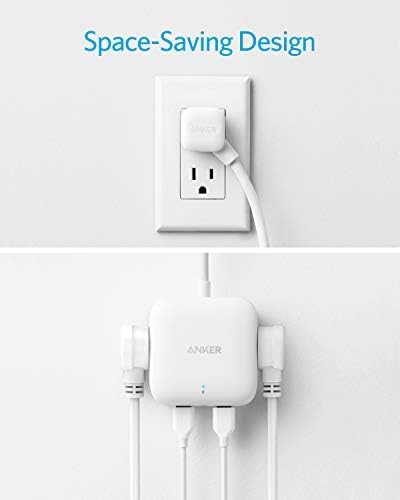
Image: The PowerPort Strip 2 mini plugged into a wall outlet, showcasing its flat plug design that allows other outlets to remain unobstructed, and its side-facing ports for a tidy setup.
3. Setélan
Follow these steps to set up your Anker PowerPort Strip 2 mini:
- Ngabongkar: Cabut stop kontak tina bungkusna kalayan ati-ati.
- Nyambung ka Daya: Plug the power strip's flat plug into a standard 125V AC wall outlet. Ensure the outlet is easily accessible.
- Sambungkeun Alat: Plug your electronic devices into the available AC outlets or USB ports.
The power strip is now ready for use.
4. Parentah Operasi
The Anker PowerPort Strip 2 mini is designed for simple operation:
- Ngagunakeun outlet AC: Insert the power plugs of your devices into the two AC outlets. Ensure the total power consumption of connected AC devices does not exceed 1250W.
- Ngagunakeun Port USB: Connect your USB-powered devices (e.g., smartphones, tablets) to the two USB ports using their respective charging cables. The PowerIQ technology will automatically detect your device and deliver an optimized, high-speed charge. Note that this product does not support Qualcomm Quick Charge.
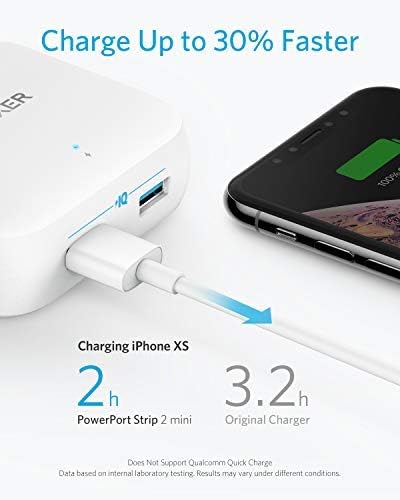
Image: The PowerPort Strip 2 mini charging an iPhone XS, demonstrating its ability to charge devices faster than a standard charger.
5. Émbaran Kasalametan
Pikeun mastikeun operasi anu aman sareng nyegah karusakan, punten perhatikeun pedoman kaamanan ieu:
- Pamakéan jero rohangan wungkul: This power strip is intended for indoor use in dry locations only. Do not expose to rain, moisture, or liquids.
- Hindarkeun Overloading: Do not exceed the maximum power rating of 1250W for AC outlets or 24W total for USB ports. Overloading can cause overheating and fire hazards.
- Safety Shutter: The internal safety shutter prevents foreign objects from being inserted into the AC outlets, enhancing safety, especially around children.
- Tahan Seuneu Casing: The product features a fire-retardant plastic casing for enhanced safety, offering flame protection up to 1382°F.
- Voltage kasaluyuan: The power strip is designed for 125V AC input and output for its AC outlets. The USB ports are compatible with devices requiring 5V USB power. While the unit itself may be compatible with worldwide input voltages (100V-240V), ensure your connected AC devices are also compatible with the local voltage if traveling internationally.
- Kapal Pesiar Friendly: This power strip is designed without surge protection, making it generally acceptable for use on cruise ships. Always confirm with your specific cruise line's policies regarding electrical devices.
- Penanganan anu leres: Do not disassemble, modify, or attempt to repair the device. Do not use if the cord or plug is damaged.
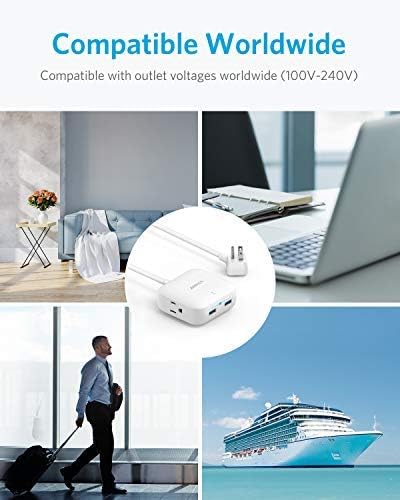
Image: The PowerPort Strip 2 mini shown in different travel environments, illustrating its global voltage compatibility (100V-240V input) and suitability for use on cruise ships.
6. Pangropéa
To maintain your Anker PowerPort Strip 2 mini in optimal condition:
- beberesih: Disconnect the power strip from the wall outlet before cleaning. Use a soft, dry cloth to wipe the surface. Do not use liquid cleaners or aerosols.
- Panyimpenan: When not in use, store the power strip in a cool, dry place away from direct sunlight and extreme temperatures.
- Pamariksaan: Periodically inspect the power cord and plug for any signs of damage. If damage is found, discontinue use and contact customer support.
7. Cara ngungkulan
If you encounter issues with your Anker PowerPort Strip 2 mini, refer to the following common solutions:
- Taya Daya/Ngeusian:
- Pastikeun yén strip kakuatan dicolokkeun aman kana stop kontak témbok jalan.
- Check if the connected devices are properly plugged into the power strip.
- Verify that the devices themselves are functioning correctly.
- Confirm that the total power draw does not exceed the maximum rating.
- Ngecas USB Lambat:
- Pastikeun anjeun nganggo kabel ngecas kualitas luhur.
- The PowerIQ technology optimizes charging speed, but some devices may have specific charging requirements or limitations.
- Note that this product does not support Qualcomm Quick Charge, so devices requiring this technology will charge at standard PowerIQ speeds.
- Overheating:
- Immediately unplug the power strip and all connected devices.
- Check for overloading. Reduce the number of connected devices or their power consumption.
- Ensure adequate ventilation around the power strip.
If the problem persists, please contact Anker customer support.
8. Spésifikasi
| Fitur | Spésifikasi |
|---|---|
| Nomer modél | A9121 |
| Outlet AC | 2 |
| palabuhan USB | 2 (PowerIQ enabled) |
| AC Input / Kaluaran Voltage | 125 volt |
| Kaluaran USB | 24W Max (5V/2.4A per port) |
| Max AC Power Rating | 1250W |
| Dimensi produk | 3.11 x 3.15 x 1.34 inci |
| Item Beurat | 10.6 ons |
| Panjang Tali | 5 peuy |
| Fitur husus | Compact, Portable, Flat Plug, Safety Door |
9. Garansi jeung Rojongan
Anker provides the following warranty and support for the PowerPort Strip 2 mini:
- Garansi kawates: This product is covered by an 18-month worry-free warranty from the date of purchase.
- Garansi Alat Dihubungkeun: A lifetime* $25,000 connected equipment warranty is provided. *For the purpose of this connected equipment warranty, "lifetime" is defined as the lifetime of the product.
- Palayanan palanggan: For technical support, warranty claims, or general inquiries, please visit the official Anker websitus atanapi ngahubungan tim layanan palanggan maranéhanana.


