Produk Leuwihview
This manual provides detailed instructions for the Anlapus H.265+ Security System, a comprehensive wired analog surveillance camera kit designed for home and business monitoring. It features a Full HD 1080P 8-channel DVR recorder with a pre-installed 1TB hard drive and 2MP outdoor surveillance cameras.

Figure 1: Anlapus H.265+ Security System Components
Fitur konci:
- H.265+ Full HD 1080p System: Includes an 8-channel 1080p DVR with a built-in 1TB hard drive and four 2.0MP surveillance cameras.
- Canggih Peuting Visi: Cameras are equipped with 24 IR LEDs and an IR-CUT filter, providing clear night vision up to 24 meters (80 feet).
- Deteksi Gerak Smart: Receive push alerts via the free mobile application when motion is detected, keeping you informed even when away from home.
- Kaméra Tahan Cuaca IP66: Durable plastic housing designed for both indoor and outdoor use, capable of withstanding extreme weather conditions. The cable is integrated into the camera mount for added protection.
- Pre-installed 1TB Hard Drive: Ready for immediate use, specifically designed for continuous surveillance data recording.
- Sababaraha Modeu Rekaman: Supports 24/7 continuous recording, motion detection recording, scheduled recording, and manual recording.
- Jauh Viewing: Access live and recorded footage anytime, anywhere via smartphone, tablet, or PC.
Eusi pakét
Sateuacan ngamimitian pamasangan, mangga pariksa yén sadaya komponén anu didaptarkeun di handap aya dina pakét anjeun:

Gambar 2: Eusi Paket Kaasup
- 1 x DVR (Digital Video Recorder) with 1TB HDD pre-installed
- 4 x 1080p Surveillance Cameras
- 4 x BNC Video Cables (approx. 18.3m / 60ft each)
- 2 x adaptor kakuatan
- 1 x 1-to-4 Power Splitter Cable
- 1 x Mouse USB
- 1 x Manual Instruksi (Dokumén ieu)
- 4 x Kantong Sekrup Pemasangan
- 4 x Stiker Peringatan
Guide Setup
1. DVR Connection
- Sambungkeun kaméra: Connect each surveillance camera to the BNC video input ports on the back of the DVR using the provided BNC cables. Ensure connections are secure.
- Sambungkeun Kakuatan: Use the power adapters and the 1-to-4 power splitter cable to power the cameras. Connect the DVR to a power outlet using its dedicated power adapter.
- Nyambung ka Monitor: Connect the DVR to a monitor or TV using an HDMI or VGA cable (not included) to view siaran langsung sareng aksés kana setélan sistem.
- Sambungkeun Beurit USB: Plug the included USB mouse into a USB port on the DVR for navigation.
- Sambungan Jaringan (Opsional tapi Disarankeun): Pikeun jauh viewing and email alerts, connect the DVR to your router using an Ethernet cable (not included).
2. Pamasangan Kaméra
The cameras are designed for both indoor and outdoor use, with an IP66 weatherproof rating. Choose strategic locations that provide optimal coverage and are within reach of the BNC cables.
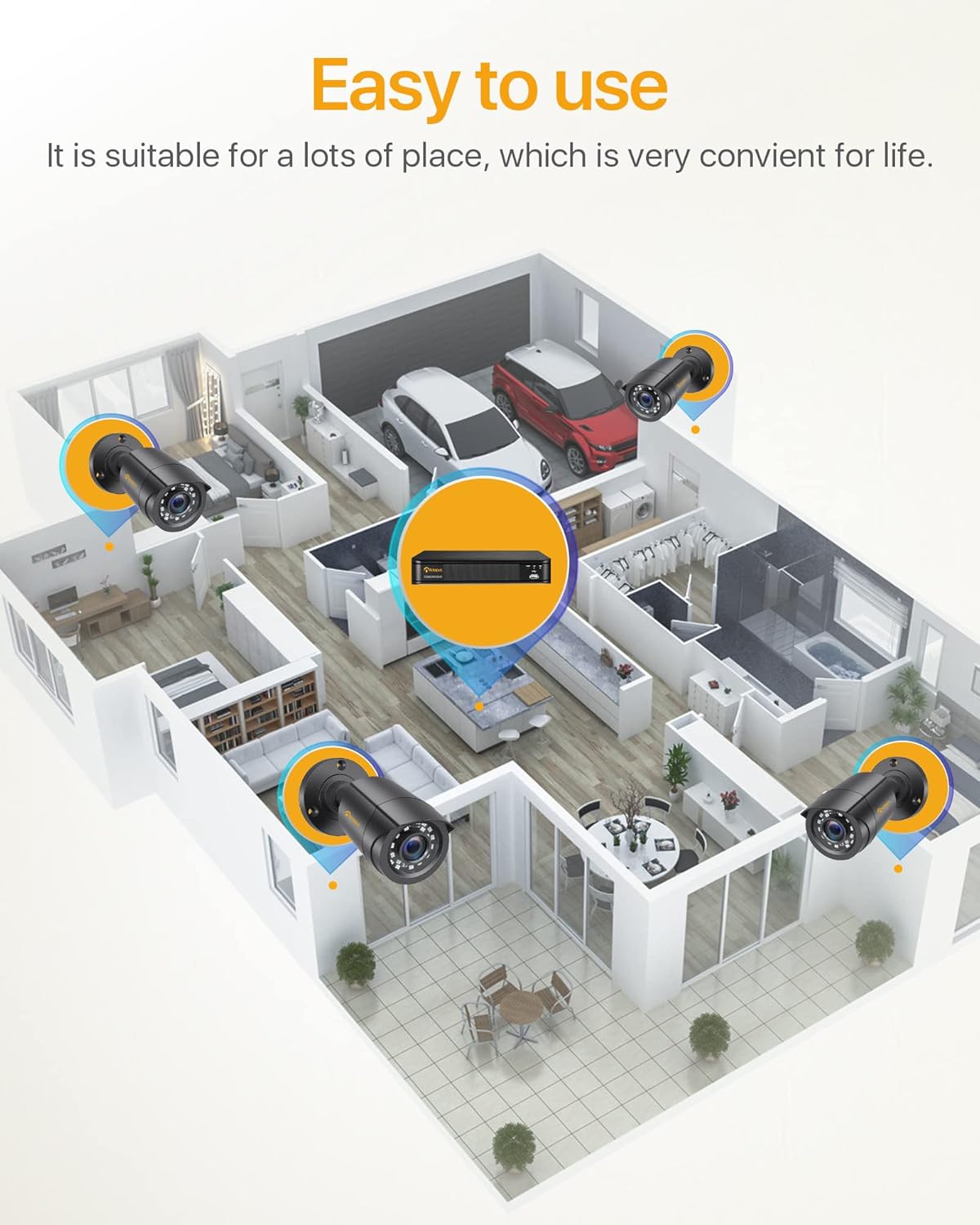
Gambar 3: Kelample Camera Placement for Optimal Coverage
- Pamasangan: Use the provided mounting screws and anchors to securely attach the cameras to walls or ceilings.
- Saluyukeun Sudut: Adjust the camera's angle (180° horizontal, 360° vertical) to cover the desired area. Ensure the lens is clean and free from obstructions.
- Manajemén Kabel: Route the BNC cables neatly and securely to prevent damage and tripping hazards. The cable is integrated into the camera mount for protection.

Figure 4: Camera Features and Adjustability
Parentah Operasi
1. Initial Setup and Login
Upon first power-on, the DVR will guide you through an initial setup wizard. You will be prompted to create a strong password for the administrator account. It is crucial to remember this password.
2. Hirup View
Once logged in, the system will display the live view from all connected cameras on the monitor. You can switch between single-camera view jeung multi-kaméra grid view.

Figure 5: 24/7 Live Monitoring Setup
3. Modeu Rekaman
- Rékam Kontinyu: The system is pre-configured for 24/7 continuous recording to the 1TB hard drive.
- Ngarekam Deteksi Gerak: To enable, navigate to the DVR's menu, select "Record" > "Motion Detection." Configure the detection area and sensitivity for each camera.
- Rekaman Dijadwalkeun: Set specific times for recording via "Record" > "Schedule."
- Ngarekam Manual: Initiate recording manually from the live view panganteur.
4. Jauh Viewing via Mobile App
Download the official Anlapus mobile application (available for iOS and Android) to view kaméra anjeun jarak jauh.
- Unduh App: Milarian pikeun "Anlapus" in your device's app store.
- Ngadaptar Akun: Create a new user account within the app.
- Tambahkeun Alat: Scan the QR code displayed on your DVR's monitor (found in Network settings) or manually enter the device ID to add your DVR to the app.
- Hirup View & Playback: Sakali ditambahkeun, anjeun tiasa view live feeds, play back recorded footage, and receive motion detection alerts on your smartphone or tablet.

Gambar 6: Jarak Jauh Viewing Across Devices
5. Gerak Deteksi Tanda
Configure email alerts for motion detection events through the DVR's network settings. Ensure your DVR is connected to the internet.

Figure 7: Smart Motion Detection Alerts
Pangropéa
- Ngabersihan rutin: Periodically clean the camera lenses with a soft, dry cloth to ensure clear image quality. For outdoor cameras, check for dirt, dust, or spiderwebs.
- Pembaruan firmware: Check the Anlapus official website for any available firmware updates for your DVR. Updates can improve performance and add new features.
- Kaséhatan Hard Drive: The 1TB hard drive is designed for continuous recording. Monitor its health through the DVR's system settings. If the hard drive becomes full, older footage bakal ditimpa sacara otomatis (rékaman puteran).
- Pamariksaan kabel: Rutin mariksa sadaya kabel upami aya tanda-tanda ngagem, ruksak, atanapi sambungan anu leupas, khususna pikeun pamasangan luar.
- Sasayogian tanaga: Ensure the DVR and camera power adapters are connected to stable power sources.
Pamérésan masalah
| Masalah | Mungkin Cukang lantaranana | Solusi |
|---|---|---|
| Taya gambar dina monitor. | Kabel vidéo leupas, input salah dipilih dina monitor, DVR teu diaktipkeun. | Check all BNC and HDMI/VGA cable connections. Ensure monitor input matches DVR output. Verify DVR power. |
| Kaméra teu némbongan. | Camera power issue, BNC cable disconnected, faulty camera. | Check camera power connections and power splitter. Re-seat BNC cables. Test camera on a different port if possible. |
| Taya rémot viewing. | DVR not connected to network, incorrect network settings, app configuration issue. | Ensure DVR is connected to router via Ethernet. Check network settings on DVR (DHCP enabled or static IP configured correctly). Verify app device ID/QR code. |
| Panglihatan peuting anu goréng. | IR LEDs obstructed, camera lens dirty, insufficient ambient light. | Clean camera lens. Ensure no obstructions are blocking the IR LEDs. Consider adding external IR illuminators if needed. |
| Deteksi gerak teu jalan. | Motion detection not enabled, sensitivity too low, detection area not set. | Enable motion detection in DVR settings. Adjust sensitivity. Define the detection area correctly. |
spésifikasi
| Fitur | Rincian |
|---|---|
| Nomer modél | 6971627216065 |
| Saluran DVR | 8-saluran |
| Resolusi Rekaman Video | 1080p lengkep HD |
| Komprési Video | H.265 + |
| Kapasitas Panyimpenan | HDD 1TB (tos dipasang sateuacanna) |
| Resolusi kaméra | 2.0 megapiksel |
| Jenis kaméra | Bullet, Wired |
| Wengi Sawangan Sawangan | Up to 24 meters (80 feet) with 24 IR LEDs |
| Peunteun Weatherproof | IP66 (Indoor/Outdoor use) |
| Konektipitas | Wired (BNC), Ethernet for network features |
| Sasayogian tanaga | 12 Volts (via included power adapters) |
| Suhu Operasi | -10°C nepi ka 55°C (14°F nepi ka 131°F) |
| Diménsi (DVR) | Kira-kira. 27.94 x 35.56 x 17.78 cm (L x W x H) |
| Weight (Total Package) | 4.56 kg |
Garansi sareng Rojongan
Anlapus products are designed for reliability and performance. For specific warranty details, please refer to the warranty card included in your package or visit the official Anlapus websitus.
For technical assistance, troubleshooting, or any inquiries regarding your security system, please contact Anlapus customer support. Our team is dedicated to providing prompt and helpful solutions.
- Dukungan Online: Visit the Anlapus official websitus pikeun FAQs, artikel rojongan, sarta formulir kontak.
- Rojongan Email: Tingali kana dokuméntasi produk anjeun pikeun alamat email dukungan khusus.


