
Bubuka
This instruction manual provides essential information for the setup, operation, and maintenance of your Superior Electronics Universal Remote Control, model SUPTRB016. This remote is designed as a direct replacement for Telefunken televisions, including Smart TV models, and requires no programming for immediate use. Its ergonomic design and durable construction ensure comfortable and reliable control of your TV.
Disetél
1. Nyelapkeun Batré
The remote control requires two (2) AAA batteries (not included). Follow these steps to insert them:
- Teangan tempat panutup kompartemen batré dina tonggong kadali jauh.
- Geser panutup ka handap atawa pencét kancing pikeun mukakeunana.
- Selapkeun dua batré AAA, mastikeun terminal positif (+) jeung négatip (-) align bener jeung markings jero kompartemen nu.
- Ganti panutup kompartemen batré, geser deui kana tempatna nepi ka klik aman.

Figure 1: Inserting AAA batteries into the remote control.
2. Pamakéan awal
Once batteries are inserted, the remote control is ready for immediate use. No additional programming or code entry is required. Simply point the remote at your Telefunken TV and begin operating it.
Parentah Operasi
The Superior Electronics SUPTRB016 remote control replicates the functions of your original Telefunken TV remote. Ensure a clear line of sight between the remote control and your TV's infrared receiver for optimal performance.

Figure 2: Remote control layout with streaming service buttons.
Fungsi konci:
- Tombol Daya: Ngahurungkeun atawa mareuman TV.
- Tombol Jumlah (0-9): Pikeun pilihan saluran langsung.
- Volume Kaluhur/Turun: Nyaluyukeun polumeu TV.
- Saluran luhur/handap: Robah saluran TV.
- Tombol Bisu: Ngajempékeun atanapi nganonaktipkeun audio TV.
- Pad Navigasi (OK, Luhur, Handap, Kénca, Katuhu): Dipaké pikeun navigasi menu jeung pilihan.
- Balik / Kaluar: Mulih ka layar saméméhna atawa kaluar hiji ménu.
- Tombol TV Smart: Dedicated buttons provide quick access to popular streaming applications such as Netflix, YouTube, and Prime Video (functionality depends on your TV model and internet connection).
- Sumber/Input: Milih sumber input (HDMI, AV, jsb.).
- Menu/Info: Accesses TV menus and displays information.
The remote operates effectively within a maximum range of 10 meters, provided there are no obstructions between the remote and the TV's infrared sensor.
Pangropéa
Pikeun mastikeun umur panjang sareng kinerja optimal tina remote control anjeun, turutan pedoman perawatan saderhana ieu:
- beberesih: Wipe the remote control with a soft, dry cloth. Avoid using liquid cleaners or abrasive materials, as these can damage the surface or internal components.
- Ngagantian batré: Ganti batréna nalika réspon remot janten laun atanapi eureun jalan. Salawasna ganti kadua batréna dina waktos anu sami ku batré AAA énggal. Ulah nyampur batré lami sareng énggal, atanapi jinis batré anu béda.
- Panyimpenan: Nyimpen remote di tempat anu tiis sareng garing jauh tina sinar panonpoé langsung sareng suhu anu ekstrim.
- Hindarkeun tetes: While constructed with durable materials, excessive drops or impacts can cause damage.
Pamérésan masalah
Upami anjeun ngalaman masalah sareng remote control anjeun, mangga tingali solusi umum ieu:
| Masalah | Mungkin Cukang lantaranana | Solusi |
|---|---|---|
| Remote does not work at all. | Batré paéh atanapi teu leres diselapkeun. | Check battery orientation. Replace with fresh AAA batteries. |
| Jauh dianggo intermittently. | Weak batteries, obstruction, or remote too far from TV. | Replace batteries. Ensure clear line of sight to TV. Move closer to the TV (within 10 meters). |
| Tombol husus teu ngabales. | Tombolna teu jalan atawa TV teu ngadukung fungsina. | Ensure your TV model supports the specific function (e.g., Smart TV apps). If other buttons work, the specific button might be faulty. |
| TV does not respond to remote. | TV's IR sensor blocked or TV is not a Telefunken model. | Clear any obstructions in front of the TV's IR sensor. Verify that your TV is a Telefunken brand. |
spésifikasi
- model: SUPTRB016
- merek: Éléktronik Unggul
- ukuran: 5 x 1.5 x 19 cm
- beurat: 90 gram
- Batré diperlukeun: 2 x AAA (1.5V)
- Batré Kaasup: No
- Téknologi konektipitas: Infrabeureum
- Rentang maksimum: 10 méter
- Alat anu cocog: Telefunken Televisions (LED, LCD, OLED, Smart TV models)
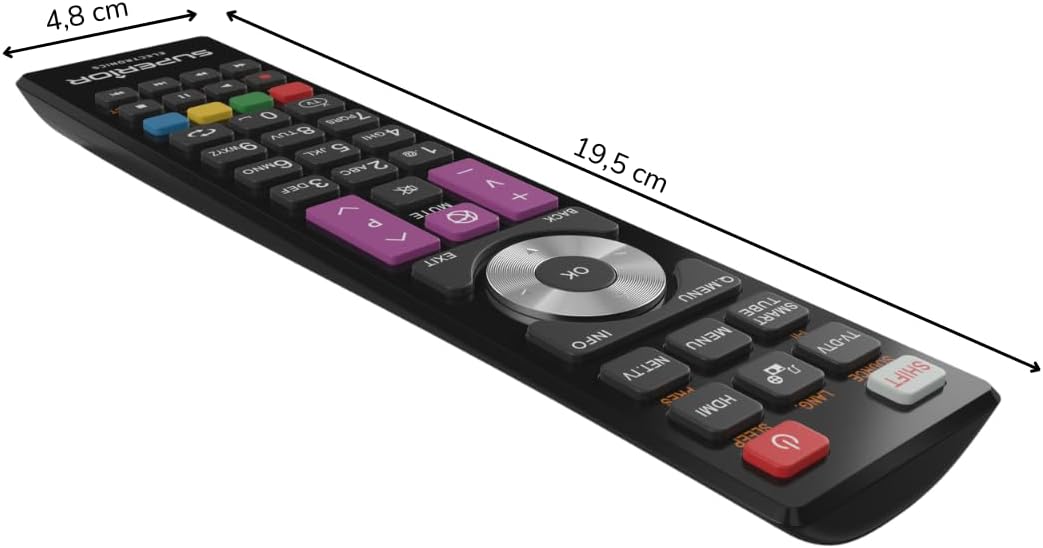
Figure 3: Remote control dimensions.
Garansi sareng Rojongan
For warranty information, please refer to the terms and conditions provided by your retailer at the time of purchase or contact Superior Electronics directly. For additional support or inquiries, you may visit the official Superior Electronics store on Amazon: