1. Bubuka
Thank you for choosing the LoraTap Connected Roller Shutter Switch. This smart WiFi curtain switch is designed to provide convenient and intelligent control over your roller shutters, blinds, and curtains. With compatibility for popular voice assistants like Amazon Alexa and Google Home, along with remote control via the Smart Life/Tuya app, you can manage your window coverings with ease from anywhere. This manual provides essential information for safe installation, operation, and maintenance of your new device.

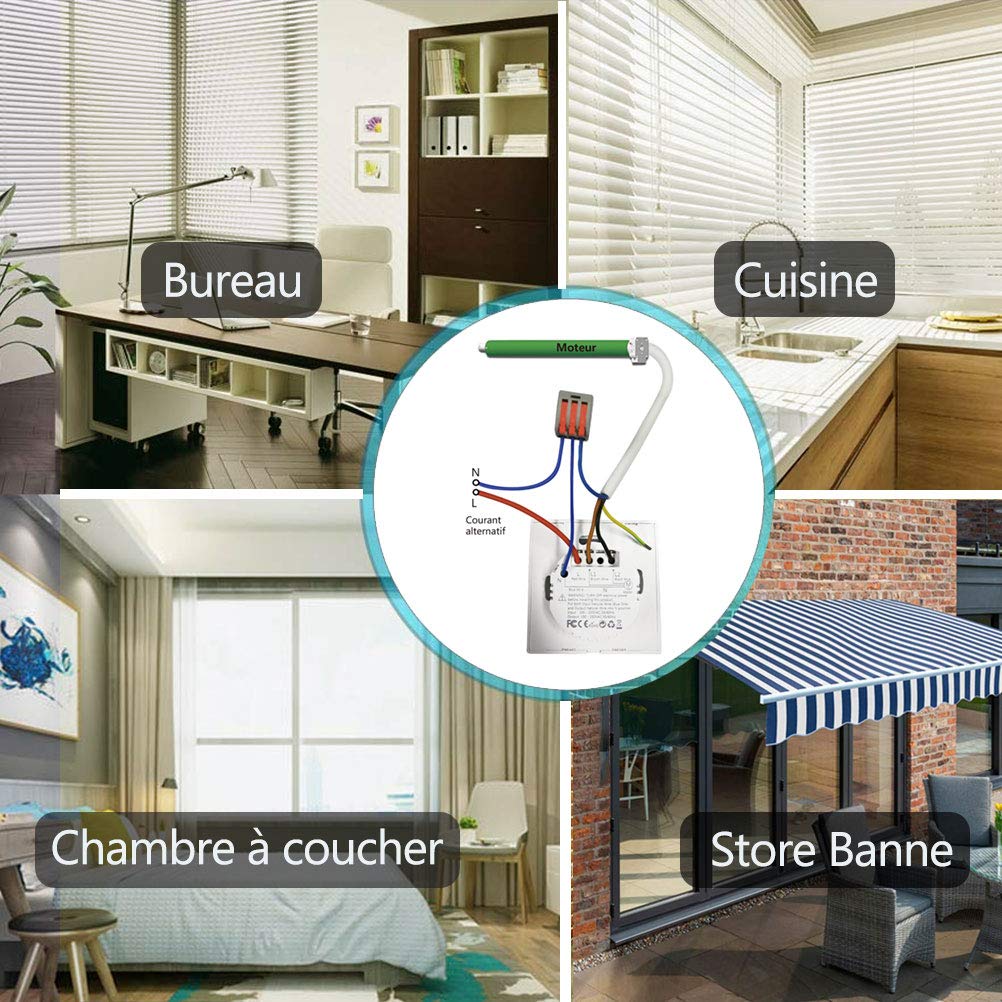
Image: The LoraTap Smart Switch seamlessly integrates into various environments, including offices, kitchens, bedrooms, and outdoor awning setups, demonstrating its versatility for different applications.
2. Émbaran Kasalametan penting
Read all safety warnings and instructions carefully before installation and operation.
- RISK OF ELECTRIC SHOCK OR FIRE: Improper use or installation can cause SERIOUS INJURY, DEATH, or LOSS/DAMAGE OF PROPERTY. TURN OFF power supply before installing, servicing, or removing the receiver.
- Paké vol non-kontaktage tester to ensure the power is off. The receiver must be installed by a licensed electrician in accordance with all national and local electrical codes. If you are unsure about any part of these instructions, consult a qualified electrician.
- Pikeun pamakéan indoor wungkul. Pikeun fixtures dipasang permanén wungkul.
- Entong neuleumkeun produk dina cairan naon waé atanapi kakeunaan panas atanapi lembab.
- Ensure the product is only compatible with motors that have 4 wires (2 output wires, 1 neutral wire, and 1 ground wire).

Image: The product packaging clearly displays a warning to turn off power before wiring, emphasizing the importance of electrical safety during installation.
3. Produk Langkungview jeung Fitur
The LoraTap Connected Roller Shutter Switch offers a sleek design with advanced smart home capabilities. Its key features include:
- Kontrol sora: Compatible with Amazon Echo Alexa and Google Home for hands-free operation.
- Kontrol Toél: Responsive touch panel for direct manual control.
- Programmable Timers: Schedule automatic opening and closing times via the "Smart Life" app.
- Kadali jauh: Control your curtains from anywhere using the Smart Life & Tuya APP on your smartphone or tablet.
- Group Control & Sharing: Control up to 20 switches in a group and share access with family members.
- Discreet LED Indicators: LED lights on buttons only illuminate when touched, ensuring no disturbance during sleep.
- Desain awét: Features a tempered glass panel for enhanced safety and longevity.
Eusi pakét:
- 1 x LoraTap Connected Roller Shutter Switch
- 1 x Manual Pamaké
- Sekrup Pemasangan (biasana kalebet)

Gambar: hareup jelas view of the LoraTap Connected Roller Shutter Switch, showcasing its minimalist design and touch control icons for up, pause, and down.
4. Pitunjuk Instalasi
Catetan: Installation should only be performed by a qualified electrician. Ensure power is OFF before beginning installation.
4.1 Diagram Wiring
The LoraTap switch requires a 4-wire motor connection. Please refer to the diagram below for correct wiring. Ensure all connections are secure.
- L: Live Wire (Input)
- N: Neutral Wire (Input)
- L1: Output Wire for UP (Motor)
- L2: Output Wire for DOWN (Motor)
- Kawat taneuh: Connect to the motor's ground wire.
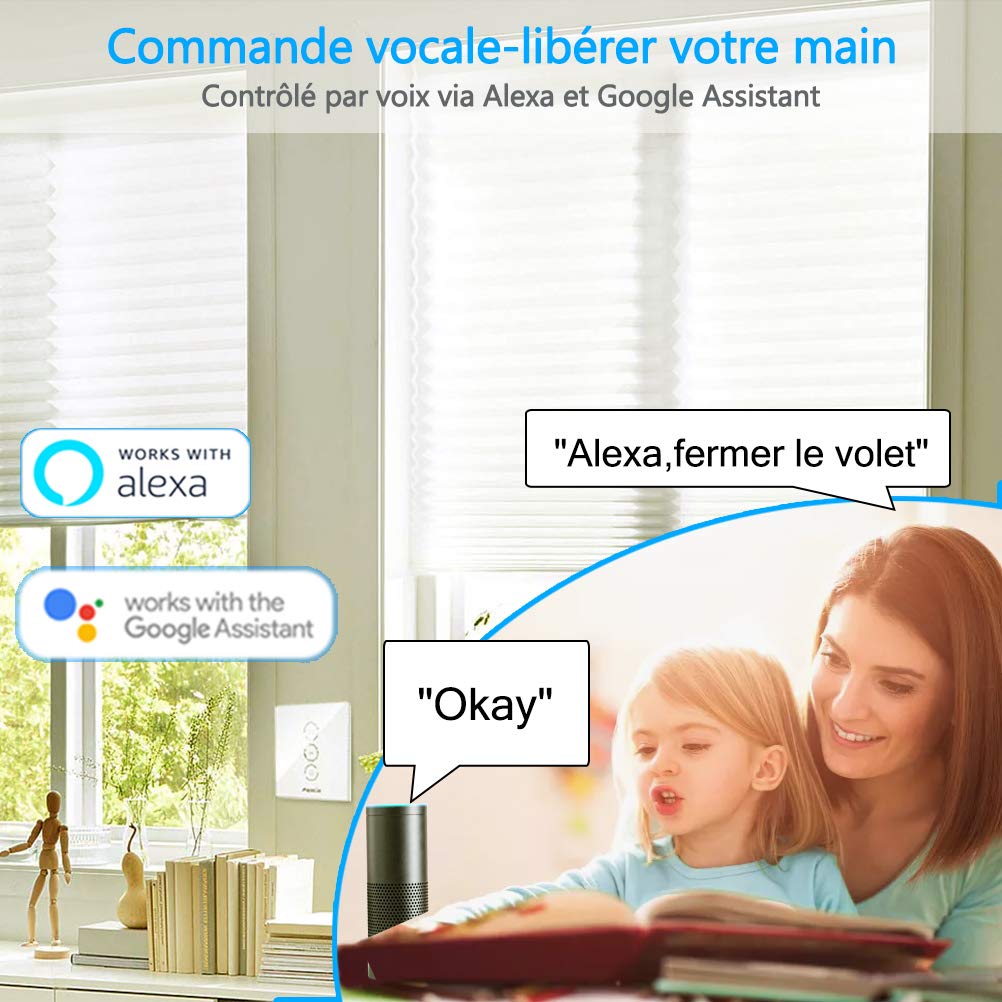
Image: A detailed wiring diagram illustrating the connections for the LoraTap switch, showing input for Live (L) and Neutral (N), and outputs for motor Up (L1) and Down (L2), along with the ground connection.
Gambar: Tukangeun view of the LoraTap switch, showing the clearly labeled wiring terminals (L, N, L1, L2) and the compact design for wall mounting. Dimensions are also visible.
4.2 Instalasi fisik
- Pareuman Daya: Locate the circuit breaker controlling the power to the switch location and turn it OFF. Verify with a non-contact voltage panguji.
- Hapus Switch Old: Carefully remove your existing roller shutter switch from the wall box.
- Wire the LoraTap Switch: Connect the wires according to the wiring diagram (Section 4.1). Ensure all wires are securely fastened in their respective terminals.
- Pasang saklar: Gently push the LoraTap switch into the wall box. Secure it using the provided screws.
- Pasang Faceplate: Tempelkeun pelat kaca kana modul sakelar.
- Mulangkeun Daya: Hurungkeun kakuatan deui ON di circuit breaker.
4.3 Ngapasangkeun Aplikasi (Aplikasi Smart Life/Tuya)
To enable smart features, you need to pair the switch with the Smart Life or Tuya app.
- Unduh App: Unduh aplikasi "Smart Life" atanapi "Tuya Smart" tina toko aplikasi telepon pinter anjeun (iOS App Store atanapi Google Play Store).
- Ngadaptar/Log: Buka aplikasi sareng ngadaptarkeun akun énggal atanapi lebet upami anjeun parantos gaduh.
- Lebetkeun Mode Papasangan: On the LoraTap switch, press and hold the PAUSE button for approximately 5-7 seconds until the indicator light starts blinking rapidly. This indicates it's in pairing mode.
- Tambahkeun Alat: In the app, tap the "+" icon (usually in the top right corner) to add a new device. Select "Curtain Switch" or "Shutter Switch" from the device list.
- Nyambung ka Wi-Fi: Follow the on-screen prompts to connect the switch to your 2.4GHz Wi-Fi network. Ensure your phone is also connected to the same 2.4GHz network.
- Konfirmasi pasangan: Once connected, the indicator light on the switch will stop blinking and remain solid. The device will appear in your app's device list.

Image: A visual representation of the Smart Life app interface, showing options for remote control, scheduling, touch control, and voice commands for the curtain switch.
5. Parentah Operasi
5.1 Kontrol Manual (Panel Toél)
The switch features three touch-sensitive buttons on its glass panel:
- Panah luhur (▲): Touch to open the roller shutter/blind.
- Pause (∥): Touch to pause the roller shutter/blind at its current position.
- Panah handap (▼): Touch to close the roller shutter/blind.
5.2 App Control (Smart Life/Tuya App)
Once paired, you can control your roller shutter from anywhere using the app:
- Remote Open/Close/Pause: Open the app, select your switch, and use the virtual buttons to control your curtain.
- Scheduling/Timer Function:
- In the app, navigate to the switch settings.
- Select "Schedule" or "Timer" to set specific times for opening or closing.
- You can set daily, weekly, or custom schedules.
- Adjusting Operation Time:
- If your shutter stops mid-way, you can adjust the full open/close time in the app settings.
- This allows for precise control over the shutter's travel distance.

Image: The Smart Life app interface demonstrating the timer function, allowing users to schedule automatic opening and closing of roller shutters at specific times, such as 8:00 AM for opening and 10:00 PM for closing.

Image: The Smart Life app interface showing the "Schedule time" setting, where users can define the precise duration for the motor's operation (e.g., 10 seconds or 120 seconds) to ensure full opening or closing of the roller shutter.
5.3 Kadali Sora (Alexa / Google Home)
Integrate your LoraTap switch with Amazon Alexa or Google Home for convenient voice commands:
- Tautan Akun: Dina aplikasi Alexa atanapi Google Home, aktipkeun kaahlian/aksi "Smart Life" atanapi "Tuya Smart" teras tautkeun akun anjeun.
- Panggihan Alat: Ask your voice assistant to "Discover devices" or manually add the switch in the app.
- Paréntah sora: Anggo paréntah sapertos:
- "Alexa, open [Device Name]"
- "Hey Google, close [Device Name]"
- "Alexa, pause [Device Name]"
- "Hey Google, set [Device Name] to 50%" (if supported by your motor/app configuration)
Image: A depiction of voice control functionality, showing a child interacting with an Amazon Echo device to control the roller shutter, highlighting compatibility with Alexa and Google Assistant.
6. Pangropéa
The LoraTap Connected Roller Shutter Switch is designed for low maintenance. Follow these guidelines to ensure its longevity:
- beberesih: Ngusap panel kaca ku lemes, damp cloth. Do not use abrasive cleaners or solvents. Ensure the switch is dry before use.
- Hindarkeun Uap: Do not expose the switch to excessive moisture or direct water spray. The tempered glass panel offers some water resistance for safe handling with wet hands, but it is not waterproof.
- Cék biasa: Pariksa sambungan kabel sacara berkala pikeun mastikeun éta tetep aman.

Image: The LoraTap switch with water droplets on its tempered glass panel, illustrating its safe and splash-resistant design, allowing for manipulation even with wet hands.
7. Cara ngungkulan
If you encounter issues with your LoraTap switch, refer to the table below for common problems and solutions:
| Masalah | Mungkin Cukang lantaranana | Solusi |
|---|---|---|
| Switch does not respond to touch. | No power; Incorrect wiring; Faulty switch. | Check circuit breaker. Verify wiring according to diagram. Contact support if issue persists. |
| Teu tiasa dipasangkeun sareng aplikasi. | Incorrect Wi-Fi band (not 2.4GHz); Incorrect pairing mode; Weak Wi-Fi signal. | Ensure your router is broadcasting 2.4GHz Wi-Fi. Confirm switch is blinking rapidly. Move closer to router. |
| Roller shutter stops mid-way. | Operation time not calibrated in app. | Adjust the "Schedule time" or "Motor reversal" settings in the Smart Life/Tuya app to match your motor's full travel time. |
| Kontrol sora teu jalan. | Smart Life/Tuya skill not linked; Device not discovered; Incorrect voice command. | Ensure Smart Life/Tuya skill is enabled and linked in Alexa/Google Home app. Redo device discovery. Use correct device name and commands. |
| LED indicators are always on. | This model's LEDs only turn on when touched. If always on, it might indicate a fault. | Kontak rojongan customer. |
8. Spésifikasi Téknis
| Fitur | Rincian |
|---|---|
| merek | LoraTap |
| Nomer modél | 602318824271 |
| Nomer Bagian | HU-XI-201 |
| Masukan Voltage | 100-250VAC, 50/60Hz |
| Kaluaran Voltage | 100-250VAC, 50/60Hz |
| Beban maksimum | 600W |
| Peunteun ayeuna | 10 Amps |
| Frékuénsi Wi-Fi | 2.4GHz |
| Wi-Fi Standar | IEEE 802.11 b/g/n |
| Jenis Radio | Wi-Fi 2.4GHz |
| Max RF Power Transmitted | 17.5 dBm |
| Item Beurat | 180 g |
| Ukuran Paket | 10.8 x 10.1 x 4.4 cm |
| Pindah Tipe | 1-jalan |
| Tipe Pamasangan | Tembok Gunung |
| Batré Diperlukeun? | No |

Image: The back of the product packaging, displaying key technical specifications such as Wi-Fi frequency, standard, and maximum RF power transmitted, along with regulatory marks.
9. Garansi jeung Rojongan
LoraTap is committed to providing high-quality products. This product comes with a garansi 3 taun ti tanggal beuli.
For technical support, troubleshooting assistance, or warranty claims, please contact LoraTap customer service through the retailer's platform or visit the official LoraTap websitus pikeun inpo kontak.
Mangga siapkeun nomer modél anjeun (602318824271) sareng rincian pameseran nalika ngahubungi dukungan.


