
Bubuka
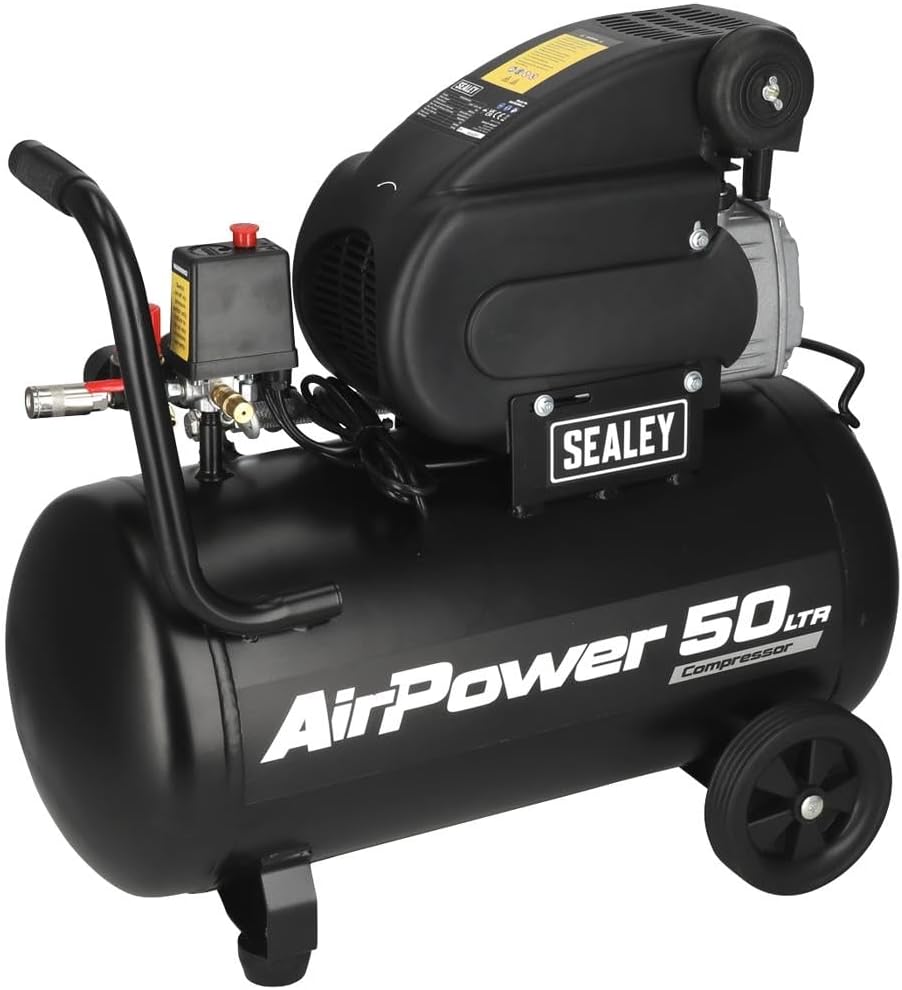
This manual provides essential information for the safe and efficient operation, maintenance, and troubleshooting of your Sealey SAC5020A 50L Direct Drive Air Compressor. The compressor features an aluminium cylinder head with a cast iron cylinder for enhanced wear resistance, making it suitable for general-purpose workshop applications. Its pump head is directly coupled to a heavy-duty induction motor, ensuring reliable and quiet operation. The precision-welded receiver tank complies with the Pressure Vessel Directive. It is equipped with a fully automatic pressure cut-out switch and twin gauges to display both tank and working pressures. The unit is supplied with a 3-pin plug.
Émbaran Kasalametan
Salawasna merhatikeun pancegahan kaamanan di handap ieu pikeun nyegah tatu pribadi atanapi karusakan alat:
- Baca jeung ngarti sagala parentah saméméh operasi compressor nu.
- Ensure the compressor is placed on a level, stable surface in a well-ventilated area.
- Wear appropriate personal protective equipment (PPE), including eye protection and hearing protection.
- Ulah ngoperasikeun kompresor dina kaayaanamp atawa kaayaan baseuh, atawa ku ayana cair atawa gas kaduruk.
- Always disconnect the compressor from the power supply before performing any maintenance or adjustments.
- Ulah langsungkeun hawa anu dikomprés ka jalma atanapi sasatoan.
- Regularly inspect the air tank for signs of corrosion or damage. Do not use a damaged tank.
- Pastikeun sadaya sambungan aman sareng bébas bocor sateuacan operasi.
- Do not modify the compressor or its safety devices.
Unpacking jeung Setup
Carefully remove the compressor from its packaging. Inspect the unit for any signs of shipping damage. If damage is found, contact your supplier immediately.
Component Identification and Dimensions

Gambar 1: Overall dimensions of the Sealey SAC5020A 50L Direct Drive Air Compressor. The image shows the compressor with its tank, motor, handle, wheels, and control panel, indicating a width of 705mm, a height of 600mm, and a depth of 300mm.
Familiarize yourself with the main components of your compressor. Refer to Figure 1 for an overview of the unit's dimensions and general layout.
Majelis
- Pasang Roda: Securely attach the wheels to the compressor base using the provided hardware.
- Gantelkeun gagang: Mount the transport handle to the designated points on the compressor body.
- Posisi: Place the compressor on a firm, level surface. Ensure there is adequate space around the unit for ventilation.
Sambungan Listrik
Connect the compressor to a suitable grounded power outlet. Ensure the power supply matches the voltage and frequency specifications of the compressor (typically 230V, 50Hz for this model). The unit is fitted with a 3-pin plug.
Initial Run-in Procedure
Before first use, or after extended storage, perform a brief run-in:
- Open the air outlet valve completely to allow air to escape freely.
- Switch on the compressor and let it run for approximately 15-20 minutes without building pressure. This helps to lubricate internal components.
- Switch off the compressor and close the air outlet valve.
Parentah Operasi
Controls and Gauges

Gambar 2: Pahareup-hareup view of the twin pressure gauges. One gauge displays the tank pressure, and the other displays the regulated working pressure.
Gambar 3: The pressure cut-out switch (black box with yellow warning label) and the red pressure regulator knob, along with the quick-connect air outlet.
- Saklar tekanan: The black box (Figure 3) automatically turns the compressor on and off to maintain tank pressure.
- Gauge tekenan tank: Displays the current pressure inside the air tank (Figure 2).
- Working Pressure Gauge: Displays the pressure of the air being supplied to your tools, adjustable via the regulator (Figure 2).
- Regulator tekanan: The red knob (Figure 3) allows you to adjust the working pressure. Turn clockwise to increase pressure, counter-clockwise to decrease.
- Quick-Connect Air Outlet: For attaching air hoses and tools (Figure 3).
Ngamimitian Compressor
- Pastikeun klep solokan di handapeun tanki ditutup.
- Colokkeun compressor kana stop kontak listrik anu cocog.
- Turn the main power switch to the "ON" position. The compressor will start to build pressure.
- Once the tank reaches its maximum pressure, the compressor will automatically shut off.
Connecting and Using Air Tools
- Connect your air hose to the quick-connect air outlet.
- Attach your air tool to the other end of the hose.
- Adjust the working pressure using the red regulator knob to suit the requirements of your air tool. Monitor the working pressure gauge.
- Begin using your air tool. The compressor will cycle on and off automatically to maintain pressure as needed.
Pareumeun
- Puterkeun saklar daya utama ka posisi "OFF".
- Cabut selang hawa sareng alat-alatna.
- Lalaunan buka klep solokan di handapeun tank pikeun ngaleupaskeun sagala Uap condensed sarta tekanan hawa residual. Tutup klep sakali tank kosong.
Pangropéa
Regular maintenance ensures the longevity and safe operation of your air compressor.
Sapopoé / Saatos Unggal Dianggo
- Solokan kondensat: After each use, or daily if used frequently, open the drain valve at the bottom of the air tank to release accumulated moisture. This prevents rust and corrosion inside the tank.
Weekly/Monthly
- Pariksa Filter Udara: Check the air filter for dirt and debris. Clean or replace if necessary to ensure proper airflow to the pump.
- Pariksa bocor: Listen for any air leaks around fittings, hoses, and valves. Tighten connections as needed. A soapy water solution can help identify small leaks.
- Pariksa hoses sareng fittings: Examine air hoses for cracks, cuts, or wear. Replace damaged hoses immediately. Ensure all quick-connect fittings are functioning correctly.
- Pariksa Kabel Daya: Check the power cord for any damage, fraying, or exposed wires.
taunan
- Inspeksi tank: Visually inspect the air tank for any signs of external corrosion, dents, or damage. If any damage is found, do not use the compressor and seek professional inspection.
- Pamariksaan Katup Kasalametan: Briefly pull the ring on the safety relief valve to ensure it operates freely and reseats properly.
For any maintenance beyond these basic steps, it is recommended to consult a qualified service technician.
Pamérésan masalah
This section provides solutions to common issues you may encounter with your air compressor.
| Masalah | Mungkin Cukang lantaranana | Solusi |
|---|---|---|
| Compressor teu ngamimitian. |
|
|
| Kompresor jalan terus-terusan atanapi sering teuing siklus. |
|
|
| tekanan hawa low di outlet. |
|
|
| Noise atawa geter kaleuleuwihan. |
|
|
spésifikasi
| Fitur | Rincian |
|---|---|
| merek | Sealey |
| Nomer modél | SAC5020A |
| Sumber Daya | AC |
| Daya Maksimum | 2 Daya kuda |
| Daya Motor | 2 Daya kuda |
| Volume tank | 50 liter |
| Kapasitas Aliran Udara | 6.8 Kaki Kubik Per Menit (CFM) |
| Item Beurat | 32980 Gram (kira-kira 33 kg) |
| Fitur husus | Operasi jempé |
| Komponén Kaasup | 50ltr Direct Drive Compressor 2hp |
| Dianjurkeun Mangpaat | Bolting, Drilling, Spraying, Sanding, Grinding, Tire Inflation |
Émbaran jaminan
This Sealey product is covered by a manufacturer's warranty against defects in materials and workmanship. The specific terms and duration of the warranty may vary by region and purchase date. Please retain your proof of purchase for warranty claims.
For detailed warranty information, please refer to the warranty card included with your product or visit the official Sealey websitus.
Rojongan jeung Kontak
Should you require technical assistance, spare parts, or have any questions regarding your Sealey SAC5020A air compressor, please contact Sealey customer support or your authorized dealer.
Sealey Resmi Websitus: www.sealey.co.uk
Please have your model number (SAC5020A) and serial number (if applicable) ready when contacting support.