1. Bubuka
Thank you for choosing the Proscenic M7 Robot Vacuum Cleaner. This device is designed to provide efficient and thorough cleaning for your home, featuring advanced laser navigation, powerful suction, and intelligent mopping capabilities. Please read this manual carefully before using the product to ensure proper operation and maintenance.
2. Parentah Kasalametan penting
- Baca sadaya parentah sateuacan nganggo alat ieu.
- Ulah ngantep barudak ngoperasikeun robot vacuum cleaner. Awasi barudak sareng piaraan nalika robot keur dioperasikeun.
- Ensure the charging dock is placed against a wall on a level surface, away from water or heat sources.
- Remove any loose cables, small objects, or fragile items from the floor before operation to prevent entanglement or damage.
- Do not use the robot vacuum in wet environments or to clean up liquids.
- Do not use the robot vacuum near open flames or flammable materials.
- Ngan anggo adaptor daya sareng dok ngecas asli anu disayogikeun ku produsén.
- Turn off the robot and unplug the charging dock before performing any maintenance or cleaning.
3. Produk Langkungview
3.1 Fitur konci
- Laser Navigation (LDS): Scans your home in 360 degrees to create real-time maps for efficient cleaning paths.
- App & Alexa Control: Manage cleaning modes, schedules, virtual no-go zones, and spot cleaning via the ProscenicHome app or Alexa voice commands.
- Ngepel bentuk Y: Emulates manual mopping for thorough dirt and grime removal with a 500ml electronically controlled water tank.
- Nyeuseup kuat: Up to 2000Pa suction power with three adjustable modes for various floor types.
- Ngecas sareng neruskeun: Automatically returns to the charging dock when the battery is low and resumes cleaning from where it left off.
3.2 Komponen Robot
Familiarize yourself with the main components of your Proscenic M7 robot vacuum.

Image: Proscenic M7 Robot Vacuum highlighting its navigation and safety features like SLAM, Anti-Collision, LDS, Anti-falling, and Jam-resistant technology. A map overlay illustrates its ability to plan cleaning routes.
- LDS Sensor: Located on top for 360-degree scanning and mapping.
- bemper: Front bumper with anti-collision sensors.
- Sikat samping: Two side brushes to sweep debris into the main brush path.
- Sikat utama: Underside brush for deep cleaning.
- Tempat Sampah/Tangki Cai: Kompartemen anu tiasa dicabut kanggo nyedot debu garing sareng ngepel baseuh.
- Ngecas Kontak: On the underside, for connecting to the charging dock.
- Sénsor turun: On the underside, to prevent falling down stairs.
4. Setup Guide
4.1 Ngecas Robot
- Place the charging dock against a wall in an open area, ensuring there are no obstacles within 1 meter (3 feet) to the sides and 2 meters (6 feet) in front.
- Sambungkeun adaptor daya kana dok ngecas teras colokkeun kana stop kontak témbok.
- Place the robot onto the charging dock, ensuring the charging contacts align. The robot will begin charging. Allow it to fully charge before first use (approximately 5 hours).
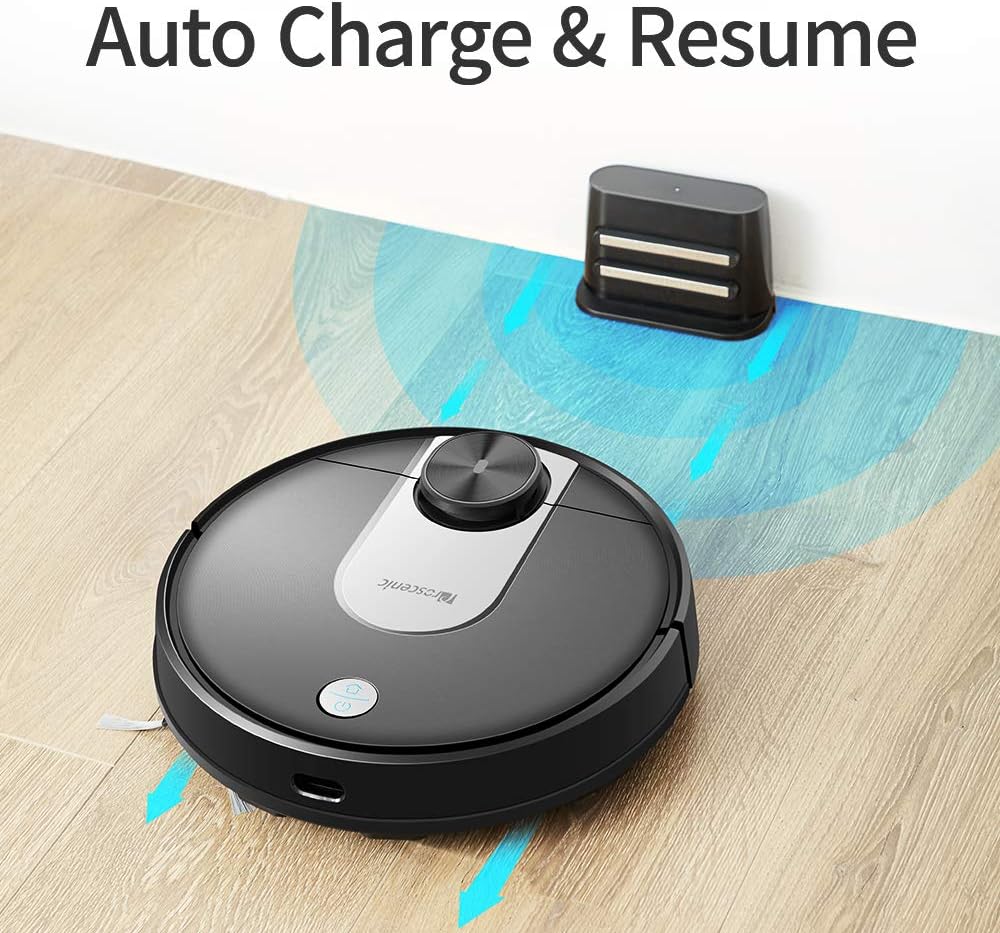
Image: The Proscenic M7 robot vacuum approaching its charging station, demonstrating its auto-charge and resume function.
4.2 Installing the ProscenicHome App
The ProscenicHome app allows you to control your robot vacuum remotely and access advanced features.
- Unduh aplikasi "ProscenicHome" ti App Store (iOS) atanapi Google Play Store (Android).
- Ngadaptar akun tur asup.
- Follow the in-app instructions to add your Proscenic M7 device. Ensure your phone is connected to a 2.4GHz Wi-Fi network, as the robot does not support 5GHz networks.
- During the binding process, ensure the robot is fully charged and near your Wi-Fi router for optimal connection. If you encounter issues, try restarting your router or moving the robot closer.

Image: A smartphone screen displaying the ProscenicHome app interface. It shows a generated cleaning map, current cleaned area, battery level, and cleaning time. Icons for scheduling, map saving, zoned cleaning, mopping, no-go zones, spot cleaning, and remote control are visible, along with compatibility logos for Alexa, Android, and iPhone.
5. Parentah Operasi
5.1 Ngamimitian siklus beberesih
- Mimitian Manual: Pencét tombol daya dina robot sakali pikeun ngamimitian siklus beberesih lengkep.
- Kontrol Aplikasi: Open the ProscenicHome app and tap "Start" to initiate cleaning.
- The robot will use its laser navigation to map your home and plan an efficient cleaning path.
5.2 Modeu beberesih
The Proscenic M7 offers various cleaning modes accessible via the ProscenicHome app:
- beberesih otomatis: The robot intelligently cleans the entire accessible area.
- Beberesihan Tempat: Ngarahkeun robot pikeun ngabersihan wewengkon leutik husus sacara intensif.
- Zoned Cleaning: Define a rectangular area on the app's map for the robot to clean. This requires a saved map.
- Bersihan Tepi: The robot cleans along the perimeter of your rooms.
- Mode ngepel: Attach the water tank and mopping pad for wet cleaning.
5.3 Fungsi Mopping
The M7 features a Y-shaped mopping pattern for effective wet cleaning.
- Fill the 500ml electronically controlled water tank with clean water.
- Pasangkeun bantalan pel pageuh kana tangki cai.
- Replace the dustbin with the filled water tank assembly.
- Select "Mopping Mode" in the app or allow the robot to detect the water tank and switch automatically.
- Adjust the water flow level via the app if desired.

Gambar: A close-up view of the Proscenic M7 robot vacuum, showcasing its large 500ml water tank, designed for extensive mopping coverage.

Gambar: Hiji overhead view of the Proscenic M7 robot vacuum on a wooden floor, illustrating its Y-shaped mopping movement pattern with arrows.
5.4 Map Management and Virtual Walls
- Map Memorization: After completing a full cleaning cycle and successfully returning to the charging dock, the robot will save the generated map. Ensure this feature is enabled in the app.
- Virtual No-Go Zones: Use the app to draw virtual boundaries or "no-go lines" on the map to prevent the robot from entering specific areas.
- Ngabersihan wewengkon: Once a map is saved, you can define specific areas for cleaning.
6. Pangropéa
Pangropéa rutin ngajamin kinerja optimal sareng manjangkeun umur vakum robot anjeun.
6.1 Ngabersihkeun Tempat Sampah sareng Saringan
- Pencét tombol ngaleupaskeun tong sampah sareng cabut tong sampah.
- Kosongkeun eusi tempat sampah kana wadah runtah.
- Remove the filter and tap it gently to dislodge dust. Rinse the filter with water if necessary, ensuring it is completely dry before reinstallation.
- Lap jero tempat sampah ku lawon garing.
- Reinstall the filter and dustbin.
6.2 Ngabersihkeun Tangki Cai sareng Alas Pengepel
- Cabut tank cai tina robot.
- Kosongkeun cai sésana tina tanki.
- Remove the mopping pad and rinse it thoroughly with water. Allow it to air dry.
- Ngabersihan tangki cai nganggo iklanamp cloth and allow it to dry completely before storage or refilling.
6.3 Sikat beberesih sarta sénsor
- Sikat utama: Remove the main brush cover and lift out the brush. Use the cleaning tool (if provided) to remove hair and debris.
- Sikat samping: Periodically check side brushes for tangled hair or debris. Remove and clean them as needed. Replace if worn.
- Sénsor: Gently wipe the LDS sensor, anti-drop sensors, and charging contacts with a clean, dry cloth to ensure they are free of dust and debris.
7. Cara ngungkulan
If you encounter issues with your Proscenic M7, refer to the following common problems and solutions.
| Masalah | Mungkin Cukang lantaranana | Solusi |
|---|---|---|
| Robot henteu ngamimitian atanapi ngabales. | batré lemah; Pareum listrik. | Ensure the robot is fully charged; Check if the main power switch is on. |
| Robot sering macét. | Obstacles (cables, rugs, furniture); Drop sensors dirty. | Clear the cleaning area of obstacles. Use virtual no-go zones for problematic areas. Clean drop sensors. |
| App connection issues (Binding Error). | Incorrect Wi-Fi band (5GHz); Weak Wi-Fi signal; Robot not fully charged. | Ensure your phone is on a 2.4GHz Wi-Fi network. Move the robot closer to the router. Ensure the robot is fully charged before binding. Try restarting your router. |
| Robot henteu uih deui ka dok ngecas. | Charging dock obstructed; Charging contacts dirty. | Ensure the charging dock area is clear. Clean the charging contacts on both the robot and the dock. |
| Kinerja beberesih goréng. | Tong sampah pinuh; Sikat kusut; Saringan mampet. | Empty the dustbin. Clean the main and side brushes. Clean or replace the filter. |
| Mopping leaves streaks or misses spots. | Mopping pad dirty or dry; Water tank empty; Water flow setting too low. | Clean or wet the mopping pad. Refill the water tank. Adjust water flow in the app. |
| Map not saving or virtual walls not working. | First full cleaning cycle not completed; App glitch. | Ensure the robot completes a full cleaning cycle and returns to the dock successfully to generate and save the map. Restart the app or robot if issues persist. |
8. Spésifikasi
| Fitur | Rincian |
|---|---|
| merek | Proscenic |
| Ngaran modél | M7 |
| Fitur husus | Zona Dilarang Mudik |
| Warna | Hideung |
| Komponén Kaasup | Batré |
| Jenis Filter | Kartrid |
| Kahirupan batré | Up to 1.5 Hours (3200mAh capacity) |
| Kapasitas tong sampah | 0.5 liter |
| Kapasitas Tangki Cai | 500ml |
| Sumber Daya | Batré Powered |
| Métode kontrol | Voice (Alexa), App |
| Alat nu cocog | Amazon Echo (Alexa) |
| Faktor Bentuk | Robotik |
| Dimensi produk | 16.5 x 13.4 x 5.5 inci |
| Item Beurat | 12.62 pon |
| Surface Rekomendasi | Karpét, Hard Floors |
9. Garansi jeung Rojongan
For warranty information or technical support, please refer to the warranty card included with your product or visit the official Proscenic website. You may also contact Proscenic customer service directly for assistance with product operation, maintenance, or troubleshooting beyond this manual.


