1. Bubuka
Hatur nuhun pikeun meuliasing the Infocus 24-inch 720p LED TV, model IM24ED800. This manual provides essential information for setting up, operating, and maintaining your television. Please read this manual thoroughly before using the product and retain it for future reference.
Émbaran Kasalametan
- Ulah ngalaan TV ka hujan atawa beueus.
- Entong meungpeung lawang angin.
- Mastikeun vol catu daya ditangtoskeuntage.
- Nangtayungan kabel kakuatan tina keur leumpang dina atawa pinched.
- Rujuk sadayana jasa ka tanaga jasa anu mumpuni.
- Jauhkeun TV tina sinar panonpoé langsung, sumber panas, sareng médan magnét anu kuat.
2. Eusi Paket
Mangga cék kotak pikeun item di handap ieu:
- Infocus 24-inch 720p LED TV (IM24ED800)
- Remote Control (kalayan batré, upami kalebet)
- Kabel listrik
- Stand TV (2 buah)
- Screws pikeun TV Stand
- Manual pangguna (dokumén ieu)
3. Setélan
3.1 Ngagantelkeun TV Stand
To attach the stand to your Infocus TV:
- Teundeun layar TV sacara saksama dina permukaan anu lemes sareng bersih pikeun nyegah goresan.
- Sejajarkeun unggal potongan nangtung sareng slot anu cocog dina handapeun TV.
- Ngamankeun unggal sapotong nangtung ngagunakeun screws disadiakeun. Pastikeun aranjeunna tightened pageuh.
- Angkat TV sacara saksama teras teundeun dina permukaan datar anu stabil.
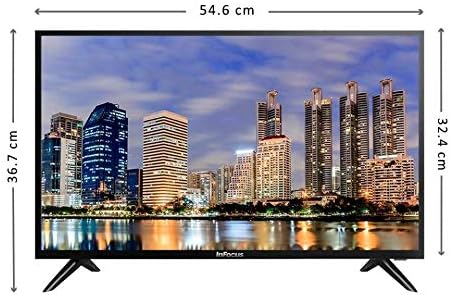
Gambar: Hareupeun view of the Infocus 24-inch LED TV with dimensions indicated. The TV measures approximately 54.6 cm in width and 36.7 cm in height with the stand.
3.2 Nyambungkeun Alat
Your Infocus TV features multiple input ports for connecting external devices.

Gambar: Tukangeun view of the Infocus 24-inch LED TV, highlighting the location of various input ports including HDMI and USB.
- Sambungan HDMI: Connect Blu-ray players, game consoles, or cable/satellite boxes to the HDMI ports. The TV has 2 HDMI inputs.
- Sambungan USB: Connect USB flash drives for media playback to the USB ports. The TV has 2 USB inputs.
- Antena/Kabel: Connect an antenna or cable TV signal to the RF input (if available, not explicitly listed but standard for TVs).
- kakuatan: Sambungkeun kabel listrik ka input kakuatan TV lajeng ka stop kontak témbok.
3.3 Daya Awal Hurung
Saatos nyambungkeun sadaya kabel anu diperyogikeun:
- Ensure the power cord is securely plugged into both the TV and a power outlet.
- Pencét tombol Daya dina kadali jauh atanapi dina TV sorangan.
- Follow the on-screen instructions for initial setup, which may include language selection, time zone, and channel scanning.
4. Ngoperasikeun TV Anjeun
4.1 Jauh Control Leuwihview
The remote control allows you to access all TV functions. While specific button layouts may vary, common functions include:
- kakuatan: Ngahurungkeun atawa mareuman TV.
- Input/Sumber: Milih sumber input (HDMI 1, HDMI 2, USB, TV).
- Volume Kaluhur/Turun: Nyaluyukeun tingkat sora.
- Saluran luhur/handap: Robah saluran TV.
- Jempé: Ngajempékeun audio TV.
- Menu: Opens the main menu for settings adjustments.
- Tombol Napigasi (Kaluhur/Turun/Kénca/Katuhu/OK): Dipaké pikeun nganapigasi ménu jeung mastikeun selections.
- Exit/Back: Mulih ka layar saméméhna atawa kaluar tina menu.
4.2 Fungsi Dasar
- Ngarobah Sumber Input: Pencét éta Input or Sumber button on your remote control. Use the navigation buttons to select the desired input (e.g., HDMI 1, USB) and press OK.
- Nyaluyukeun Volume: Ngagunakeun éta Volume Naik (+) or Volume Turun (-) kancing.
- Ngarobih Saluran: Ngagunakeun éta Channel Up (CH+) or Channel Down (CH-) kancing.
4.3 USB Media Playback
Pikeun muterkeun média files from a USB flash drive:
- Insert a USB flash drive into one of the TV's USB ports.
- Pencét éta Input or Sumber tombol dina kadali jarak jauh anjeun sareng pilih USB.
- Browser média TV kedahna némbongan. Navigasi ngaliwatan files (photos, music, videos) using the remote control.
- Pilih a file jeung pencét OK pikeun muterkeunana.
5. Pangropéa
5.1 Ngabersihan Layar
- Turn off the TV and unplug the power cord before cleaning.
- Use a soft, lint-free cloth (e.g., microfiber cloth) to gently wipe the screen.
- Pikeun tanda pengkuh, enteng dampen lawon jeung cai atawa cleaner layar husus. Ulah nyemprot cleaner langsung kana layar.
- Hindarkeun nganggo pembersih abrasive, alkohol, bénzéna, atanapi thinners, sabab ieu tiasa ngaruksak layar.
5.2 Perawatan Umum
- Keep the TV in a well-ventilated area.
- Hindarkeun nempatkeun barang beurat dina luhureun TV.
- Cabut colokan TV salila badai kilat atawa lamun teu dipaké pikeun période nambahan.
6. Cara ngungkulan
Upami anjeun ngalaman masalah sareng TV anjeun, tingal masalah sareng solusi umum ieu:
| Masalah | Mungkin Cukang lantaranana | Solusi |
|---|---|---|
| Taya kakuatan | Power cord not connected; power outlet issue | Pastikeun kabel listrik dicolokkeun sacara aman. Uji stop kontak nganggo alat anu sanés. |
| Henteu aya gambar, tapi aya sora | Incorrect input source selected; loose video cable | Pencét éta Input/Sumber tombol pikeun milih input anu leres. Pariksa sambungan kabel vidéo. |
| Henteu aya sora, tapi aya gambar | Volume muted or too low; audio cable issue | Pencét éta Ngajempékeun tombol atawa ningkatkeun polumeu. Pariksa sambungan kabel audio. |
| Kadali jauh teu jalan | Batré béak; halangan; sensor jauh diblokir | Replace batteries. Remove any obstructions between the remote and TV. Ensure the TV's remote sensor is clear. |
| "No Signal" pesen | Incorrect input source; device not powered on; cable issue | Verify the correct input source is selected. Ensure the connected device is powered on. Check all cable connections. |
7. Spésifikasi
The following are the technical specifications for the Infocus 24-inch 720p LED TV model IM24ED800:
| Fitur | Rincian |
|---|---|
| Nomer modél | IM24ED800 |
| Ukuran layar | 24 inci (61 cm) |
| Téknologi tampilan | LED |
| Resolusi | 1366 x 768 (720p HD) |
| Refresh Laju | 60 Hz |
| Masukan HDMI | 2 |
| Input USB | 2 |
| Konektipitas | HDMI, USB |
| Tipe Pamasangan | Méja Stand |
| Ukuran Paket | 60.8 x 37.8 x 12 cm |
| Beurat pakét | 5 kg |
8. Garansi jeung Rojongan
This Infocus TV is sold as a renewed product, which typically comes with a limited warranty provided by the seller or refurbisher. Please refer to your purchase documentation or contact your retailer for specific warranty terms and conditions.
For technical support or service inquiries, please contact the customer support channel provided by your retailer or the Infocus support websitus.


