
Bubuka
This manual provides instructions for the proper setup, operation, and maintenance of your Gembird MUS-4B-01 USB Optical Mouse. Please read this manual thoroughly before using the device to ensure optimal performance and longevity.
Disetél
Follow these steps to connect your Gembird MUS-4B-01 USB Optical Mouse to your computer.
- Buka bungkus Beurit: Taliti miceun beurit tina bungkusanna.
- Nyambung ka Port USB: Locate an available USB port on your computer. Insert the USB connector of the Gembird MUS-4B-01 mouse firmly into the USB port.
- Pamasangan supir otomatis: Your operating system (Windows 7/8/10) will typically detect the new hardware and install the necessary drivers automatically. This process may take a few moments.
- Verifikasi Fungsionalitas: Once the drivers are installed, move the mouse to check if the cursor on your screen responds. If the cursor moves, the mouse is ready for use.
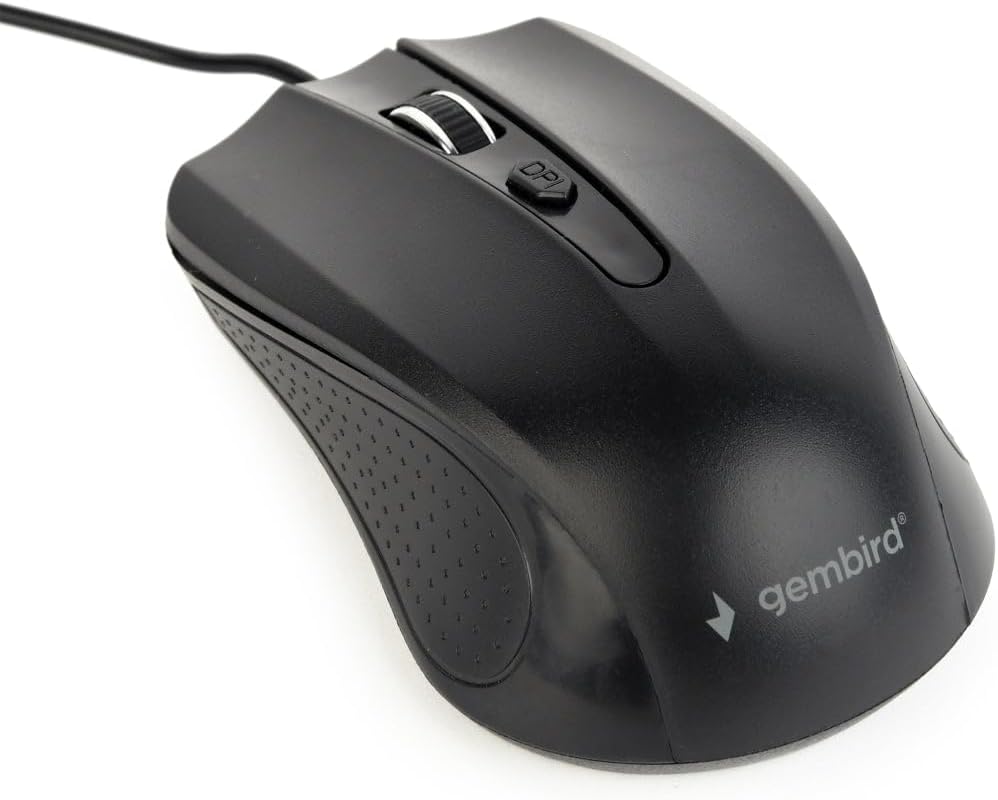
Image: The Gembird MUS-4B-01 USB Optical Mouse, showing its black design and USB cable, ready for connection.
Parentah Operasi
The Gembird MUS-4B-01 mouse features standard controls for efficient navigation.
- Tombol kénca: Dianggo pikeun milih barang, ngaklik tautan, sareng ngalakukeun tindakan utama.
- Tombol katuhu: Dianggo pikeun ngaksés menu kontéks sareng fungsi sekundér.
- Gulung kabayang: Gulung kaluhur atanapi kahandap pikeun ngagulung dokumén sareng web pages. The scroll wheel can also be pressed as a middle button for additional functions (e.g., opening links in new tabs).
- Tombol DPI: Located behind the scroll wheel, this button allows you to adjust the mouse's sensitivity (Dots Per Inch) on the fly. Press it to cycle through available DPI settings to match your preference.

Gambar: A close-up view of the Gembird MUS-4B-01 mouse, highlighting the scroll wheel and the DPI adjustment button.
Pangropéa
Pangropéa anu leres mastikeun umur panjang sareng kinerja mouse anjeun anu optimal.
- beberesih: Anggo kaén anu lembut sareng garing pikeun ngusap permukaan beurit. Keur kokotor bandel, rada dampen lawon ku cai atawa solusi beberesih hampang. Hindarkeun bahan kimia anu kasar atanapi bahan abrasive.
- Sénsor optik: Periodically check the optical sensor on the underside of the mouse for dust or debris. Use a soft brush or compressed air to gently clean the sensor area. Do not touch the sensor directly.
- Perawatan kabel: Avoid bending or twisting the USB cable sharply. Store the mouse in a way that prevents the cable from being crimped or damaged.
- Panyimpenan: Upami henteu dianggo salami lami, simpen beurit dina lingkungan anu bersih sareng garing, jauh tina suhu anu ekstrim.
Pamérésan masalah
If you encounter issues with your Gembird MUS-4B-01 mouse, refer to the following common solutions.
- Beurit Teu Ngabales:
- Pastikeun kabel USB tos aman dicolokkeun kana port USB anu tiasa dianggo dina komputer anjeun.
- Coba colokkeun beurit ka port USB anu béda.
- Balikan deui komputer anjeun.
- Tés beurit dina komputer séjén pikeun nangtukeun naha masalahna aya dina beurit atawa komputerna.
- Gerak Kursor Erratic atanapi Jumpy:
- Ngabersihan sensor optik dina underside beurit.
- Pastikeun anjeun ngagunakeun beurit dina permukaan anu bersih, henteu reflektif, sareng seragam (contona, alas beurit).
- Atur setélan DPI nganggo tombol DPI dina beurit.
- Tombol atanapi Roda Gulung Henteu Jalan:
- Pariksa naha aya halangan fisik di sabudeureun tombol atanapi roda gulung.
- Ensure the mouse drivers are correctly installed. You can check Device Manager on Windows.
- Coba balikan deui komputer anjeun.
spésifikasi
Key technical specifications for the Gembird MUS-4B-01 USB Optical Mouse.
| Fitur | Rincian |
|---|---|
| merek | Manuk permata |
| Ngaran modél | MUS-4B-01 |
| Téhnologi konektipitas | USB |
| Téhnologi Deteksi Gerakan | Optik |
| Jumlah Kancing | 4 |
| Orientasi leungeun | Ambidextrous |
| Sistem Operasi cocog | Windows 7/8/10 |
| Platform hardware | PC |
| Item Beurat | 71 gram |
| Warna | Hideung |
Garansi sareng Rojongan
For warranty information or technical support, please refer to the documentation included with your purchase or visit the official Gembird websitus. Simpen bukti pameseran anjeun pikeun klaim garansi.