1. Bubuka
This manual provides detailed instructions for the installation, operation, and maintenance of your Lorex 2K Wi-Fi Smart Lightbulb Camera. Please read this manual thoroughly before using the product to ensure proper functionality and safety. This camera is designed for both indoor and outdoor use, offering 2K resolution, pan-tilt functionality, color night vision, and smart detection features.
2. Émbaran Kasalametan
- Kasalametan listrik: Ensure the power is off at the circuit breaker before installing or removing the camera from any light socket.
- Lokasi Instalasi: Install the camera in a standard E26 or E27 light socket. For outdoor use, ensure the socket is covered and protected from direct weather exposure.
- Suhu operasi: The camera is rated for outdoor conditions from approximately -4°F to 122°F (-20°C to 50°C).
- Tahan cai: The camera has an IP65 rating, indicating it is weatherproof and protected against dust and low-pressure water jets. However, it is not submersible.
- Sumber Daya: Use only the specified power source (110-220Vac / 0.06A).
- Barudak jeung Pets: Keep the device out of reach of children and pets to prevent accidental damage or injury.
3. Naon dina Box
pakét ngawengku komponén di handap:
- 1 x Lorex 2K Wi-Fi Smart Lightbulb Camera
- 1 x Light Socket Adapter (for initial setup/testing)
- 1 x Gancang Mimitian Guide
4. Produk Langkungview
The Lorex 2K Wi-Fi Smart Lightbulb Camera integrates a security camera into a standard lightbulb form factor, allowing for discreet and easy installation. It features a pan-tilt lens for wide coverage and an integrated LED light.
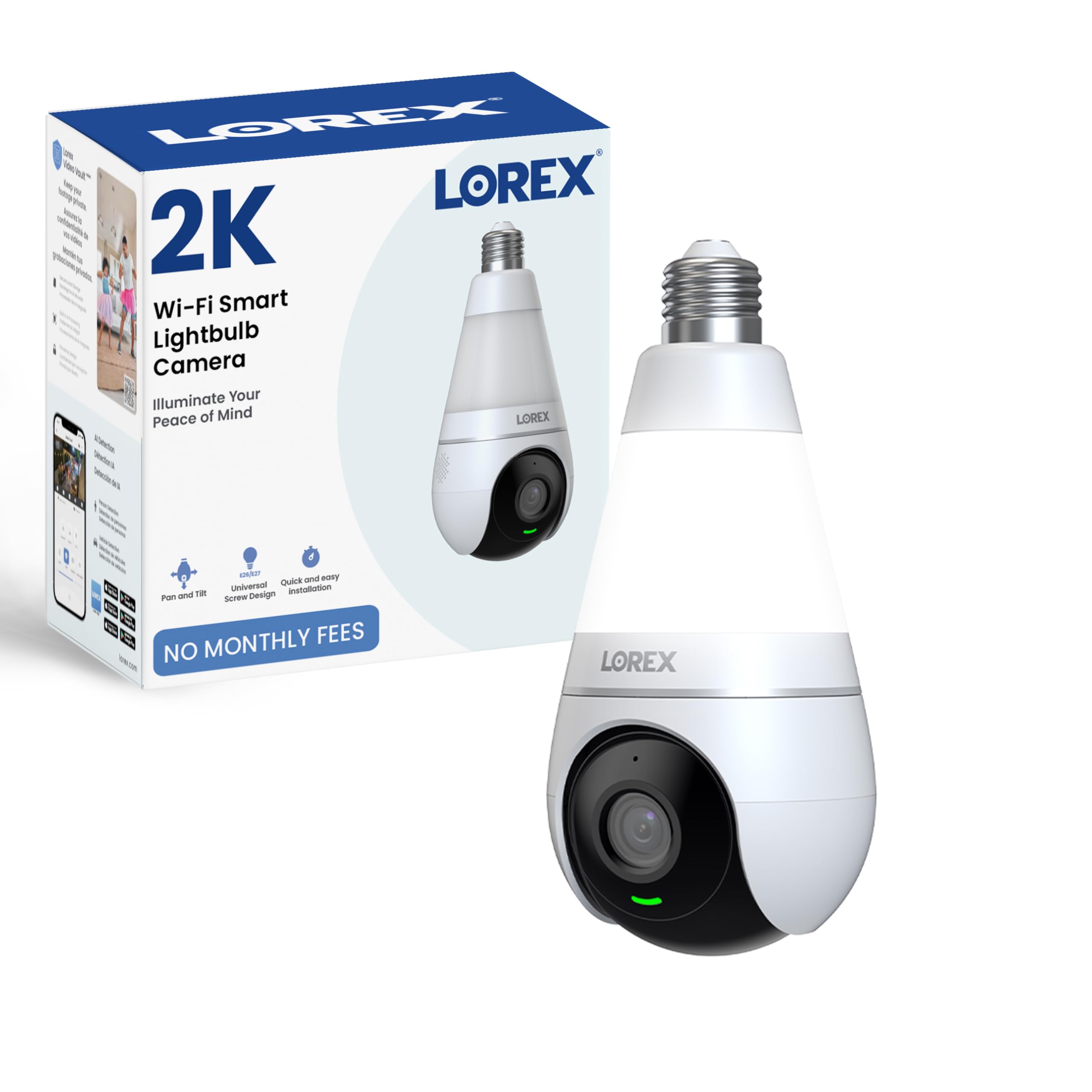
Figure 4.1: Lorex 2K Wi-Fi Smart Lightbulb Camera (Front View)

Gambar 4.2: Balik view of the camera showing model number and specifications.
5. Setélan
Setting up your Lorex Lightbulb Camera is a straightforward process. Follow these steps for quick installation and configuration.
5.1. Instalasi fisik
- Pareum listrik: Before installation, ensure the power to the light socket is turned off at the circuit breaker to prevent electrical shock.
- Lebetkeun: Carefully screw the Lorex Lightbulb Camera into a standard E26 or E27 light socket. Ensure it is securely fastened but do not overtighten. If the socket is recessed or requires more clearance, use the provided light socket adapter.
- Daya Hurung: Restore power to the light socket from the circuit breaker. The camera's LED indicator will light up, indicating it is powering on.

Figure 5.1: The camera screws directly into a standard lightbulb socket for easy installation.
5.2. App Download and Wi-Fi Connection
- Unduh Aplikasi: Download the 'Lorex Home' app from your smartphone's app store (available for Android and iOS).
- Ngadamel akun: Open the app and follow the on-screen instructions to create a new Lorex account or log in if you already have one.
- Tambahkeun Alat: Tap the '+' icon in the app to add a new device. Select the 'Lightbulb Camera' from the list of devices.
- Nyambung ka Wi-Fi: Follow the app's prompts to connect the camera to your home Wi-Fi network. Ensure your phone is connected to a 2.4GHz Wi-Fi network during the setup process, as the camera supports both 2.4GHz and 5GHz bands but initial setup often requires 2.4GHz.
- papasangan: The app will guide you through the pairing process, which may involve scanning a QR code or listening for an audible prompt from the camera.
Video 5.1: Official Lorex video demonstrating the setup process for the 2K Wi-Fi Smart Lightbulb Camera, including app pairing and initial configuration.
6. Parentah Operasi
Once installed and connected, you can access and control your Lorex Lightbulb Camera through the Lorex Home app.
6.1. Hirup View sareng Kontrol Pan-Tilt
- Open the Lorex Home app and select your camera to view eupan hirup.
- Use the on-screen controls to pan (horizontal) and tilt (vertical) the camera lens, providing 360° coverage of the area.

Figure 6.1: The camera offers 360-degree pan and tilt functionality for comprehensive area coverage.
6.2. Kualitas Pidéo sareng Visi Peuting
- The camera records in 2K resolution (2560 x 1440 pixels) for clear video. You can adjust the resolution settings within the app.
- Warna Night Vision: The camera features enhanced color night vision, providing full-color footage sanajan dina kondisi cahaya remen.
- Infrabeureum Night Vision: For complete darkness, the camera utilizes infrared light, which is invisible to the human eye, to provide clear black and white video.

Figure 6.2: The camera delivers crisp 2K resolution video.

Gambar 6.3: Kelample of Color Night Vision in action.
6.3. Deteksi Gerakan Pinter
- The camera is equipped with smart motion detection, capable of distinguishing between people and vehicles.
- Configure detection zones and sensitivity settings within the app to minimize false alerts.
- Receive real-time notifications on your smartphone when motion is detected.

Figure 6.4: The app interface showing options for Person and Vehicle Detection.
6.4. Two-Way Talk and Quick Replies
- Utilize the built-in microphone and speaker for two-way audio communication through the app.
- Send pre-recorded quick replies to visitors or deter intruders remotely.

Figure 6.5: Interacting with visitors using the two-way talk feature.
6.5. Integrated LED Light Functions
The camera features a dimmable 400 Lumen LED light (6500K Cool White) with multiple operating modes:
- Modeu Manual: Turn the light on or off directly from the Lorex app.
- Diaktipkeun gerak: Lampuna otomatis hurung nalika aya gerakan anu dideteksi.
- Jadwal Smart: Set custom schedules for the light to turn on/off at specific times or based on sunrise/sunset.
- Mode libur: Simulate occupancy by having the light turn on and off at randomized intervals.

Gambar 6.6: Leuwihview of the four unique light modes.
6.6. Pilihan Panyimpenan
Your camera offers flexible storage solutions for recorded footage:
- Panyimpenan Lokal: Insert a microSD card (up to 256GB, sold separately) into the camera for continuous 24/7 recording.
- Panyimpenan awan: Optional cloud storage plans are available for remote backup of your recordings.
- Perekam Lorex Fusion: The camera can be integrated with compatible Lorex Fusion recorders for expanded storage and system management.

Figure 6.7: Visual representation of local (microSD) and cloud storage options.
6.7. Modeu Privasi
- Aktipkeun Modeu Privasi via aplikasi pikeun nyumputkeun lénsa kaméra sacara fisik, mastikeun privasi nalika diperyogikeun.

Figure 6.8: Privacy Mode physically conceals the camera lens.
7. Pangropéa
- beberesih: Lap lénsa sareng awak kaméra ku lawon anu lemes sareng garing. Entong nganggo bahan kimia anu keras atanapi pembersih anu kasar.
- Pembaruan firmware: Regularly check the Lorex Home app for available firmware updates to ensure optimal performance and security.
- Kartu MicroSD: If using local storage, periodically check the microSD card for errors or fill status. Replace if necessary.
8. Cara ngungkulan
| Masalah | Mungkin Cukang lantaranana | Solusi |
|---|---|---|
| Kaméra teu nyambung ka Wi-Fi | Incorrect Wi-Fi password; Camera too far from router; 5GHz network selected during initial setup. | Verify Wi-Fi password. Move camera closer to router. Ensure your phone is connected to a 2.4GHz network during initial setup. Reset camera and try again. |
| Kualitas pidéo goréng | Weak Wi-Fi signal; App resolution settings too low; Dirty lens. | Improve Wi-Fi signal strength. Adjust video resolution to 2K in app settings. Clean the camera lens. |
| Peringatan gerakan palsu anu sering | High motion sensitivity; Wide detection zones. | Adjust motion sensitivity in the app. Configure specific detection zones to exclude irrelevant areas (e.g., moving trees). |
| Audio dua arah teu jelas | Weak network connection; Environmental noise. | Ensure a stable Wi-Fi connection. Reduce background noise if possible. |
| Light not turning on/off as expected | Incorrect light mode settings; Scheduling conflicts. | Check the light mode settings (Manual, Motion-activated, Smart Scheduling, Vacation Mode) in the app and adjust as needed. |
9. Spésifikasi
| Fitur | Rincian |
|---|---|
| Resolusi Capture Video | 2K (2560 x 1440) |
| Protokol konektipitas | Wi-Fi (2.4GHz & 5GHz compatible) |
| Sumber Daya | Light Socket (E26/E27) |
| Tipe Pamasangan | Soket Lampu |
| Viewdina Angle | 360 Degrees (Pan-Tilt) |
| Wengi Sawangan Sawangan | Nepi ka 33 Feet (10 méter) |
| Téhnologi Lampu Lemah | Warna Peuting Visi |
| Fitur husus | 2-Way Audio, Local Recording, Motion Sensor, PTZ Technology, Person & Vehicle Detection |
| Lampu terpadu | Dimmable LED, 6500K Cool White, 400 Lumens |
| Pilihan Panyimpenan | MicroSD (up to 256GB), Cloud Storage, Lorex Fusion Recorders |
| Tingkat Résistansi Cai | IP65 Cuaca |
| Ukuran (L x W x H) | 9.84 x 3.94 x 3.94 inci |
| Item Beurat | 12.3 ons |
| Nomer modél | Lightbulb Camera |
10. Garansi jeung Rojongan
Lorex products are designed for reliability and performance. For warranty information, technical support, and additional resources, please visit the official Lorex websitus atanapi ngahubungan layanan palanggan maranéhna. Simpen resi pameseran anjeun salaku bukti pameseran pikeun klaim garansi.
Dukungan Online: www.lorex.com/support


