1. Bubuka
Thank you for choosing the electriQ Portable Slimline Air Cooler. This 3-in-1 appliance functions as an air cooler, air purifier, and humidifier, designed to enhance your indoor comfort. This manual provides essential information for the safe and efficient operation, setup, and maintenance of your new air cooler. Please read it thoroughly before use and retain it for future reference.
2. Émbaran Kasalametan
Pikeun ngurangan résiko kahuruan, kejutan listrik, atawa tatu, salawasna turutan pancegahan kaamanan dasar nalika ngagunakeun alat ieu.
- Baca sadaya parentah kalayan saksama sateuacan ngoperasikeun unit ieu.
- Pastikeun catu daya cocog sareng voltage dieusian dina labél rating.
- Ulah ngajalankeun unit ku kabel ruksak atawa colokan. Upami kabelna ruksak, éta kedah digentos ku produsén, agén jasa, atanapi jalma anu mumpuni anu sami pikeun nyegah bahaya.
- Salawasna cabut colokan alat tina stopkontak sateuacan beberesih, ngalayanan, atanapi mindahkeun.
- Entong neuleumkeun unit, kabel listrik, atanapi nyolok kana cai atanapi cairan sanés.
- This appliance is for indoor use only. Do not use it outdoors or in wet conditions.
- Jauhkeun alat ieu tina sumber panas, sinar panonpoé langsung, sareng bahan anu gampang kaduruk.
- Pastikeun unit disimpen dina permukaan datar anu stabil pikeun nyegah tipping.
- Do not block the air inlets or outlets. Maintain at least 20cm clearance around the unit.
- Do not insert fingers or foreign objects into the air grille.
- Ngawaskeun barudak sareng mastikeun aranjeunna henteu maén sareng alatna.
- Only use clean tap water in the water tank. Do not add chemicals or other substances.
- Empty the water tank when the unit is not in use for an extended period.
3. Eusi Paket
Mangga parios eusi pakét anjeun:
- electriQ Portable Slimline Air Cooler Unit
- Kadali jauh
- 2 x És Bungkusan
- Manual pangguna (dokumén ieu)
4. Produk Langkungview

Hareupeun view of the air cooler, showing the air outlet louvres and water level indicator.

Diwincik view of the top control panel, indicating buttons for Oscillation, Cool, Ioniser, Timer, Mode, Fan Speed, and Power.
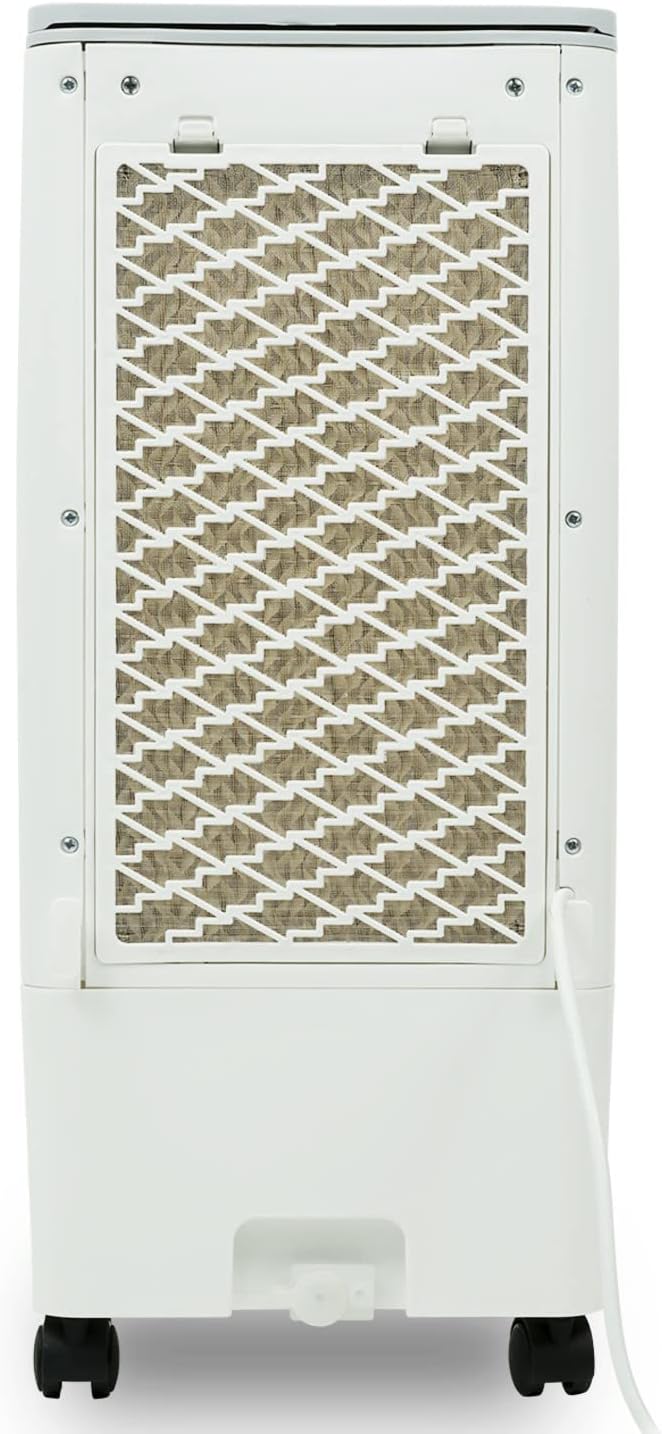
Tukangeun view of the air cooler, highlighting the removable honeycomb cooling pad and air filter.
Komponén konci:
- Panél kontrol: Tombol sénsitip toél pikeun sadaya fungsi.
- Air Outlet Louvres: Adjustable for directing airflow.
- Tangki cai: 6-liter capacity with MAX/MIN indicators for water level.
- Honeycomb Cooling Pads: Located at the rear, essential for evaporative cooling and air filtration.
- Saringan Inlet Udara: Protects internal components from dust.
- Roda kastor: Pikeun mobilitas unit anu gampang.
- Mawa cecekelan: Integrated for convenient lifting.
5. Setélan
- Ngabongkar bungkusan: Carefully remove the air cooler from its packaging. Retain the packaging for future storage or transport.
- panempatan: Place the unit on a firm, level surface. Ensure there is adequate ventilation around the unit, at least 20cm from walls or furniture, to allow for proper airflow. For optimal cooling, ensure good air circulation in the room (e.g., open a window slightly).
- Ngeusian Tangki Cai:
- Open the water tank cover located on the top of the unit.
- Pour clean tap water into the tank, ensuring the water level is between the 'MIN' and 'MAX' indicators on the front of the unit. Do not overfill.
- For enhanced cooling, place the two included ice packs (or ice cubes) directly into the water tank.

Adding the included ice packs to the water tank for improved cooling performance.
- Daya Nyambungkeun: Colokkeun kabel listrik kana stop kontak listrik anu cocog. Unit bakal asup kana mode standby.
6. Operasi
The air cooler can be operated using the touch control panel on top of the unit or the supplied remote control.
Fungsi Panel Kontrol:
- Tombol Daya (⏻): Pencét pikeun ngahurungkeun atanapi mareuman unit.
- Tombol Mode: Siklus ngaliwatan modeu operasi anu béda: Normal, Alami, sareng Saré.
- Tombol Speed: Adjusts fan speed (Low, Medium, High). There are 3 fan speeds available.
- Tombol Timer: Sets the operating timer from 1 to 7 hours. Each press adds 1 hour.
- Cooler Button: Activates or deactivates the evaporative cooling function. Ensure water is in the tank when using this mode.
- Ioniser Button: Activates or deactivates the air ioniser for improved air quality.
- Tombol ayun: Activates or deactivates the automatic oscillation of the vertical louvres for wider air distribution.
Modeu Operasi:
- Modeu Normal: Provides a constant airflow at the selected fan speed.
- Mode alam: Simulasikeun angin alami ku cara ngarobih kecepatan kipas sacara berkala.
- Modeu Bobo: Reduces fan speed and noise level for quiet operation, ideal for nighttime use.
Fungsi cooling:
The unit uses evaporative cooling. Water from the tank is pumped over the honeycomb cooling pads. As air passes through these wet pads, water evaporates, absorbing heat from the air and lowering its temperature. This process also adds humidity to the air and acts as an air filter. For best results, ensure the water tank is filled and consider adding ice packs.
7. Pangropéa
Regular cleaning and maintenance will ensure the longevity and optimal performance of your air cooler. Always unplug the unit before performing any maintenance.
Ngabersihan Luar:
- Ngusap permukaan luar kalayan lemes, damp lawon.
- Ulah make cleaners abrasive, lilin, atawa pangleyur sabab bisa ngaruksak finish.
Ngabersihan Tangki Air:
- Empty the water tank regularly, especially if the unit will not be used for a few days.
- Remove the water tank (if detachable) or access the inside through the top opening.
- Bersihkeun tanki nganggo deterjen hampang teras bilas tuntas ku cai bersih.
- Ensure the tank is completely dry before refilling or storing.
Cleaning the Honeycomb Cooling Pads and Air Filter:
- The honeycomb cooling pads and air filter are located behind the rear grille.
- Carefully remove the rear grille and then slide out the cooling pads and filter.
- Rinse the cooling pads and filter under running water to remove dust and mineral deposits. For stubborn dirt, use a soft brush.
- Allow them to air dry completely before reinserting them into the unit.
- Clean these components at least once a month, or more frequently depending on usage and air quality.
Panyimpenan:
- If storing the unit for an extended period, ensure the water tank is empty and clean, and the cooling pads are dry.
- Simpen unit dina tempat anu tiis sareng garing, langkung saé dina bungkusan aslina.
8. Cara ngungkulan
Sateuacan ngahubungi dukungan, mangga tingal masalah sareng solusi umum ieu:
| Masalah | Mungkin Cukang lantaranana | Solusi |
|---|---|---|
| Unit teu hurung | Teu aya catu daya; Kabel daya teu dipasang; Tombol daya teu dipencet. | Pariksa stop kontak listrik; Pastikeun kabel listrik dicolokkeun sacara aman; Pencét tombol Daya. |
| Taya pangaruh cooling | Water tank empty; Cooler function not activated; Honeycomb pads are dry or dirty. | Fill water tank; Press the Cooler button; Clean or wet the honeycomb pads. |
| Aliran hawa lemah | Air inlet/outlet blocked; Fan speed too low; Filter dirty. | Clear obstructions; Increase fan speed; Clean the air filter. |
| Sora teu biasa | Unit not on a level surface; Water pump issue (if gurgling); Foreign object inside. | Place on a flat surface; Check water level (if pump noise); Unplug and inspect for obstructions. |
| Leak cai | Water tank overfilled; Unit tilted; Drain plug loose. | Do not overfill; Ensure unit is level; Check drain plug is secure. |
9. Spésifikasi
| Fitur | Spésifikasi |
|---|---|
| Nomer modél | AC60E |
| Ukuran (W x H x D) | 26 cm x 56.5 cm x 23.5 cm |
| Beurat | 3.51 kg (empty) / 3.95 kg (packaged) |
| Kapasitas Tangki Cai | 6 liter |
| Laju kipas | 3 (Henteu, Sedeng, Luhur) |
| Max. Tiupan hawa | 216 m³/jam |
| Timer | Nepi ka 7 jam |
| Kakuatan | 180W |
| Catu daya (V) | 200-240V |
| Fitur husus | Air Purification Filter, Humidifier, Digital Controls, Remote Control, Castor Wheels |

Diménsi leuwihview of the electriQ Portable Slimline Air Cooler.

The unit features built-in castor wheels for easy movement and portability.
10. Garansi jeung Rojongan
Kanggo inpormasi garansi atanapi dukungan téknis, mangga tingal dokuméntasi pameseran atanapi ngahubungi pangecér anjeun. Simpen bukti pameseran anjeun pikeun klaim garansi.


