
Sharp LC-40LE185M
Sharp 40-inch LED TV (Model LC-40LE185M) User Manual
Model: LC-40LE185M
1. Bubuka
This manual provides essential information for the safe and efficient use of your Sharp 40-inch LED TV, model LC-40LE185M. Please read these instructions thoroughly before operating the television and retain them for future reference. This television is designed to provide a high-quality viewing experience with its 1366 x 768 resolution display and various connectivity options.
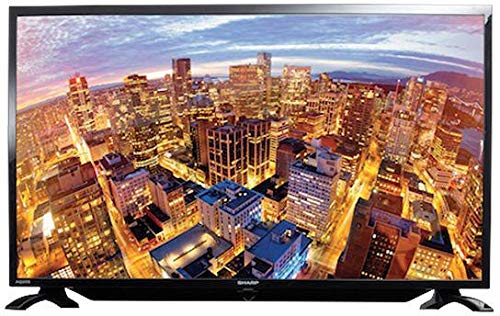
Gambar 1.1: Hareupeun view of the Sharp 40-inch LED TV.
2. Émbaran Kasalametan
Salawasna perhatikeun pancegahan kaamanan di handap ieu pikeun nyegah kejutan listrik, seuneu, atanapi tatu:
- Ulah ngalaan TV ka hujan atawa beueus.
- Ulah muka TV casing. Rujuk sadayana jasa ka tanaga anu mumpuni.
- Mastikeun ventilasi ditangtoskeun; ulah ngahalangan bukaan ventilasi.
- Teundeun TV dina permukaan datar nu stabil pikeun nyegah ragrag.
- Cabut colokan TV nalika badai kilat atanapi nalika henteu dianggo kanggo waktos anu lami.
- Jauhkeun TV tina sinar panonpoé langsung, sumber panas, sareng médan magnét anu kuat.
3. Eusi Paket
Pastikeun yén sadaya item aya dina bungkusan:
- Sharp 40-inch LED TV (Model LC-40LE185M)
- Kadali jauh
- Kabel listrik
- Table-top Stand (including screws)
- Manual pangguna (dokumén ieu)
4. Setélan
4.1 Ngabongkar bungkusan
Cabut TV sareng sadaya asesoris tina bungkusna kalayan ati-ati. Simpen bahan bungkusna kanggo transportasi atanapi panyimpenan engké.
4.2 Ngagantelkeun Stand
If using the table-top stand:
- Teundeun TV nyanghareupan handap dina permukaan lemes, beresih pikeun nyegah karuksakan layar.
- Sejajarkeun stand jeung liang pamasangan di handapeun TV.
- Ngamankeun stand ngagunakeun screws disadiakeun. Pastikeun nangtung napel pageuh.
If wall-mounting, consult a professional installer. Catetan: Some users have reported that the lower screw bracket hole for wall mounting may not be firmly attached, and the frame can be flimsy/wobbly. Exercise caution and ensure secure installation if wall mounting.

Figure 4.1: Illustration of the TV with its table-top stand.
4.3 Nyambungkeun Daya
Sambungkeun kabel listrik ka input kakuatan TV lajeng ka stop kontak témbok.
4.4 Nyambungkeun Alat éksternal
TV anjeun ngadukung rupa-rupa sambungan:
- HDMI: Connect Blu-ray players, gaming consoles, or set-top boxes using HDMI cables. The TV has HDMI ports for compatible devices.
- USB: Sambungkeun alat panyimpenan USB ka view photos or other media. The TV has a USB port for compatible devices.
- MHL: Use MHL connectivity to connect your smartphone to the TV.
5. Parentah Operasi
5.1 Daya Hurung/Pareuman
Press the Power button on the remote control or on the TV to turn the TV on or off. The TV automatically switches to standby mode when there is no signal, saving power consumption.
5.2 Kadali Dasar
Use the remote control to navigate menus, adjust volume, and change channels. Refer to the remote control diagram (not included in this manual) for specific button functions.
5.3 Pamilihan Input
Press the 'Input' or 'Source' button on your remote to select the desired input source (e.g., HDMI 1, USB, TV).
5.4 Gambar jeung Sora Setélan
Access the TV's menu to adjust picture settings (brightness, contrast, color, sharpness) and sound settings (bass, treble, balance, sound mode). The Easy Colour Adjustment feature allows you to achieve ideal color tones.
5.5 Fitur husus
- Elang View Téknologi: Enhances your visual experience with improved display quality.
- AquoMotion Lite Technology: Reduces motion blur and distortions, improving transitions during fast-paced movements.
- Photo Frame Mode: Relive your special memories by displaying vibrant photos on the screen.
- Puterkeun USB: Enjoy content stored on compatible USB devices directly on the TV screen.
- Konektipitas HDMI: Connect various compatible devices for an immersive viewing or gaming experience.
6. Spésifikasi
| Fitur | Spésifikasi |
|---|---|
| merek | Seukeut |
| Nomer modél | LC-40LE185M |
| Ukuran layar | 40 inci |
| Téknologi tampilan | LED |
| Resolusi | 1366 x 768 piksel |
| Refresh Laju | 60 Hz |
| Dimensi produk | 40.8 x 29 x 2.8 cm |
| Beurat | 5.8 kg |
| Téhnologi konektipitas | HDMI, USB |
| Rasio Aspék | 1.77:1 |
| Dirojong jasa Internét | YouTube |
| Fitur husus | Layar lega |
7. Cara ngungkulan
Upami anjeun ngalaman masalah sareng TV anjeun, tingal masalah sareng solusi umum ieu:
- Henteu aya kakuatan: Ensure the power cord is securely connected to both the TV and the wall outlet. Check if the outlet is functional.
- Taya Gambar/Sora: Verify the correct input source is selected. Check all cable connections (HDMI, antenna).
- Kualitas Gambar goréng: Saluyukeun setelan gambar (kacaangan, kontras, seukeutna gambar). Pastikeun sumber input nyadiakeun sinyal kualitas luhur.
- Remote Control Teu Gawé: Check the batteries and ensure there are no obstructions between the remote and the TV's IR sensor.
- TV Automatically Switches to Standby: This is a power-saving feature that activates when no signal is detected. Ensure your input source is active.
Pikeun masalah pengkuh, kontak rojongan customer.
8. Pangropéa
- Ngabersihan layar: Gently wipe the screen with a soft, lint-free cloth. For stubborn marks, use a screen cleaner specifically designed for LED TVs. Do not spray cleaner directly onto the screen.
- Ngabersihkeun Kabinet: Anggo kaén anu lembut sareng garing pikeun ngusap kabinet TV. Ulah make cleaners abrasive atawa pangleyur.
- Ventilasi: Pastikeun bukaan ventilasi dina tonggong TV teu diblokir pikeun nyegah overheating.
9. Garansi jeung Rojongan
Your Sharp TV comes with a standard manufacturer's warranty. Please refer to the warranty card included in your product packaging for details regarding coverage, terms, and conditions. For technical support, service, or warranty claims, please contact Sharp customer service through their official websitus atanapi inpormasi kontak anu disayogikeun sareng dokuméntasi pameseran anjeun.