1. Bubuka
This user manual provides comprehensive instructions for the setup, operation, and maintenance of your SHARP LC-32HI5012E HD Ready Smart LED TV. Please read this manual thoroughly before using your television to ensure proper functionality and safety.
The SHARP LC-32HI5012E is an 81 cm (32-inch) HD Ready Smart LED TV featuring Active Motion 200 technology for enhanced picture quality and a Triple Tuner for versatile reception options. It includes integrated Wi-Fi and a Harman/Kardon sound system for a complete entertainment experience.
2. Eusi Paket
Saatos muka bungkusan, mangga pariksa yén sadaya item di handap ieu kalebet:
- SHARP LC-32HI5012E Main Unit
- Remote Control (kalayan batré)
- Manual pangguna (dokumén ieu)

Gambar: Hareupeun view of the SHARP LC-32HI5012E television, displaying a vibrant city skyline on its screen. This image shows the slim bezel design and the central SHARP logo.
3. Setélan
3.1 Ngarakit Stand
Carefully place the TV screen-down on a soft, flat surface to prevent damage. Attach the two stand feet to the designated slots at the bottom of the TV, securing them with the provided screws. Ensure the stand is firmly attached before proceeding.
3.2 Nyambungkeun périferal
Your TV offers various connection options for external devices:
- Port HDMI (x3): Sambungkeun pamaén Blu-ray, konsol kaulinan, atawa kotak set-top.
- Port USB (x2): Pikeun playback média ti drive USB.
- Antenna In (RF): Connect your terrestrial antenna for DVB-T/T2HD reception.
- Sat In: Sambungkeun parabola anjeun pikeun panarimaan DVB-S/S2.
- RJ45 (LAN): Pikeun sambungan internét kabel.
- CI+ Port: Pikeun modul aksés kondisional (CAM) ka view saluran énkripsi.
- Mini Component/YPbPr, Mini AV Composite: Pikeun alat analog heubeul.
- Kaluaran Audio Optik Digital: Pikeun nyambungkeun ka sistem audio éksternal.
- Audio out / Headphone: Pikeun headphone atanapi speaker éksternal.

Gambar: Tukangeun view of the SHARP LC-32HI5012E television, highlighting the arrangement of various input and output ports for connecting external devices.
3.3 Daya Awal Hurung sareng Setup Kahiji-Waktos
After connecting all necessary cables, plug the power cord into an electrical outlet. Press the power button on the remote control or the TV. The first-time setup wizard will guide you through:
- Pilihan basa.
- Network connection (Wi-Fi or wired LAN).
- Channel scanning for DVB-C, DVB-S/S2, or DVB-T/T2HD.
- Zona waktos sareng setélan dasar anu sanés.
4. Parentah Operasi
4.1 Fungsi TV Dasar
- Hurungkeun/Pareuman: Paké tombol daya dina jauh atawa TV.
- Kontrol volume: Paké tombol VOL +/-.
- Pilihan Saluran: Use CH +/- or number buttons.
- Sumber Input: Press the SOURCE button to switch between HDMI, AV, TV, etc.
- Napigasi Menu: Use arrow keys and OK button to navigate menus.
4.2 Fitur TV Smart
Your SHARP LC-32HI5012E is equipped with integrated Wi-Fi and offers access to various smart features:
- Aplikasi anu tos dipasang: Access popular streaming services like Netflix and YouTube directly.
- Web Browser: Kotektak internét langsung tina TV anjeun.
- Aquos Net+: Access additional online content and services provided by Sharp.
Ensure your TV is connected to the internet for full Smart TV functionality.
4.3 Sistim Audio
The integrated Harman/Kardon sound system provides a high-quality audio experience with excellent dynamics and clarity. Adjust audio settings in the TV menu to customize your sound preferences.
5. Pangropéa
5.1 Ngabersihan Layar
Pikeun ngabersihkeun layar, usap lembut nganggo kaen anu lemes sareng teu aya serat. Pikeun tanda nekad, rada dampen lawon jeung cai atawa cleaner layar husus. Entong semprotkeun cairan langsung kana layar.
5.2 Perawatan Umum
- Jauhkeun TV tina sinar panonpoé langsung sareng sumber panas.
- Pastikeun ventilasi nyukupan sabudeureun TV.
- Cabut colokan TV tina colokan listrik nalika badai kilat atawa lamun ditinggalkeun tanpa dijaga pikeun période lila.
6. Cara ngungkulan
If you encounter any issues with your TV, please refer to the following common problems and solutions before contacting support.
| Masalah | Mungkin Cukang lantaranana | Solusi |
|---|---|---|
| Taya Daya | Power cord unplugged, power outlet issue. | Pariksa sambungan kabel listrik. Cobi stop kontak anu béda. |
| Taya Gambar, tapi Sora Aya Hadir | Sumber input salah, kabel lepat. | Pariksa sumber input anu leres. Pariksa sambungan kabel HDMI/AV. |
| Taya Sora | Volume diredam atawa lemah teuing, masalah sistem audio éksternal. | Unmute volume, increase volume. Check external audio connections. |
| Teu Bisa Nyambung ka Wi-Fi | Sandi salah, masalah router, TV jauh teuing ti router. | Re-enter password. Restart router. Move TV closer or use wired connection. |
7. Spésifikasi
| Fitur | Rincian |
|---|---|
| merek | SEUUT |
| Nomer modél | LC-32HI5012E |
| Téhnologi layar | LED |
| Resolusi | Siap HD (1366 x 768 piksel) |
| Diagonal layar | 81.3 cm (32 inci) |
| Refresh Laju | 60 Hz |
| Fitur husus | Internét (Smart TV) |
| Dirojong jasa Internét | Netflix, YouTube, Browser |
| Téhnologi konektipitas | USB, HDMI, LAN, Wi-Fi |
| Tuners | DVB-C, DVB-S/S2, DVB-T/T2HD |
| Sistim Audio | Harman / Kardon |
| Diménsi Produk (W x H x D) | 74 x 49.1 x 18 cm (kalayan nangtung) |
| Beurat | 4.8 kg |
| Tipe Pamasangan | Méja Gunung |
7.1 Énergi Énergi
The SHARP LC-32HI5012E has an energy efficiency rating of F. For detailed energy consumption information, please refer to the energy label and product information sheet.

Image: Energy efficiency label for the SHARP LC-32HI5012E television, showing its energy class F and power consumption details.
Kanggo inpo nu leuwih lengkep, buka database EPREL resmi: https://eprel.ec.europa.eu/qr/402565
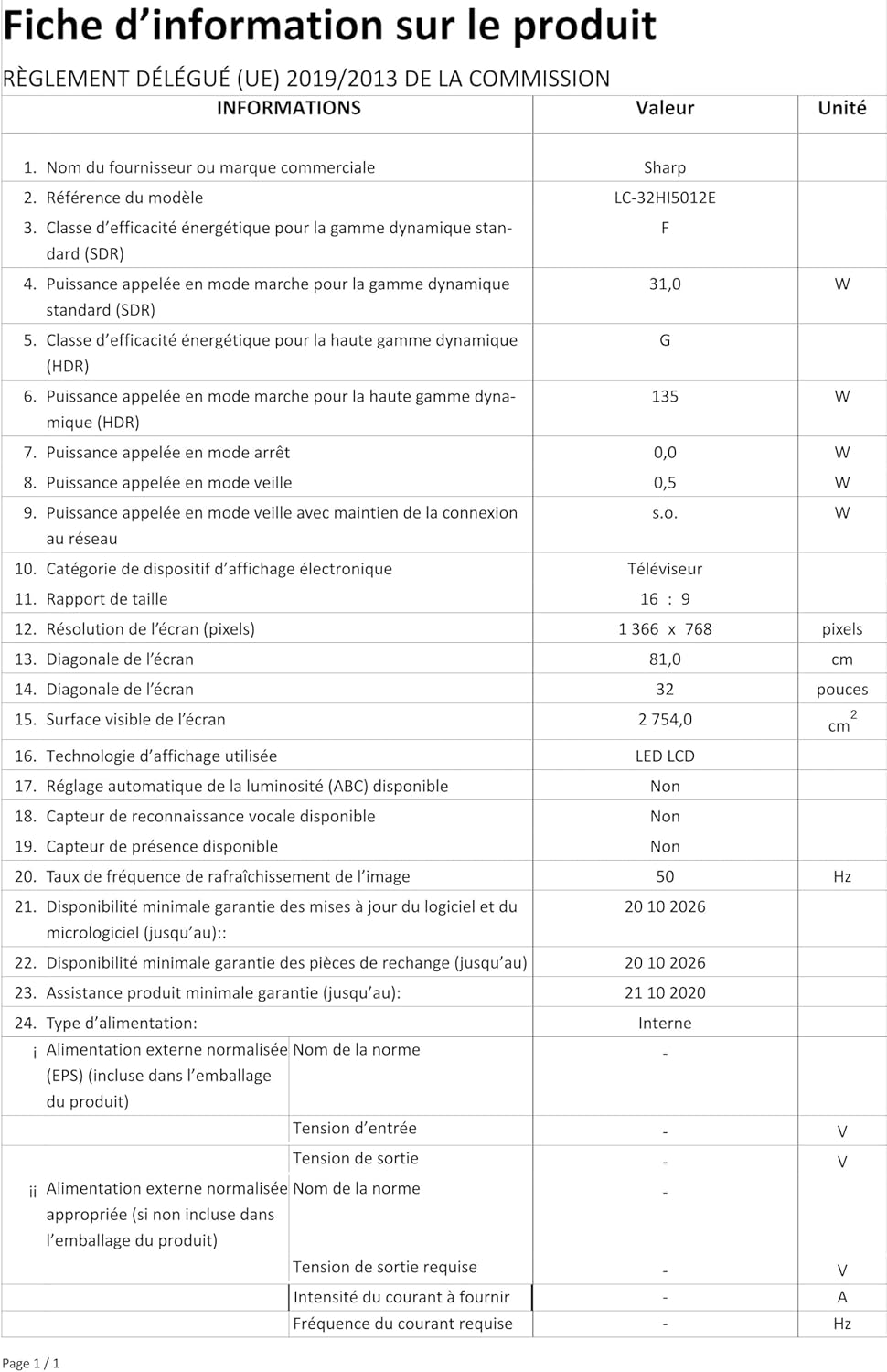
Image: Product information sheet detailing technical specifications and compliance information for the SHARP LC-32HI5012E television.
8. Garansi jeung Rojongan
For warranty information, please refer to the warranty card included with your product or visit the official SHARP websitus. Simpen resi pameseran anjeun salaku bukti pameseran pikeun klaim garansi.
For technical support or service inquiries, please contact SHARP customer service. Contact details can typically be found on the SHARP official websitus atanapi dina bungkusan produk.


