1. Bubuka
This manual provides comprehensive instructions for the operation and maintenance of the LAUNCH U400 OBD2 Automotive Scanner. The U400 is a professional diagnostic tool designed to assist in identifying and resolving issues in various vehicle systems, including engine, transmission, and performing specific reset functions.
Please read this manual thoroughly before operating the device to ensure correct usage and to prevent damage.
2. Eusi Paket
Pastikeun yén sadaya item anu didaptarkeun di handap aya dina pakét anjeun:
- 1 x LAUNCH Creader U400 Scanner
- 1 x OBDII Connector Cable
- 1 x Kabel USB
- 1 x Gancang Mimitian Guide
3. Alat Leuwihview
The LAUNCH U400 scanner features a user-friendly interface with a clear display and intuitive button layout for easy navigation and operation.

Figure 3.1: LAUNCH U400 Device Layout
This image displays the front of the LAUNCH U400 scanner, highlighting its key components. The Layar LCD indicates test results. Buttons include DTC (F1) for reading diagnostic trouble codes, ER (F2) for clearing codes, I/M (F3) for I/M Readiness, and a Help Button (F4). Navigation is managed by a Tombol Pamilihan (directional arrows), and actions are confirmed with the Tombol OKÉ. A Tombol Balik deui (ESC) allows navigation to the previous screen.
The device is designed for durability with a thick, flexible insulator casing.

Figure 3.2: LAUNCH U400 Durability and Ports
This image shows various views of the LAUNCH U400 scanner, emphasizing its robust construction. The top view reveals a USB port for connectivity, while the side view illustrates the device's ergonomic design. The bottom view displays the OBDII connector port, which is used to connect the scanner to the vehicle's diagnostic port.
4. Spésifikasi
| Fitur | Rincian |
|---|---|
| layar | 4.0" TFT, 320*480 dpi |
| Voltage Rentang | 9-18V |
| Suhu Operasi | 0°C nepi ka 50°C (32°F nepi ka 122°F) |
| Suhu Panyimpenan | -20°C nepi ka 70°C (-4°F nepi ka 158°F) |
| Diménsi | 195mm x 86mm x 32mm (7.6" x 3.4" x 1.2 ") |
| Beurat | 839 g |
| Sumber Daya | Didukung ku Kendaraan |
| Operating System for Updates | Windows XP (or newer compatible versions) |
| Protokol anu dirojong | ISO9141-2, ISO14230-4, SAEJ1850, ISO15765-4 |
5. Setélan
- Manggihan Port OBDII: Port OBDII biasana aya di handapeun dasbor di sisi supir kendaraan. Rujuk kana manual pamilik kendaraan anjeun upami anjeun henteu tiasa mendakanana.
- Sambungkeun scanner: Plug the OBDII connector cable into the vehicle's OBDII port. Ensure a secure connection.
- Daya Hurung: Once connected, the scanner will automatically power on, drawing power from the vehicle's battery. The main menu will appear on the screen.
- Ignition kandaraan: For most diagnostic functions, the vehicle's ignition should be in the "ON" position (engine off) or the engine running, depending on the specific test.
6. Parentah Operasi
6.1. General OBDII Functions
The LAUNCH U400 supports all standard OBDII diagnostic modes. Navigate through the menu using the directional buttons and press OK pikeun milih hiji pilihan.

Figure 6.1: OBD-II Diagnostic Modes
This diagram illustrates the various OBD-II service modes supported by the LAUNCH U400 scanner. These include: Baca Kodeu (retrieving Diagnostic Trouble Codes), Hapus Kodeu (clearing DTCs), Freeze pigura (snapshot of engine conditions when a fault occurred), Abdi / M Kesiapan (emissions system status), Aliran Data (live sensor data), Tés Sénsor O2, Pangimeutan Dina Papan, EVAP System Test (Mode $8), jeung VIN Information (vehicle identification number).
- Baca Konci: Select this option to retrieve current, pending, and permanent Diagnostic Trouble Codes (DTCs) from the vehicle's Engine Control Unit (ECU).
- Hapus Kodeu: After repairs are made, select this to erase DTCs and turn off the Malfunction Indicator Lamp (MIL). Ensure the issue is resolved before clearing codes.
- Kesiapan I / M: Checks the status of the vehicle's emission-related monitoring systems. This is useful for emissions testing.
- Aliran Data: Displays live data parameters from the vehicle's sensors in numerical or graphical format. Up to 4 data streams can be graphically displayed simultaneously. Data stream storage and playback are also supported.
- Frame Frame: Ngarekam snapshot kaayaan operasi nalika kode gangguan disetel.
- Tés Sénsor O2: Retrieves O2 hasil tés ngawas sensor.
- Pemantauan di jero pesawat: Retrieves hasil tés pikeun komponén powertrain patali émisi jeung sistem nu teu terus diawaskeun.
- Uji Sistem EVAP: Ngamimitian tés Sistem Kontrol Émisi Évaporatif.
- Émbaran Kandaraan: Mintonkeun nomer idéntifikasi kendaraan (VIN), ID kalibrasi, sareng nomer verifikasi kalibrasi (CVN).
6.2. Fungsi Husus
The U400 offers specific reset functions for common maintenance tasks.
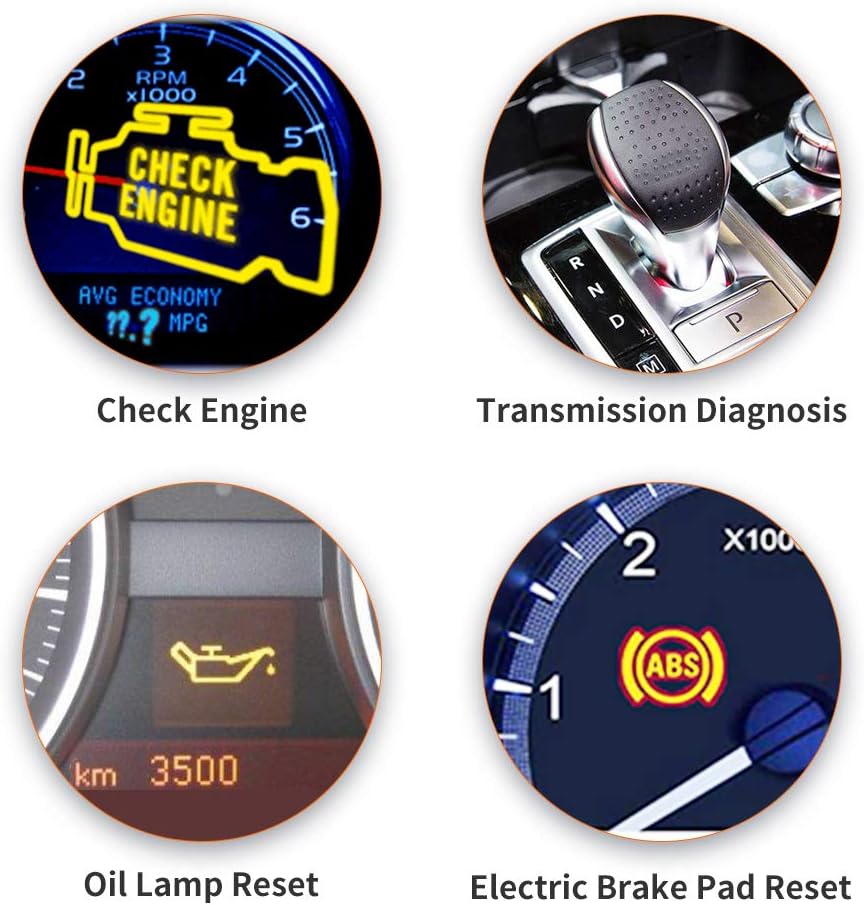
Figure 6.2: Special Diagnostic and Reset Functions
This image illustrates key diagnostic and reset capabilities of the LAUNCH U400. These include diagnosing issues related to the Pariksa Engine light, performing Transmission Diagnosis, executing an Minyak Lamp Reset after an oil change, and performing an Electric Brake Pad Reset for vehicles equipped with electronic parking brakes.
- Minyak Lamp Reset: Used to reset the oil service light after an oil change. Follow the on-screen prompts for your specific vehicle model.
- Electronic Brake Pad Reset (EPB Reset): Essential when replacing brake pads on vehicles with an electronic parking brake system. This function allows the brake calipers to be safely retracted and then reset after new pads are installed. Follow the on-screen prompts carefully.
6.3. Jangkauan Kendaraan
The LAUNCH U400 is compatible with a wide range of vehicles manufactured from 1996 onwards, supporting over 40 global car brands.

Gambar 6.3: Kasaluyuan Kandaraan Lega
This image shows the LAUNCH U400 scanner's screen displaying a partial list of supported car brands, including Acura, VW, Audi, Ford, Benz, BMW, Chrysler, and Citroen. This demonstrates the device's extensive compatibility with various global vehicle manufacturers.
Supported brands include, but are not limited to: GM, Ford, Chrysler, BMW, Mercedes, Toyota, Honda, Nissan, Hyundai, Kia, Subaru, Mitsubishi, Acura, Audi, VW, Benz, Citroen, and more.
7. Pangropéa
7.1. Apdet parangkat lunak
The LAUNCH U400 offers lifetime free software updates to ensure compatibility with new vehicle models and diagnostic protocols. Updates are performed via a USB connection to a Windows PC.

Gambar 7.1: Prosés Apdet Parangkat Lunak
This image illustrates the process of updating the LAUNCH U400 scanner. The device is connected to a Windows PC via a USB cable, indicating that software updates are performed by downloading and installing the latest firmware from the manufacturer's website onto the scanner through the computer.
- Unduh Alat Apdet: Nganjang ka LAUNCH resmi website to download the update tool software for your PC.
- Connect Scanner: Connect the U400 scanner to your PC using the provided USB cable.
- Jalankeun Alat Apdet: Launch the update tool on your PC and follow the on-screen instructions to download and install the latest software onto your scanner.
7.2. beberesih sarta Panyimpenan
- Rapihkan alat dengan lembut, damp lawon. Ulah make cleaners abrasive atawa pangleyur.
- Store the scanner in a dry, cool place, away from direct sunlight and extreme temperatures.
- Keep the OBDII connector free from dirt and debris.
8. Cara ngungkulan
If you encounter issues with your LAUNCH U400 scanner, consider the following common troubleshooting steps:
- Henteu aya kakuatan: Ensure the OBDII cable is securely connected to both the scanner and the vehicle's OBDII port. Verify the vehicle's ignition is in the "ON" position.
- Kasalahan Komunikasi: Check that the vehicle's ignition is on. Ensure the OBDII cable is not damaged. Try connecting to a different compatible vehicle to rule out a vehicle-specific issue.
- Bacaan/Fungsi Anu Salah: Ensure the scanner's software is up to date. Verify that the vehicle is compatible with the specific function you are attempting to perform.
- Masalah layar: If the screen is unresponsive or displays errors, try restarting the device by disconnecting and reconnecting it.
For persistent issues, refer to the official LAUNCH support resources or contact customer service.
9. Garansi jeung Rojongan
For information regarding the product warranty, please refer to the warranty card included in your package or visit the official LAUNCH websitus. Sarat jeung kaayaan jaminan bisa rupa-rupa dumasar wewengkon.
Kanggo dukungan téknis, apdet parangkat lunak, atanapi bantosan salajengna, mangga buka LAUNCH Official Store on Amazon atawa resmi produsén urang websitus.


