Bubuka
The Insignia NS-SPBTWAVE2-BK Wave 2 Portable Bluetooth Speaker provides high-quality wireless audio streaming from your compatible devices. Designed for versatility, its robust construction and rubberized feet allow for stable placement in both horizontal and vertical orientations. Enjoy hands-free communication with the built-in speakerphone and extended listening sessions thanks to its 12-hour battery life.
This manual provides essential information for setting up, operating, maintaining, and troubleshooting your speaker. Please read it thoroughly before use and retain it for future reference.
Eusi pakét
Pastikeun sadaya item aya dina bungkusan:
- Insignia NS-SPBTWAVE2-BK Wave 2 Portable Bluetooth Speaker
- Kabel Ngecas USB
- 3.5mm Audio Cable (Auxiliary)
- Quick Setup Guide (or similar documentation)
Fitur produk
- Konéktipitas nirkabel: Connects wirelessly to smartphones, tablets, and other Bluetooth-enabled devices.
- Hirup batré anu panjang: Features a rechargeable 2,000 mAh battery, providing up to 12 hours of playback on a full charge.
- Mikropon internal: Enables hands-free calling directly through the speaker.
- Auxiliary Audio Input: Allows for wired connection to audio devices via a 3.5mm audio cable.
- Penempatan serbaguna: Designed to stand securely in both horizontal and vertical positions.
Bagian tina Speaker
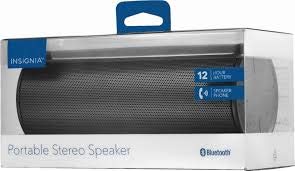
Gambar 1: Hareupeun view of the Insignia Wave 2 Speaker in horizontal orientation.

Gambar 2: Nangtung view of the speaker, illustrating the power button, charging port, and auxiliary input port at the bottom.
Refer to the images above for the location of key components such as the power button, volume controls, Bluetooth indicator, charging port, and auxiliary input.
Disetél
1. Ngecas Speaker
- Connect the small end of the USB charging cable to the charging port on the speaker (refer to Figure 2).
- Connect the large end of the USB charging cable to a USB power adapter (not included) or a powered USB port on a computer.
- The charging indicator light will illuminate. Allow approximately 12 hours for a full charge before first use. The indicator light will change or turn off once charging is complete.
2. Papasangan Bluetooth
- Ensure the speaker is fully charged. Press and hold the Power button to turn on the speaker. The Bluetooth indicator light will begin to flash, indicating it is in pairing mode.
- On your Bluetooth-enabled device (smartphone, tablet, etc.), navigate to the Bluetooth settings and ensure Bluetooth is enabled.
- Milarian pikeun available devices. Select "Insignia Wave 2" from the list.
- Once paired, the Bluetooth indicator light on the speaker will become solid, and you may hear an audible confirmation.
- Upami dipenta pikeun kecap akses, lebetkeun "0000".
3. Auxiliary (Wired) Connection
- Connect one end of the 3.5mm audio cable to the AUX input port on the speaker (refer to Figure 2).
- Sambungkeun tungtung kabel audio 3.5mm anu hiji deui kana jack headphone atanapi port kaluaran audio alat audio anjeun.
- The speaker will automatically switch to auxiliary mode when a cable is detected.
Ngoperasikeun Speaker
Daya Hurung/Pareuman
- To turn on: Press and hold the Power button until the indicator lights illuminate.
- To turn off: Press and hold the Power button until the indicator lights turn off.
Volume Control
- Saluyukeun polumeu nganggo tombol polumeu dina spéker.
- You can also control the volume from your connected Bluetooth device or auxiliary audio source.
Leungeun-Free Telepon
Lamun disambungkeun via Bluetooth, speaker bisa dipaké pikeun nelepon handsfree:
- Ngajawab telepon: Pencét tombol Puter/Pause/Telepon sakali.
- Tutup telepon: Pencét tombol Puter/Pause/Telepon sakali salami nelepon.
- Nolak telepon: Press and hold the Play/Pause/Call button.
- Speak clearly towards the speaker's built-in microphone for optimal voice pickup.
Pangropéa
- beberesih: Anggo lawon anu lemes, garing, sareng henteu aya bulu pikeun ngabersihkeun bagian luar speaker. Entong nganggo pembersih cair, aerosol, atanapi pelarut.
- Perawatan batré: To prolong battery life, avoid fully discharging the battery frequently. Recharge the speaker regularly, even if not in use. Avoid exposing the speaker to extreme temperatures (hot or cold).
- Panyimpenan: When not in use for extended periods, store the speaker in a cool, dry place away from direct sunlight and moisture.
- Tahan cai: This speaker is TEU tahan cai. Hindarkeun kakeunaan cai atanapi kalembaban anu kaleuleuwihi.
Pamérésan masalah
| Masalah | Solusi anu mungkin |
|---|---|
| Speaker teu hurung. | Pastikeun batréna geus dieusian. Sambungkeun spiker ka sumber listrik nganggo kabel ngecas USB. |
| Teu aya sora ti panyatur. | Check the volume level on both the speaker and the connected device. Ensure the correct input source (Bluetooth or AUX) is selected. Verify the Bluetooth connection or auxiliary cable. |
| Teu bisa masangkeun via Bluetooth. | Ensure the speaker is in pairing mode (flashing Bluetooth indicator). Turn off and on Bluetooth on your device. Move the speaker closer to your device. Forget the speaker from your device's Bluetooth list and try pairing again. |
| Kualitas sora atanapi distorsi anu goréng. | Ensure the speaker is within Bluetooth range (approx. 33 ft / 10 m). Reduce the volume on the source device or speaker. Check for interference from other wireless devices. Try a different audio source or file. |
| Mikropon teu jalan nalika nelepon. | Ensure the speaker is properly connected via Bluetooth. Speak directly towards the speaker. Check your phone's call settings to ensure audio is routed to the Bluetooth speaker. |
spésifikasi
- Ngaran modél: Gelombang 2
- Jumlah modél: NS-SPBTWAVE2-BK
- Téknologi konektipitas: Bluetooth
- Kahirupan batré: Nepi ka 12 Jam
- Jenis Batré: 1 Litium Ion (kaasup)
- Waktu Ngecas: Kurang leuwih 12 Jam
- Ukuran produk: 6.8 x 2.8 x 2.8 inci (17.3 x 7.1 x 7.1 cm)
- Beurat barang: 1 pon (0.45 kg)
- Mode Kaluaran Audio: Stereo
- Rasio Signal-to-Noise: 80 dB
- Mikropon internal: Sumuhun
- Input bantu: Leres (3.5mm)
- Tahan cai: No
- Bahan: palastik
- UPC: 600603230455
Garansi sareng Rojongan
This Insignia NS-SPBTWAVE2-BK Wave 2 Portable Bluetooth Speaker comes with a Garansi kawates. For specific terms and conditions of your warranty, please refer to the warranty card included with your purchase or visit the official Insignia websitus.
Kanggo dukungan téknis, bantuan ngungkulan masalah, atanapi klaim garansi, mangga ngahubungi Layanan Palanggan Insignia. Inpormasi kontak biasana tiasa dipendakan dina Insignia websitus atanapi dina dokuméntasi produk Anjeun.