Bubuka
This manual provides instructions for the installation, operation, maintenance, and troubleshooting of the Intermatic 40-100-1020 Time Clock. This mechanical time clock is designed as a replacement component for various spa controllers, enabling precise 24-hour filtration settings.
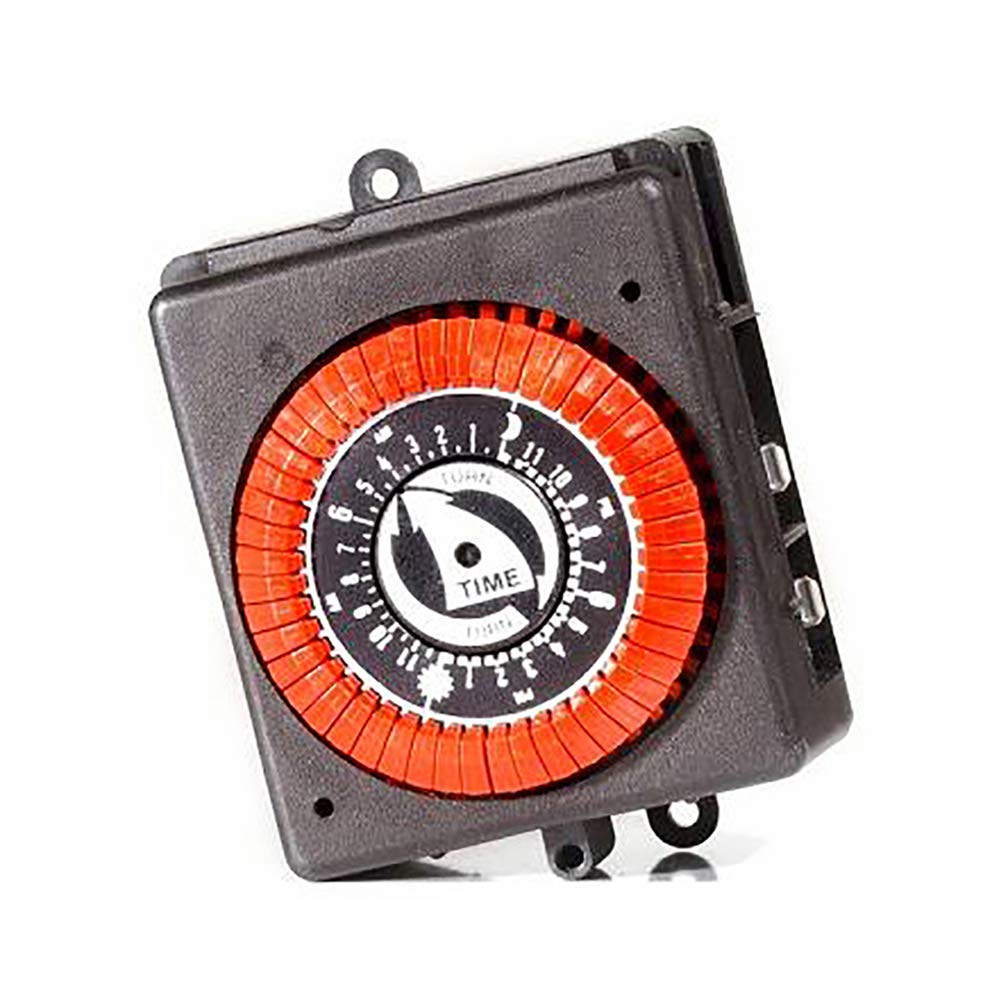
Image: The Intermatic 40-100-1020 Time Clock, a mechanical timer with a visible dial and orange setting tabs.
Setup sareng Instalasi
Kasalametan munggaran: Before beginning any installation, ensure that the power supply to the spa controller or equipment is completely disconnected at the circuit breaker. Failure to do so can result in electrical shock or injury.
- Identify Existing Time Clock: Locate the current mechanical time clock within your spa controller. Note its orientation and wiring connections.
- Pegatkeun sambungan kabel: Carefully disconnect the existing 4-pin plug from the old time clock. If applicable, remove any mounting screws or clips securing the old unit.
- Install New Time Clock: Position the Intermatic 40-100-1020 Time Clock in the designated slot. Connect the 4-pin plug to the corresponding receptacle on the new time clock. Ensure the connection is secure.
- Unit Aman: Fasten the new time clock using the appropriate mounting hardware (not included, typically re-use existing).
- Mulangkeun Daya: Once the installation is complete and all connections are secure, restore power to the equipment at the circuit breaker.
Parentah Operasi
The Intermatic 40-100-1020 Time Clock utilizes a mechanical dial and tabs for setting filtration schedules.
- Setel Waktos Ayeuna: Rotate the dial clockwise until the current time aligns with the time indicator arrow on the clock face. The dial represents a 24-hour cycle.
- Setel Waktu ON/OFF: The clock features orange tabs, each representing 30 minutes of operation.
- Pikeun nyetel hiji ON period, push the orange tabs outwards for the desired duration.
- Pikeun nyetel hiji Pareum period, leave the orange tabs in their inward position.
Pikeun example, to set a filtration cycle from 8:00 AM to 10:00 AM, push out the tabs corresponding to 8:00, 8:30, 9:00, and 9:30. The clock will automatically cycle through these settings daily.
Pangropéa
The Intermatic 40-100-1020 Time Clock is designed for reliable operation with minimal maintenance. Follow these guidelines to ensure optimal performance:
- Ngabersihan rutin: Periodically inspect the clock for dust or debris accumulation. Gently wipe the exterior with a soft, dry cloth. Avoid using harsh chemicals or abrasive cleaners.
- Pariksa sambungan: Annually, or if issues arise, ensure that the 4-pin plug connection remains secure and free from corrosion.
- Kaayaan Lingkungan: Ensure the time clock is installed in an environment consistent with the spa controller's specifications, protected from excessive moisture or extreme temperatures.
Pamérésan masalah
If you encounter issues with your Intermatic 40-100-1020 Time Clock, refer to the following common problems and solutions:
- Clock Not Running:
- Verify that the power supply to the spa controller is active.
- Check the 4-pin plug connection to ensure it is fully seated.
- Confirm the clock motor is receiving the correct 125V operating voltage.
- ON/OFF Times Not Activating:
- Ensure the orange tabs are correctly positioned (out for ON, in for OFF) for the desired schedule.
- Verify that the current time is accurately set on the dial.
- Inspect the tabs for any physical damage that might prevent proper engagement.
- Timing teu akurat:
- Check for any obstructions preventing the dial from rotating freely.
- If the clock consistently runs fast or slow, the unit may require replacement.
If these steps do not resolve the issue, contact a qualified technician or the manufacturer for further assistance.
spésifikasi
| Fitur | Spésifikasi |
|---|---|
| Nomer modél | 40-100-1020 |
| Peunteun Listrik | 1HP, 110V, 20A, 1800W |
| Clock Motor Voltage | 125V |
| Peunteun beban | 24-277V |
| Pindah Tipe | 4-Pin SPST |
| Siklus | 24-Jam |
| Tab Rating | Each tab represents 30 minutes |
| Clock Diameter (Approx) | 2.31 inci |
| Overall Dimensions (Approx) | 3.375 H x 2.75 L x 1.94 W inches |
| Item Beurat | 3 pon |
| Tipe Pamasangan | Pasang-In Gunung |
| Produsén | SpaGuts |
Garansi sareng Rojongan
This Intermatic 40-100-1020 Time Clock comes with a 90 poé jaminan kawates ti tanggal beuli. Garansi ieu nyertakeun cacad dina bahan sareng pagawean dina panggunaan normal. Punten tahan bukti pameseran anjeun pikeun klaim garansi.
For technical support, warranty inquiries, or further assistance, please contact the manufacturer or your authorized dealer. This item is non-returnable once installed or used, except in cases of manufacturing defects covered by the warranty.


