Bubuka
The MIFA A60 is a versatile device combining a white noise machine with a 20W TWS Bluetooth speaker. It is designed to help users relax, improve sleep, and enjoy audio content with its array of soothing sounds and robust speaker capabilities. This manual provides detailed instructions for setup, operation, and maintenance of your MIFA A60.

Figure 1: MIFA A60 White Noise Speaker. This image shows the compact, white, circular design of the speaker with its control panel and digital display on top.
Eusi pakét
Punten parios yén sadaya barang aya dina pakét:
- 1 * White Noise Machine (MIFA A60)
- Cable 1 * 3.5mm Audio
- 1 * USB Ngecas Cable
- 1 * Manual pamaké
Fitur produk
- 15 Soothing Sleep Sounds: Includes White Noise, Clock, Bubbles, No-looping Fan, Lullaby, Rain, Lullaby and water, Ocean Wave, Summer Night, Cricket, Birds, Campfire, Thunder and Rain, Creek and Birds. Designed to aid relaxation and sleep.
- 20W TWS Bluetooth Speaker: Capable of linking two A60 speakers for a 2.0 channel stereo audio experience. Features dual speakers and radiators for enhanced bass. Supports 3.5mm audio cable, Micro SD card slot, and hands-free calling.
- Setélan Timer Tilu: Auto-off timers for 30, 60, and 90 minutes in sleep aid mode. Volume gradually reduces before turning off. Also supports continuous play.
- Kontrol Volume anu tepat: 31 grades of volume adjustment to set the ideal sound level. Separate volume memory function for Bluetooth and sleep-aid modes.
- Long Battery Life & Powered USB: Equipped with a 2200mAh Lithium Battery providing 8-10 hours of playback. The display can remain on as a clock when connected to power via USB.
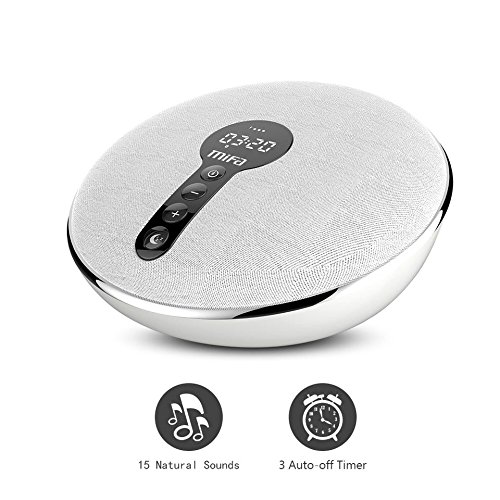
Figure 2: Key features of the MIFA A60. This image highlights the 15 natural sounds and 3 auto-off timer functions with corresponding icons.
Disetél
- Ngecas Alat:
Connect the provided USB charging cable to the MIFA A60's charging port and the other end to a standard USB power adapter (DC 5V / 1A) or a computer's USB port. The charging indicator will illuminate. A full charge typically takes 3-4 hours.
- Hurungkeun/Pareuman:
Press and hold the Power button (usually integrated with the Mode button) for a few seconds to turn the device on or off. The display will light up upon activation.
Parentah Operasi

Figure 3: Simplified Controls of the MIFA A60. This diagram labels the buttons: Bluetooth/Mode, Previous/Volume Down, Next/Volume Up, and Sleep Pattern.
Mode Bluetooth
- papasangan:
Turn on the MIFA A60. It will automatically enter Bluetooth pairing mode (indicated by a flashing Bluetooth icon on the display). On your device (smartphone, tablet, etc.), enable Bluetooth and search for "MIFA A60". Select it to pair. A confirmation sound will indicate successful pairing.
- Maénkeun Audio:
Once paired, you can play audio from your connected device. Use the volume buttons on the A60 or your device to adjust playback volume. Use the Previous/Next buttons on the A60 to skip tracks.
- Telepon Hand-Free:
When a call comes in, press the Bluetooth/Mode button to answer. Press again to end the call. Press and hold to reject a call.
- Pamasangan TWS (True Wireless Stereo):
To use two A60 speakers in stereo mode, ensure both are powered on and not connected to any other Bluetooth device. On one A60, double-press the Bluetooth/Mode button. It will search for another A60. Once connected, they will function as left and right channels. Then, pair your device to the primary A60.
White Noise / Sleep Aid Mode
- Ngalihkeun Modeu:
Press the Bluetooth/Mode button to cycle between Bluetooth mode and Sleep Aid mode. In Sleep Aid mode, the display will show the current sound and timer setting.
- Milih Sora:
In Sleep Aid mode, press the "Sleep pattern" button (often indicated by a moon icon) to cycle through the 15 available soothing sounds. The display will show the sound number or name.
- Nyetél Timer:
While in Sleep Aid mode, press the "Sleep pattern" button repeatedly to cycle through timer options: 30 minutes, 60 minutes, 90 minutes, or continuous play. The selected timer will be displayed. The volume will gradually decrease as the timer approaches its end.
- Nyaluyukeun Volume:
Use the '+' and '-' buttons to adjust the volume level (31 grades). The volume setting for Sleep Aid mode is independent of the Bluetooth mode volume.

Gambar 4: Kelamples of natural sounds available on the MIFA A60. This image displays icons for Wave, Bird, White Noise, Rain, Cricket, Campfire, Lullaby, and a central MIFA logo.

Figure 5: Common applications of the MIFA A60. This image shows the device being used for sleep aid, office relaxation, yoga, music listening, travel, and addressing insomnia.
Pangropéa
- beberesih:
Lap alat ku kaén nu lemes, garing, atawa rada garingamp lawon. Ulah nganggo pembersih abrasif, alkohol, atanapi pangleyur kimia, sabab ieu tiasa ngaruksak permukaan.
- Panyimpenan:
Store the MIFA A60 in a cool, dry place away from direct sunlight and extreme temperatures. If storing for an extended period, charge the battery periodically to maintain its health.
- Perawatan batré:
To prolong battery life, avoid fully discharging the battery frequently. Charge the device when the low battery indicator appears.
Pamérésan masalah
| Masalah | Mungkin Cukang lantaranana | Solusi |
|---|---|---|
| Alat teu hurung. | batré lemah atawa euweuh muatan. | Connect the device to a power source using the USB charging cable and allow it to charge for at least 30 minutes before attempting to power on again. |
| Taya sora tina speaker. | Volume too low; device not paired correctly (Bluetooth); incorrect mode. | Increase volume using the '+' button. Re-pair the Bluetooth device. Ensure the correct mode (Bluetooth or Sleep Aid) is selected. |
| Teu bisa nyambung via Bluetooth. | Device not in pairing mode; too far from source; interference; previously connected to another device. | Ensure the A60 is in Bluetooth pairing mode (flashing icon). Move the devices closer. Disconnect from other Bluetooth devices. Restart both the A60 and the source device. |
| Timer teu jalan. | Setélan timer salah. | Ensure you are in Sleep Aid mode and have selected a 30, 60, or 90-minute timer setting. |
spésifikasi
| Fitur | Rincian |
|---|---|
| Daya Kaluaran | 10W x 2 (Total 20W) |
| Réspon Frékuénsi | 50Hz-19KHz |
| Standar Bluetooth | Bluetooth 4.2 |
| Jenis Batré | Batré litium |
| Kapasitas batré | 2200 mah |
| Ngecas Voltage | DC 5V / 1A |
| Waktu Ngecas | 3-4 jam |
| Waktu Playback | 8-10 jam |
| Ukuran produk (L * W * H) | 15.4cm * 7.8cm * 14.8cm |
| Unit Beurat | 380g |
| Warna | Bodas |
| Bahan | palastik |
| Produsén | MIFA INOVASI LLC |
| Number of Music Tracks | 15 (White Noise, Clock, Bubbles, No-looping Fan, Lullaby, Rain, Lullaby and water, Ocean Wave, Summer Night, Cricket, Birds, Campfire, Thunder and Rain, Creek and Birds) |
Garansi sareng Rojongan
This product comes with a standard 30-day warranty as per Amazon's policy. For any technical support, warranty claims, or inquiries, please contact MIFA customer service through the retailer's platform or refer to the contact information provided on the product packaging or MIFA's official websitus.
Punten nahan resi pameseran anjeun salaku bukti pameseran kanggo tujuan garansi.


