
Bubuka
Thank you for choosing the MIFA A3 Soundbox Bluetooth Portable Speaker. This manual provides essential information for the safe and efficient use of your device. Please read it thoroughly before operating the speaker and retain it for future reference.
Émbaran Kasalametan
- Ulah ngalaan speaker ka suhu ekstrim, sinar panonpoé langsung, atawa kalembaban luhur.
- Hindarkeun lungsur atanapi nahan panyatur kana tabrakan anu kuat.
- Do not disassemble or attempt to repair the speaker yourself. Contact qualified service personnel.
- Keep the speaker away from water and liquids, despite its waterproof rating, to prevent damage to charging ports or internal components.
- Paké ngan kabel ngecas husus sarta adaptor.
Eusi pakét
Mangga parios pakét kanggo barang-barang ieu:
- MIFA A3 Bluetooth Portable Speaker
- Kabel Ngecas USB
- Kabel Audio AUX
- Manual pangguna (dokumén ieu)
Produk Leuwihview
The MIFA A3 speaker features intuitive touch controls and multiple connectivity options. Familiarize yourself with the speaker's layout:
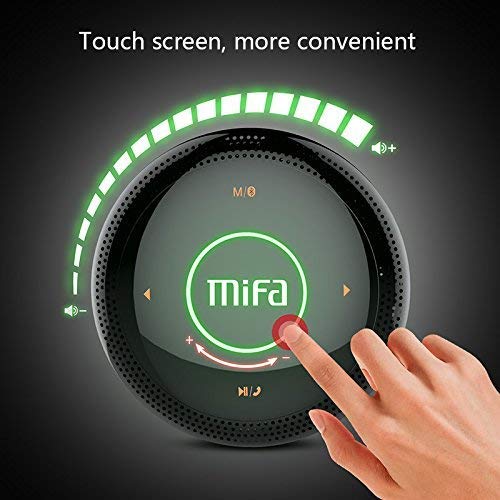
Gambar 1: Puncak view of the MIFA A3 speaker, highlighting the touch-sensitive control panel. The panel displays volume indicators, play/pause, and track navigation buttons. A central 'Mifa' logo is also visible.
- Panel Kontrol Toél: Located on the top surface for volume adjustment, playback control, and mode selection.
- Mikropon: Pikeun nelepon handsfree.
- Port ngecas: Port mikro USB pikeun ngecas.
- Input AUX: Jack audio 3.5mm pikeun sambungan kabel.
- Slot Kartu SD Mikro: Pikeun muterkeun musik langsung tina kartu memori.
Disetél
1. Ngecas Speaker
Saméméh dipaké munggaran, ngeusi pinuh spéker. Sambungkeun kabel ngecas USB nu disadiakeun ka port ngecas spiker urang jeung tungtung séjén ka adaptor kakuatan USB (teu kaasup) atawa port USB komputer urang.
- Lampu indikator ngecas bakal hurung nalika ngecas.
- The indicator will turn off or change color once fully charged.
- A full charge provides approximately 8 hours of continuous playtime.
2. Daya Hurung / Pareum
- Pikeun Ngahurungkeun: Press and hold the Power button (usually integrated into the touch panel or a dedicated button) for 2-3 seconds until you hear an audible prompt or see an indicator light.
- Pikeun mareuman: Press and hold the Power button again for 2-3 seconds.
Parentah Operasi
1. Papasangan Bluetooth
- Ensure the speaker is powered on and in Bluetooth pairing mode (indicated by a flashing blue light or audible prompt).
- Dina alat anjeun (smartphone, tablet, PC), aktipkeun Bluetooth sareng milarian alat anu sayogi.
- Select "MIFA A3" from the list of devices.
- Once paired, the speaker will provide an audible confirmation, and the indicator light will become solid blue.
- The speaker will automatically connect to the last-paired device when powered on, if that device's Bluetooth is active and within range.
2. Sambungan AUX
For devices without Bluetooth, use the provided 3.5mm AUX audio cable:
- Connect one end of the AUX cable to the speaker's AUX input port.
- Sambungkeun tungtung anu sanés kana jack headphone alat audio anjeun.
- Spéker bakal otomatis pindah ka modeu AUX.
3. Micro SD Card Playback
Insert a Micro SD card (up to 32GB, FAT32 format) with music files into the designated slot. The speaker will automatically detect the card and begin playback.
4. Touch Control Operations
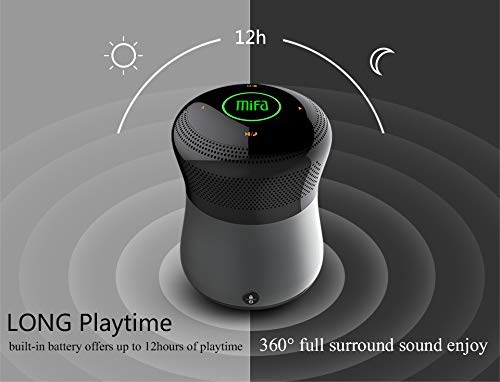
Gambar 2: The MIFA A3 speaker shown with an overlay indicating "LONG Playtime" (up to 12 hours) and "360° full surround sound enjoy." This image emphasizes the speaker's battery life and audio dispersion.
- Kontrol volume: Slide your finger clockwise on the touch panel to increase volume, counter-clockwise to decrease.
- Puter / Reureuh: Tap the central Play/Pause icon.
- Lagu salajengna: Tap the "Next" arrow icon.
- Lagu Sateuacanna: Tap the "Previous" arrow icon.
- Pindah mode: Tap the "M/O" icon to cycle between Bluetooth, AUX, and Micro SD card modes.
- Tombol konci: Press the lock icon to prevent accidental touch inputs.
5. Call Handling (Bluetooth Mode)
- Ngajawab Telepon: Tap the Play/Pause icon when a call comes in.
- Tungtung Telepon: Tap the Play/Pause icon again.
- Nolak Telepon: Press and hold the Play/Pause icon for 2 seconds.
Pangropéa
- Ngabersihan spéker nganggo kaén anu lemes sareng garing. Ulah make cleaners abrasive atawa pangleyur.
- Simpen spéker dina tempat anu tiis sareng garing upami henteu dianggo kanggo waktos anu lami.
- Cas batréna sahenteuna tilu bulan sakali pikeun ngajaga kaséhatan batréna.
Pamérésan masalah
| Masalah | Solusi anu mungkin |
|---|---|
| Speaker teu hurung. | Pastikeun batréna geus dieusian. Sambungkeun ka sumber listrik teras cobian deui. |
| Teu bisa masangkeun via Bluetooth. |
|
| Taya sora. |
|
| Kualitas sora henteu saé. |
|
spésifikasi
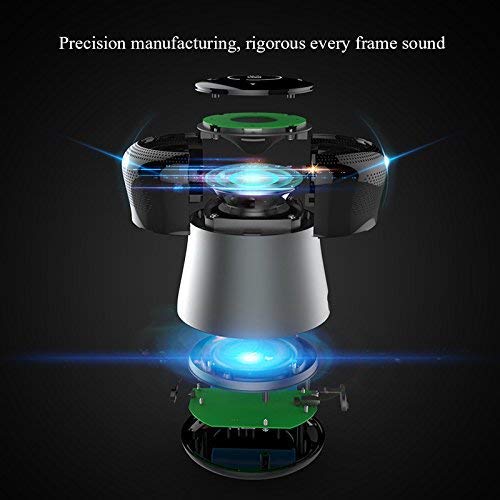
Gambar 3: An exploded diagram of the MIFA A3 speaker, illustrating its internal components and structural design, emphasizing precision manufacturing.
| Modél | MIFA A3 |
| Daya Kaluaran | 10W |
| Konektipitas | Bluetooth 4.2, AUX, Micro SD Card |
| Batré | 1800 mAh Li-ion |
| Waktu maén | Nepi ka 8 jam (dina volume 60%) |
| Waktu Ngecas | Kurang leuwih 3-4 jam |
| Mikropon | Diwangun-di pikeun telepon handsfree |
| Tahan cai | Yes (as per product specifications, but general caution advised for ports) |
| Métode kontrol | Toél |
| Alat nu cocog | Laptop, PC, Smartphone, Tablet |
Garansi sareng Rojongan
MIFA products are designed to provide reliable performance. For warranty information or technical support, please refer to the warranty card included with your purchase or visit the official MIFA websitus. Simpen bukti pameseran anjeun pikeun klaim garansi.
For further assistance, you may contact MIFA customer support through their official channels.