
1. Bubuka
This manual provides instructions for the proper setup, operation, and maintenance of your Acer B247Y 23.8-inch LED LCD Monitor. Please read this manual thoroughly before using your monitor to ensure optimal performance and to prevent damage.
The Acer B247Y is a 23.8-inch Full HD (1920 x 1080) monitor featuring an IPS panel for wide viewing angles, an anti-glare display, and a frameless design on three sides. It includes multiple connectivity options and an ergonomic stand for comfortable viewing.
2. Eusi Paket
Pastikeun yén sadaya item aya dina pakét anjeun. Upami aya barang anu leungit atanapi rusak, hubungi pangecér anjeun.
- Acer B247Y 23.8-inch LED LCD Monitor
- Stand Monitor (Dasar sareng Beuheung)
- Power Adapter (Internal) and Power Cable
- VGA Kabel
- DisplayPort 1.2 Kabel
- Kabel HDMI
- Audio-in Cable (if included)
- Audio-out Cable (if included)
- Manual pangguna (dokumén ieu)
3. Setélan
3.1 Ngarakit Stand Monitor
The monitor comes with a detachable foot stand. Follow these steps to assemble:
- Taliti cabut monitor jeung nangtung komponén tina bungkusan.
- Pasang beuheung nangtung ka panel monitor. Pastikeun éta ngaklik aman kana tempatna.
- Attach the stand base to the stand neck. Tighten any screws if provided, usually located on the underside of the base.
- Teundeun monitor dirakit dina stabil, permukaan datar.
Catetan: The monitor also supports VESA mount (100 x 100 mm) for wall or arm mounting. Refer to your VESA mount kit instructions for installation.
3.2 Nyambungkeun Monitor
Sambungkeun monitor ka komputer Anjeun atawa alat sejenna make kabel nu luyu.
- Sambungan Video:
- Sambungkeun hiji tungtung kabel DisplayPort kana output DisplayPort dina komputer anjeun sareng tungtung anu sanésna kana input DisplayPort dina monitor.
- Alternatively, connect an HDMI cable from your computer's HDMI output to the monitor's HDMI input.
- For older systems, connect a VGA cable from your computer's VGA output to the monitor's VGA input.
- Sambungan Audio:
- If using VGA or DisplayPort without audio, connect an audio cable from your computer's audio output to the monitor's audio-in port for integrated speakers.
- To connect external speakers or headphones, use the monitor's audio-out port.
- Sambungan Daya:
- Connect the power cable to the monitor's power input, then plug the other end into a grounded electrical outlet.

Figure 3.2.1: Acer B247Y Monitor with Stand. This image illustrates the overall appearance of the monitor when fully assembled on its stand.
4. Parentah Operasi
4.1 Powering on / Pareum
Press the power button, usually located on the bottom right or rear of the monitor, to turn the monitor on or off. The power indicator light will illuminate when the monitor is on.
4.2 Adjusting Monitor Settings (OSD)
The monitor features an On-Screen Display (OSD) menu for adjusting various settings. Use the control buttons (typically located near the power button) to navigate and select options within the OSD menu.
Setélan OSD umum ngawengku:
- Gambar: Brightness, Contrast, Color Temperature, Gamma, Acer eColor Management modes (e.g., Dark Room, Eco).
- Audio: Volume control for integrated speakers or audio-out.
- Input: Select the active video input source (VGA, DisplayPort, HDMI).
- OSD: OSD timeout, language.
- Manajemén: Reset kana standar pabrik.
4.3 Pangaluyuan ergonomic
The Acer B247Y monitor stand offers several ergonomic adjustments to optimize your viewpangalaman:
- Dengdekkeun: Adjust the screen angle from -5 degrees to 25 degrees (forward/backward).
- Putar: Rotate the monitor horizontally up to +/- 45 degrees.
- Penyesuaian Jangkungna: Adjust the screen height by up to 120mm.
- Pangsi: Puterkeun layar 90 derajat pikeun posisi potret viewing.
5. Pangropéa
Pangropéa anu leres mastikeun umur panjang sareng kinerja optimal monitor anjeun.
- Ngabersihan layar: Ngusap layar nganggo kaén anu lembut sareng teu aya serat. Pikeun tanda nekad, dampen the cloth with a small amount of water or a non-abrasive screen cleaner. Do not spray liquid directly onto the screen.
- Ngabersihan Casing: Anggo kaén anu lemes sareng garing pikeun ngabersihan monitor casing. Ulah make detergents kuat atawa cleaners abrasive.
- Ventilasi: Pastikeun bukaan ventilasi dina monitor teu diblokir pikeun nyegah overheating.
- Pareum listrik: Pareuman monitor teras cabut tina stop kontak sateuacan dibersihkeun atanapi upami teu dianggo salami lami.
6. Cara ngungkulan
Upami anjeun mendakan masalah sareng monitor anjeun, tingali léngkah-léngkah ngungkulan umum ieu:
- No Power / Monitor Does Not Turn On:
- Ensure the power cable is securely connected to both the monitor and a working electrical outlet.
- Pastikeun stop kontak listrik berpungsi ku cara nyolokkeun alat sejen.
- Pencét kenop daya pageuh.
- No Image / "No Signal" Message:
- Check that the video cable (DisplayPort, HDMI, or VGA) is securely connected to both the monitor and your computer.
- Pastikeun komputer anjeun hurung sareng henteu dina modeu sare.
- Use the OSD menu to manually select the correct input source.
- Try a different video cable or port if available.
- Gambarna teu jelas atanapi teu jelas:
- Ensure the display resolution on your computer is set to the monitor's native resolution (1920 x 1080).
- Adjust brightness, contrast, and other picture settings via the OSD menu.
- Check for any physical damage to the screen or cables.
- Henteu aya Sora tina Speaker:
- Increase the volume using the OSD menu or your computer's sound settings.
- Ensure the audio cable (if used) is properly connected.
- Pastikeun alat kaluaran audio anu leres dipilih dina setélan sora komputer anjeun.
7. Spésifikasi
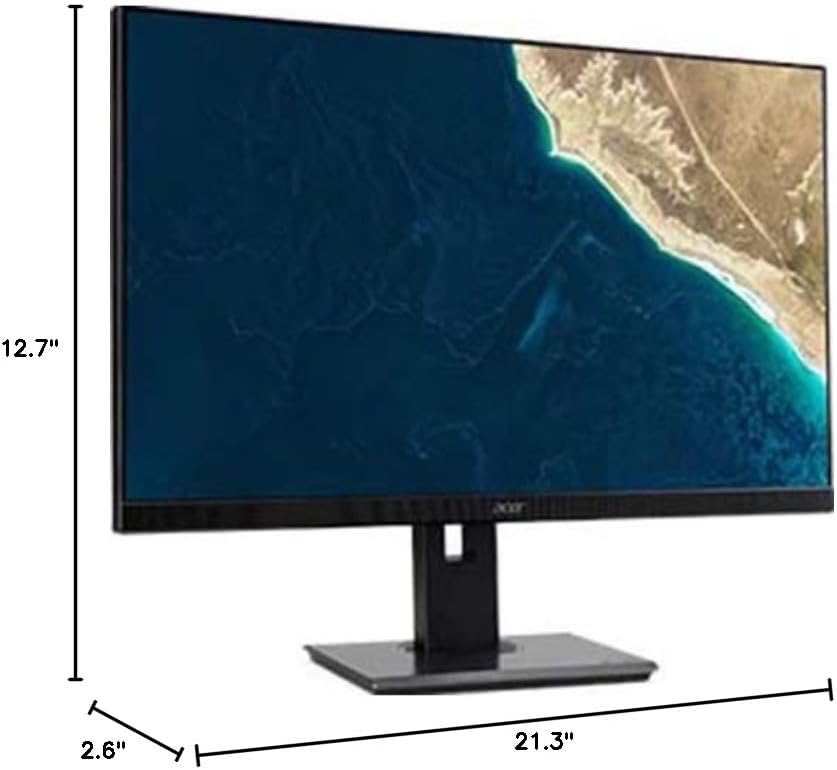
Figure 7.1.1: Acer B247Y Monitor Dimensions. This image shows the approximate height (12.7"), width (21.3"), and depth (2.6") of the monitor without the stand.
| Fitur | Spésifikasi |
|---|---|
| Nomer modél | B247Y |
| Ukuran layar | 23.8 inci (60.5 cm) |
| Tipe tampilan | LED LCD, IPS Panel, Anti-glare (AG) |
| Resolusi maksimum | 1920 x 1080 (HD lengkep) |
| Rasio Aspék | 16:9 |
| Refresh Laju | 75 Hz |
| Waktu Tanggapan | 4ms (gray-to-gray) |
| Caang (khas) | 250 cd/m² |
| Babandingan Kontras Asli | 1,000:1 |
| Rasio Kontras Dinamis | 100,000,000:1 |
| Viewing Angles (H / V) | 178° / 178° |
| Konektipitas | VGA, DisplayPort 1.2, HDMI, Audio-in, Audio-out |
| Speaker Integrasi | 2 x 2.0W |
| Pangaluyuan Ergonomic | Tilt (-5° to 25°), Swivel (+/- 45°), Height Adjustment (120mm), Pivot (90°) |
| VESA Gunung Rojongan | 100 x 100 mm |
| Ukuran jeung Stand (W x H x D) | 21.3" x 14.9"~19.6" x 7.6" (54.0cm x 37.9cm~49.9cm x 19.3cm) |
| Beurat kalawan Stand | 12.3 lb. (5.6 kg) |
| Adaptor kakuatan | Internal |
| Warna | Hideung |
8. Garansi jeung Rojongan
Your Acer B247Y monitor comes with a Limited Three-Year Warranty. Please retain your proof of purchase for warranty claims.
For technical support, service, or warranty inquiries, please refer to the official Acer support website or contact their customer service department. Contact information can typically be found on the Acer websitus atawa dina kartu jaminan kaasup kalayan produk Anjeun.
Kensington Lock: The monitor supports a Kensington lock for security. Attach a compatible Kensington lock (sold separately) to the security slot on the monitor to deter theft.