Bubuka
Manual ieu nyayogikeun inpormasi penting pikeun operasi anu aman sareng efektif tina alat anjeun Ampeg BA-210V2 450-Watt Bass Combo Amplifier. The BA-210V2 is designed to deliver classic Ampeg bass tone with features optimized for stage performance. It includes a Bass Scrambler overdrive, a true 60-degree monitoring angle, front-facing controls, auxiliary inputs, and a headphone jack.
Please read this manual thoroughly before using the amplifier to ensure proper setup and to maximize your experience with this product.
Parentah Kasalametan penting
- Baca parentah ieu.
- Tetep parentah ieu.
- Heed sagala warnings.
- Turutan sagala parentah.
- Entong nganggo alat ieu caket cai.
- Ngabersihan ngan ku kaén garing.
- Ulah meungpeuk sagala bukaan ventilasi. Pasang saluyu sareng parentah produsén.
- Entong dipasang di deukeut sumber panas sapertos radiator, register panas, kompor, atanapi aparat sanésna (kalebet ampLiifiers) anu ngahasilkeun panas.
- Ulah eleh tujuan kaamanan colokan polarized atawa grounding-tipe. A colokan polarized boga dua wilah jeung hiji leuwih lega ti lianna. A colokan tipe grounding boga dua wilah jeung prong grounding katilu. Agul lega atawa prong katilu disadiakeun pikeun kaamanan Anjeun. Upami colokan anu disayogikeun henteu pas kana stop kontak anjeun, konsultasi ka tukang listrik pikeun ngagantian stop kontak anu tos lami.
- Nangtayungan kabel listrik tina leumpang atawa diciwit, utamana dina colokan, wadah merenah, jeung titik dimana aranjeunna kaluar tina aparat.
- Ngan anggo kantétan/aksésori anu ditunjuk ku produsén.
- Anggo ngan sareng karanjang, stand, tripod, bracket, atanapi méja anu ditunjuk ku produsén, atanapi dijual sareng alatna. Nalika karanjang dipaké, ati-ati nalika ngagerakkeun kombinasi karanjang/aparatur pikeun nyegah tatu tina tip-over.
- Cabut colokan alat ieu nalika badai kilat atanapi nalika henteu dianggo kanggo waktos anu lami.
- Rujuk sadayana jasa ka tanaga jasa anu mumpuni. Diperlukeun ngalayanan nalika aparatur ruksak ku cara naon waé, sapertos kabel catu daya atanapi colokan rusak, cairan tumpah atanapi barang murag kana aparatur, aparatur parantos kakeunaan hujan atanapi lembab, henteu beroperasi normal. , atawa geus turun.
Fitur
The Ampeg BA-210V2 Bass Combo Amplifier offers a range of features designed for bass players seeking powerful tone and versatility:
- 450 Watts RMS Power: Delivers substantial power suitable for stage kinerja.
- 2x10" Ampeg Custom Speakers: Equipped with two 10-inch Ampeg Custom speakers for clear and robust bass reproduction.
- Bass Scrambler Overdrive: Provides a classic tube-like grind, allowing for versatile tonal options.
- Ultra Hi/Lo Tone Shaping: Offers enhanced tonal flexibility for sculpting your sound.
- 1" HF Tweeter: Includes a 1-inch high-frequency tweeter for extended treble response.
- 60° Monitoring Angle: The cabinet design allows for a true 60-degree monitoring angle, directing sound towards the player.
- Kontrol Nyanghareup ka Hareup: All controls are conveniently located on the front panel for easy access.
- Input bantu: Allows connection of external audio devices for practice.
- Jack headphone: Enables silent practice.
Kontrol sareng Sambungan
Kadali Panel hareup
The front panel provides all necessary controls for shaping your sound and connecting your instrument and other devices.

Gambar 1: Panel hareup Leuwihview of the BA-210V2 Amppangagung.
- Input: Sambungkeun gitar bass anjeun di dieu.
- -15 dB Pad: Engages a 15 dB attenuation for active basses or high-output instruments to prevent input clipping.
- Scrambler (Drive, Blend):
- nyetir: Nyaluyukeun jumlah overdrive/distorsi.
- Adun: Mixes the overdriven signal with the clean signal.
- Volume: Ngadalikeun tingkat kaluaran sakabéh tina amppangagung.
- Ultra Hai: Boosts high frequencies for added clarity and presence.
- Ultra Lo: Boosts low frequencies for a deeper, fuller bass tone.
- Bass: Nyaluyukeun ékualisasi frékuénsi handap.
- Pertengahan: Adjusts the mid-frequency equalization.
- Treble: Nyaluyukeun ékualisasi frékuénsi luhur.
- AUX Level: Controls the volume of the auxiliary input.
- AUX In: 3.5mm stereo input for connecting external audio devices like MP3 players or phones.
- Jalur Kaluar: XLR balanced output for connecting to a mixing console or recording interface.
- Kirim: Output for sending signal to external effects processors.
- Balik deui: Input for receiving signal from external effects processors.
- Telepon: 1/4-inch stereo headphone output for silent practice.
- HF Mute: Mutes the high-frequency tweeter. Useful for certain tones or when using external cabinets without tweeters.
- Saklar suku: Input for an optional footswitch to control the Scrambler and HF Mute functions.
- kakuatan: Saklar On/Off pikeun amppangagung.
Sambungan Panel Rear
The rear panel provides connections for power and external speaker options.
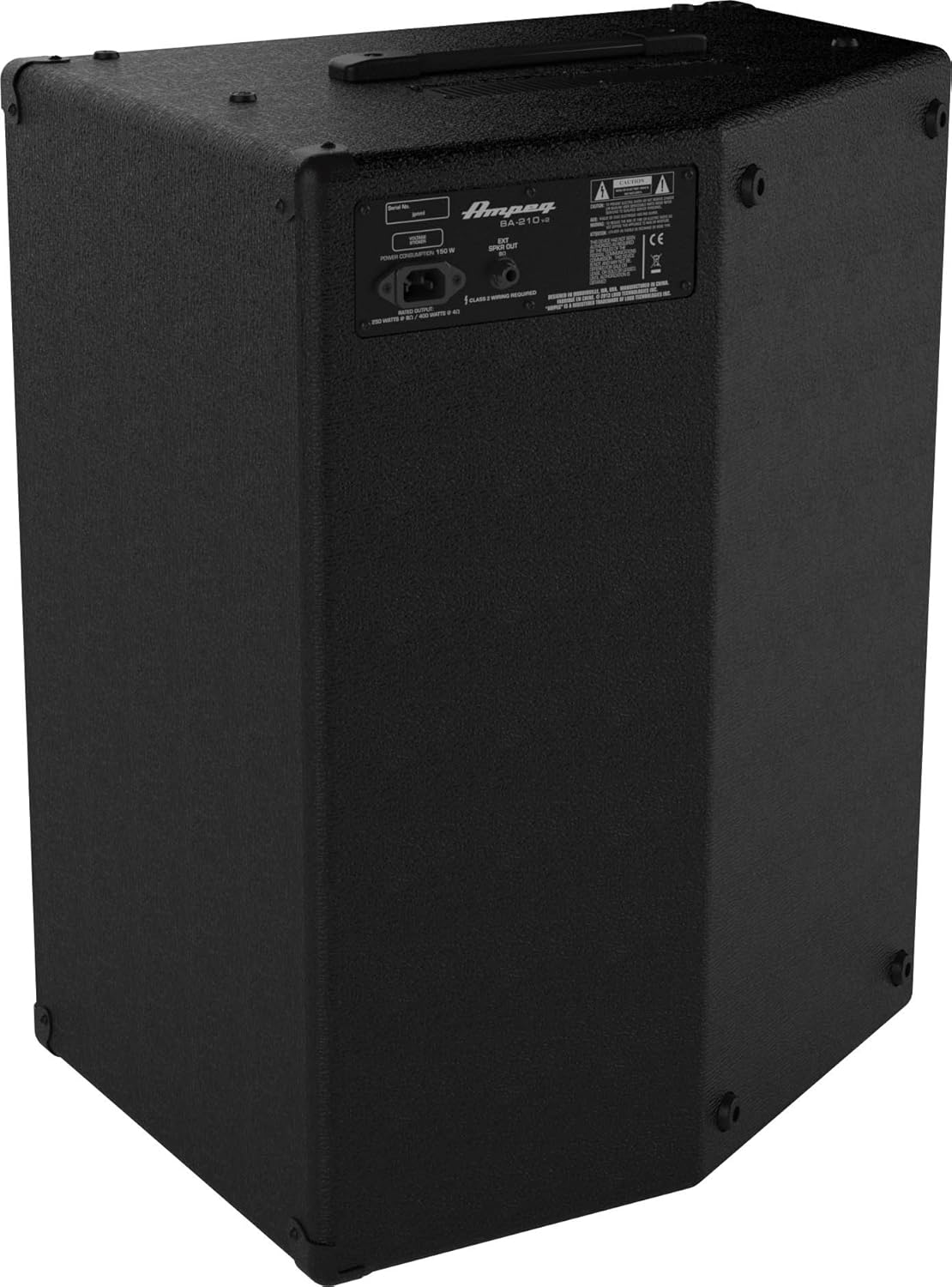
Gambar 2: Panel Tukang di Luhurview of the BA-210V2 Amppangagung.
- Input Daya AC: Connect the supplied AC power cord here.
- External Speaker Output: 1/4-inch output for connecting an external speaker cabinet. Ensure the impedance matches the ampsyarat liifier urang.
Disetél
Unpacking sarta panempatan
- Ati-ati ngaleupaskeun amplifier from its packaging.
- Tempatna amplifier on a stable, level surface.
- Pastikeun ventilasi anu cekap di sakitar unit. Ulah ngahalangan ventilasi hawa.
- The BA-210V2 can be used in a standard upright position or tilted back at a 60-degree angle for use as a floor monitor.
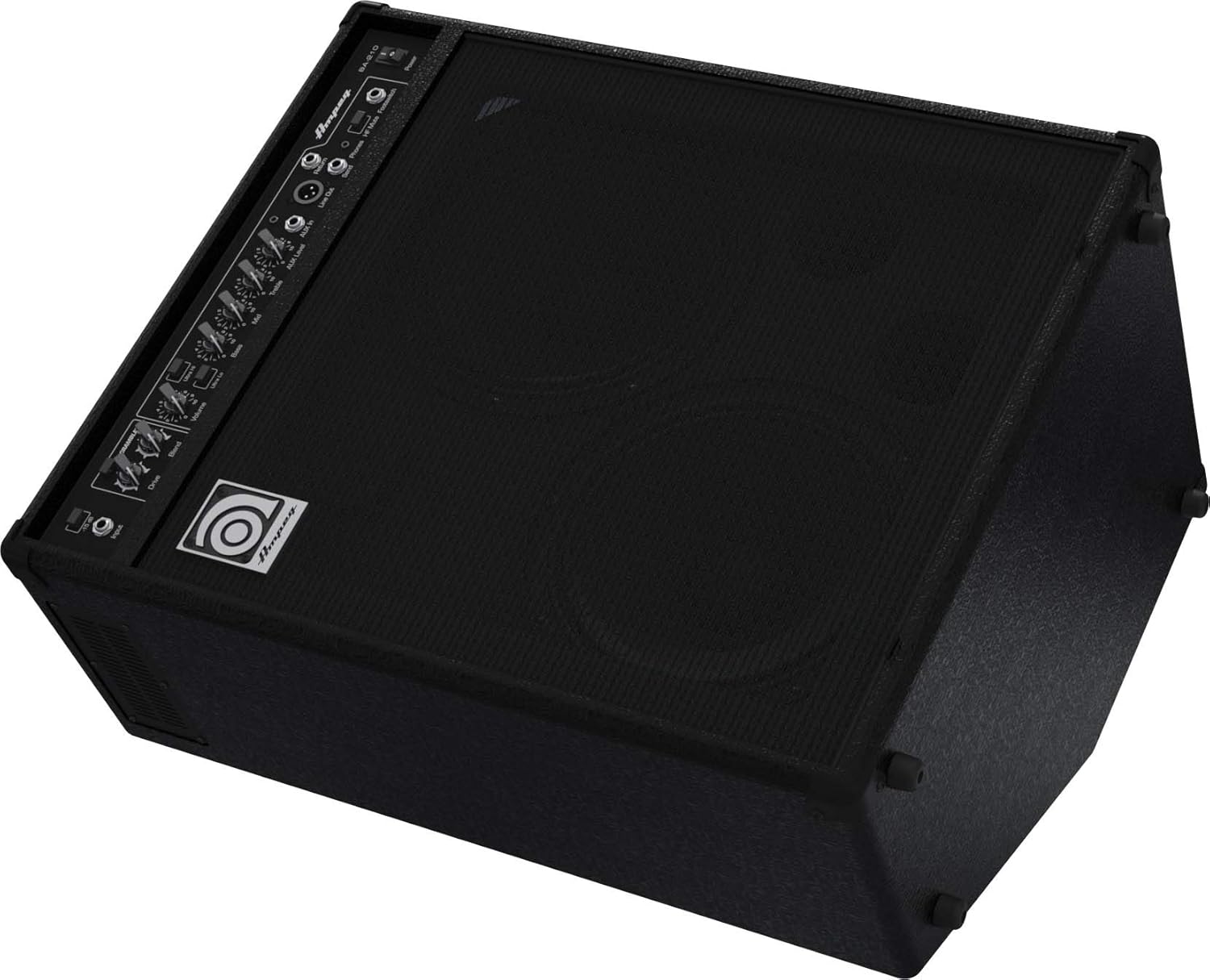
Figure 3: BA-210V2 in 60-degree monitoring position.
Connecting Your Instrument
- Pastikeun ampSaklar daya lifier aya dina posisi OFF.
- Sambungkeun gitar bass anjeun ka Input jack maké kabel instrumen 1/4 inci baku.
- If using an active bass or a high-output instrument, engage the -15 dB Pad switch to prevent input clipping.
Ngahurungkeun/Pareuman
- Before powering on, ensure all volume controls are set to their minimum.
- Sambungkeun kabel daya AC anu disayogikeun ka Input Daya AC on the rear panel and then to a grounded electrical outlet.
- Balikkeun Kakuatan switch to the ON position. The power indicator light will illuminate.
- To power off, turn down all volume controls, then flip the Kakuatan pindah ka posisi OFF.
Parentah Operasi
Basic Tone Setting
- Mimitian ku Bass, Pertengahan, jeung Treble controls at their center (12 o'clock) positions.
- Lalaunan ningkatkeun teh Jilid control to a desired listening level.
- Saluyukeun Bass, Pertengahan, jeung Treble controls to achieve your preferred tone.
- Ékspérimén jeung Ultra Hi jeung Ultra Lo switches to further shape your sound.
Using the Bass Scrambler Overdrive
- Ngalibetkeun Scrambler switch to activate the overdrive circuit.
- Saluyukeun Ngajalankeun knob to control the amount of distortion.
- Ngagunakeun éta Nyampur knob to mix the overdriven signal with your clean bass tone. A lower blend setting will retain more of your original signal, while a higher setting will emphasize the overdrive.
Auxiliary Input and Headphone Use
- Connect an external audio source (e.g., smartphone, MP3 player) to the AUX Di jack using a 3.5mm stereo cable.
- Adjust the playback volume on your external device and the Tingkat AUX kenop dina amplifier to balance the sound with your bass.
- For silent practice, connect headphones to the Telepon jack. This will mute the amplifier's internal speakers.
Sambungan Speaker Éksternal
- The BA-210V2 can power an external speaker cabinet. Connect a speaker cable from the Kaluaran Speaker éksternal on the rear panel to your external cabinet.
- Ensure the impedance of the external cabinet matches the amplifier's requirements (typically 8 ohms). Refer to the specifications section for details.
DI Output and Effects Loop
- The Garis Kaluar (XLR) provides a balanced signal for direct connection to a mixing console or recording device.
- The Ngirimkeun jeung Balik deui jacks form an effects loop, allowing you to integrate external effects processors into your signal chain. Connect the Send to the input of your effect and the output of your effect to the Return.
Pangropéa
- beberesih: Ngabersihan amplifier with a dry, lint-free cloth. Do not use liquid cleaners or solvents.
- Panyimpenan: Lamun teu dipaké pikeun période nambahan, nyimpen éta amplifier in a dry, temperature-controlled environment.
- Ventilasi: Salawasna mastikeun yén amplifier's ventilation openings are clear and unobstructed to prevent overheating.
- Palayanan: Refer all servicing to qualified service personnel. Do not attempt to service the unit yourself.
Pamérésan masalah
| Masalah | Mungkin Cukang lantaranana | Solusi |
|---|---|---|
| Taya sora | Power cord not connected; Power switch off; Volume controls at minimum; Instrument cable faulty; Speaker cable faulty (if external speaker used); HF Mute engaged. | Check power connections; Turn power switch ON; Increase volume; Test/replace cables; Check HF Mute switch. |
| Sora distort | Input signal too hot; Volume too high; Scrambler Drive too high; Faulty instrument or cable. | Engage -15 dB pad; Reduce input gain or instrument volume; Lower amplifier volume; Adjust Scrambler Drive/Blend; Test with another instrument/cable. |
| Hum atawa noise | Ground loop; Faulty cables; Nearby electrical interference. | Ensure proper grounding; Use shielded cables; Try different power outlets; Move amppangilon jauh ti alat éléktronik lianna. |
spésifikasi
| Fitur | Spésifikasi |
|---|---|
| Modél | BA-210v2 |
| Kaluaran Wattage | 450 Watt RMS |
| Panyatur | 2 x 10" Ampeg Custom Speakers, 1 x 1" HF Tweeter |
| Ukuran (H x W x D) | 25.7 x 15.7 x 20.7 inci (65.3 x 39.9 x 52.6 cm) |
| Beurat | 50 pon (22.7 kg) |
| Input Pad | -15 dB |
| Input bantu | 3.5mm stéréo Jack |
| Kaluaran headphone | 1/4" Stereo Jack |
| Garis Kaluar | XLR saimbang |
| Pangaruh Loop | Send/Return 1/4" Jacks |
| Footswitch Control | Scrambler On/Off, HF Mute On/Off |
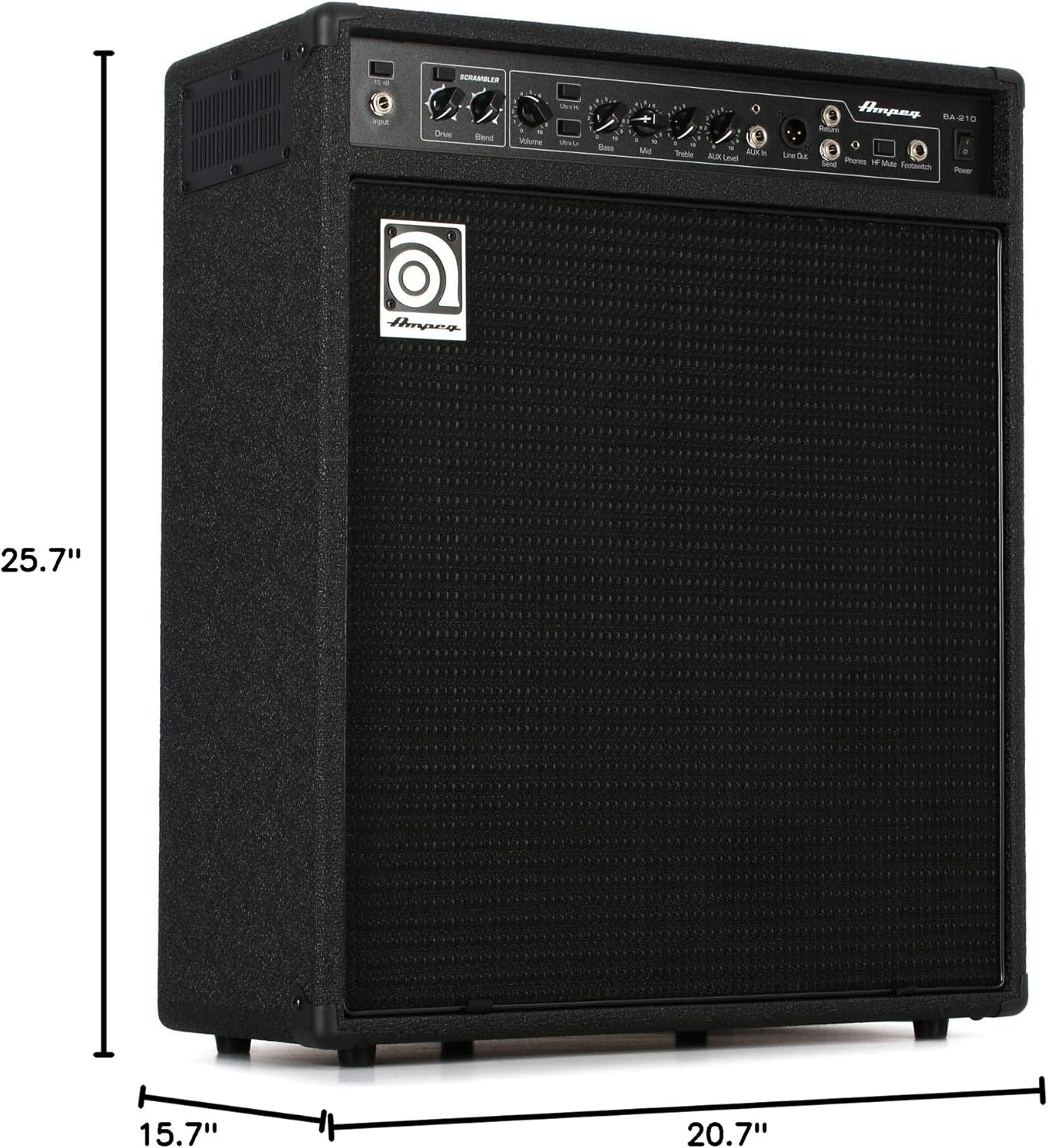
Figure 4: Dimensions of the BA-210V2 Amppangagung.
Garansi sareng Rojongan
For warranty information and technical support, please refer to the warranty card included with your product or visit the official Ampeg websitus. Ulah nyobian ngalereskeun unit sorangan, sabab ieu tiasa ngabatalkeun garansi anjeun.
Pikeun pitulung salajengna, kontak Ampeg customer support through their official channels.


