1. Bubuka
This manual provides essential information for the safe and effective use of your BSEED Voltage Protector Model 008. This device is designed to safeguard your valuable home appliances from various electrical fluctuations, including high and low voltage, brownouts, spikes, instant surges, and power failures. Please read this manual thoroughly before installation and operation.
2. Émbaran Kasalametan
- Kasalametan listrik: Salawasna mastikeun voltage protector is plugged into a properly grounded 125V AC outlet. Do not use with ungrounded outlets or adapters.
- Pamakéan jero rohangan wungkul: This device is intended for indoor use in dry locations. Do not expose to moisture, rain, or extreme temperatures.
- Pencegahan overload: Do not exceed the maximum rated capacity of 1875W. Overloading can cause damage to the unit and connected appliances, and may pose a fire hazard.
- Barudak jeung Pets: Jauhkeun alat tina jangkauan barudak sareng piaraan.
- Inspeksi Karusakan: Before each use, inspect the unit for any signs of damage. Do not use if the casing is cracked, the prongs are bent, or if there are any exposed wires.
- Pembongkaran: Ulah nyobian muka atanapi ngalereskeun unitna. Serahkan sadaya perawatan ka tanaga anu mumpuni.
3. Produk Langkungview
The BSEED Voltage Protector Model 008 is a compact, wall-mount power suppressor featuring three outlets and intelligent protection mechanisms. Its design prioritizes ease of use and robust appliance safeguarding.

Gambar 3.1: Hareupeun view of the BSEED Voltage Protector Model 008, showing its three standard outlets and the indicator lights at the top right.
Fitur konci:
- Three Outlets: Provides power and protection for up to three appliances simultaneously.
- Indikator LED: Four distinct LED lights provide real-time status of the power conditions.
- 3-Minute Delay: Incorporates a crucial 3-minute waiting cycle to protect appliance compressors after power interruptions.
- Bahan Tahan Seuneu: Constructed from PC flame retardant material for enhanced safety.
4. Setup jeung Instalasi
Installing the BSEED Voltage Protector is a straightforward process:
- Ngabongkar: Carefully remove the voltage protector from its packaging.
- Pilih Lokasi: Choose a standard 125V AC wall outlet that is easily accessible and in a dry indoor environment. Ensure there is sufficient space around the outlet for the protector and connected appliance plugs.
- Colokkeun: Insert the prongs of the voltage protector firmly into the wall outlet.
- Niténan Indikator: Upon plugging in, the LED indicators will illuminate to show the current power status. Initially, the "Waiting Cycle" LED will light up.
- Sambungkeun Perkakas: Once the "Normal Voltage" LED is illuminated (after the 3-minute waiting cycle), you can plug your appliances into the three outlets of the protector.

Gambar 4.1: Voltage protector installed in a kitchen, demonstrating its compact design when plugged into a wall outlet.
5. Parentah Operasi
The BSEED Voltage Protector operates automatically to safeguard your appliances. Understanding the LED indicators is key to monitoring its status.
Pituduh Indikator LED:
- Biasa Voltage (Green): Indicates that the incoming voltage is within safe operating limits (125V) and power is being supplied to the outlets.
- Langkung Voltage (Red): Illuminates when the incoming voltage exceeds safe levels. The protector will cut power to connected appliances to prevent damage.
- Low Voltage (Red): Illuminates when the incoming voltage drops below safe levels. The protector will cut power to connected appliances.
- Waiting Cycle (Yellow/Orange): Indicates that the device is in a delay period (approximately 3 minutes) before restoring power. This occurs after initial plug-in or after a power fluctuation event, allowing appliance compressors to equalize pressure.
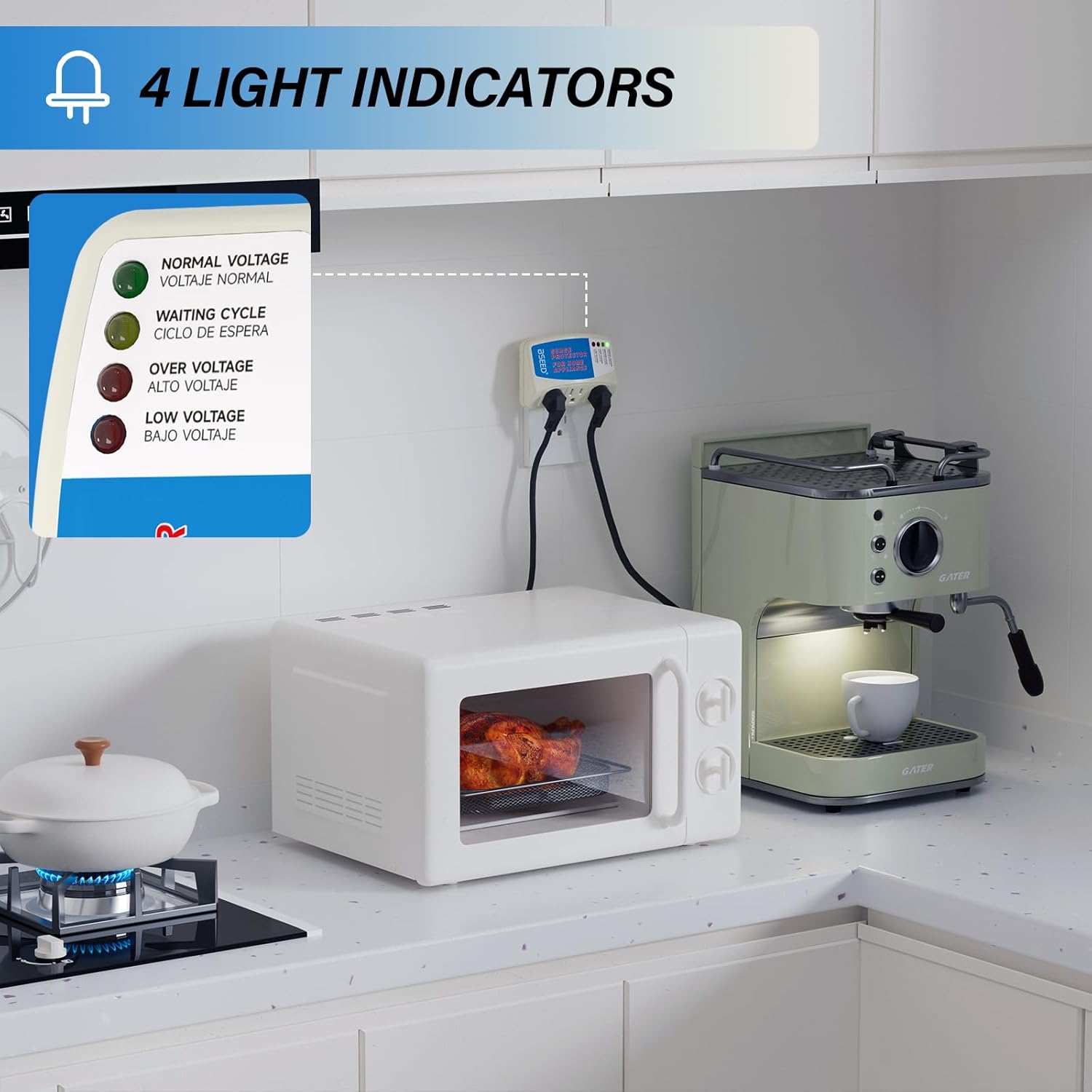
Gambar 5.1: Diwincik view of the four LED indicators and their corresponding labels, providing clear status information.
3-Minute Delay Function:
The 3-minute delay is a critical feature, especially for appliances with compressors like refrigerators, freezers, and air conditioners. After a power outage or fluctuation, the protector will wait for approximately 3 minutes before restoring power. This delay allows the compressor's internal pressures to stabilize, preventing potential damage from rapid power cycling.

Gambar 5.2: Visual representation of the 3-minute delay feature, emphasizing its role in protecting appliances like refrigerators.
6. Applicable Appliances
The BSEED Voltage Protector is suitable for a wide range of home appliances, particularly those sensitive to voltage fluctuations. These include:
- Kulkas
- AC
- Freezers
- Kacipta és
- Mesin cuci
- Televisi (TV)
- Personal Computers (PCs)
- Oven gelombang mikro
- Mesin Kopi
- Tukang cuci piring

Gambar 6.1: Examples of common household appliances that can be protected by the BSEED Voltage Pelindung.
7. Fitur panyalindungan
Your BSEED Voltage Protector offers comprehensive protection against various electrical anomalies:
- Luhur Voltage panyalindungan: Automatically disconnects power when voltage exceeds a safe threshold.
- Low Voltage panyalindungan: Automatically disconnects power when voltage drops below a safe threshold.
- Spike/Surge Protection: Guards against sudden, short-duration increases in voltage (spikes and surges).
- Power-Back Surge Protection: Protects against surges that can occur when power is restored after an outage.
- panyalindungan kilat: Offers a degree of protection against electrical damage caused by lightning strikes.

Gambar 7.1: Leuwihview of the five types of electrical protection provided by the device.
8. Pangropéa
The BSEED Voltage Protector requires minimal maintenance to ensure optimal performance and longevity:
- beberesih: Disconnect the unit from the wall outlet before cleaning. Use a soft, dry cloth to wipe the exterior. Do not use liquid cleaners or abrasive materials.
- Pamariksaan: Periodically check the unit for any physical damage, loose connections, or discoloration. If any issues are found, discontinue use and contact customer support.
- Panyimpenan: If storing the unit for an extended period, keep it in a cool, dry place away from direct sunlight and moisture.
9. Cara ngungkulan
| Masalah | Mungkin Cukang lantaranana | Solusi |
|---|---|---|
| No power to appliances, no LEDs lit. | Unit not properly plugged in; Wall outlet has no power; Unit is damaged. | Ensure unit is firmly plugged in. Check wall outlet with another device. If still no power, unit may be damaged; contact support. |
| "Waiting Cycle" LED remains lit for more than 3 minutes. | Persistent voltage instability; Internal fault. | Unplug the unit, wait 30 seconds, and plug it back in. If the issue persists, the voltage in your area may be unstable, or the unit may have an internal fault. |
| "Over Voltage" or "Low Voltage" LED is lit, no power to appliances. | Datang Voltage is outside safe operating range. | This indicates the protector is functioning correctly. Wait for the voltage to stabilize. If the condition persists, contact your electricity provider. |
| Appliances are not receiving power, but "Normal Voltage" LED is lit. | Appliance issue; Loose connection. | Check if the appliance is properly plugged into the protector. Test the appliance directly in a wall outlet (if safe to do so). If the appliance works directly, the protector may be faulty. |
10. Spésifikasi
| Fitur | Rincian |
|---|---|
| Nomer modél | 7545886604 |
| merek | BSEED |
| Masukan Voltage | 125V AC |
| Daya Maksimum | 1875W |
| Total outlet kakuatan | 3 |
| Fitur husus | Surge Protection, Voltage Protection (High/Low), 3-Minute Delay |
| Item Beurat | 5 ons |
| Dimensi produk | 6.54 x 7.32 x 11.97 inci |
| Bahan | Bahan Tahan Api PC |
| Tanggal Sadia munggaran | 17 Juli 2018 |

Gambar 10.1: Detailed product dimensions for both horizontal and vertical plug orientations.
11. Garansi jeung Rojongan
BSEED stands behind the quality of its products. Your BSEED Voltage Protector comes with a garansi 3 taun. For any questions, technical assistance, or warranty claims, please contact BSEED customer service. Our dedicated support team is available 24/7 to assist you.
For further information or to contact support, please refer to the official BSEED websitus atanapi dokuméntasi pameseran Anjeun.


