1. Bubuka
The CONTEC 08A is a fully automatic digital blood pressure monitor designed for accurate and convenient measurement of blood pressure and pulse rate. This device is suitable for use with adults, children, and neonates, offering multiple measurement modes and cuff sizes to accommodate various users. It features an intuitive interface, data storage capabilities, and essential alarm functions to assist in monitoring health.
Please read this manual thoroughly before using the device to ensure proper operation and to understand all safety precautions.
2. Émbaran Kasalametan
- Ulah nganggo alat ieu pikeun tujuan anu sanés tibatan ngukur tekanan darah.
- Consult a healthcare professional for interpretation of blood pressure readings. Self-diagnosis and treatment based on measurements can be dangerous.
- Jauhkeun alat ieu tina jangkauan orok sareng barudak.
- Ulah ngalaan alat ka suhu ekstrim, kalembaban, atawa sinar panonpoé langsung.
- Avoid strong electromagnetic fields, such as those from mobile phones or microwave ovens, near the device during operation.
- If the device displays an error message, refer to the troubleshooting section or contact customer support.
3. Eusi Paket
Saatos muka bungkusan, pariksa yén sadaya komponén aya sareng henteu ruksak:
- CONTEC 08A Blood Pressure Monitor Unit
- Awéwé panangan Cuff
- Child Arm Cuff
- Pediatric Arm Cuff
- USB Data Line
- Manual pamaké
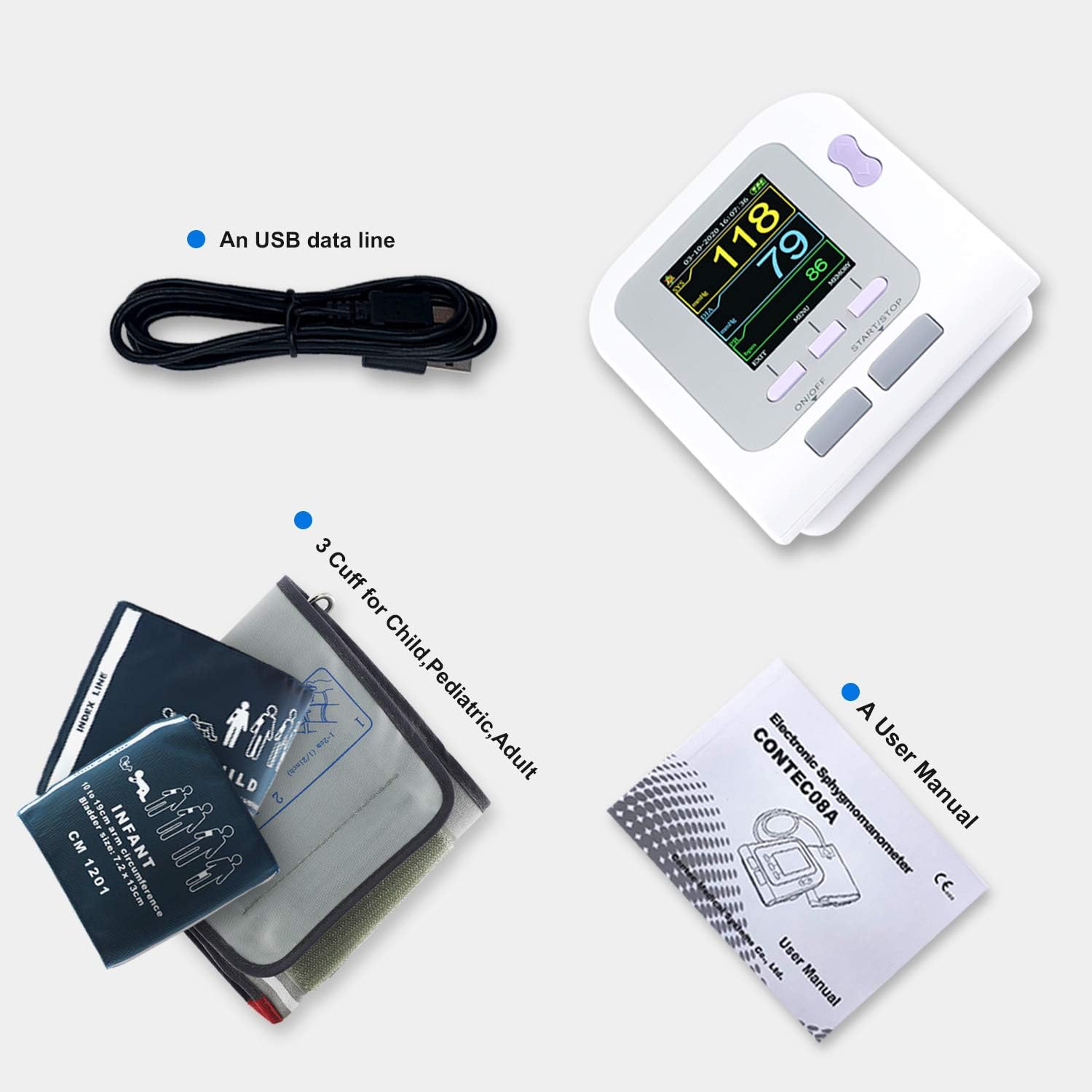
Gambar 3.1: Leuwihview of the CONTEC 08A package contents, showing the main unit, three different sized cuffs (infant, child, adult), a USB data cable, and the user manual.
4. Produk Langkungview
4.1 Fitur konci
- Fully automatic blood pressure measurement.
- Storage for three users, with up to 100 measurements per user.
- Three measurement modes: Adult, Pediatric, and Neonatal.
- High-definition color display for clear data viewing.
- Physiological alarm function with settable limits.
- Low power prompt and settable prompt sound.
- Automatic error message display for measurement issues.
- Option to display units in mmHg or kPa.

Gambar 4.1: Visual representation of the CONTEC 08A's main features, highlighting its user-friendly design and advanced capabilities.
4.2 Komponén alat jeung kadali

Gambar 4.2: Hareup jeung sisi view of the CONTEC 08A monitor with labels indicating the display screen, control buttons, and connection ports.
- tampilan: Shows blood pressure readings (SYS, DIA, PR), time, date, user mode, and battery status.
- Tombol ON/OFF: Ngahurungkeun atanapi mareuman alat.
- Tombol START/STOP: Ngamimitian atanapi ngeureunkeun pangukuran tekanan darah.
- Tombol MENU: Accesses the device settings and options.
- USER SWITCH Button: Toggles between User 1, User 2, and User 3.
- MEMORY Button: Enters the memory review mode pikeun view pangukuran anu kapungkur.
- UP/DOWN Button: Navigates through menu options or memory records.
- AC Adapter Jack: Port for connecting an optional AC power adapter (not included).
- USB Plug Jack: Port for connecting the USB data line to a computer for data transfer (software download required).
5. Setélan
5.1 Powering Alat
The CONTEC 08A is battery-powered. Insert four AA batteries into the battery compartment located on the back of the device, ensuring correct polarity. Alternatively, an optional 6V DC power adapter can be used via the AC Adapter Jack.
5.2 Nyambungkeun Cuff
Select the appropriate cuff size (Adult, Child, or Pediatric) based on the arm circumference of the user. Connect the cuff's air tube securely to the air jack on the side of the monitor.

Gambar 5.1: The CONTEC 08A monitor with a cuff attached, illustrating the readiness for measurement.
5.3 Cuff Size Guidelines
Using the correct cuff size is crucial for accurate measurements. Refer to the table below for recommended limb circumference ranges for each cuff type:
| Tipe | Dewasa | Anaking | murangkalih | Neonatal |
|---|---|---|---|---|
| The range of limb circumference | 32–42 CM | 18–26 CM | 10–19 CM | 6–11 CM |
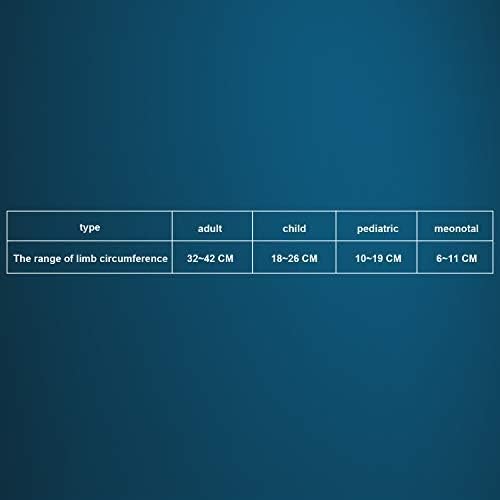
Gambar 5.2: Cuff size chart for accurate selection based on arm circumference.
6. Parentah Operasi
6.1 Nyiapkeun Pangukuran
For accurate readings, ensure the user is in a quiet and relaxed state:
- Adopt a comfortable sitting position, using back and arms to support the body.
- Place the elbow on a table, with the palm facing up, and the body relaxed.
- Ensure the cuff is level with the heart.
- Keep feet flat on the floor and do not cross legs.

Gambar 6.1: Proper body and arm positioning for an accurate blood pressure reading.
6.2 Ngalakukeun Pangukuran
- Pencét éta ON/OFF tombol pikeun kakuatan dina alat.
- Ngagunakeun éta USER SWITCH button to select the desired user profile (User 1, User 2, or User 3).
- Ensure the correct cuff is applied snugly to the upper arm, approximately 2-3 cm above the elbow joint, with the air tube running down the center of the arm.
- Pencét éta Mimitian / STOP button to begin the measurement. The cuff will inflate automatically.
- Remain still and quiet during the measurement. The device will automatically deflate the cuff and display the Systolic (SYS), Diastolic (DIA), and Pulse Rate (PR) readings.
- The measurement will be automatically stored under the selected user profile.
6.3 Selecting Measurement Mode (Adult, Pediatric, Neonatal)
The device supports three measurement modes. To switch modes:
- Kalayan alatna hurung, pencét MENU kancing.
- Navigate through the menu options using the luhur/handap buttons until 'Mode' or a similar setting is highlighted.
- Pencét MENU again to select the option, then use luhur/handap to choose between 'Adult', 'Pediatric', or 'Neonatal'.
- Konfirmasi pilihan anjeun ku mencét MENU or Mimitian / STOP (refer to on-screen prompts).
7. Manajemén Data
7.1 deuiviewing Stored Data
The monitor stores up to 100 measurements for each of the three users. To review bacaan kaliwat:
- Pastikeun alat diaktipkeun.
- Pencét éta ENGÉLING kancing.
- Ngagunakeun éta luhur/handap buttons to scroll through the stored measurements. Data can be viewed in 'data list', 'trend graph', or 'big font' interfaces for clarity.
- Pencét KALUAR or ON/OFF to return to the main screen or power off.
7.2 Physiological Alarm Function
The device features a physiological alarm that can be set to alert users when blood pressure readings exceed or fall below predefined limits. To set or adjust alarm limits:
- Pencét éta MENU button to enter settings.
- Navigate to the 'Alarm' or 'Limits' setting using the luhur/handap kancing.
- Select the option and adjust the high and low blood pressure limits as desired.
- Ensure the alarm switch is set to 'ON' if you wish to activate this feature.
7.3 Software Download Steps
To transfer data to a computer, you may need to download specific software. Follow these general steps:
- Enter the download address into your browser's address bar: http://download.contecmed.com
- Enter the index code "06SFB031" then click download. (Note: The index code does not allow spaces).
- A RAR file (e.g., 06SFB031.rar) will be downloaded.
- Buka zip ieu file and install the executable (e.g., BPMeter_V4.1.0_Setup.exe).
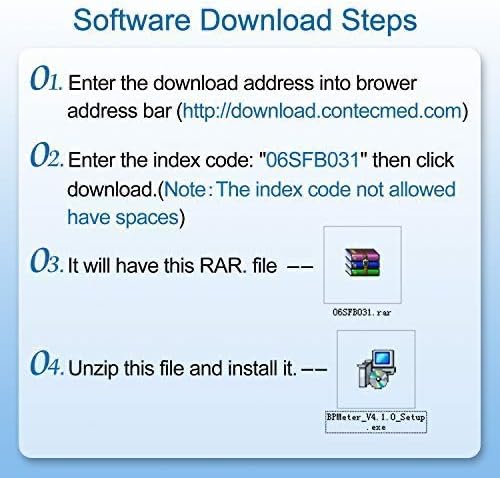
Gambar 7.1: Step-by-step guide for downloading and installing the CONTEC 08A data management software.
8. Pangropéa
8.1 beberesih
Clean the monitor and cuff regularly to ensure hygiene and proper function:
- Wipe the monitor's surface with a soft, dry cloth. If necessary, use a cloth lightly dampened with water or a mild disinfectant. Do not use abrasive cleaners or immerse the device in water.
- Bersihkeun manset ku kaén anu lemes,amp lawon. Ulah ngumbah manset dina mesin cuci atanapi ngalelepkeun kana cai.
- Pastikeun alat parantos garing sateuacan disimpen atanapi dianggo salajengna.
8.2 Panyimpenan
Store the device in a cool, dry place, away from direct sunlight, extreme temperatures, and high humidity. If the device will not be used for an extended period, remove the batteries to prevent leakage.
8.3 Ngagantian batré
When the screen displays a low power prompt or the device gives a low power sound, replace all four AA batteries with new ones. Ensure correct polarity when inserting new batteries.
9. Cara ngungkulan
If you encounter issues with your CONTEC 08A monitor, refer to the table below for common problems and their solutions:
| Masalah | Mungkin Cukang lantaranana | Solusi |
|---|---|---|
| Alat teu hurung. | Batré pareum atawa salah dipasang. | Ganti batré, mastikeun polaritasna bener. |
| Manset henteu ngembang atanapi ngembang sakedik teuing. | Cuff not connected properly; air leakage; cuff tube kinked. | Ensure cuff tube is securely connected. Check for any damage to the cuff or tube. Straighten any kinks. |
| Bacaan teu akurat. | Incorrect cuff size; improper measurement posture; movement during measurement. | Use correct cuff size. Follow proper measurement posture guidelines. Remain still and quiet during measurement. |
| Talatah kasalahan dipintonkeun. | Gangguan pangukuran; gangguan fungsi alat. | Repeat measurement, ensuring proper conditions. If error persists, contact customer support. |
| ajakan kakuatan low. | Batré lemah. | Ganti batré. |
10. Spésifikasi
- Ngaran modél: CONTEC 08A
- Jumlah modél: CONTEC08A-3 Cuffs
- merek: CONTEC
- Pabrikan: Contec Medical Systems Co.ltd
- Sumber Daya: Battery Powered (4x AA batteries) or optional 6V DC adapter
- Komponén Kaasup: Monitor, Adult Cuff, Child Cuff, Pediatric Cuff, USB Data Line, User Manual
- Ukuran Paket: 6.42 x 4.8 x 4.76 inci
- beurat: 1.48 pon
- UPC: 733430164683
- Modeu pangukuran: Adult, Pediatric, Neonatal
- Panyimpenan Data: 3 users, 100 measurements per user
11. Garansi jeung Rojongan
For warranty information or technical support, please contact Contec Medical Systems Co.ltd directly or refer to the contact details provided on the product packaging or official websitus. Simpen resi pameseran anjeun salaku bukti pameseran pikeun klaim garansi.


