1. Bubuka jeung Leuwihview
The Zoom LiveTrak L-20 is a 20-channel digital mixer designed for live sound, studio recording, and podcasting. It integrates a 24-bit/96kHz 22-track recorder, a 22-in/4-out USB audio interface, 6 independent monitor outputs, 3-band EQ, and 20 built-in effects. This manual provides essential information for setting up, operating, maintaining, and troubleshooting your L-20 unit.
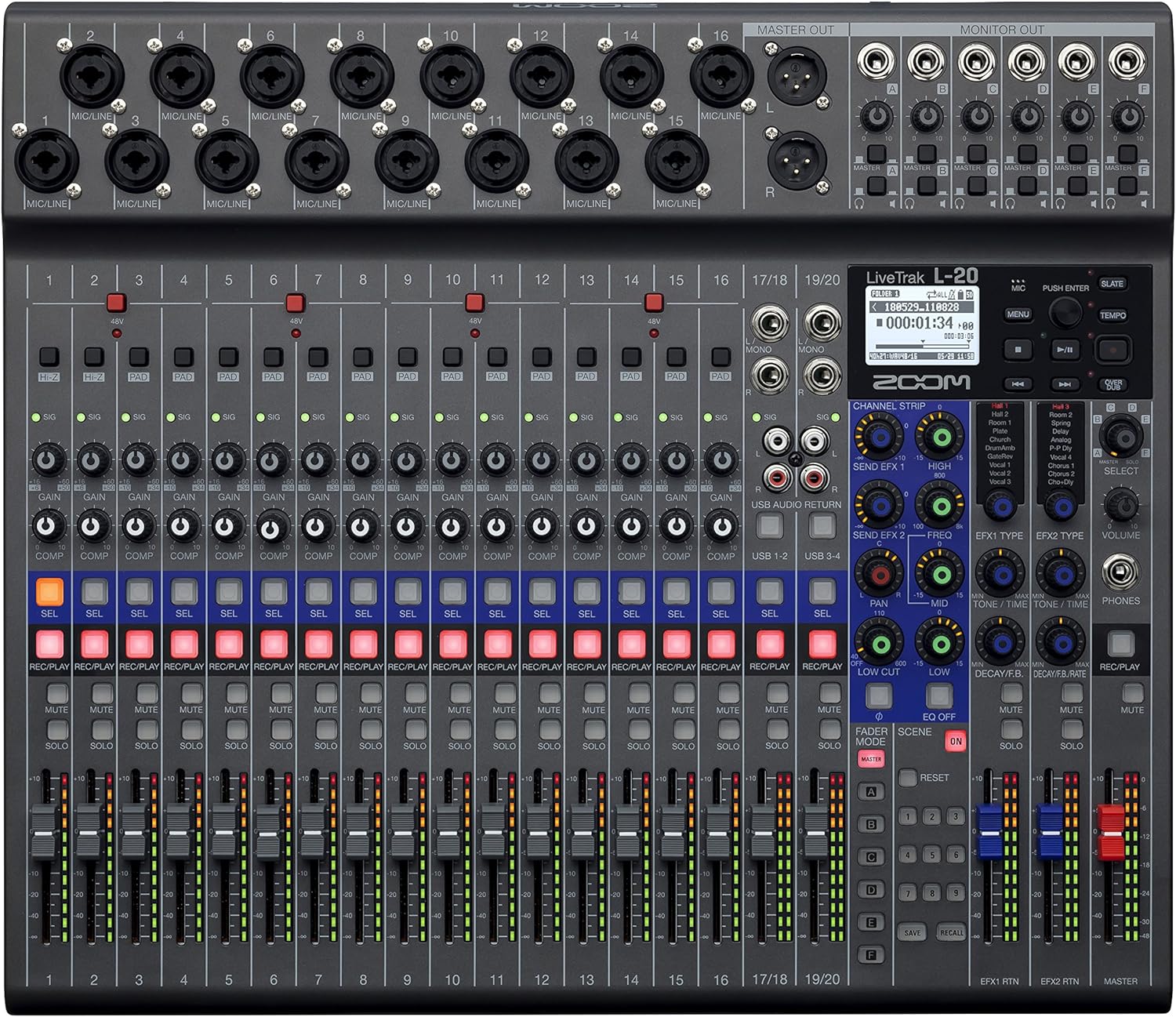
Gambar 1: Hareupeun view of the Zoom LiveTrak L-20 Digital Mixer, showcasing permukaan kontrol komprehensifna.
Fitur konci:
- Kualitas Sora Unggul: Experience pristine audio with 44.1/48/96 kHz sampling, ensuring every recording captures the nuances of your performance with exceptional clarity and depth.
- Konektipitas serbaguna: Seamlessly integrate with various devices using USB 2.0 for audio interface capabilities, offering 22-channel recording and 4-channel playback for flexible workflow.
- Kontrol intuitif: Navigate effortlessly with the LCD backlight display (128 x 64 resolution), providing clear visual feedback for settings and levels, enhancing your mixing experience.
- Expanded Input Options: Accommodate diverse audio sources with 16 mono (MIC/LINE) inputs and 2 stereo (LINE) inputs, offering XLR/TRS combo jacks and selectable Hi-Z input for instruments.
- Robust Recording Capabilities: Capture every moment with up to 22 simultaneous recording tracks at high resolution (96 kHz), ensuring no detail is missed during live performances or studio sessions.
2. Setélan
2.1 Unboxing sareng Inspeksi Awal
Upon receiving your Zoom LiveTrak L-20, carefully unpack all components. The package typically includes the L-20 unit and an AC Adapter. Inspect the unit for any signs of damage during transit. Ensure all listed accessories are present.
2.2 Nyambungkeun Daya
Connect the supplied AC adapter to the DC IN 12V port on the rear panel of the L-20 and plug it into a suitable power outlet. Use the POWER switch to turn the unit on or off.
2.3 Sambungan Input jeung Output
The L-20 offers extensive connectivity options:
- Input Mikropon/Jalur (Saluran 1-16): These channels feature XLR/TRS combo jacks, accommodating both microphones and line-level instruments. Channels 1-2 also offer selectable Hi-Z input for direct connection of guitars or basses.
- Stereo Line Inputs (Channels 17/18, 19/20): These inputs are suitable for stereo line-level sources such as keyboards or media players.
- Kaluaran Master: XLR outputs for connecting to main PA systems or studio monitors.
- Monitor Outputs (A-F): Six independent TRS outputs for connecting to personal monitor systems or headphones, allowing for customized mixes for each performer.
- Port USB: USB Host port for connecting flash drives and a USB 2.0 port for computer connectivity (audio interface mode).
- Slot Kartu SD: For multitrack recording directly to an SD card.
- Input Saklar Foot: Allows connection of an optional foot switch for remote control of certain functions, such as punch-in/out for recording.

Figure 2: Rear panel connections of the Zoom LiveTrak L-20, detailing various input and output options.
2.4 SD Card sisipan
Insert a compatible SD card (up to 512GB) into the SD card slot on the front panel. The L-20 supports SD, SDHC, and SDXC cards. Ensure the card is formatted correctly by the L-20 before recording.
2.5 Kadali Jauh Bluetooth
The L-20 includes a Bluetooth remote adapter. Insert this adapter into the 'REMOTE' port on the front panel. This enables wireless control of the L-20 via a dedicated application on a compatible device (e.g., iPad).
3. Parentah Operasi
3.1 Kadali saluran
Each channel on the L-20 features dedicated controls for optimal sound shaping:
- Gain Knob: Adjusts the input level for each channel.
- Tombol PAD: Attenuates the input signal by 26dB for high-level sources.
- Kenop COMP (Kompresor): Applies compression to the input signal, helping to control dynamics.
- 3-Band EQ: High, Mid, and Low frequency controls to shape the tone of each channel.
- SEND EFX: Controls the amount of signal sent to the built-in effects processor.
- PAN: Saluyukeun posisi stereo saluran.
- REC/PLAY Button: Engages recording or playback for the individual track.
- Tombol bisu: Ngajempékeun saluran.
- SOLO Button: Isolates the channel for monitoring.
- Fader: Controls the output level of the channel.
3.2 Multitrack Recording
The L-20 can record up to 22 tracks simultaneously to an SD card. To begin recording:
- Ensure an SD card is inserted and formatted.
- Pencét éta REC / MUTER button on each channel you wish to record. The button will illuminate red.
- Pencét utama REC button (red circle) in the master section to start recording.
- Pencét éta ulin tombol pikeun ngeureunkeun ngarékam.
3.3 Monitor Mixes
The L-20 provides 6 independent monitor mixes (A-F). Each mix can be customized for individual performers:
- Select the desired monitor mix (A-F) using the dedicated buttons.
- Adjust the level of each channel within that specific monitor mix using the channel's Ngirimkeun kenop.
- Connect headphones or in-ear monitors to the corresponding monitor output.
3.4 Built-in Effects
The L-20 features 20 built-in effects. To apply effects:
- Ngagunakeun éta JENIS EFX knob to select the desired effect.
- Saluyukeun EFX mulang level to control the overall effect amount.
- Ngagunakeun éta SEND EFX knob on individual channels to send signal to the effects processor.
3.5 USB Audio Interface Mode
The L-20 can function as a 22-in/4-out USB audio interface for your computer (Mac/PC/iOS). Use the MODE alat switch to select between HOST (for flash drives) and DEVICE (for computer connection). The CLASS COMPLIANT MODE switch allows for driverless operation with iOS devices.
Video 1: Produk Leuwihview of the Zoom LiveTrak L-20. This video demonstrates the key features and operational aspects of the mixer, including inputs, outputs, and controls.
Pidéo 2: Langkung lengkepnaview of the Zoom LiveTrak L-20 Digital Mixer and Multitrack Recorder. This video focuses on the recording features, input channels, and overall design.
4. Pangropéa
4.1 beberesih
Regularly clean the surface of the L-20 with a soft, dry cloth. For stubborn dirt, use a slightly damp cloth with a mild, non-abrasive cleaner. Avoid using harsh chemicals or solvents, as these can damage the finish and electronic components. Ensure no liquids enter the unit.
4.2 Panyimpenan
When not in use, store the L-20 in a cool, dry place away from direct sunlight, extreme temperatures, and high humidity. Protect the unit from dust by covering it with a dust cover or storing it in its original packaging or a suitable carrying case.
4.3 Apdet firmware
Périodik pariksa Zoom resmi website for firmware updates. Keeping your L-20's firmware up-to-date ensures optimal performance, new features, and bug fixes. Follow the instructions provided by Zoom carefully when performing updates.
5. Cara ngungkulan
This section addresses common issues you might encounter with your Zoom LiveTrak L-20.
5.1 Taya Daya
- Ensure the AC adapter is securely connected to both the L-20 and a working power outlet.
- Pastikeun saklar daya aya dina posisi 'ON'.
- Uji stop kontak nganggo alat anu sanés pikeun mastikeun éta tiasa dianggo.
5.2 Taya Kaluaran Sora
- Check all cable connections from inputs to outputs.
- Ensure channel faders and the master fader are raised.
- Verify that channels are not muted or soloed incorrectly.
- Check the gain settings for each channel to ensure adequate input level.
- Confirm that monitor mixes are correctly configured and their output levels are sufficient.
5.3 Ngarekam Masalah
- Ensure a compatible SD card is inserted and properly formatted.
- Check the available space on the SD card.
- Pariksa yén REC / MUTER button is illuminated red for the desired tracks before pressing the main REC kancing.
- If using as a USB audio interface, ensure the correct drivers are installed (if required by your OS) and the L-20 is selected as the audio input/output device in your DAW.
5.4 Masalah Konektipitas Bluetooth
- Ensure the Bluetooth remote adapter is securely inserted into the 'REMOTE' port.
- Verify Bluetooth is enabled on your controlling device (e.g., iPad).
- Restart both the L-20 and your controlling device.
- Ensure the controlling app is up-to-date.
6. Spésifikasi
| Fitur | Spésifikasi |
|---|---|
| Item Beurat | 9.8 ons (0.28 kg) |
| Dimensi produk | 17.5 x 15.3 x 3.25 inci (44.45 x 38.86 x 8.26 cm) |
| Nomer Modél Item | L-20 |
| Jumlah Saluran | 20 |
| Sumber Daya | Kabel Listrik |
| Téhnologi konektipitas | USB |
| Sampling Frékuénsi | 44.1 / 48 / 96 kHz |
| Ngarékam Lagu | Up to 22 simultaneous tracks |
| Ngawas Kaluaran | 6 kaluaran mandiri |
| Pangaruh Diwangun | 20 rupa |
7. Émbaran jaminan
The Zoom LiveTrak L-20 typically comes with a manufacturer's warranty. For detailed information regarding warranty coverage, duration, and terms, please refer to the warranty card included with your product or visit the official Zoom websitus. Simpen bukti pameseran anjeun pikeun klaim garansi.
8. Rojongan jeung Kontak
For further assistance, technical support, or to download the latest drivers and firmware, please visit the official Zoom support website. You can also find FAQs and community forums for additional help.
Zoom Resmi Websitus: www.zoom.co.jp


