1. Produk Langkungview
The Sennheiser XSW 1-825 DUAL-A Channel Wireless Microphone System is designed for ease of use and reliable audio performance. This dual vocal set includes one EM-XSW 1 DUAL receiver and two SKM 825-XSW dynamic, cardioid microphones. Operating within the A frequency range (548 - 572MHz), the system offers convenient features such as one-button scanning and synchronization for straightforward setup. The streamlined receiver features internal diversity antennas, contributing to a clean aesthetic and stable signal reception. Up to 10 systems can be used simultaneously, making it suitable for various applications.
- Easy-to-use handheld wireless system with great sound.
- 1-button scanning and synchronization for easy setup.
- Intuitive icon-based indicators for simple operation.
- Internal diversity receiver antennas for a simplified look.
- Supports use of up to 10 systems simultaneously.

Figure 1: Sennheiser XSW 1-825 DUAL Wireless Microphone System showing the receiver and two handheld microphones.
2. Naon dina Box
Your Sennheiser XSW 1-825 DUAL system package should contain the following items:
- 1x EM-XSW 1 DUAL receiver
- 2x SKM 825-XSW handheld microphones (dynamic, cardioid)
- 2x MZQ 1 microphone clips
- 1x NT 12-5 CW power supply
- 2x AA batteries (included for immediate use)
3. Setélan
3.1 Receiver Setup (EM-XSW 1 DUAL)
- Sambungan Daya: Connect the NT 12-5 CW power supply to the DC 12V input on the rear of the EM-XSW 1 DUAL receiver. Plug the power supply into a suitable electrical outlet.
- Kaluaran Audio: Connect the receiver's audio output to your mixer or amplifier. The receiver offers both balanced XLR outputs and an unbalanced 1/4 inch (6.3mm) jack. Ensure the correct cable type is used for your audio system.
- Anteneu: The receiver features internal diversity antennas. No external antenna setup is required.
- Daya Hurung: Press the power button on the front panel of the receiver to turn it on. The display will illuminate.
3.2 Microphone Setup (SKM 825-XSW)
- Pamasangan batré: Unscrew the bottom part of the microphone handle to reveal the battery compartment. Insert two AA batteries, ensuring correct polarity. The system includes 2 AA batteries.
- Daya Hurung: Press and hold the power button on the microphone handle until the indicator light illuminates.
- Singkronisasi: With both the receiver and microphone powered on, use the 'SET/SCAN' button on the receiver to initiate a frequency scan. Once a clear channel is found, use the 'SYNC' button on the receiver and align the microphone's IR window with the receiver's IR sensor to synchronize the frequency. The microphone display will confirm successful synchronization.
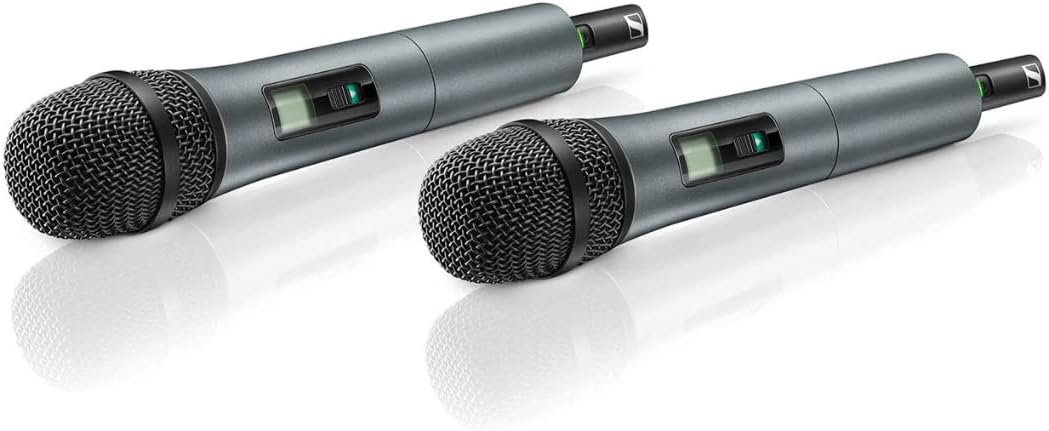
Figure 2: Two SKM 825-XSW handheld microphones, showing their design and battery compartment access.

Figure 3: The EM-XSW 1 DUAL receiver, illustrating its front panel controls and rear panel connections for audio output and power.
4. Parentah Operasi
4.1 Operasi Mikropon
- Hurungkeun/Pareuman: Press and hold the power button on the microphone to turn it on or off. A green light indicates the microphone is active.
- Fungsi mute: The microphone features a mute function. Refer to the microphone's display or indicator for its current mute status.
- Status batré: The microphone's display provides an indication of the remaining battery life.
4.2 Operasi panarima
- Pilihan Saluran: Use the 'CH+' and 'CH-' buttons on the receiver to manually select a channel, or use the 'SET/SCAN' function to automatically find a clear frequency.
- Kontrol volume: Adjust the output volume of each channel using the 'VOL+' and 'VOL-' buttons on the receiver.
- Indikator Kahirupan Batré: The receiver's display shows the battery life of the connected microphones.
5. Spésifikasi
| Fitur | Spésifikasi |
|---|---|
| Sensitipitas Audio | 75 desibel |
| Item Weight (Microphone) | 245 Gram (8.6 ons) |
| Faktor Bentuk Mikropon | Dicekel |
| Dimensi produk | 16.9 x 13.6 x 3.3 inci |
| Sumber Daya | Didukung ku batré (perlu 2 batré AA, kalebet) |
| Bahan | ABS (Acrylonitrile Butadiene Styrene) |
| Rasio Signal-to-Noise | 103 dB |
| Jumlah Saluran | 2 |
| Réspon Frékuénsi | 572 MHz (A band: 548 - 572MHz) |
| Produsén | Sennheiser |
| Téhnologi konektipitas | XLR |
| Tipe Panyambung | XLR |
| Fitur husus | Fungsi Jempé, Rékam Diaktipkeun Sora |
| Alat nu cocog | Amplifier, Karaoke Machine, Radio, Speaker |
| Warna | Hideung |
| Pola Polar | Saarah |
6. Pangropéa
- beberesih: Use a soft, dry cloth to clean the exterior of the receiver and microphones. Avoid using liquid cleaners or solvents.
- Perawatan batré: If using rechargeable AA batteries, ensure they are charged regularly and replaced when their performance degrades. Remove batteries if the system will not be used for an extended period to prevent leakage.
- Panyimpenan: Simpen sistem di tempat anu tiis sareng garing, jauh tina sinar panonpoé langsung sareng suhu anu ekstrim.
7. Cara ngungkulan
- Henteu aya sora:
- Ensure both the receiver and microphone are powered on.
- Check microphone batteries and replace if low.
- Verify that the microphone is not muted.
- Confirm the receiver is correctly connected to your audio system and input levels are appropriate.
- Resynchronize the microphone and receiver.
- Gangguan/Kualitas Sora Goréng:
- Perform a frequency scan on the receiver to find a clear channel.
- Ensure the microphone and receiver are within operating range and have a clear line of sight.
- Ulah neundeun panarima caket alat nirkabel anu sanés atanapi sumber gangguan éléktromagnétik.
- Microphone Not Synchronizing:
- Ensure both devices are powered on and in close proximity during the sync process.
- Check for any obstructions between the IR sensors.
8. Garansi jeung Rojongan
For warranty information and technical support, please refer to the official Sennheiser websitus atanapi ngahubungan layanan palanggan maranéhna. Simpen bukti pameseran anjeun pikeun klaim garansi.


