
Andoer HDV-Z82
Andoer HDV-Z82 Digital Video Camera Camcorder User Manual
Model: HDV-Z82
1. Bubuka
This manual provides comprehensive instructions for the operation and maintenance of your Andoer HDV-Z82 Digital Video Camera Camcorder. The HDV-Z82 is a versatile device capable of capturing 1080P Full HD video and 24MP still images, featuring a 0.45X wide-angle lens, 3-inch LCD touchscreen, and support for external accessories.

The Andoer HDV-Z82 camcorder, shown with its included remote control, highlighting its compact design and primary lens.

The Andoer HDV-Z82 camcorder is designed to capture vivid and bright moments with its 24MP High Definition CMOS Sensor.
2. Eusi Paket
Punten parios yén sadaya barang anu didaptarkeun di handap kalebet kana pakét anjeun:
- 1 x Andoer HDV-Z82 Digital Camera with Battery (NP-40B 3.7V 1250mAh)
- 1 x Remote Control with Battery (CR2025 3V)
- 1 x 0.45X Wide Angle Lens with 2 Covers
- 1 x Klip Lénsa
- 1 x Lens Bag
- 1 x Kabel USB
- 1 x Kabel HD
- 1 x Tutup Lénsa
- 1 x Camera Bag with Shoulder Strap
- 1 x Lens User Manual (English)
- 1 x Camera User Manual (English/Chinese)
3. Bagian Idéntifikasi
Familiarize yourself with the various parts of your camcorder:
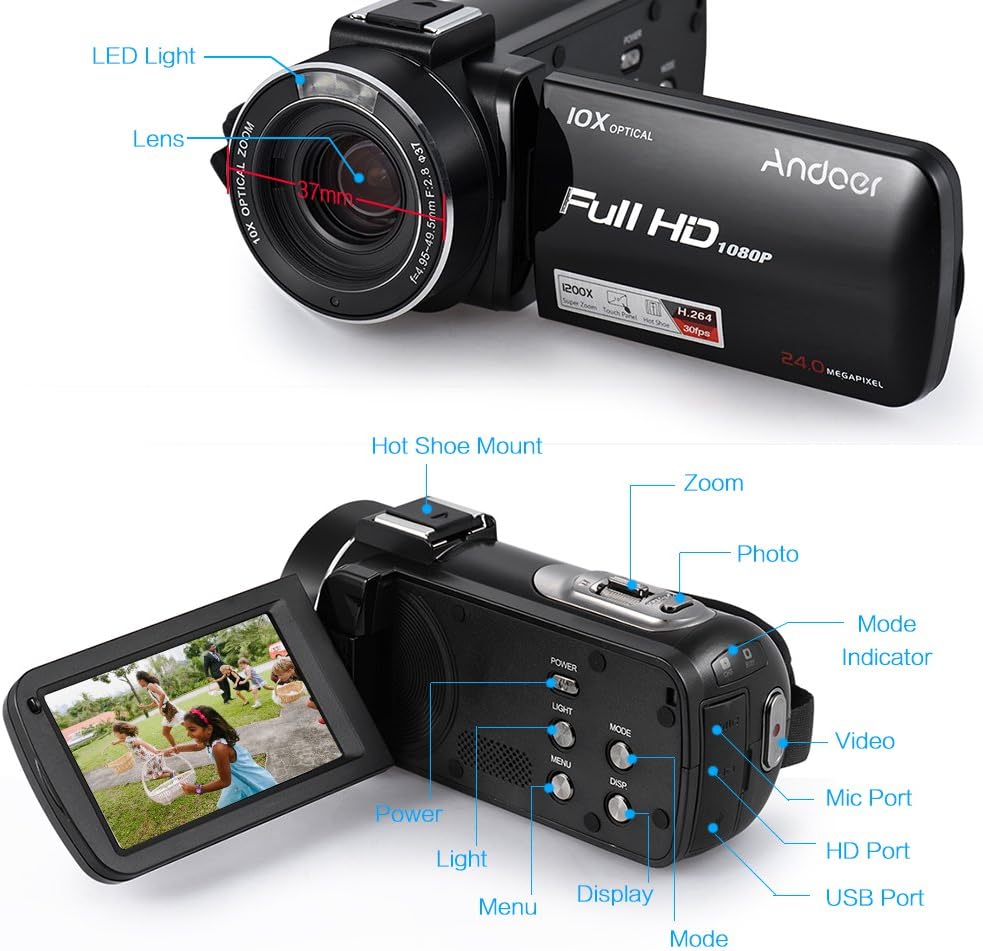
This diagram illustrates the various components of the HDV-Z82 camcorder, including the LED Light, Lens, Hot Shoe Mount, Zoom control, Photo button, Mode selector, Video button, Mic Port, HD Port, USB Port, Power button, Light button, Menu button, Display button, and Mode indicator.
- Lampu LED: Provides supplementary illumination in low-light conditions.
- Lensa: Komponen optik utama pikeun ngarekam gambar sareng pidéo.
- Dudukan Sepatu Panas: For attaching external accessories like microphones or additional LED lights.
- Kontrol zum: Adjusts the optical and digital zoom levels.
- Tombol Poto: Press to capture still images.
- Pamilih Mode: Ngaganti antara modeu pidéo, poto, sareng puter deui.
- Tombol Video: Mimitian sareng ngeureunkeun ngarékam pidéo.
- Port Mic: Pikeun nyambungkeun mikropon éksternal.
- Port HD: For connecting the camcorder to an HD display.
- Port USB: For connecting to a computer for data transfer or charging.
- Tombol Daya: Turns the camcorder on or off.
- Tombol Lampu: Ngaktipkeun atanapi mareuman lampu LED anu dipasang dina éta.
- Tombol Menu: Accesses the camcorder's settings menu.
- Tombol tampilan: Toggles display information on the LCD screen.
- Indikator Mode: Nembongkeun mode operasi ayeuna.
4. Setélan
4.1. Pamasangan batré
- Buka panutup kompartemen batré.
- Insert the NP-40B battery, ensuring the correct polarity.
- Tutup panutup kompartemen batré aman.
- Catetan: The camera and remote control batteries are insulated for secure delivery. Please remove the insulation paste before first use.
4.2. Selapkeun Card Mémori
The camcorder supports up to a 64GB memory card (not included). A Class 10 or above memory card is highly recommended for optimal performance.
- Panggihan slot kartu memori.
- Insert the SD/SDHC memory card with the metal contacts facing the correct direction until it clicks into place.
- To remove, gently press the card until it pops out.
4.3. Attaching the Wide Angle Lens
The included 0.45X wide-angle lens can be attached to expand your field of view.

This image demonstrates the expanded field of view achieved with the 0.39X Wide Angle + Macro Lens compared to a standard 27mm lens, allowing for capture of wider scenery.

This diagram illustrates the assembly of the Macro Lens and the 0.39X Wide Angle Lens, which can be combined for super wide vision or used separately for macro photography.
- Remove the lens cap from the camcorder's main lens.
- Screw the wide-angle lens onto the camcorder's lens thread until secure.
- Ensure the lens is firmly attached to prevent accidental detachment.
4.4. Batré Kadali Jauh
The remote control uses one CR2025 3V battery, which is included. Remove the insulation tab before first use.
5. Parentah Operasi
5.1. Daya Hurung / Pareum
Pencét éta POWER button to turn the camcorder on or off. The LCD screen will illuminate upon power-on.
5.2. Pilihan Modeu
Ngagunakeun éta MODÉ button to switch between Video Recording Mode, Photo Shooting Mode, and Playback Mode.
5.3. Ngarékam Pidéo
- Pindah ka Modeu Rekaman Video.
- Pencét éta VIDEO button to start recording. A red indicator will typically appear on the screen.
- Pencét éta VIDEO tombol deui pikeun ngeureunkeun ngarékam.
5.4. Nyokot Poto
- Switch to Photo Shooting Mode.
- Pigura shot anjeun ngagunakeun layar LCD.
- Pencét éta FOTO button to capture a still image.
5.5. Fungsi zum
Ngagunakeun éta ZOOM controls (T for Telephoto, W for Wide) to adjust the 10X optical zoom and up to 120X digital zoom.
5.6. Using the 3-inch LCD Touchscreen
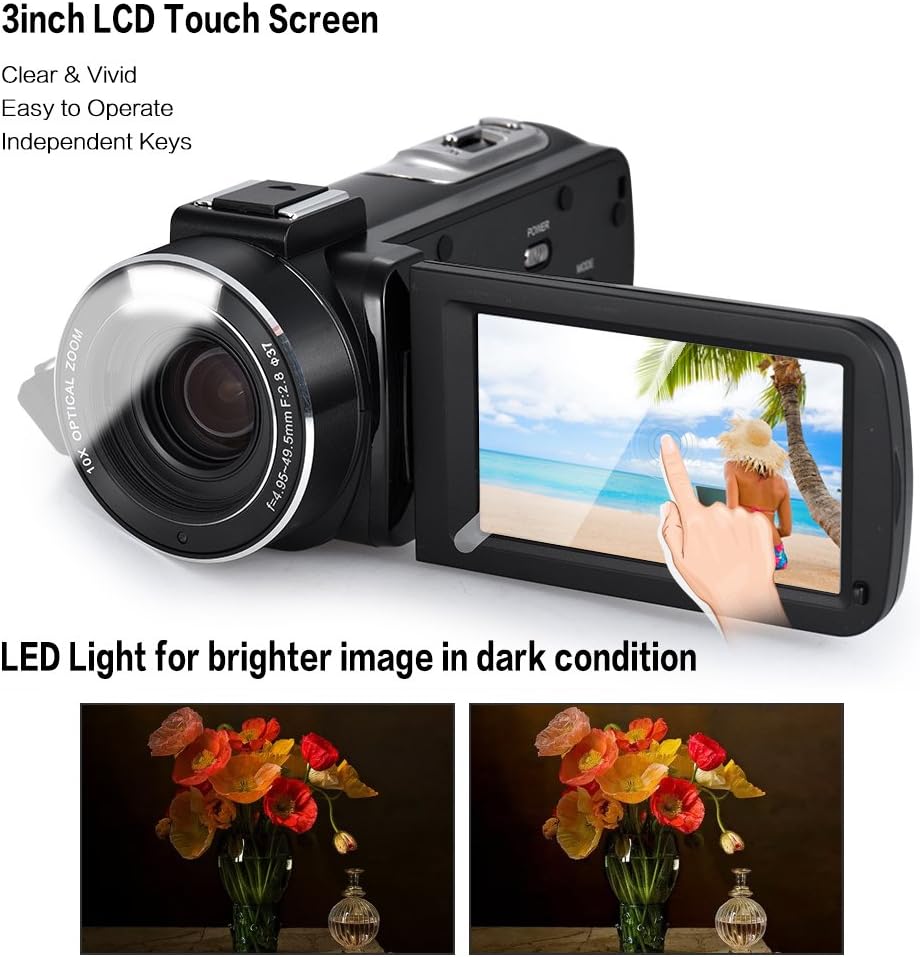
The camcorder features a 3-inch rotary LCD touchscreen for clear and vivid viewing. The built-in LED light enhances image brightness in low-light conditions, as shown in the comparison.
The rotary LCD touchscreen allows for easy navigation of menus and settings. Simply touch the desired option on the screen to select it.
5.7. Fitur canggih
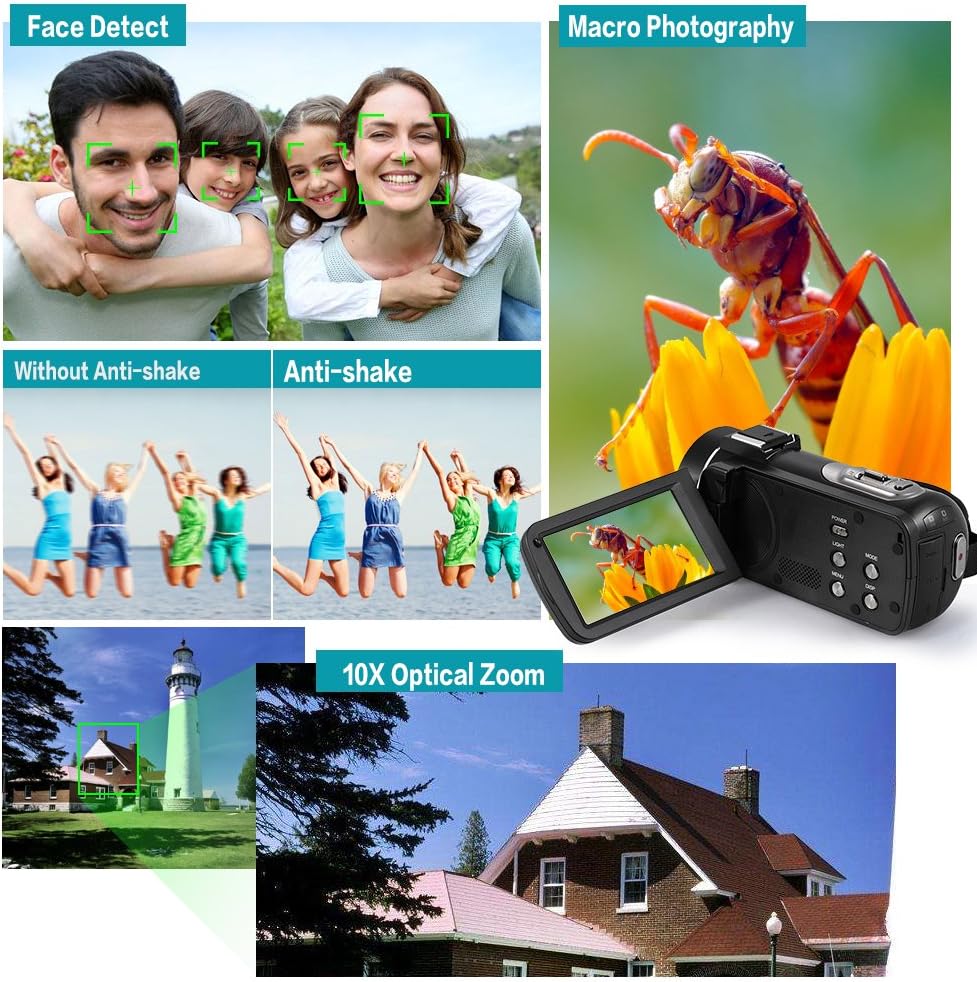
This composite image showcases key functionalities: Face Detect for automatic facial recognition, Anti-shake technology for stable footage, Macro Photography for detailed close-ups, and the powerful 10X Optical Zoom for distant subjects.
- Face Detect: Automatically detects and optimizes focus and exposure for faces in the frame.
- Anti ngocok: Reduces blur caused by camera movement, ensuring clearer footage.
- Fotografi Makro: Allows for close-up shots of small subjects with fine detail.
- Teruskeun Shot: Enables continuous shooting for a series of rapid photos.
- Timer Timer: Set a delay (2/5/10s) before a photo is taken.
- Jempé: Toggles audio recording on/off.
- HIRUP otomatis: Configures the camcorder to automatically power off after a period of inactivity.
- Waktos St.amp: Adds date and time information to your recordings/photos.
5.8. Using the Hot Shoe Mount

The unique hot shoe mount on the camcorder allows for the attachment of external accessories such as microphones and LED lights, enhancing audio quality and illumination for various shooting scenarios.
The hot shoe mount allows you to attach compatible external accessories like microphones for improved audio or additional LED lights for enhanced illumination. Simply slide the accessory onto the mount until it locks into place.
5.9. Connecting to TV/Computer
Use the provided HD Cable to connect the camcorder to an HD television for playback. Use the USB Cable to connect to a computer (Windows XP/Vista/7/8 or above) for transferring files.
6. Pangropéa
- Ngabersihan lensa: Use a soft, lint-free cloth specifically designed for camera lenses. Do not use harsh chemicals.
- Ngabersihan awak: Wipe the camcorder body with a soft, dry cloth. Avoid using water or cleaning solutions directly on the device.
- Panyimpenan: Simpen kaméra video di tempat anu tiis, garing, sareng jauh tina sinar panonpoé langsung sareng suhu anu ekstrim. Cabut batréna upami disimpen kanggo waktos anu lami.
- Perawatan batré: Recharge the battery regularly, even if not in use, to maintain its lifespan.
7. Cara ngungkulan
| Masalah | Mungkin Cukang lantaranana | Solusi |
|---|---|---|
| Camcorder teu hurung. | Battery is dead or not inserted correctly. Insulation tab not removed. | Charge the battery. Reinsert the battery correctly. Remove the insulation tab from the battery. |
| Teu tiasa ngarékam pidéo / nyandak poto. | Memory card is full, not inserted, or incompatible. Incorrect mode selected. | Selapkeun kartu memori nu cocog. Pupus teu perlu files or use a new card. Switch to the correct mode (Video/Photo). |
| Images/videos are blurry. | Lens is dirty. Anti-shake feature off. Insufficient lighting. | Clean the lens. Ensure Anti-shake is enabled in settings. Use the LED light or shoot in brighter conditions. |
| Kadali jauh teu jalan. | Battery is dead or insulation tab not removed. Obstruction between remote and camcorder. | Replace the CR2025 battery. Remove the insulation tab. Ensure clear line of sight to the camcorder's IR receiver. |
8. Spésifikasi
| Modél | HDV-Z82 |
| Resolusi Video | 1080P 30fps, 720P 60/30fps, VGA 30fps |
| Resolusi Poto | 24M (5600 * 4200), 20M, 16M, 12M, 10M, 7MHD, 5M, 3M, 2MHD, VGA |
| Zoom optik | 10x |
| Zum Digital | 120x |
| Ukuran layar | 3 Inches (Rotary LCD Touchscreen) |
| Téhnologi Sénsor Poto | CMOS |
| Média Panyimpenan | Supports up to 64GB Memory Card (Class 10 or above recommended) |
| Batré | NP-40B 3.7V 1250mAh (Camera), CR2025 3V (Remote Control) |
| Panganteur | HD Out, USB 2.0 |
| Rojongan System Operasi | Windows XP/Vista/7/8 or above |
| Fitur husus | Face Detect, Anti-shake, Macro Photography, Continue Shot, Self-timer, Mute, Auto OFF, Time Stamp, Built-in LED Light, Hot Shoe Mount |
| Diménsi | 19.5 x 16.2 x 10 cm |
| Beurat | 801 g |
9. Garansi jeung Rojongan
For product support, technical assistance, or warranty inquiries, please contact Andoer customer service through the retailer where the product was purchased or visit the official Andoer websitus pikeun inpo kontak.
Punten tahan bukti pameseran anjeun pikeun klaim garansi.
Ask a question about this manual
Ask about setup, troubleshooting, compatibility, parts, safety, or missing instructions. Manuals+ will review the question and use this page’s manual context to help answer it.