Bubuka
Hatur nuhun pikeun meuliasing the Aduro LED Wireless Speaker. This portable speaker combines high-quality audio with dynamic LED lighting, creating an immersive experience for any setting. Designed for ease of use and portability, it features wireless connectivity, hands-free calling, and multiple light modes. Please read this manual carefully to ensure proper operation and to maximize your enjoyment of the product.
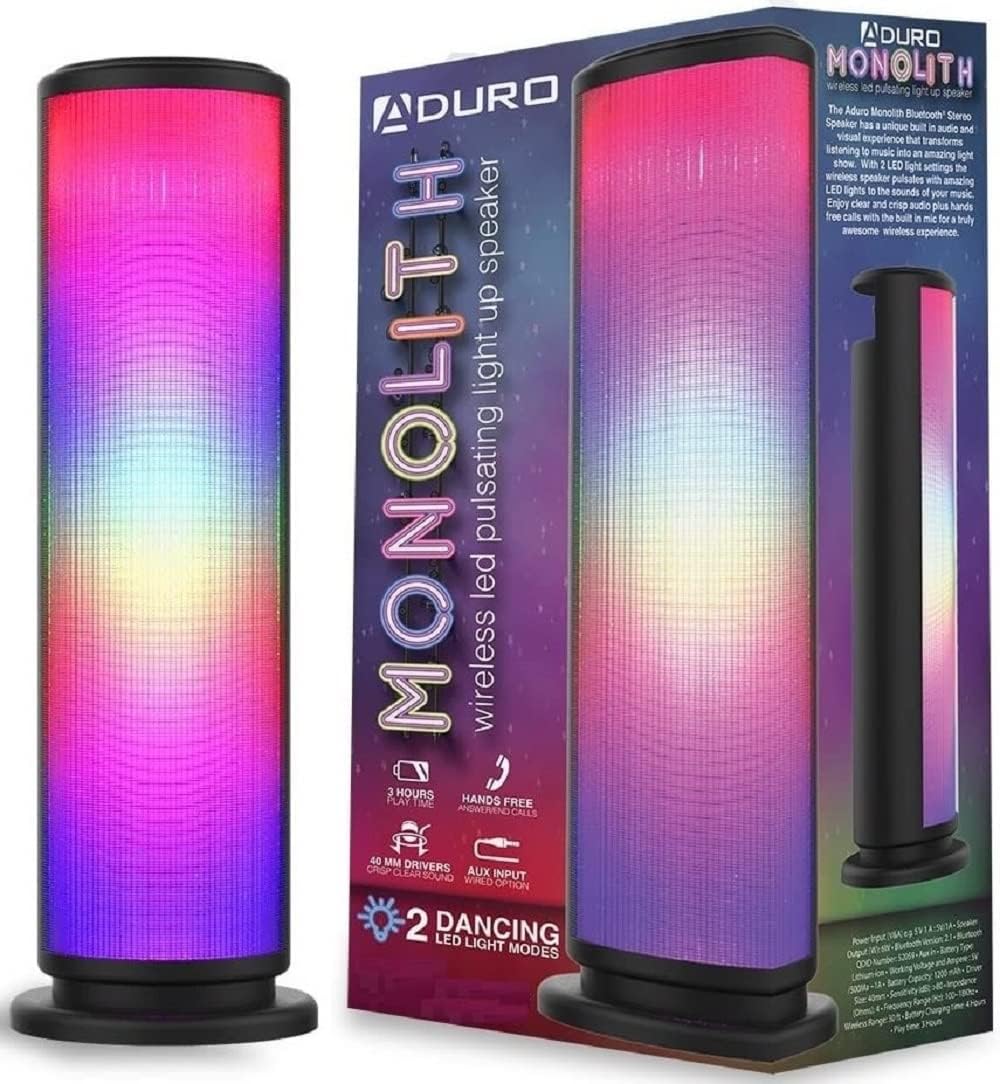
Image: The Aduro LED Wireless Speaker, showcasing its vibrant pulsating LED lights and sleek black design.
Émbaran Kasalametan
- Ulah ngalaan speaker ka suhu ekstrim, sinar panonpoé langsung, atawa kalembaban luhur.
- Hindarkeun lungsur atanapi nahan panyatur kana tabrakan anu kuat.
- Ulah ngabongkar, ngalereskeun, atawa ngaropéa speaker sorangan. Rujuk sadayana jasa ka tanaga anu mumpuni.
- Jauhkeun speaker tina cai sareng cairan. Produk ieu henteu tahan cai.
- Anggo ngan ukur kabel ngecas sareng adaptor kakuatan anu ditangtukeun.
- Do not operate the speaker near medical equipment or in environments where radio frequency interference is prohibited.
Naon dina Box
Mangga parios eusi pakét pikeun mastikeun yén sadaya barang aya:
- Aduro LED Wireless Speaker (1 unit)
- Kabel Ngecas USB (1 unit)
- Manual pangguna (dokumén ieu)
Note: Wall adapter for charging is not included.
Produk Leuwihview
Biasakeun diri sareng komponén sareng kadali speaker:
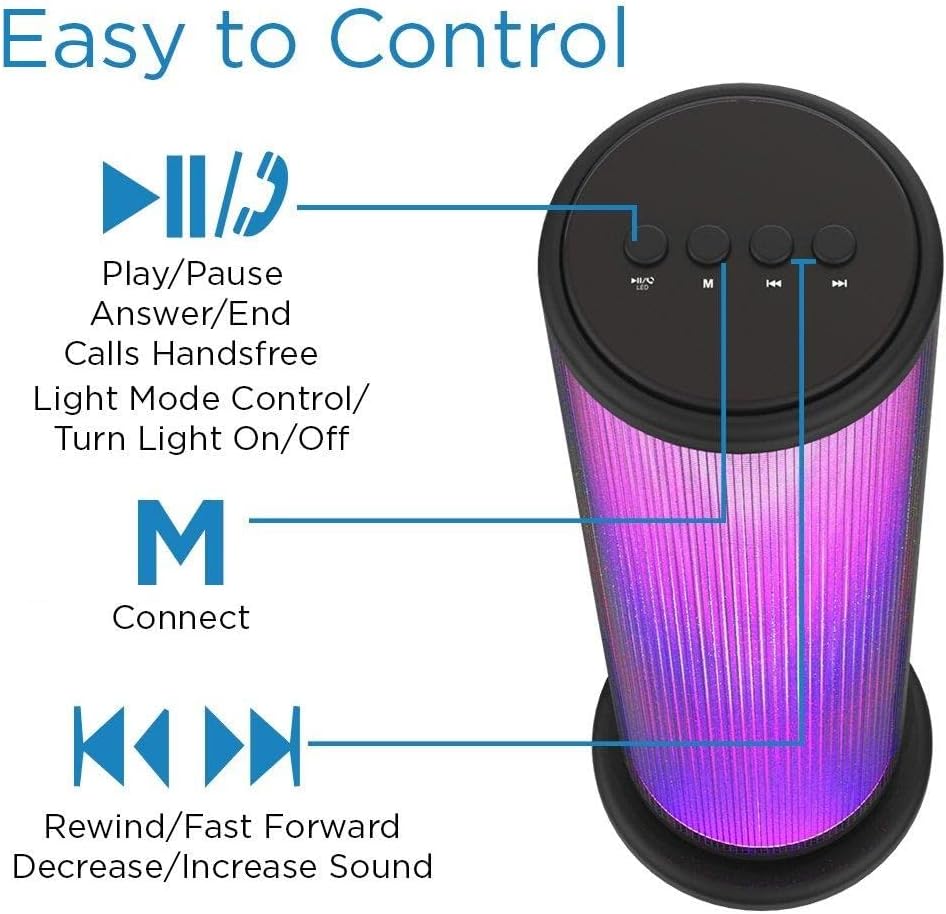
Image: Top panel of the Aduro speaker, illustrating the control buttons for play/pause, light mode, connect, and track/volume control.
Panel Kontrol (Luhur)
- Play/Pause Button (►▮▮): Press to play or pause audio. Also used to answer/end calls.
- Light Mode Button (●/LED): Press to switch between LED light modes (Rhythmic Lights, Still Pattern) or turn lights on/off.
- Mode/Connect Button (M): Press to switch between Bluetooth and AUX input modes. Long press to enter Bluetooth pairing mode.
- Previous Track/Volume Down (◀◀): Short press for previous track. Long press to decrease volume.
- Next Track/Volume Up (►►): Short press for next track. Long press to increase volume.

Image: Bottom panel of the Aduro speaker, showing the Micro USB charging port and the AUX input port.
Ports (Bottom)
- Port USB Mikro: Pikeun ngecas speaker.
- Input AUX: For wired audio connection using a 3.5mm audio cable.
Disetél
Ngecas Speaker
- Connect the Micro USB end of the charging cable to the Micro USB port on the speaker.
- Sambungkeun tungtung kabel ngecas USB-A kana sumber daya USB (contona, port USB komputer, adaptor témbok USB).
- Indikator LED bakal nyaangan nalika ngecas sareng pareum nalika dicas pinuh.
- A full charge takes approximately 4 hours. The speaker provides up to 3 hours of playtime with LED lights active.
Parentah Operasi
Daya Hurung/Pareuman
- To power on, press and hold the Play/Pause button (►▮▮) for a few seconds until you hear an audible prompt.
- To power off, press and hold the Play/Pause button (►▮▮) again for a few seconds.
Papasangan Bluetooth
- Pastikeun spiker hurung sareng dina modeu Bluetooth (ditunjukkeun ku LED biru anu kedip-kedip). Upami henteu, pencét tombol 'M' pikeun ngagentos modeu.
- Dina alat anjeun (smartphone, tablet, jsb.), aktipkeun Bluetooth sareng milarian alat anu sayogi.
- Select "Aduro Monolith" from the list of devices.
- Once paired, the speaker will provide an audible confirmation, and the blue LED will stop flashing and remain solid.
- Spéker bakal otomatis nyobian nyambung deui ka alat anu dipasangkeun terakhir nalika diaktipkeun.
Ngagunakeun AUX Input
- Sambungkeun hiji tungtung kabel audio 3.5mm (teu kaasup) kana port input AUX dina spiker.
- Sambungkeun tungtung kabel audio nu sejen ka jack headphone atawa kaluaran audio alat Anjeun.
- Spéker bakal otomatis pindah ka modeu AUX.
- Control audio playback and volume from your connected device.
Modeu Lampu LED
The speaker features two LED light modes. Press the Light Mode button (●/LED) to cycle through the options:
- Rhythmic Lights: Lights pulsate and change color in sync with the music.
- Still Pattern: Lights display a continuous, non-pulsating color pattern.
- Pressing the button again will turn the lights off.

Image: The Aduro speaker demonstrating its two distinct LED light modes: Rhythmic Lights and Still Pattern.
Leungeun-Free Telepon
Nalika disambungkeun via Bluetooth, mikropon internal spiker ngamungkinkeun nelepon tanpa nganggo leungeun:
- Ngajawab Telepon: Press the Play/Pause button (►▮▮) once.
- Tungtung Telepon: Press the Play/Pause button (►▮▮) once during a call.
- Nolak Telepon: Press and hold the Play/Pause button (►▮▮) for 2 seconds.
Pangropéa
- Ngabersihan spéker nganggo kaén anu lemes sareng garing. Ulah make cleaners abrasive atawa pangleyur.
- Simpen spéker dina tempat anu tiis sareng garing upami henteu dianggo.
- Hindarkeun paparan anu berkepanjangan ka sinar panonpoé langsung atanapi suhu anu ekstrim.
- Ngeusi batre rutin, sanajan teu sering dipake, pikeun ngajaga kaséhatan batré.
Pamérésan masalah
| Masalah | Mungkin Cukang lantaranana | Solusi |
|---|---|---|
| Speaker teu hurung. | Batré béak. | Ngecas spéker pinuh. |
| Teu bisa masangkeun via Bluetooth. | Speaker henteu dina mode papasangan atanapi jauh teuing tina alat. | Ensure speaker is in Bluetooth pairing mode (flashing blue LED). Move device closer to speaker (within 10 meters). Turn off and on Bluetooth on your device. |
| Taya sora tina speaker. | Volume is too low or device is not connected properly. | Increase volume on both speaker and connected device. Re-pair Bluetooth or re-connect AUX cable. |
| Lampu LED teu jalan. | Lights are turned off or battery is low. | Press the Light Mode button (●/LED) to turn lights on. Charge the speaker. |
| Kualitas sora henteu saé. | Device is too far, interference, or low battery. | Pindahkeun alat leuwih deukeut. Hindarkeun halangan. Cas speaker. |
spésifikasi
| Fitur | Rincian |
|---|---|
| Ngaran modél | Monolith |
| Nomer modél | AY-MTSP-01 |
| Tipe Speaker | Luar, Portabel |
| Téhnologi konektipitas | Bluetooth, AUX |
| Rentang Bluetooth | Nepi ka 10 méter (33 suku) |
| Mode Kaluaran Audio | Stereo |
| Speaker Maksimum Kaluaran Power | 6 Watt |
| Ukuran supir | 40 mm |
| Jenis Batré | Litium Ion |
| Kapasitas batré | 1200 mah |
| Kahirupan batré | Up to 3 hours (with LED lights active) |
| Waktu Ngecas | Kurang leuwih 4 jam |
| Ukuran (L x W x H) | 3.5 x 5.8 x 11.8 inci |
| Item Beurat | 15 ons (0.94 lbs) |
| Warna | Hideung |
| Komponén Kaasup | 40mm Drivers, rechargeable battery, sensitive control panel, speakers, built-in microphone |
Garansi sareng Rojongan
Aduro products are designed with quality and reliability in mind. This product comes with a manufacturer's warranty. For specific warranty details and duration, please refer to the warranty card included with your purchase or visit the official Aduro websitus.
For technical support, troubleshooting assistance, or warranty claims, please contact Aduro customer service through their official channels. Please have your model number (AY-MTSP-01) and proof of purchase ready when contacting support.
Anjeun tiasa manggihan inpo nu leuwih lengkep sareng wincik kontak dina Aduro Store on Amazon.


