
1. Bubuka
Hatur nuhun pikeun meuliasing the Nobsound NS-01G Pro Bluetooth 5.0 Power Amplifier. Ieu kompak tapi kuat amplifier is designed to deliver high-fidelity audio for your speakers, offering versatile input options including Bluetooth 5.0, AUX, and USB. This manual provides detailed instructions for setup, operation, maintenance, and troubleshooting to ensure you get the best performance from your device.
2. Produk Langkungview
2.1 Fitur konci
- Desain 2-in-1: Functions as both a Bluetooth receiver and a power amppangagung.
- Konéktipitas nirkabel: Seamlessly connect to smartphones and other devices via Bluetooth 5.0.
- Daya Kaluaran Tinggi: Despite its mini size, it delivers up to 100W output power.
- Sababaraha Input: Supports AUX, USB, and Bluetooth audio inputs.
- Kontrol nada: Features Bass, Middle, and Treble tone controls for sound customization.
2.2 Eusi pakét
- 1 × Nobsound NS-01G Pro Amppangagung
- 1 × DC 19V Power Adapter
- 1 × Kabel USB
- 1 × RCA Cable
- 1 × 3.5mm Kabel Audio
- 1 × Buku Panduan

2.3 Layout Panel hareup

2.4 Layout Panel Rear
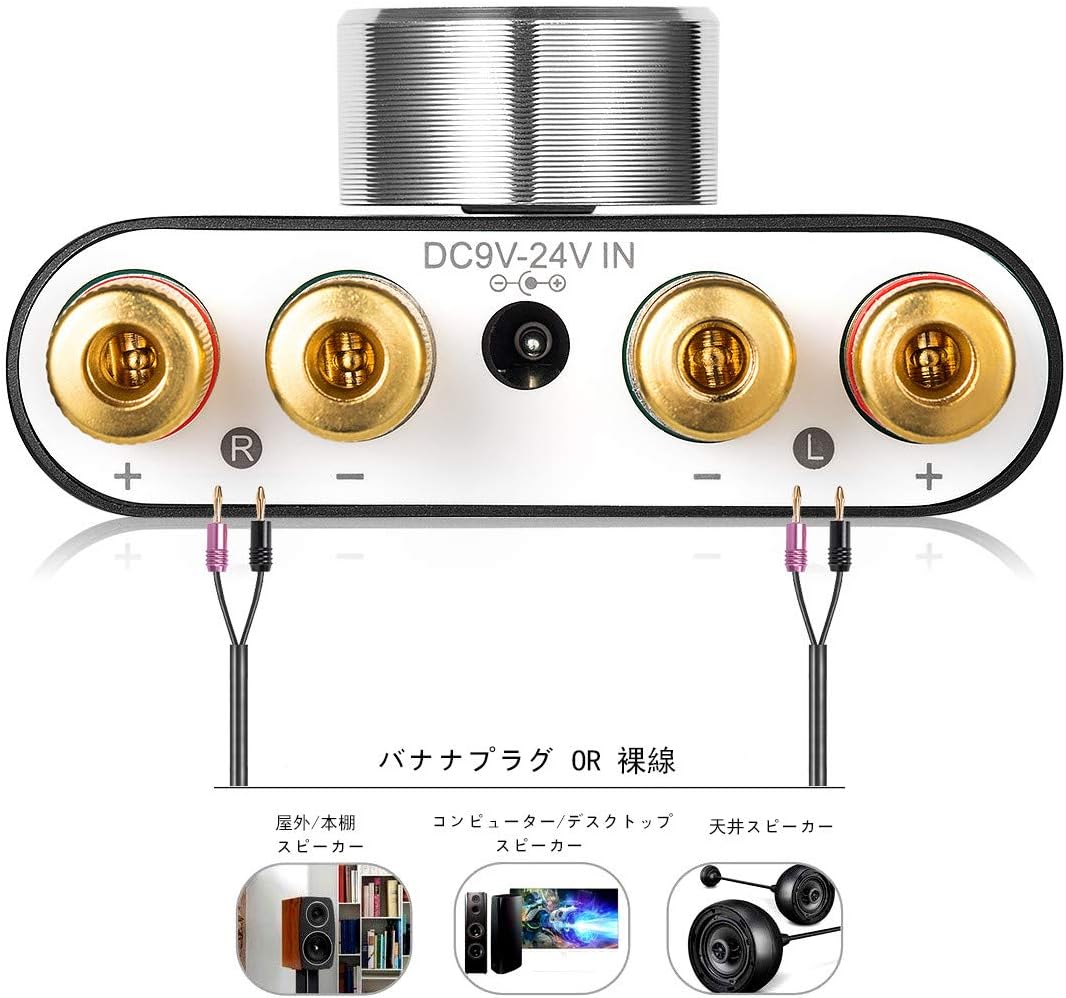
3. Parentah Setup
3.1 Sambungan Speaker
- Pastikeun amplifier dipareuman.
- Connect your passive speakers to the speaker output terminals on the rear panel. Pay attention to polarity: connect the red (+) terminal on the amplifier to the red (+) terminal on the speaker, and the black (-) terminal on the amplifier to the black (-) terminal on the speaker.
3.2 Input Source Connection
The NS-01G Pro supports three input methods: AUX, USB, and Bluetooth.

3.2.1 Input AUX
- Connect your audio source (e.g., smartphone, CD player, TV) to the AUX input jack on the front panel using a 3.5mm audio cable.
3.2.2 Input USB
- Connect your computer to the USB sound input port on the front panel using a USB cable. No drivers are typically required for this plug-and-play connection.

3.2.3 Input Bluetooth
- Attach the Bluetooth antenna to the RF connector on the rear panel.
- Switch the input selector on the front panel to 'BT' mode.
- Dina alat sélulér anjeun, aktipkeun Bluetooth sareng milarian
Ask a question about this manual
Ask about setup, troubleshooting, compatibility, parts, safety, or missing instructions. Manuals+ will review the question and use this page’s manual context to help answer it.