1. Bubuka
This manual provides comprehensive instructions for the safe and effective installation and operation of your Kanto PS350W Full Motion Articulating TV Wall Mount. Designed for 37-inch to 60-inch televisions, this mount offers versatile viewing angles and a clean, space-saving solution for your home entertainment setup. Please read all instructions carefully before beginning installation.

Figure 1: Kanto PS350W Full Motion Articulating TV Wall Mount.
2. Émbaran Kasalametan
- Kapasitas beurat: Ulah ngaleuwihan kapasitas beurat maksimum 88 pon (40 kg).
- Ukuran TV: This mount is designed for TVs between 37 and 60 inches. Ensure your TV falls within this range.
- Jenis Témbok: The mount can be installed on a single wood stud or a concrete pillar. Do not install on drywall alone without a stud.
- Pamasangan profésional: Upami anjeun henteu yakin ngeunaan bagian mana waé tina prosés pamasangan, konsultasi ka profésional anu mumpuni.
- Pakakas: Use appropriate tools and wear safety gear (e.g., eye protection) during installation.
- Barudak: Keep children away from the installation area and ensure the TV is securely mounted to prevent tipping hazards.
3. Eusi Paket
Pastikeun sadaya komponén anu didaptarkeun di handap ieu aya dina bungkusan anjeun sateuacan ngamimitian perakitan.

Gambar 2: Leuwihview of Kanto PS350W package contents.
- Majelis Lempeng témbok
- TV Plate (H-frame style)
- Artikulasi Panangan
- Hardware Kit (various screws, washers, spacers for TV and wall mounting)
- Témplat Bor
- Manajemén kabel nyertakeun
- Instruksi Manual
4. Setup jeung Instalasi
Follow these steps carefully to install your Kanto PS350W TV Wall Mount.
4.1. Prepare the TV
- Carefully place your TV face-down on a soft, clean surface to prevent scratches.
- Identipikasi liang pamasangan VESA dina tonggong TV anjeun.
- Select the appropriate screws, washers, and spacers from the hardware kit that fit your TV's VESA pattern. Ensure screws are not too long to avoid damaging internal components.
- Attach the TV plate to the back of your TV using the selected hardware. Ensure it is securely fastened.

Figure 3: VESA compatibility details for the Kanto PS350W mount, supporting up to 600x400mm.
4.2. Mount the Wall Plate
- Locate a single wood stud or concrete pillar in your desired mounting location using a stud finder.
- Use the provided drill template to mark the pilot holes for the wall plate. Ensure the template is level.
- Drill pilot holes into the wall at the marked locations. For wood studs, use a 5/32 inch (4mm) drill bit. For concrete, use a 1/4 inch (6mm) drill bit for the first pass, then a 3/8 inch (10mm) drill bit for the final pass.
- Insert the concrete anchors (if applicable) into the drilled holes.
- Attach the wall plate assembly to the wall using the provided lag bolts and washers. Tighten securely.

Figure 4: Installation kit with drill template and bolt pack for wood stud and concrete installation.
4.3. Attach TV to Mount
- With the help of an additional person, carefully lift the TV with the attached TV plate.
- Align the TV plate with the articulating arm on the wall mount.
- Hook the TV plate onto the arm and secure it using the locking screws or mechanisms provided. Ensure the TV is firmly seated and cannot be accidentally dislodged.
Video 1: Installation Guide for Kanto PS350 & PS350W Full Motion TV Mount. This video demonstrates the step-by-step process of mounting the TV to the wall and attaching the TV to the mount.
5. Parentah Operasi
The Kanto PS350W mount offers a range of motion for optimal viewing.
5.1. Ékstensi jeung Rétraksi
- Gently pull the TV away from the wall to extend the articulating arm. The mount can extend up to 22 inches (56 cm).
- To retract, push the TV back towards the wall until it sits approximately 1.9 inches (4.7 cm) from the wall.

Figure 5: The mount extends up to 22 inches (56 cm) from the wall.
5.2. Pangaluyuan Putar
- The mount allows for a 90° swivel in either direction, depending on your TV's screen size.
- Carefully rotate the TV to achieve your desired viewsudut ing.
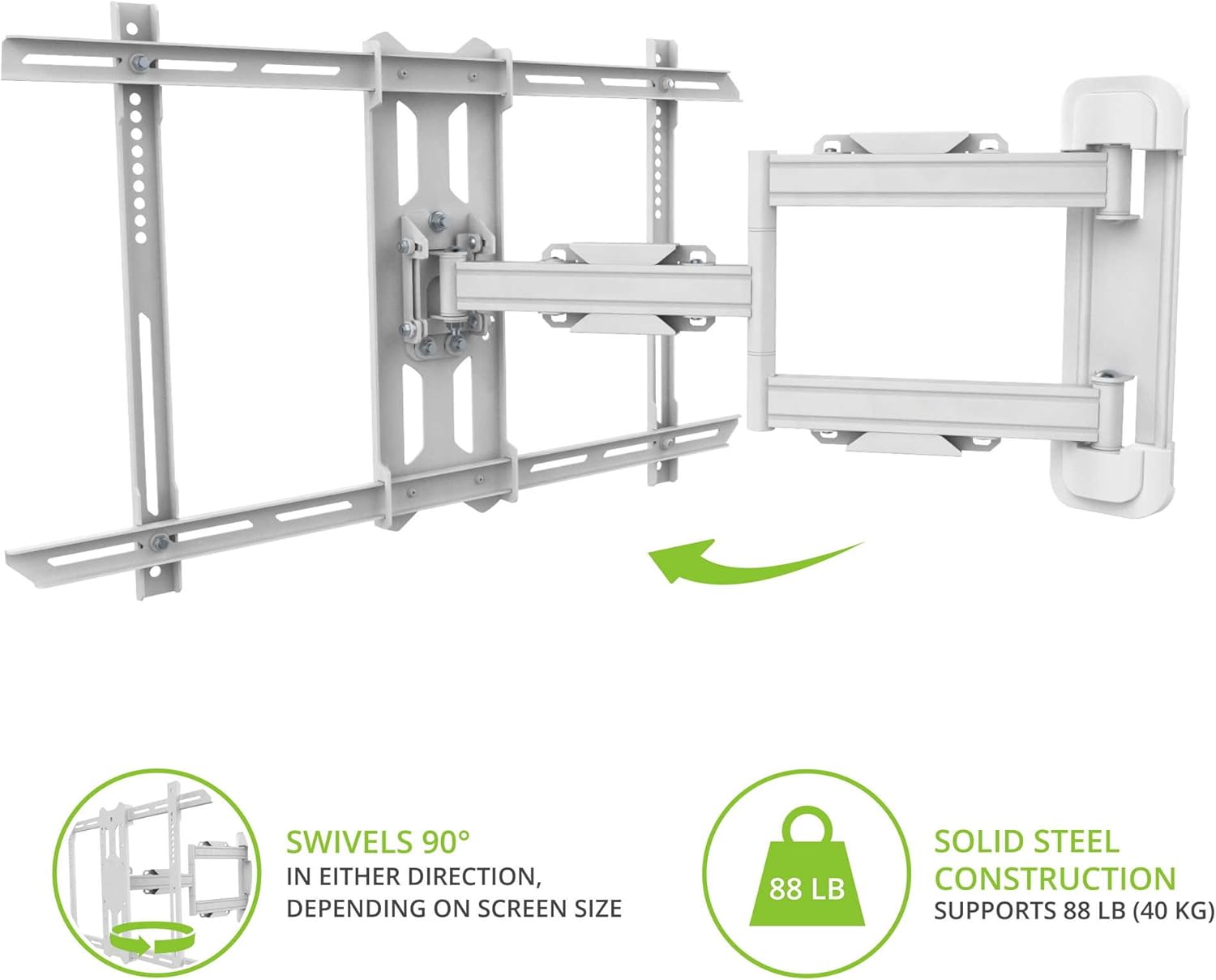
Figure 6: The mount provides 90° swivel capability in either direction.
5.3. Ngepaskeun Dengdekkeun
- The tilt mechanism allows for a +15° to -3° tilt angle.
- Adjust the tilt to reduce glare or optimize your viewpangalaman.

Figure 7: Tilt mechanism provides a +15°/-3° tilt angle.
5.4. Manajemén kabel
- Utilize the integrated cable management raceways and magnetic covers to keep your cables organized and out of sight for a clean appearance.
6. Pangropéa
- Cék périodik: Regularly inspect the mount and all fasteners to ensure they remain secure. Tighten any loose screws.
- Lubrication: If movement of the articulating arm becomes stiff over time, apply a small amount of silicone-based lubricant to the pivot points.
- beberesih: Ngabersihan gunung ku lawon lemes, garing. Hindarkeun pembersih abrasive atanapi pangleyur.
7. Cara ngungkulan
- Gunung karasa leupas: Check all wall mounting bolts and TV attachment screws. Ensure they are fully tightened. If mounted to a wood stud, confirm the stud was properly located and lag bolts are fully engaged.
- TV teu rata: The mount has a leveling adjustment feature. Refer to the detailed assembly instructions for specific steps to adjust the level.
- Difficulty moving the arm: Ensure no cables are snagged. If the arm is stiff, apply lubricant as described in the Maintenance section.
- Screws too long for TV: Use the provided spacers to ensure the screws do not penetrate too deeply into the TV.
8. Spésifikasi
| Fitur | Spésifikasi |
|---|---|
| Dimensi produk | 22 x 28 x 17.2 inci |
| Item Beurat | 14.1 pon |
| Nomer Modél Item | PS350W |
| Tipe Pamasangan | Tembok Gunung |
| Jinis Gerakan | Artikulasi |
| merek | Kanto |
| Bahan | Alloy Steel |
| Warna | Bodas |
| Alat nu cocog | Televisi |
| Maximum Dengdekkeun Angle | 15 darajat |
| UPC | 800152718194 |
9. Garansi jeung Rojongan
Kanto Distribution Inc. provides a comprehensive warranty for its products. For detailed warranty information, please refer to the official Kanto websitus atanapi ngahubungan rojongan customer.
If you encounter any issues or have questions regarding your Kanto PS350W mount, please visit the Kanto Store on Amazon or contact Kanto customer support directly.


