Bubuka
The Joytech YS04 Music Tesla Coil is a desktop experiment model designed for wireless transmission and sound generation through plasma. This device features an acrylic shell base for enhanced aesthetics and protection against accidental contact. It is capable of playing various music formats and includes circuit protection to safeguard connected audio devices. The secondary coil is epoxy-coated to reduce the risk of disconnection.
Equipped with a special heat dissipation device and cooling fans, this Tesla coil is designed for extended operation. It can illuminate gaseous tubes and various types of bubbles, making it an effective educational tool for demonstrating scientific principles. The YS04 model is designed for ease of use, requiring no complex assembly or grounding.
Émbaran Kasalametan
PERHATOSAN: Alat ieu ngahasilkeun voltase anu luhurtage and high-frequency electromagnetic fields. Improper use can result in serious injury or damage.
- Jaga Jarak Aman: Maintain a minimum distance of 30 cm (12 inches) from the Tesla coil during operation.
- Hindarkeun Kontak: Do not touch the discharge needle or any part of the secondary coil while the device is powered on.
- Alat médis: Individuals with pacemakers, hearing aids, or other electronic medical implants should not operate or be near the Tesla coil when it is active.
- Bahan anu gampang kaduruk: Keep the device away from flammable liquids, gases, and materials.
- pangawasan: Adult supervision is required for users under the age of 15.
- Sasayogian tanaga: Use only the provided power adapter. Do not use damaged power cords or adapters.
- Ventilasi: Pastikeun ventilasi nyukupan sabudeureun alat pikeun nyegah overheating.
- Paparan cai: Ulah ngalaan alat ka cai atawa beroperasi dina damp lingkungan.
Eusi pakét
Pastikeun yén sadaya item aya dina bungkusan:
- Joytech YS04 Music Tesla Coil Unit
- Adaptor kakuatan
- Kabel Audio (jack 3.5mm)
- Discharge Needle
- Various Light Bulbs/Accessories for demonstration
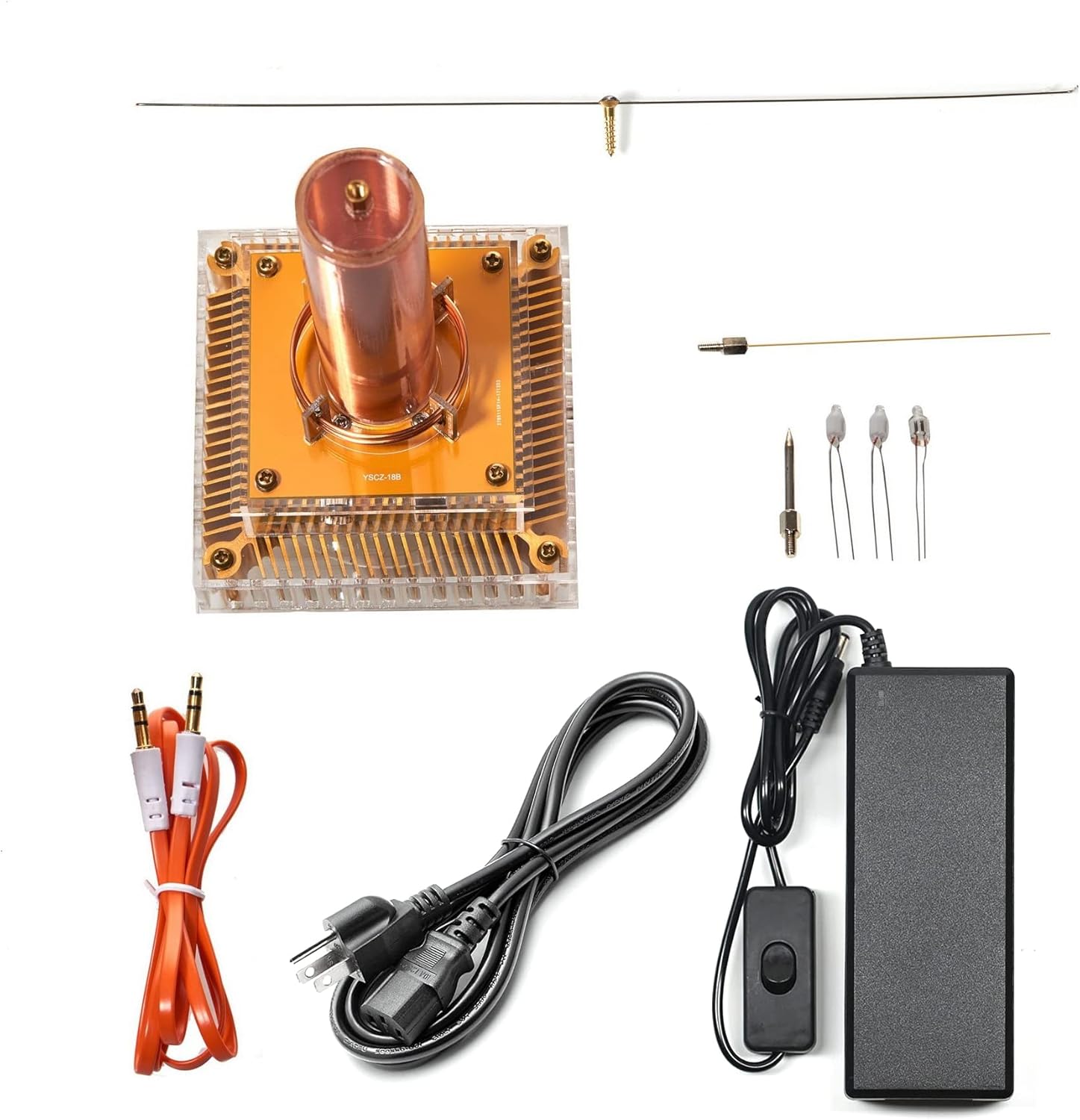
Image: All components included in the Joytech YS04 Music Tesla Coil package.
Parentah Setup
- Buka bungkus Alat: Carefully remove the Tesla coil unit and all accessories from the packaging.
- Pasang Unit: Position the Tesla coil on a stable, non-conductive surface, away from other electronic devices and metallic objects.
- Install Discharge Needle: Gently insert the discharge needle into the top of the secondary coil. Ensure it is seated firmly.
- Sambungkeun Audio (Opsional): If you wish to play music, connect one end of the provided audio cable to the 3.5mm audio input jack on the Tesla coil base and the other end to your audio source (e.g., smartphone, MP3 player).
- Sambungkeun Kakuatan: Plug the power adapter into the DC input port on the Tesla coil base. Then, plug the power adapter into a standard electrical outlet.
- Siap pikeun Operasi: Alat ayeuna tos siap dianggo.

Gambar: Hareupeun view of the assembled Joytech YS04 Tesla Coil.
Parentah Operasi
- Daya Hurung: Flip the power switch on the power adapter or the device itself to the 'ON' position. The base LEDs should illuminate, and a small arc may appear at the tip of the discharge needle.
- Puteran musik: If an audio source is connected, start playing music on your device. Adjust the volume on your audio source to a high level for optimal sound output from the Tesla coil. The plasma arc will modulate with the music.
- Demonstrations:
- Lighting Bulbs: Hold an incandescent or fluorescent light bulb near the discharge needle. The bulb will light up wirelessly due to the electromagnetic field.
- Plasma Effects: Observe the plasma arc. You can use the provided accessories, such as the spinning light attachment, to create dynamic visual effects.
- Pareum listrik: When finished, flip the power switch to the 'OFF' position and disconnect the power adapter from the wall outlet.

Image: The Tesla Coil demonstrating wireless lighting and plasma effects.

Image: A time-lapse photograph showing the light patterns created by the spinning attachment.
Video: Demonstration of the Joytech YS04 Music Tesla Coil in action, showcasing its plasma effects and wireless transmission capabilities.
Pangropéa
- beberesih: Use a soft, dry cloth to wipe the exterior of the device. Do not use abrasive cleaners or solvents.
- Panyimpenan: Store the Tesla coil in a cool, dry place, away from direct sunlight and moisture, when not in use. Keep it in its original packaging or a protective container to prevent dust accumulation and damage.
- Pamariksaan: Periodically inspect the power cord and discharge needle for any signs of damage. If any damage is found, discontinue use and contact support.
Pamérésan masalah
| Masalah | Mungkin Cukang lantaranana | Solusi |
|---|---|---|
| No arc or light from the discharge needle. | Power not connected or switched on. Discharge needle not properly installed. Device malfunction. | Ensure power adapter is securely plugged in and the power switch is ON. Check if the discharge needle is fully inserted. If the problem persists, contact customer support. |
| No sound or poor sound quality during music playback. | Audio cable not connected properly. Audio source volume too low. Audio source not playing. | Verify the audio cable is securely connected to both the Tesla coil and the audio source. Increase the volume on your audio source to maximum. Ensure music is playing on your audio source. |
| Alatna panas teuing. | Insufficient ventilation. Prolonged continuous operation. | Ensure the device is placed in an area with good airflow. Allow the device to cool down after extended use. Do not block the cooling vents. |
| Accessories (e.g., spinning light) do not function. | Improper placement or connection. | Ensure accessories are correctly placed or connected according to their design. Some accessories may require specific proximity to the main coil to function. |
spésifikasi
- Jumlah modél: YS04 Tesla Model
- Ukuran produk: 3.3 x 3.3 x 6.9 inci (8.4 x 8.4 x 17.5 cm)
- Beurat barang: 9.5 ons (269 gram)
- Pabrikan: Joytech
- Umur Disarankeun: 15 taun ka luhur

Gambar: Diménsi leuwihview of the Joytech YS04 Tesla Coil.
Garansi sareng Rojongan
For warranty information or technical support, please contact Joytech customer service. Refer to your purchase documentation for specific warranty terms and contact details.
You can often find support information on the official Joytech websitus atawa ngaliwatan pangecér mana produk ieu dibeuli.
Video: A demonstration of the Joytech Tesla Coil's capabilities, potentially useful for understanding its operation and features.
Video: Another video showcasing the Joytech Tesla Coil, providing visual context for its functionality.


