1. Bubuka
This manual provides essential information for the safe and efficient operation of your Digi International WR21-L52A-DE1-TB Cellular Wireless Router. Please read this manual thoroughly before installation and use, and retain it for future reference. This device is designed to provide reliable cellular connectivity for various applications.
2. Émbaran Kasalametan
- Sasayogian tanaga: Use only the power adapter supplied with the device. Using an incorrect adapter may damage the device and void the warranty.
- Ventilasi: Ensure adequate ventilation around the router. Do not block ventilation openings.
- Lingkungan: Avoid exposing the device to extreme temperatures, humidity, direct sunlight, or corrosive environments.
- Palayanan: Ulah nyobian muka atawa ngalereskeun alat sorangan. Rujuk sadayana jasa ka tanaga anu mumpuni.
- Anteneu: Ensure antennas are securely connected before powering on the device.
3. Eusi Paket
Pastikeun yén sadaya item aya dina bungkusan:
- Digi International WR21-L52A-DE1-TB Cellular Wireless Router
- Adaptor kakuatan
- Antennas (quantity may vary)
- Kabel Ethernet
- Pituduh Mimitian Gancang (upami kalebet)
Upami aya barang anu leungit atanapi ruksak, langsung ngahubungi vendor anjeun.
4. Produk Langkungview
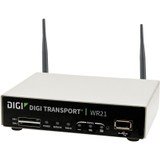
Gambar: Hareupeun view of the Digi International WR21-L52A-DE1-TB Cellular Wireless Router. This image displays the compact form factor of the device, likely showing ports for antennas, power, and network connections.
The Digi International WR21-L52A-DE1-TB is a robust cellular wireless router designed for reliable and secure connectivity. It features multiple connectivity options and is suitable for various industrial and enterprise applications requiring remote access and data transfer over cellular networks.
5. Setélan
5.1. Pamasangan Kartu SIM
- Pastikeun router dipareuman sareng dipegatkeun tina sumber listrik.
- Locate the SIM card slot(s) on the device. Refer to the device's physical markings for exact location.
- Insert the activated cellular SIM card into the slot with the gold contacts facing down and the notched corner oriented correctly. Push until it clicks into place.
- If applicable, secure the SIM card tray or cover.
5.2. Sambungan anteneu
- Identify the cellular antenna ports (typically labeled 'MAIN' and 'DIV' or similar).
- Screw the provided cellular antennas onto the corresponding ports until finger-tight. Do not overtighten.
- Posisi anteneu pikeun panarimaan sinyal optimal.
5.3. Sambungan Daya
- Sambungkeun adaptor daya ka port input daya router.
- Colokkeun adaptor kakuatan kana stop kontak listrik anu cocog.
- The router will power on automatically or may require pressing a power button. Observe the LED indicators for power status.
5.4. Sambungan Jaringan (Opsional)
- To connect a device via Ethernet, plug one end of an Ethernet cable into an available LAN port on the router.
- Plug the other end of the Ethernet cable into the network port of your computer or other network device.
6. Parentah Operasi
6.1. Powering on / Pareum
- Daya Hurung: Connect the power adapter. The device will typically power on automatically. Observe the power LED.
- Pareum listrik: Disconnect the power adapter from the electrical outlet. For controlled shutdown, refer to the device's web interface or specific documentation for a software shutdown procedure if available.
6.2. Ngaksés ka Web Panganteur
- Ensure your computer is connected to the router via Ethernet or Wi-Fi (if enabled).
- Buka a web browser (contona, Chrome, Firefox, Edge).
- Enter the router's default IP address (e.g., 192.168.1.1 or 192.168.0.1) into the address bar and press Enter. Refer to the Quick Start Guide or device label for the exact default IP address.
- Enter the default username and password when prompted. These are typically found on a label on the device or in the Quick Start Guide.
- Upon successful login, you will access the router's configuration interface.
6.3. Konfigurasi Dasar
Dina jero web antarmuka, anjeun tiasa ngonpigurasikeun rupa-rupa setélan:
- Cellular Settings: Verify APN settings, signal strength, and connection status.
- Setélan jaringan: Configure LAN IP address, DHCP server, and port forwarding.
- Kaamanan: Change default login credentials, configure firewall rules, and VPN settings.
- Pembaruan firmware: Pariksa sareng terapkeun apdet firmware pikeun mastikeun kinerja sareng kaamanan anu optimal.
7. Pangropéa
- beberesih: Anggo lawon anu lemes sareng garing pikeun ngabersihkeun bagian luar router. Entong nganggo pembersih cair atanapi aerosol.
- Pembaruan firmware: Rutin pariksa produsén urang websitus pikeun apdet firmware. Ngajaga firmware tetep diropéa mastikeun fitur panganyarna, patch kaamanan, sareng paningkatan kinerja.
- Kaayaan Lingkungan: Ensure the router is operating within its specified temperature and humidity ranges to prevent overheating or damage.
8. Cara ngungkulan
8.1. No Cellular Connection
- Verify the SIM card is correctly inserted and activated with your cellular provider.
- Check antenna connections and ensure they are positioned for optimal signal.
- Asup kana web interface to check cellular signal strength and connection status.
- Balikan deui router.
8.2. Teu Bisa Aksés Web Panganteur
- Ensure your computer is directly connected to the router via Ethernet.
- Verify your computer's IP address is in the same subnet as the router (e.g., if router is 192.168.1.1, computer should be 192.168.1.x).
- Coba mupus cache browser anjeun atanapi nganggo browser anu sanés.
- If you forgot the password, a factory reset might be necessary (refer to specific device documentation for this procedure, as it will erase all configurations).
8.3. Laju Koneksi Leungit
- Check cellular signal strength in the web interface. Weak signal can lead to slow speeds.
- Pastikeun anteneu diposisikan kalayan leres sareng henteu kahalangan.
- Verify your cellular data plan has not reached its data cap or is being throttled.
- Restart the router and connected devices.
9. Spésifikasi
| Fitur | Katerangan |
|---|---|
| Modél | WR21-L52A-DE1-TB |
| merek | Digi Internasional |
| Protokol konektipitas | sélular |
| Téhnologi konektipitas | USB |
| Métode kontrol | Jauh |
| Fitur husus | WPS |
| Alat nu cocog | Komputer Pribadi |
| Dianjurkeun Mangpaat | Imah |
| UPC | 747356312219 |
10. Garansi jeung Rojongan
For detailed warranty information, please refer to the warranty card included with your product or visit the official Digi International website. Technical support is available through the manufacturer's support channels. Please have your product model number (WR21-L52A-DE1-TB) and serial number ready when contacting support.


