1. Bubuka
This manual provides essential information for the proper installation, operation, and maintenance of your Pioneer Carrozzeria CyberNavi AVIC-CW902 navigation system. Please read this manual thoroughly before using the product to ensure safe and optimal performance.
The AVIC-CW902 is a 7-inch wide navigation system designed to enhance your driving experience with advanced features including MapFan Connect for seamless trip planning, Music Cruise Channel for high-quality audio streaming, and comprehensive multimedia support.
2. Fitur konci
- MapFan Connect: Realize a comfortable connected car life by planning trips on your smartphone and sending them to the navigation system.
- Music Cruise Channel: Enjoy music streaming with high-quality audio.
- High-Quality Sound Design: Experience superior audio performance.
- Navigasi anu Akurat: Precise vehicle positioning and optimal route guidance.
- Pangrojong Multimedia: Playback from DVD, CD, Bluetooth, SD, USB, HDMI, FM/AM, iPhone/iPod, and AUX.
- Integrated Connectivity: Built-in Wi-Fi, Bluetooth, and Bluetooth Smart modules.
- VICS WIDE Support: Receive real-time traffic and weather information.
3. Setélan
3.1 Instalasi Awal
Professional installation is recommended for this device. Ensure all wiring connections are secure and follow the detailed installation guide provided separately with the product. The main unit is designed for a 200mm wide slot.
3.2 Asesoris Pilihan
Certain advanced features and connections require optional accessories, sold separately:
- Multi-Drive Assist Unit: Model ND-MA1.
- Data Communication Module: Model ND-DC2.
- ETC2.0/ETC Unit.
- Optical Beacon Unit: Model ND-IB1.
- Drive Recorder Unit: Model ND-DVR1.
- Kaméra tukang: Requires dedicated terminal and separate RD-C200.
- Rear Camera Connection Kit: Vehicle-specific kit + separate RD-C200.
- Steering Remote Control Cable/Adapter.
- Vehicle-Specific Acoustic Tuning Data: Requires a separate SD card.
- Auto TA & EQ: Requires separate CD-MC1 for use.
4. Parentah Operasi
4.1 MapFan Connect for Trip Planning
The MapFan Connect feature allows you to plan your drive routes on your smartphone and seamlessly transfer them to your CyberNavi. This ensures your navigation system is ready with your planned itinerary before you even start your engine.
This video demonstrates how to use MapFan Connect to plan a trip on your smartphone and transfer it to the Pioneer CyberNavi. It also shows how to select music channels via the Music Cruise Channel feature for an enhanced driving experience.
To use MapFan Connect:
- On your smartphone, open the MapFan Connect application.
- Select 'New Plan' and determine your destination.
- Add the destination to your plan. You can also search for waypoints and add them.
- Specify arrival times for each stop to reflect traffic predictions.
- Review the route and estimated departure times.
- Save the plan and send it to your CyberNavi.
- When you start your car, the CyberNavi will prompt you to receive the drive plan. Confirm to load the route.
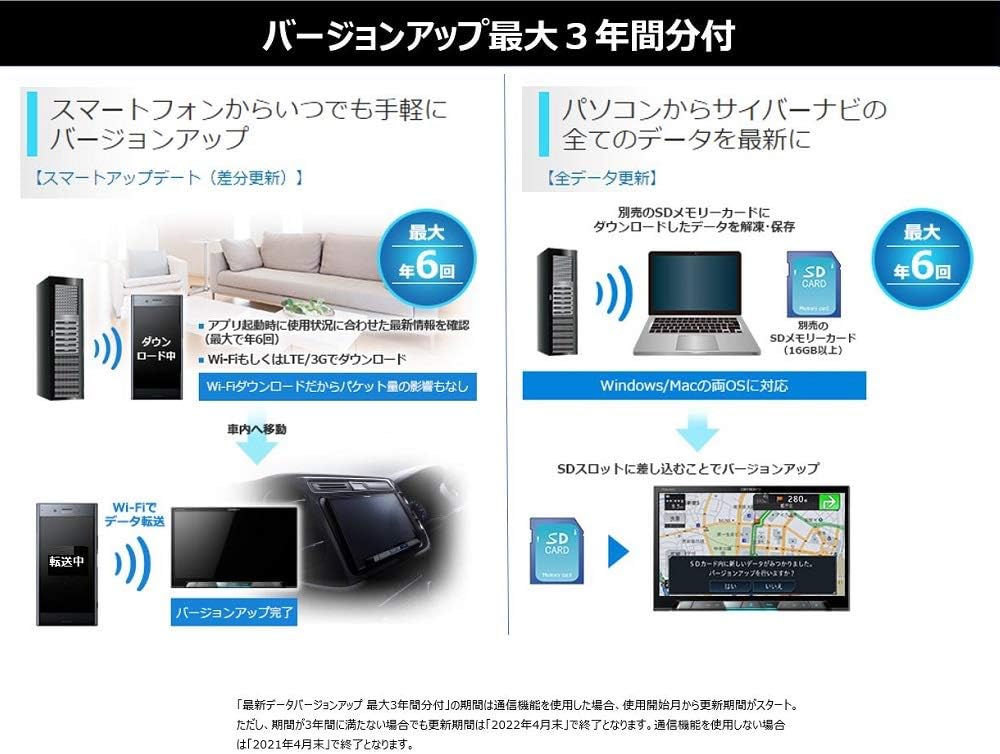
This image illustrates the process of updating the navigation system's software and map data. Updates can be performed easily via a smartphone application or by downloading data to an SD card from a PC. The image shows steps for both Wi-Fi transfer and SD card updates, highlighting the convenience of keeping the system current.
4.2 Music Cruise Channel
The Music Cruise Channel allows you to stream music directly to your CyberNavi, enhancing your journey with your preferred audio. You can select channels from a dedicated smartphone application.
To use Music Cruise Channel:
- Open the dedicated Music Cruise Channel application on your smartphone.
- Browse and select your desired music channel, for example, 'Relaxing BGM ~Hawaiian~'.
- Press the 'My Channel' button to send the selected channel to your CyberNavi.
- Upon starting your car, the CyberNavi will automatically begin playing the sent music channel.
4.3 High-Resolution Audio Playback
The AVIC-CW902 supports high-resolution audio sources (up to 96kHz/24bit), providing a superior listening experience. It also features a music server and can upgrade the sound quality of compressed audio sources (like CD or compressed files) to near high-resolution levels using the 'Master Sound Revive' function.

This image highlights the high-resolution audio capabilities of the Pioneer AVIC-CW902. It shows the display indicating 'Hi-Res FLAC 96kHz/24bit' playback and the 'Master Sound Revive' function which enhances compressed audio to near high-resolution quality.
4.4 Rear Entertainment
The system supports rear entertainment, allowing passengers in the back to enjoy video content while the driver listens to music or uses navigation in the front. This feature is ideal for long journeys with family.
This video demonstrates how to send a destination from a smartphone to the Pioneer CyberNavi using MapFan Connect. It also showcases the rear entertainment feature, allowing passengers to watch videos on rear monitors while the front unit displays navigation or plays music.
To activate Rear Entertainment:
- From the AV menu, select 'Rear Cruise'.
- Choose the desired source for the rear display, such as 'SD' for video playback.
- The rear monitors will display the selected video content, while the front unit can operate independently.
4.5 Supported Media Sources and Formats
The AVIC-CW902 offers extensive compatibility with various media sources and formats:
- Sumber: Music Cruise Channel, Terrestrial Digital TV (12-segment/1-segment), DVD-VIDEO/DVD-R/RW/CD/CD-R/RW, USB, SD, FM/AM, iPhone/iPod, HDMI, AUX, Multi Recorder.
- Video Formats (USB/SD): WMV, MP4, H.264.
- Audio Formats (USB/SD): WMA, MP3, AAC, WAV, FLAC, ALAC, DSD (2.8MHz, 5.6MHz).
5. Pangropéa
5.1 Map and Software Updates
The CyberNavi AVIC-CW902 includes free map updates for up to 3 years (if communication functions are not used, until April 2021; if communication functions are used, until April 2022). Regular updates ensure you have the latest map data and system enhancements.
Updates can be performed via Wi-Fi using the smartphone application or by downloading data to an SD card from a computer.
6. Cara ngungkulan
If you encounter any issues with your AVIC-CW902, please refer to the comprehensive troubleshooting section in the full product manual. Common issues often relate to power supply, media playback, or GPS signal. Ensure all connections are secure and the system software is up to date.
For persistent problems, contact Pioneer customer support or an authorized service center.
7. Spésifikasi
| Fitur | Spésifikasi |
|---|---|
| tampilan | 7V-type wide VGA monitor (Lumina Panel LED backlight) |
| Mémori | 32GB (SD memory card) |
| Playback Audio | Hi-Res sound source playback (96kHz/24bit) |
| Fitur Musik | Music Cruise Channel support (up to 3 months included), Music server built-in |
| Kaluaran Audio | Network mode support (3 pre-outs (F/R/SW) or (Hi/Mid/SW)) |
| Tuning sora | Auto TA & EQ built-in (CD-MC1 required separately) |
| Konéktipitas Wireless | Wi-Fi module built-in (version update, tethering), Bluetooth module built-in, Bluetooth Smart module built-in (Smart Commander, app) |
| Konektipitas kabel | HDMI input/output terminals, USB, SD, AUX |
| Kontrol | Steering remote control support |
| Émbaran lalulintas | VICS WIDE support |
| Format Pidéo anu Dirojong | WMV, MP4, H.264 (via USB/SD) |
| Format Audio Dirojong | WMA, MP3, AAC, WAV, FLAC, ALAC, DSD (2.8MHz, 5.6MHz) (via USB/SD) |
| Beurat produk | 3.13 kg |
| Warna | Hideung |
| Ukuran Pamasangan | 2 DIN |
8. Garansi jeung Rojongan
Kanggo inpormasi garansi, mangga tingali kartu garansi anu kalebet dina produk anjeun atanapi kunjungi situs wéb resmi Pioneer. websitus. Simpen bukti pameseran anjeun pikeun klaim garansi.
For technical support, product inquiries, or service requests, please contact Pioneer customer service through their official channels. Contact details can typically be found on the manufacturer's websitus atanapi dina bungkusan produk.