1. Bubuka
This manual provides essential information for the safe and efficient operation of your Sennheiser ew 500 G4-MKE2-AW+ Wireless Lavalier Set. Please read it thoroughly before initial use and keep it for future reference. This system is designed for professional audio applications requiring high-quality wireless transmission.
2. komponén Leuwihview
The Sennheiser ew 500 G4-MKE2-AW+ Wireless Lavalier Set includes the following main components:
- EM 300-500 G4 Rackmount Receiver: The central unit for receiving audio signals from the transmitter. It features a clear display for frequency, signal strength, and audio levels.
- SK 500 G4 Bodypack Transmitter: A compact, battery-powered unit that connects to the lavalier microphone and transmits the audio wirelessly to the receiver.
- MKE 2 Gold Lavalier Microphone: An omnidirectional condenser microphone designed for clear and natural voice reproduction, ideal for discreet placement.
- GA3 Rack Kit: Hardware for securely mounting the EM 300-500 G4 receiver into a standard 19-inch equipment rack.
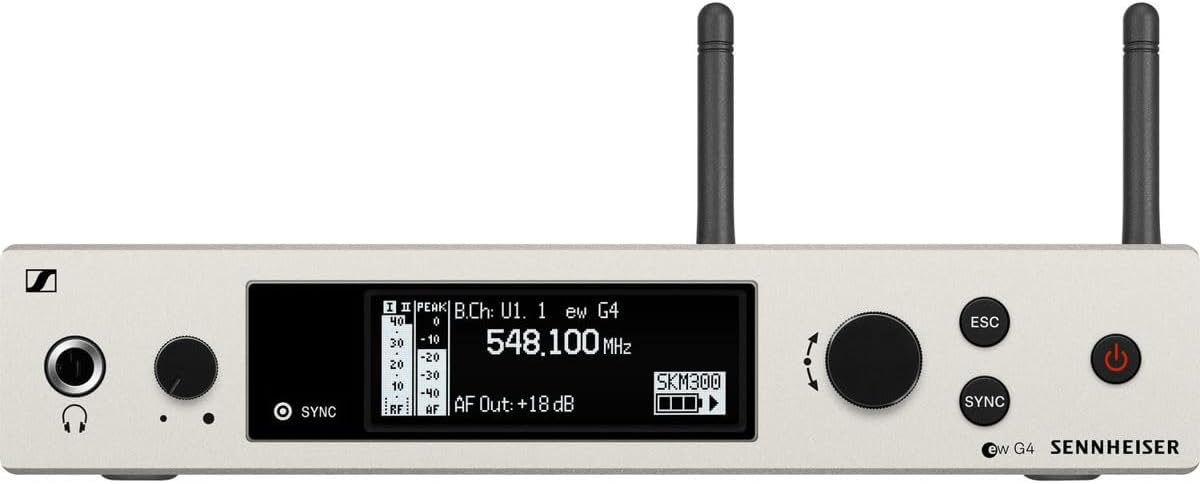
Hareupeun view of the EM 300-500 G4 Rackmount Receiver.

Tukangeun view of the EM 300-500 G4 Rackmount Receiver with various input/output ports.

Hareupeun view of the SK 500 G4 Bodypack Transmitter.

The MKE 2 Gold Lavalier Microphone.
3. Setélan
3.1. Ngabongkar sareng Inspeksi Awal
Carefully unpack all components and verify that all items listed in the Components Overview are present and undamaged. Retain the packaging for future transport or storage.
3.2. Receiver Placement and Connection (EM 300-500 G4)
- panempatan: Position the receiver in a location free from obstructions and away from strong electromagnetic interference sources. For rack mounting, use the provided GA3 rack kit.
- Sambungan Antenna: Connect the two supplied antennas to the ANT I and ANT II BNC connectors on the rear of the receiver. Ensure they are securely fastened.
- Kaluaran Audio: Connect the receiver's AF OUT (XLR or 1/4 inch) to the input of your mixing console, amppangrekam, atawa alat ngarékam.
- Sambungan Daya: Connect the power supply unit to the DC IN 12V/300mA port on the receiver and then plug it into a power outlet.
3.3. Transmitter and Microphone Setup (SK 500 G4 & MKE 2 Gold)
- Pamasangan batré: Open the battery compartment of the SK 500 G4 bodypack transmitter. Insert two AA batteries, observing correct polarity. Close the compartment securely.
- Sambungan Mikropon: Connect the MKE 2 Gold lavalier microphone to the audio input jack on the SK 500 G4 bodypack transmitter.
- Nempatkeun mikropon: Clip the lavalier microphone to clothing, approximately 6-8 inches below the chin, ensuring it is not covered by fabric to avoid muffled sound.
3.4. Frequency Synchronization
- Daya Hurung: Power on both the EM 300-500 G4 receiver and the SK 500 G4 bodypack transmitter.
- Scan for Frequencies: On the receiver, navigate to the 'Scan' menu and initiate an automatic frequency scan to find clear, interference-free channels.
- Sync Transmitter: Once a clear frequency is selected on the receiver, activate the 'Sync' function. Position the infrared (IR) port of the transmitter close to the IR port of the receiver. The frequency and settings will be automatically transferred to the transmitter.
- Pariksa sambungan: Check the receiver's display for RF (radio frequency) signal strength and AF (audio frequency) level indicators to confirm a successful connection.
4. Parentah Operasi
4.1. Powering on / Pareum
- panarima: Pencét tombol daya dina panel hareup.
- Pamancar: Press and hold the power button on the bodypack until the display illuminates. To power off, press and hold the power button again until the unit shuts down.
4.2. Nyaluyukeun Tingkat Audio
- Transmitter Input Gain: Adjust the input sensitivity on the SK 500 G4 transmitter to prevent clipping (distortion) while ensuring a strong signal. Speak into the microphone at your normal volume and observe the audio level meter on the transmitter and receiver.
- Receiver Output Level: Adjust the AF OUT level on the EM 300-500 G4 receiver to match the input requirements of your mixing console or amppangagung.
4.3. Ngawas Audio
Connect headphones to the receiver's headphone jack to monitor the audio signal directly from the wireless system. Adjust the headphone volume control as needed.
4.4. Setélan Canggih
The receiver and transmitter offer various advanced settings accessible through their respective menus. These include:
- Manajemén Frékuénsi: Manual frequency selection, bank management, and fine-tuning.
- Tingkat némbak: Adjusting the squelch threshold helps eliminate unwanted noise when no signal is present.
- Nada Pilot: Ensures compatibility and prevents interference from non-Sennheiser transmitters.
5. Pangropéa
5.1. beberesih
- Use a soft, dry cloth to clean the surfaces of the receiver and transmitter.
- Pikeun kokotor nekad, a rada damp cloth with mild soap solution can be used, ensuring no moisture enters the device openings.
- Do not use harsh cleaning agents, solvents, or abrasive materials.
5.2. Kaperawatan batré
- Always use high-quality alkaline or rechargeable AA batteries.
- Cabut batré tina pamancar upami henteu dianggo kanggo waktos anu panjang pikeun nyegah bocor.
- Buang batré anu dipaké nurutkeun peraturan lokal.
5.3. Panyimpenan
Store the wireless system in a cool, dry place, away from direct sunlight and extreme temperatures. Use the original packaging or a protective case for transport.
6. Cara ngungkulan
| Masalah | Mungkin Cukang lantaranana | Solusi |
|---|---|---|
| Taya kaluaran audio | Transmitter or receiver not powered on; incorrect frequency; audio cables disconnected; low battery. | Ensure both units are powered. Verify frequencies match. Check all cable connections. Replace batteries. |
| Interferensi atanapi statik | Occupied frequency; proximity to other wireless devices; antenna issues. | Perform a frequency scan and sync to a clear channel. Increase distance from other wireless equipment. Check antenna connections and positioning. |
| Low audio level or distortion | Incorrect input gain on transmitter; receiver output level too low/high; microphone placement. | Adjust transmitter input gain. Adjust receiver output level. Reposition microphone closer to the sound source. |
| rentang operasi pondok | Antenna obstruction or damage; environmental factors; low battery. | Ensure clear line-of-sight between transmitter and receiver antennas. Replace batteries. Avoid operating in areas with dense obstacles. |
7. Spésifikasi
| Fitur | Rincian |
|---|---|
| Ngaran modél | EW 500 G4-MKE2-AW+ |
| Nomer Modél Item | 509668 |
| Rentang Frékuénsi | AW+ (470 - 558 MHz) |
| Faktor Bentuk Mikropon | Lavalier |
| Tipe Mikropon | MKE 2 Gold (Omnidirectional, Condenser) |
| Jumlah Saluran | 32 |
| Rasio Signal-to-Noise | 110 dB |
| Sumber Daya | Batré Powered (2 batré AA diperlukeun) |
| Bahan | logam |
| Item Beurat | 6.1 Pon (total pakét) |
| Dimensi produk | 15.94 x 13.78 x 2.87 inci |
| Téhnologi konektipitas | Nirkabel |
| Tipe Panyambung | XLR or 1/4 inch (receiver output) |
8. Garansi jeung Rojongan
8.1. Émbaran jaminan
Sennheiser products are manufactured to the highest quality standards and come with a limited warranty against defects in materials and workmanship. The specific warranty period and terms may vary by region. Please refer to the warranty card included with your product or visit the official Sennheiser websitus pikeun inpo wincik.
8.2. Rojongan Palanggan
For technical assistance, service, or further inquiries, please contact Sennheiser customer support. You can find contact information and additional resources, including FAQs and software updates, on the official Sennheiser websitus:


