Produk Leuwihview
The PowerLocus P2 Bluetooth Over-Ear Headphones offer a premium audio experience with versatile connectivity options. Designed for comfort and durability, these headphones are perfect for travel, sports, and everyday use. They feature high-definition stereo sound, deep bass, and noise reduction technology for an immersive listening experience.
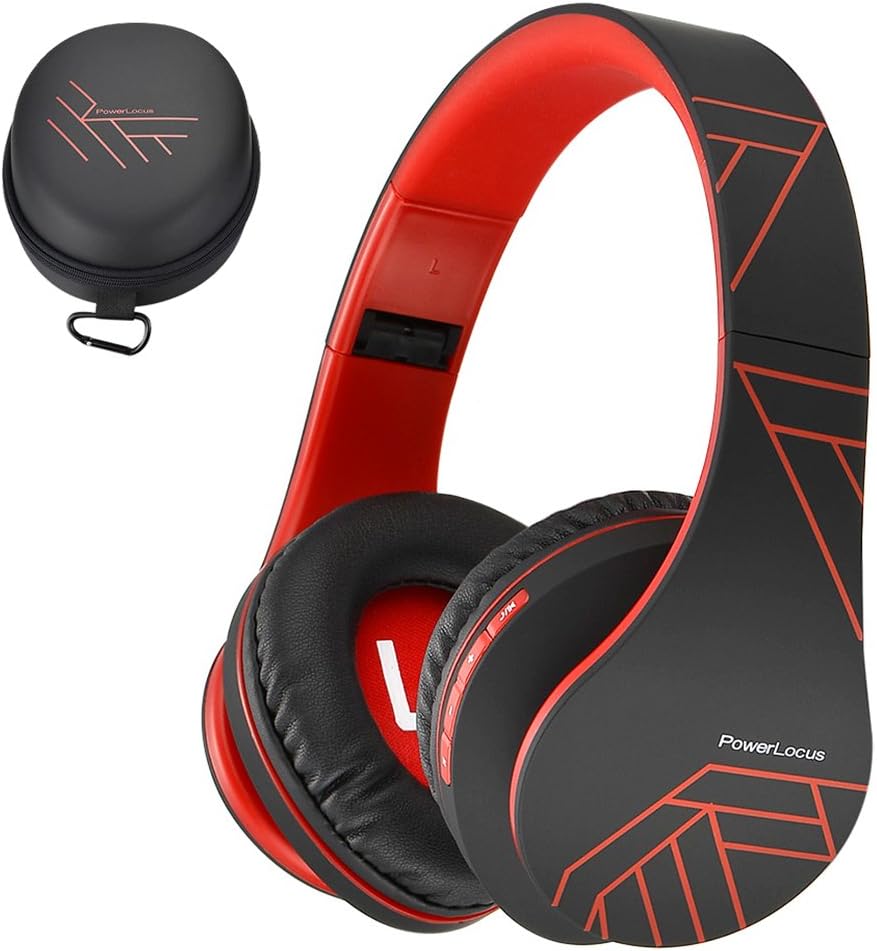
Figure 1: PowerLocus P2 Headphones and Protective Case (Black/Red)
Naon Kaasup
- 1x PowerLocus P2 Wireless Over-Ear Headphones
- 1x Kabel Ngecas USB-C
- 1x 3.5mm Kabel Audio
- 1x Kasus Mawa Pelindung
- 1 x Manual Pamaké

Figure 2: All included components in the PowerLocus P2 package.
Fitur produk
- High-Definition Stereo Sound: Equipped with 40mm audio drivers for deep bass and dynamic power sound, ensuring superior audio quality.
- Téknologi réduksi bising: Advanced software and noise reduction for clear audio and hands-free communication via the built-in microphone.
- Desain nyaman: Foldable and stretchable over-ear design with super soft memory-protein foam leather earmuffs and headband for optimum comfort during extended wear.
- Konektipitas serbaguna: Supports Bluetooth 5.3 for wireless connection and includes a 3.5mm jack for wired use when battery is low or for non-Bluetooth devices.
- Multi-fungsi: Features include Micro SD/TF card support and FM radio functionality.
- Portabel: Comes with a durable protective case for easy and safe transport.

Figure 3: Key features of the PowerLocus P2 Headphones.
Setup jeung Operasi
Ngecas Headphone
Before first use, fully charge your PowerLocus P2 headphones. A full charge takes approximately 2.5 hours and provides up to 15 hours of playtime.
- Panggihan port ngecas USB-C dina earcup headphone.
- Connect the provided USB-C charging cable to the headphone port.
- Plug the other end of the USB-C cable into a compatible USB power source (e.g., laptop, wall adapter not exceeding 5V).
- The LED indicator light will be RED while charging.
- When fully charged, the RED LED light will disappear.
Video 1: Instructions on how to charge the PowerLocus P2 Over-Ear Headphones. This video demonstrates plugging the USB-C cable into the headphone and a power source, showing the LED indicator light behavior during charging.
Papasangan Bluetooth
Follow these steps to pair your PowerLocus P2 headphones with a Bluetooth-enabled device:
- Pastikeun headphone dipareuman.
- Slide the On/Off button to the "On" position. The LED indicator will flash blue/red, indicating pairing mode.
- Dina alat anjeun (smartphone, tablet, laptop), aktipkeun Bluetooth sareng milarian alat anu sayogi.
- Pilih "PowerLocus P2" tina daptar alat anu sayogi.
- Sakali disambungkeun, indikator LED dina headphone bakal ngahurungkeun biru padet.
Video 2: Guide on how to connect PowerLocus P2 headphones via Bluetooth. The video shows the power switch, the flashing blue/red LED in pairing mode, and the solid blue LED once connected to a device.
Modeu kabel
To use the headphones in wired mode, simply connect the provided 3.5mm audio cable to the headphone's audio jack and the other end to your audio source. This mode works even if the headphone battery is depleted.
Kadali Langkungview
The PowerLocus P2 headphones feature intuitive controls located on the earcup for easy management of your audio and calls.

Figure 4: Detailed diagram of headphone controls.
- Tombol Puter/Reureuh: Pencét pikeun muterkeun atawa ngareureuhkeun musik.
- Volume Up/Lagu Salajengna: Pencét pondok pikeun polumeu ka luhur, pencét panjang kanggo lagu salajengna.
- Leutikan Volume/Lagu Saméméhna: Pencét pondok pikeun volume handap, pencét panjang kanggo lagu sateuacana.
- Tombol M: Mode switch (e.g., Bluetooth, FM Radio, Micro SD).
- Saklar on/off: Powers the headphones on or off and initiates Bluetooth pairing.
- Mikropon internal: Pikeun telepon handsfree.
Pangropéa sareng Perawatan
- Tetep headphone beresih ku ngusap aranjeunna ku lawon lemes tur garing.
- Hindarkeun headphone ka suhu ekstrim, kalembaban, atanapi sinar panonpoé langsung.
- Simpen headphone dina wadah pelindung anu disayogikeun nalika henteu dianggo pikeun nyegah goresan sareng karusakan.
- Do not use abrasive cleaners or solvents on the headphones.
- Hindarkeun leupaskeun headphone atanapi némpélkeun kana tabrakan anu kuat.

Figure 5: Folding and storing headphones in the premium carry case.
Pamérésan masalah
| Masalah | Mungkin Cukang lantaranana | Solusi |
|---|---|---|
| Headphone teu hurung. | batré lemah. | Ngecas headphone pinuh. |
| Teu bisa masangkeun via Bluetooth. | Headphone henteu dina mode papasangan; alat Bluetooth pareum; jauh teuing ti alat. | Ensure headphones are flashing blue/red. Turn device Bluetooth off/on. Move closer to device (within 36 feet). |
| Taya sora atawa volume low. | Volume teuing leutik dina headphone atanapi alat; sumber audio anu dipilih salah. | Increase volume on both headphones and device. Check audio source connection (Bluetooth or 3.5mm cable). |
| Distorsi sora. | sinyal Bluetooth lemah; audio file kualitas. | Move closer to the paired device. Try a different audio file. |
spésifikasi
| Fitur | Rincian |
|---|---|
| Ngaran modél | P2 |
| Téhnologi konektipitas | Nirkabel (Bluetooth 5.3), Kabel (Jack 3.5mm) |
| Rentang Bluetooth | Nepi ka 36 Feet |
| Kahirupan batré | Nepi ka 15 Jam Playtime |
| Waktu Ngecas | 2.5 Jam |
| Ukuran Supir Audio | 40 mm |
| Réspon Frékuénsi | 20 Hz - 20,000 Hz |
| Impedansi | 32 ohm |
| Kontrol bising | Isolasi sora |
| Item Beurat | 6.2 ons (175 gram) |
| Diménsi | 3.8 x 6 x 8.1 inci |
| Fitur husus | Foldable, Built-in Mic, Micro SD/TF, FM Radio, Multipoint Pairing |
Garansi sareng Rojongan
PowerLocus provides a 24-month warranty for the P2 headphones, ensuring customer satisfaction. For any inquiries or support, please contact PowerLocus customer service. They offer 24/7 customer support to assist with any issues or questions you may have.
Visit the official PowerLocus Store for more information and support: PowerLocus Store


