1. Bubuka
The Logitech Wireless Mini Mouse M187 is designed for portability and ease of use, making it an ideal companion for your laptop or PC. Its extra-small design allows you to take it anywhere, providing more precision and control than a traditional touchpad. The simple plug-and-play setup ensures you can start working quickly and efficiently.

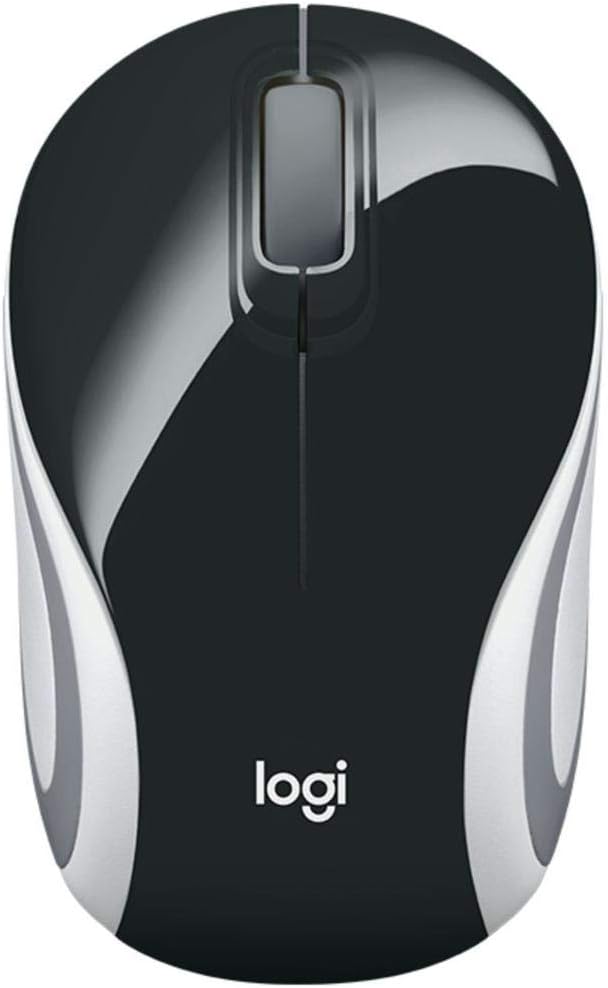
Image: Logitech Wireless Mini Mouse M187 in Palace Blue, top view.
Fitur konci:
- Desain Ultra-Portable: Pocket-ready and extra-small for easy transport.
- Setup basajan: Plug-and-play functionality with a nano receiver.
- Konéksi Nirkabel anu Bisa Diandelkeun: Enjoy wireless freedom with the reliability of a wired mouse.
- Convenient Receiver Storage: The nano receiver stores inside the mouse to prevent loss.
- Pelacakan Optik: 1000 DPI optical tracking for precise and smooth cursor control.
Pidéo: Produk resmi parantos réngséview demonstrating the Logitech M170 Wireless Mouse features and setup.
2. Eusi Paket
Pastikeun sadaya item aya dina pakét anjeun:
- M187 Beurit
- Panarima USB
- 1 Batré AAA (Pra-Pasang)
- Dokuméntasi pamaké
3. Parentah Setup
Setting up your Logitech Wireless Mini Mouse M187 is quick and easy:
- Selapkeun Batré: The mouse comes with one AAA battery pre-installed. If you need to replace it, gently slide off the top cover of the mouse to access the battery compartment. Ensure the battery is inserted with the correct polarity.
- Manggihan USB Receiver: The nano USB receiver is stored inside the mouse, usually near the battery compartment. Carefully remove it.
- Sambungkeun panarima: Plug the nano USB receiver into an available USB port on your computer (PC, Mac, or Laptop).
- Power On Mouse: Locate the On/Off switch on the bottom of the mouse and slide it to the 'On' position. A small indicator light may illuminate briefly.
- Sambungan otomatis: Your computer should automatically detect and connect to the mouse within a few seconds. No additional software installation is typically required.

Gambar: handap view of the Logitech Wireless Mini Mouse M187, illustrating the USB receiver storage slot.
Gambar: handap view of the Logitech Wireless Mini Mouse M187 with the battery compartment open, showing the AAA battery slot.
4. Parentah Operasi
Once connected, your Logitech Wireless Mini Mouse M187 is ready for use:
- Gerakan: Move the mouse across a flat surface to control the cursor on your screen. The 1000 DPI optical tracking provides smooth and precise navigation.
- Klik Kénca: Press the left button to select items, open applications, or activate functions.
- Klik katuhu: Pencét tombol katuhu pikeun muka ménu kontéks atanapi aksés pilihan tambahan.
- Gulung kabayang: Gulung roda gulung ka luhur atanapi ka handap pikeun nganapigasi dokumén sareng web pages. The scroll wheel can also be pressed for a middle-click function, depending on your operating system settings.
- Manajemén kakuatan: To conserve battery life, slide the On/Off switch on the bottom of the mouse to the 'Off' position when not in use or when transporting the mouse.
5. Pangropéa
Ngagantian batré:
The Logitech M187 mouse uses one AAA battery with an average life of 6 months. To replace the battery:
- Turn the mouse off using the switch on the bottom.
- Gently slide the top cover of the mouse backward and lift it off.
- Remove the old AAA battery.
- Insert a new AAA battery, ensuring correct polarity (+/-).
- Pasang deui panutup luhur ku cara ngajajarkeun teras geser ka hareup dugi ka ngaklik kana tempatna.
- Hurungkeun deui beurit.
beberesih:
To maintain optimal performance, periodically clean your mouse:
- Make kaen nu lemes, teu aya lint rada dampdikumbah ku cai atawa solusi beberesih hampang.
- Hindarkeun bahan kimia anu kasar atanapi bahan abrasive.
- Do not immerse the mouse in water.
- Clean the optical sensor on the bottom of the mouse with a dry cotton swab to ensure accurate tracking.
6. Cara ngungkulan
Beurit Teu Ngabales:
- Pariksa batré: Ensure the AAA battery is correctly inserted and has sufficient charge. Replace if necessary.
- Saklar kakuatan: Verify the On/Off switch on the bottom of the mouse is in the 'On' position.
- Panarima USB: Ensure the nano USB receiver is securely plugged into a working USB port on your computer. Try a different USB port.
- Balikan deui Komputer: Sometimes restarting your computer can resolve connectivity issues.
Gerakan Kursor Erratic:
- Sensor beresih: Clean the optical sensor on the bottom of the mouse with a dry cotton swab.
- Beungeut: Pastikeun anjeun nganggo beurit dina permukaan anu bersih, henteu mantulkeun cahaya, sareng rata. Hindarkeun kaca atanapi permukaan anu mantulkeun cahaya.
- gangguan: Pindahkeun beurit leuwih deukeut kana panarima USB atawa jauh ti alat nirkabel séjén anu bisa nyababkeun gangguan.
7. Spésifikasi Téknis
| Fitur | Spésifikasi |
|---|---|
| Nomer modél | 910-005360 |
| Tipe Wireless | 2.4 Frékuénsi Radio GHz |
| Téhnologi Deteksi Gerakan | Optik |
| DPI | 1000 DPI |
| Jumlah Kancing | 3 (Kénca, Katuhu, Gulung Roda) |
| Sumber Daya | Batré Powered |
| Jenis Batré | 1 batré AAA (kaasup) |
| Rata Kahirupan Batré | 6 bulan |
| Item Beurat | 1.83 ons |
| Ukuran produk (L x W x H) | 1.25 x 1.94 x 3.22 inci |
| Platform hardware | Laptop, PC |
| Kasaluyuan System Operasi | Windows 10 or later, Windows 8, Windows 7, Mac OS X 10.10 or later, Chrome OS, Linux Kernel 2.6+ |
| Warna | Istana Biru |
8. Garansi jeung Rojongan
Kanggo inpormasi garansi sareng dukungan téknis, mangga tingal ka Logitech resmi website or the user documentation included in your product package. Logitech provides comprehensive support resources to ensure your satisfaction with their products.
You can visit the Logitech support page for your product model for FAQs, troubleshooting guides, and contact information.


