Parentah Kasalametan penting
Always observe basic safety precautions when using this power tool to reduce the risk of fire, electric shock, and personal injury.
- Kasalametan Area Gawé: Jaga wewengkon gawé anjeun beresih jeung cahayana alus. Wewengkon nu pabalatak atawa poek ngondang kacilakaan. Ulah ngajalankeun parabot kakuatan dina atmosfir ngabeledug, kayaning ku ayana cair kaduruk, gas, atawa lebu.
- Kasalametan listrik: Hindarkeun kontak awak sareng permukaan bumi atanapi grounded sapertos pipa, radiator, rentang, sareng kulkas. Aya ngaronjat résiko shock listrik lamun awak anjeun earthed atawa grounded.
- Kasalametan Pribadi: Always wear eye protection. Use hearing protection when operating the tool for extended periods. Wear a dust mask if working in dusty conditions. Dress properly. Do not wear loose clothing or jewelry. Keep your hair, clothing, and gloves away from moving parts.
- Pamakéan sareng Perawatan Alat: Ulah maksakeun pakakas listrik. Anggo pakakas listrik anu pas pikeun aplikasi anjeun. Pakakas listrik anu pas bakal ngalakukeun padamelan anu langkung saé sareng langkung aman dina laju anu dirancang pikeun éta. Cabut batré tina pakakas listrik sateuacan ngadamel pangaluyuan, ngarobih asesoris, atanapi nyimpen pakakas listrik.
- Paké Batré jeung Perawatan: Ngecas ukur nganggo carjer anu ditunjuk ku produsén. Pangecas anu cocog pikeun hiji jinis pak batré tiasa nyababkeun résiko seuneu nalika dianggo sareng pak batré anu sanés. Anggo alat-alat listrik ngan nganggo bungkus batré anu ditunjuk sacara khusus.
Produk Leuwihview
The STANLEY FMCD900B-XJ is a powerful 18V BRUSHLESS SDS-Plus hammer drill designed for efficient drilling and chiseling in various materials. This section identifies the main components of your tool.

Gambar 1: The STANLEY FMCD900B-XJ SDS-Plus 18V BRUSHLESS Hammer Drill. This image shows the overall design of the hammer drill, highlighting its ergonomic handle and compact form factor.
Komponén konci:
- SDS-Plus Chuck: Pikeun parobahan bit gancang jeung aman.
- Pamilih Mode: Allows switching between drilling, hammer drilling, and chiseling modes.
- Gagang bantu: Nyadiakeun kontrol tambahan sarta stabilitas salila operasi.
- Batang Jerona: Pikeun kontrol jero pangeboran tepat.
- Saklar pemicu: Aktipkeun alat.
- Port batré: For inserting the 18V STANLEY FATMAX battery (sold separately).
- Lampu Gawé LED: Illuminates wewengkon gawé.
Disetél
1. Pamasangan sareng Cabut Batré
This tool requires an 18V STANLEY FATMAX battery (not included). Ensure the battery is fully charged before use.
- Pikeun Pasang: Align the battery pack with the battery port on the tool. Slide the battery pack into the tool until it clicks securely into place.
- Pikeun ngahapus: Pencét tombol pelepas batré (biasana aya dina pak batré) teras geser pak batré kaluar tina alat.

Gambar 2: Checking the battery charge level. The image shows a finger pressing the battery indicator button, illuminating three green LED bars, indicating a good charge.
2. SDS-Plus Bit Installation and Removal
Chuck SDS-Plus ngamungkinkeun pikeun ngaganti mata bor anu gancang sareng tanpa alat.
- Pikeun Pasang: Pull back the chuck collar and insert the SDS-Plus bit into the chuck. Rotate the bit slightly until it engages with the locking mechanism. Release the chuck collar. Pull on the bit to ensure it is securely locked. Note: SDS-Plus bits have a slight play when correctly installed; this is normal.
- Pikeun ngahapus: Pull back the chuck collar firmly and pull the bit out of the chuck.

Gambar 3: Installing an SDS-Plus bit. The image shows a hand holding an SDS-Plus chisel bit, ready to be inserted into the tool's chuck, demonstrating the quick-change mechanism.
3. Adjusting the Auxiliary Handle and Depth Rod
- Gagang bantu: Loosen the auxiliary handle by rotating it counter-clockwise. Adjust it to a comfortable and secure position, then tighten by rotating clockwise.
- Batang Jerona: Insert the depth rod into the hole on the auxiliary handle. Adjust the rod to the desired drilling depth. The tip of the bit should extend beyond the end of the depth rod by the desired drilling depth.
Parentah Operasi
1. Milih Modeu Operasi
The FMCD900B-XJ offers three operating modes: Rotary Drilling, Hammer Drilling, and Chiseling.

Gambar 4: Adjusting the mode selector. The image shows a hand rotating the black mode selector dial on the side of the tool, indicating the selection of an operating mode.
- Pangeboran Rotary (Ikon Bor): Pikeun ngebor dina kai, logam, plastik, sareng bahan sanés anu henteu meryogikeun palu.
- Pangeboran Palu (Ikon Palu jeung Bor): For drilling in concrete, masonry, and stone. This mode combines rotation with hammering action.
- Pahat (Ikon Pahat): For light chiseling, chipping, or demolition work in masonry. The bit rotates freely for positioning, but locks during operation.
To change modes, rotate the mode selector dial to the desired icon. Ensure the tool is switched off before changing modes.
2. Operasi Umum
- Ngamimitian Alat: Grip the tool firmly with both hands. Press the trigger switch to start the tool. The LED work light will illuminate the work area.
- Ngeureunkeun Alat: Leupaskeun saklar pemicu pikeun ngeureunkeun alat.
- Pangeboran: Apply steady, even pressure. Do not force the tool. Allow the tool to do the work.
- Pahat: Position the chisel bit at the desired angle. Apply light pressure and allow the hammer action to break the material.
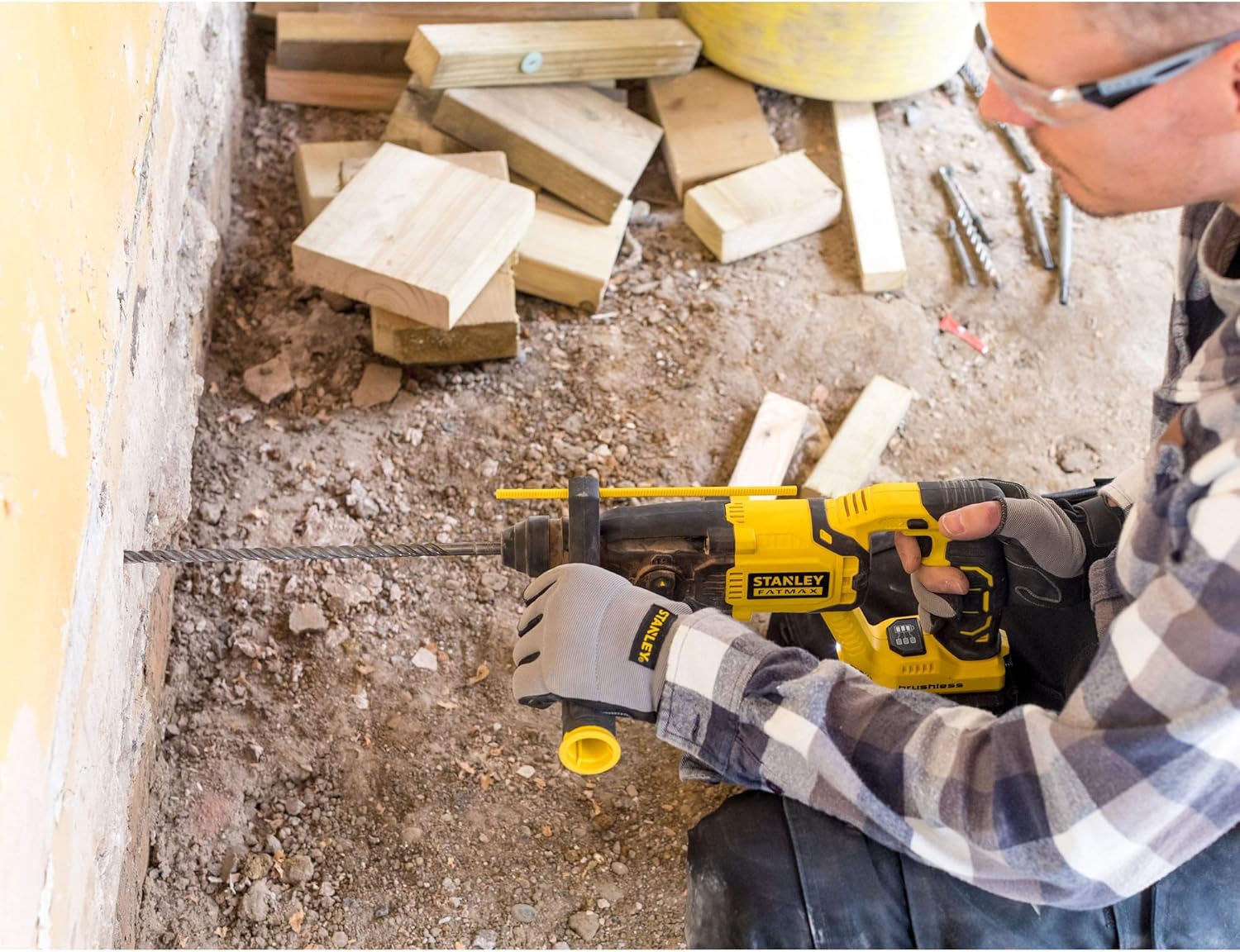
Gambar 5: Drilling operation. A user is shown wearing safety glasses and ear protection, operating the hammer drill to create a hole in a brick wall, demonstrating proper handling and safety.

Gambar 6: Chiseling operation. A user is shown wearing safety glasses and ear protection, using the hammer drill with a chisel bit to remove material from a brick wall, illustrating the tool's chiseling capability.
Pangropéa
Pangropéa rutin ngajamin kinerja optimal sareng manjangkeun umur alat anjeun.
- beberesih: Keep the ventilation slots clean to prevent overheating. Use a soft brush or dry cloth to remove dust and debris. Do not use water or chemical cleaners.
- Lubrication: The SDS-Plus chuck mechanism benefits from occasional lubrication. Apply a small amount of SDS grease to the shank of the drill bits before insertion to reduce wear.
- Panyimpenan: Store the tool and battery pack in a cool, dry place, away from direct sunlight and moisture. Ensure the battery is removed from the tool before storage.
- Pamariksaan: Periodically inspect the tool for any damage, loose screws, or worn parts. If any damage is found, have it repaired by an authorized service center before further use.
Pamérésan masalah
| Masalah | Mungkin Cukang lantaranana | Solusi |
|---|---|---|
| Alat henteu ngamimitian. | Batré teu diselapkeun leres atanapi discharged. | Ensure battery is fully inserted. Charge the battery pack. |
| Ngurangan kinerja atawa overheating. | Ventilation slots blocked. Tool overloaded. | Clean ventilation slots. Reduce pressure on the tool. Allow tool to cool down. |
| Bit teu ngonci kana cuk. | Chuck collar not pulled back sufficiently. Bit shank dirty or damaged. | Pull chuck collar back fully. Clean or replace bit. |
| Geter kaleuleuwihi. | Worn or damaged bit. Incorrect mode selected. | Replace bit. Ensure correct mode is selected for the application. |
spésifikasi
| Fitur | Rincian |
|---|---|
| Nomer modél | FMCD900B-XJ |
| merek | STANLEY |
| Sumber Daya | Batré Powered |
| Voltage | 18 volt |
| Jinis bor | Palatih Drill |
| Jenis Chuck | SDS Plus |
| Tipe Motor | Brushless |
| Item Beurat | 2.2 Kilogram (4.84 pon) |
| Dimensi produk | 15.55 x 3.74 x 4.13 inci |
| Batré Kaasup | Henteu (Alat Ngan) |
| Tipe sél batré | Litium |
Garansi sareng Rojongan
STANLEY provides a warranty for this product against defects in materials and workmanship. For detailed warranty information, please refer to the warranty card included with your purchase or visit the official STANLEY websitus.
For technical support, service, or to order replacement parts, please contact STANLEY customer service through their official channels. Keep your proof of purchase for warranty claims.